Page 458 of 574
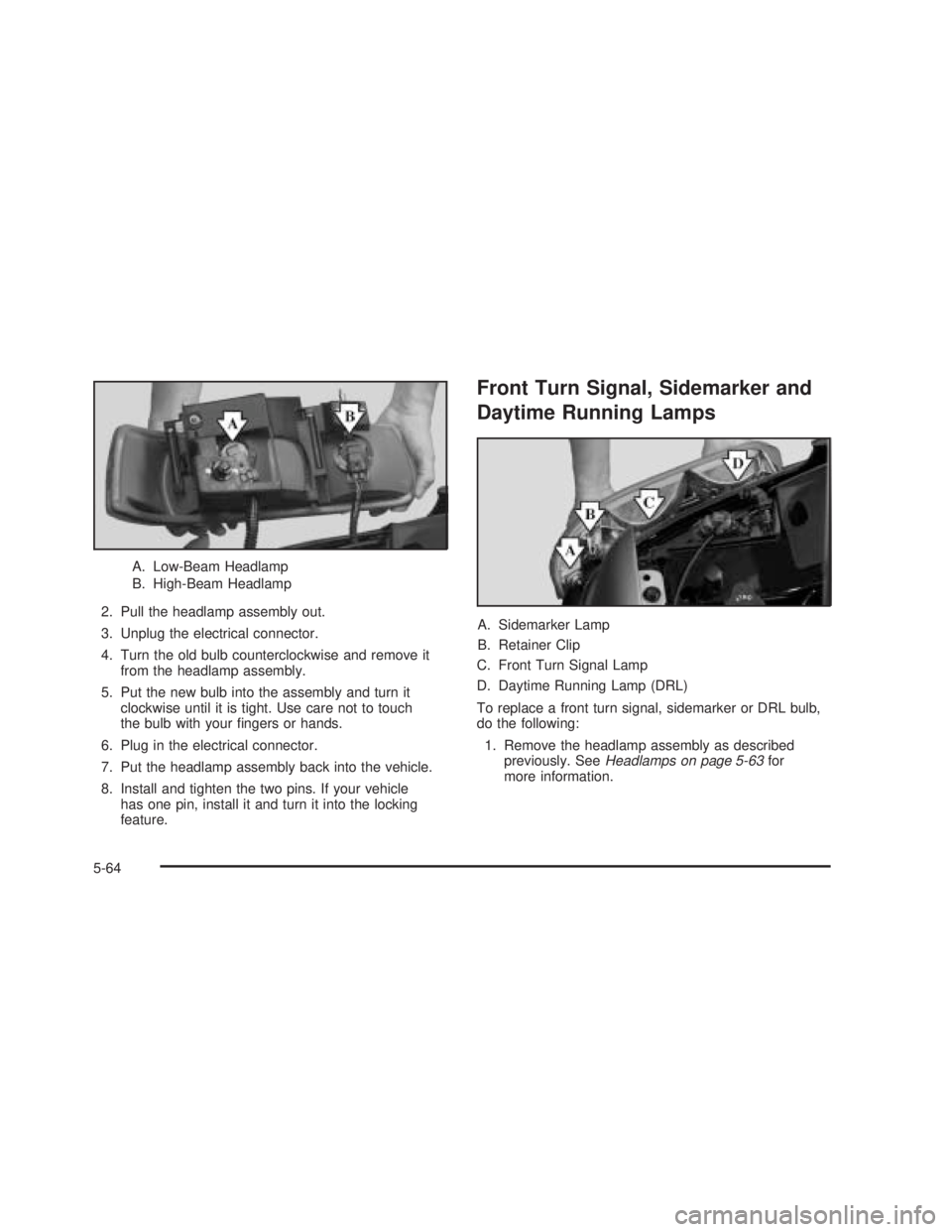
A. Low-Beam Headlamp
B. High-Beam Headlamp
2. Pull the headlamp assembly out.
3. Unplug the electrical connector.
4. Turn the old bulb counterclockwise and remove it
from the headlamp assembly.
5. Put the new bulb into the assembly and turn it
clockwise until it is tight. Use care not to touch
the bulb with your ngers or hands.
6. Plug in the electrical connector.
7. Put the headlamp assembly back into the vehicle.
8. Install and tighten the two pins. If your vehicle
has one pin, install it and turn it into the locking
feature.
Front Turn Signal, Sidemarker and
Daytime Running Lamps
A. Sidemarker Lamp
B. Retainer Clip
C. Front Turn Signal Lamp
D. Daytime Running Lamp (DRL)
To replace a front turn signal, sidemarker or DRL bulb,
do the following:
1. Remove the headlamp assembly as described
previously. SeeHeadlamps on page 5-63for
more information.
5-64
Page 459 of 574
2. Press the retainer clip (B), located behind the turn
signal housing, towards the outside of the vehicle.
3. Pull the turn signal housing out of the vehicle.
4. Press the locking release lever, turn the bulb socket
counterclockwise and remove it from the turn signal
housing.
5. Remove the old bulb from the bulb socket.
6. Put a new bulb into the bulb socket. Use care not
to touch the bulb with your ngers or hands.7. Put the bulb socket back into the turn signal
housing and turn it clockwise until it locks.
8. Put the turn signal housing back into the vehicle
placing the hook and posts on the inner side into
the alignment holes rst, then the outer side into the
retainer bracket until you hear a click.
9. Put the headlamp assembly back into the vehicle.
Roof Marker Lamps
To replace a roof marker lamp bulb, do the following:
1. Remove the two
screws and lift
off the lens.
5-65
Page 460 of 574
2. Remove the six screws on the center roof
marker lamps.
3. Turn the old bulb counterclockwise to remove it
from the socket.4. Put a new bulb into the
socket and turn
clockwise until it locks
in place.
5-66
Page 462 of 574
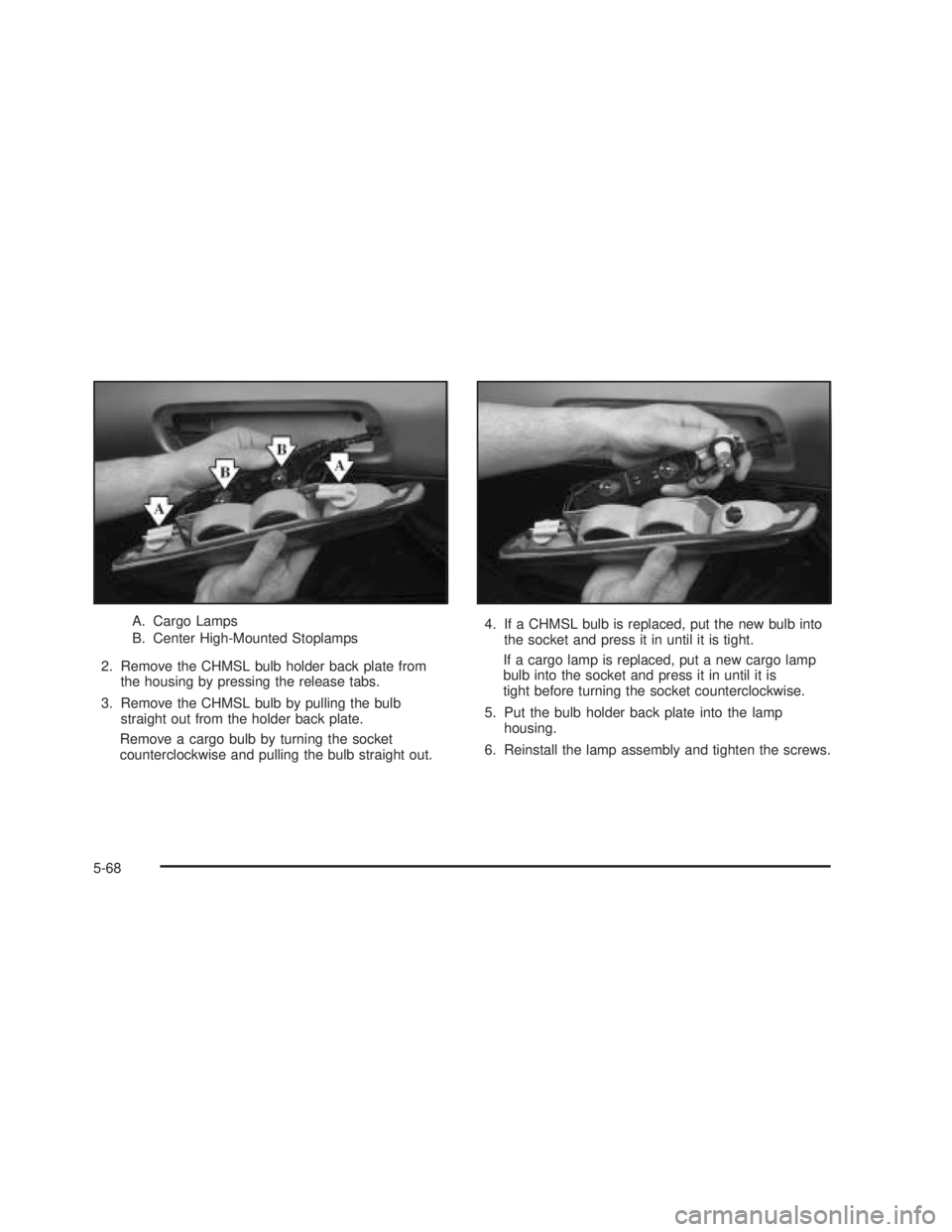
A. Cargo Lamps
B. Center High-Mounted Stoplamps
2. Remove the CHMSL bulb holder back plate from
the housing by pressing the release tabs.
3. Remove the CHMSL bulb by pulling the bulb
straight out from the holder back plate.
Remove a cargo bulb by turning the socket
counterclockwise and pulling the bulb straight out.4. If a CHMSL bulb is replaced, put the new bulb into
the socket and press it in until it is tight.
If a cargo lamp is replaced, put a new cargo lamp
bulb into the socket and press it in until it is
tight before turning the socket counterclockwise.
5. Put the bulb holder back plate into the lamp
housing.
6. Reinstall the lamp assembly and tighten the screws.
5-68
Page 464 of 574
A. Stoplamp
B. Turn Signal Lamp
C. Back-up Lamp
D. Sidemarker Lamp4. Press the release tab,
if equipped, and turn
the bulb socket
counterclockwise to
remove it from
the taillamp housing.
5. Pull the old bulb straight out from the socket.
6. Press a new bulb into the socket and turn the socket
clockwise into the taillamp housing.
7. Reinstall the rear lamp assembly.
8. Close the tailgate.
5-70
Page 474 of 574

A Tire and Loading Information label is attached to the
vehicle’s center pillar (B-pillar), below the driver’s
door lock post (striker). This label lists your vehicle’s
original equipment tires and their recommended cold tire
ination pressures. The recommended cold tire
ination pressure, shown on the label, is the minimum
amount of air pressure needed to support your vehicle’s
maximum load carrying capacity.
For additional information regarding how much weight
your vehicle can carry, and an example of the tire
and loading information label, seeLoading Your Vehicle
on page 4-50.
When to Check
Check your tires once a month or more. Do not forget to
check the spare tire. For additional information
regarding the spare tire, seeSpare Tire on page 5-112.
How to Check
Use a good quality pocket-type gage to check tire
pressure. You cannot tell if your tires are properly inated
simply by looking at them. Radial tires may look properly
inated even when they’re underinated. Check the tire’s
ination pressure when the tires are cold. Cold means
your vehicle has been sitting for at least three hours or
driven no more than 1 mile (1.6 km).
Remove the valve cap from the tire valve stem. Press
the tire gage rmly onto the valve to get a pressure
measurement. If the cold tire ination pressure matches
the recommended pressure on the Tire and Loading
Information label, no further adjustment is necessary.
If the ination pressure is low, add air until you reach the
recommended amount.
If you overll the tire, release air by pushing on the
metal stem in the center of the tire valve. Recheck the
tire pressure with the tire gage.
Be sure to put the valve caps back on the valve stems.
They help prevent leaks by keeping out dirt and
moisture.
5-80
Page 486 of 574

Changing a Flat Tire
If a tire goes at, avoid further tire and wheel damage
by driving slowly to a level place. Turn on your
hazard warning ashers.
{CAUTION:
Changing a tire can be dangerous. The vehicle
can slip off the jack and roll over or fall on you
or other people. You and they could be badly
injured or even killed. Find a level place to
change your tire. To help prevent the vehicle
from moving:
1. Set the parking brake rmly.
2. Put an automatic transmission shift lever in
PARK (P), or shift a manual transmission to
FIRST (1) or REVERSE (R).
3. If you have a four-wheel-drive vehicle,
be sure the transfer case is in a drive
gear—not in NEUTRAL.
CAUTION: (Continued)
CAUTION: (Continued)
4. Turn off the engine and do not restart
while the vehicle is raised.
5. Do not allow passengers to remain in
the vehicle.
To be even more certain the vehicle won’t
move, you can put blocks at the front and rear
of the tire farthest away from the one being
changed. That would be the tire on the other
side, at the opposite end of the vehicle.
When you have a at tire, use the following as a guide
to assist you in the placement of the wheel blocks.
5-92
Page 488 of 574
For regular cab models, the equipment you’ll need is
behind the passenger’s seat. For extended and
crew cab models, the equipment is on the shelf behind
the passenger’s side second row seat.
1. If there is a cover, move the seats forward and turn
the wing nut on the cover counterclockwise to
remove it. For crew cab models, pull up the
second row seat with the loop at the base of the
seat cushion to access the tools.
2. Turn the knob on the bottle jack counterclockwise
to lower the jack head to release the bottle jack
from its holder. Extended Cab
1500 Crew Cab
5-94