Page 31 of 240

REAR WINDOW DEFROSTER (R)
Ensure that the ignition is in the 3 (ON) position. Press the control to
clear the rear window of thin ice and fog. The LED will illuminate.
The rear window defroster turns off automatically after 10 minutes, or
when the ignition is turned to the 1 (OFF/LOCK) position. To manually
turn off the defroster before 10 minutes have passed, push the control
again.
Do not use razor blades or other sharp objects to clean the inside
of the rear window or to remove decals from the inside of the
rear window. This may cause damage to the heated grid lines and
will not be covered by your warranty.
CABIN AIR FILTER
Your vehicle is equipped with a cabin air filter, which is located just in
front of the windshield under the cowl grille on the passenger side of the
vehicle.
The particulate air filtration system is designed to reduce the
concentration of airborne particles such as dust, spores and pollen in the
air being supplied to the interior of the vehicle. The particulate filtration
system gives the following benefits to customers:
•Improves the customer’s driving comfort by reducing particle
concentration
•Improves the interior compartment cleanliness
•Protects the climate control components from particle deposits
For more information regarding the interval at which you should replace
the cabin air filter, refer to yourScheduled Maintenance Guide.
For more cabin air filter information, or to replace the filter, see your
authorized dealer.
2005 05+ Mustang(197)
Owners Guide (post-2002-fmt)
USA_English(fus)
Climate Controls
31
Page 32 of 240

HEADLAMP CONTROL
Turns the lamps off.
Turns on the parking lamps,
instrument panel lamps, license
plate lamps and tail lamps.
Turns the headlamps on.
Foglamp control (if equipped)
The foglamps can be turned on
when the headlamp control is in
the
orposition and the
high beams are not on.
Pull the headlamp control towards
you to turn on the foglamps. The
indicator light under the foglamp
symbol will illuminate.
Daytime running lamps (DRL) (if equipped)
Turns the headlamps on with a reduced output. When activated, the DRL
telltale is illuminated.
To activate:
•the ignition must be in the ON position,
•the headlamp control is in the OFF or parking lamp position and
•the parking brake must be disengaged.
Always remember to turn on your headlamps at dusk or during
inclement weather. The Daytime Running Lamp (DRL) system
does not activate the tail lamps and generally may not provide
adequate lighting during these conditions. Failure to activate your
headlamps under these conditions may result in a collision.
P
2005 05+ Mustang(197)
Owners Guide (post-2002-fmt)
USA_English(fus)
Lights
Lights
32
Page 45 of 240

When closing the power windows, you should verify they are free
of obstructions and ensure that children and/or pets are not in
the proximity of the window openings.
Press and pull the switches to open
and close windows.
•Push down (to the first detent)
and hold the switch to open.
•Pull up (to the first detent) and
hold the switch to close.
Express down (One Touch Down, Front windows only)
Allows the driver and passenger’s
window to open fully without
holding the control down. Push the
switch completely down to the
second detent and release quickly.
The window will open fully.
Momentarily press the switch to any
position to stop the window
operation.
Express Up (One Touch Up, Front windows only)
Allows the driver and passenger’s
window to close fully without
holding the control up. Pull the
switch completely up to the second
detent and release quickly. The
window will close fully. Momentarily
press the switch to any position to
stop the window operation
Accessory delay
With accessory delay, the window switches and radio may be used for up
to ten minutes after the ignition switch is turned to the OFF position or
until any door or trunk is opened.
Bounce Back (Front windows only)
When an obstacle has been detected in the window opening as the
window is moving upward, the window will automatically move down and
stop at a prescribed position.
AUTOAUTO
2005 05+ Mustang(197)
Owners Guide (post-2002-fmt)
USA_English(fus)
Driver Controls
45
Page 47 of 240

•Push down and hold the switch to open.
•Pull up and hold the switch to close.
Rear Power Windows Manual Override (Convertible Only)
The rear quarter window switch will not operate under the following
conditions:
•Convertible top is moving.
•Convertible top is not completely UP or DOWN.
In the event that the rear quarter window switch does not operate when
the convertible top is completely UP or DOWN, the rear quarter windows
can be manually raised UP.
The following procedure must be performed within 2 minutes:
•Turn the ignition key to the OFF position, then turn back to the ON
position.
•Press the rear window switch DOWN 3 times.
•Turn the ignition key to the OFF position, then turn back to the ON
position.
•Pull and hold the rear window switch UP and hold for 3 seconds, the
rear windows will begin to start moving UP.
POWER SIDE VIEW MIRRORS (IF EQUIPPED)
To adjust your mirrors:
1. Rotate the control clockwise to
adjust the right mirror and rotate
the control counterclockwise to
adjust the left mirror.
2. Move the control in the direction
you wish to tilt the mirror.
3. Return to the center position to lock mirrors in place.
SPEED CONTROL (IF EQUIPPED)
With speed control set, you can maintain a speed of 30 mph (48 km/h)
or more without keeping your foot on the accelerator pedal. Speed
control does not work at speeds below 30 mph (48 km/h).
Do not use the speed control in heavy traffic or on roads that
are winding, slippery or unpaved.
2005 05+ Mustang(197)
Owners Guide (post-2002-fmt)
USA_English(fus)
Driver Controls
47
Page 49 of 240
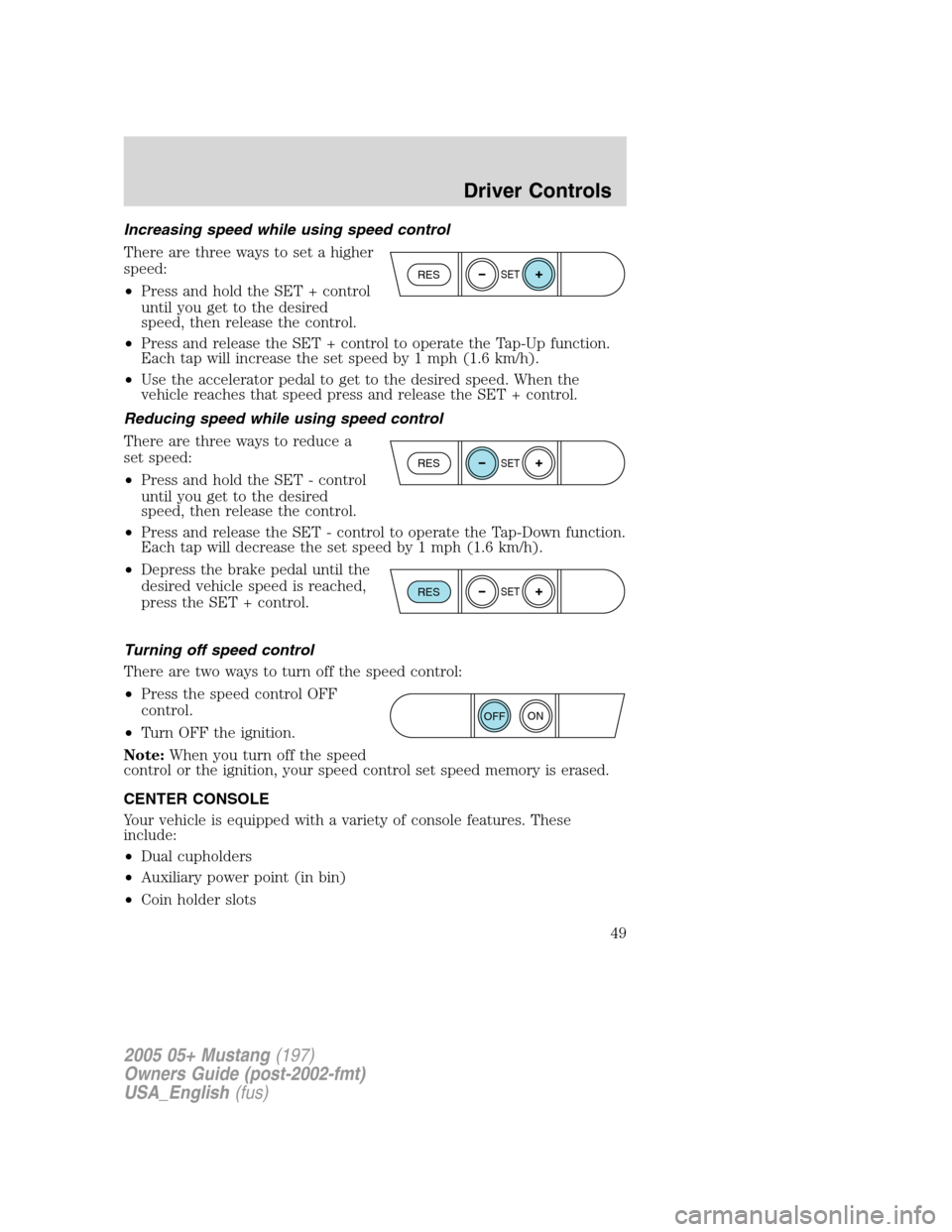
Increasing speed while using speed control
There are three ways to set a higher
speed:
•Press and hold the SET + control
until you get to the desired
speed, then release the control.
•Press and release the SET + control to operate the Tap-Up function.
Each tap will increase the set speed by 1 mph (1.6 km/h).
•Use the accelerator pedal to get to the desired speed. When the
vehicle reaches that speed press and release the SET + control.
Reducing speed while using speed control
There are three ways to reduce a
set speed:
•Press and hold the SET - control
until you get to the desired
speed, then release the control.
•Press and release the SET - control to operate the Tap-Down function.
Each tap will decrease the set speed by 1 mph (1.6 km/h).
•Depress the brake pedal until the
desired vehicle speed is reached,
press the SET + control.
Turning off speed control
There are two ways to turn off the speed control:
•Press the speed control OFF
control.
•Turn OFF the ignition.
Note:When you turn off the speed
control or the ignition, your speed control set speed memory is erased.
CENTER CONSOLE
Your vehicle is equipped with a variety of console features. These
include:
•Dual cupholders
•Auxiliary power point (in bin)
•Coin holder slots
RESSET
RESSET
RESSET
ON
OFF
2005 05+ Mustang(197)
Owners Guide (post-2002-fmt)
USA_English(fus)
Driver Controls
49
Page 50 of 240

Use only soft cups in the cupholder. Hard objects can injure you
in a collision.
Cell phone use
The use of Mobile Communications Equipment has become increasingly
important in the conduct of business and personal affairs. However,
drivers must not compromise their own or others’safety when using
such equipment. Mobile Communications can enhance personal safety
and security when appropriately used, particularly in emergency
situations. Safety must be paramount when using mobile communications
equipment to avoid negating these benefits.
Mobile Communication Equipment includes, but is not limited to cellular
phones, pagers, portable email devices, in vehicle communications
systems, telematics devices and portable two-way radios.
A driver’s first responsibility is the safe operation of the vehicle.
The most important thing you can do to prevent a crash is to
avoid distractions and pay attention to the road. Wait until it is safe to
operate Mobile Communications Equipment.
MESSAGE CENTER (IF EQUIPPED)
With the ignition in the ON position,
the message center, located on your
instrument cluster, displays
important vehicle information
through a constant monitor of
vehicle systems.You may select
display features on the message center for a display of status preceded
by a brief indicator chime. The system will also notify you of potential
vehicle problems with a display of system warnings followed by a long
indicator chime.
2005 05+ Mustang(197)
Owners Guide (post-2002-fmt)
USA_English(fus)
Driver Controls
50
Page 51 of 240

Selectable features
Reset
Press this control to select and reset
functions shown in the INFO menu
and SETUP menu.
Info menu
This control displays the following
control displays:
•Odometer
•Trip odometer
•Distance to Empty
•Average Fuel Economy
•Instantaneous Fuel Economy
•Fuel Used
•Trip Elapsed Drive Time
•Average Speed
•Blank Display
Odometer/Trip odometer
Refer toGaugesin theInstrument Clusterchapter.
Distance to empty (DTE)
Selecting this function from the
INFO menu estimates approximately
how far you can drive with the fuel
remaining in your tank under
normal driving conditions.
Remember to turn the ignition OFF
when refueling to allow this feature to correctly detect the added fuel.
The DTE function will display LOW FUEL LEVEL and sound a tone for
one second when you have approximately 50 miles (80 km) to empty. If
you RESET this warning message, this display and tone will return
within 10 minutes.
2005 05+ Mustang(197)
Owners Guide (post-2002-fmt)
USA_English(fus)
Driver Controls
51
Page 53 of 240

Fuel Used
Select this function from the INFO
menu to display the fuel used since
last reset. The information displayed
will be in gallons or liters,
depending on English/metric mode
state.
Trip elapsed drive time
Select this function from the INFO
menu to display a timer. Trip
elapsed drive time will only
accumulate time when the ignition
is in the Run/Start position.
To operate the Trip Elapsed Drive
Time perform the following:
1. Press and release RESET in order to start the timer.
2. Press and release RESET to pause the timer.
3. Press and hold RESET for 2 seconds in order to reset the timer.
Average speed
Select this function from the INFO
menu to display average speed since
last reset.
Blank Display
Select this function from the INFO control to turn your message center
display OFF.
Setup menu
Press this control for the following
displays:
•System Check
•Display Color
•Units (English/Metric)
•Display Mode
•Language
2005 05+ Mustang(197)
Owners Guide (post-2002-fmt)
USA_English(fus)
Driver Controls
53