2005 FORD FREESTYLE mirror
[x] Cancel search: mirrorPage 1 of 288

Introduction 4
Instrument Cluster 10
Warning and control lights 10
Gauges 14
Entertainment Systems 17
AM/FM stereo with CD 17
AM/FM stereo with in-dash six CD 20
Family entertainment system 24
Climate Controls 39
Manual heating and air conditioning 39
Electronic automatic temperature control 41
Rear window defroster 50
Lights 51
Headlamps 51
Turn signal control 55
Bulb replacement 56
Driver Controls 61
Windshield wiper/washer control 61
Steering wheel adjustment 63
Power windows 65
Mirrors 67
Speed control 68
Message center 76
Locks and Security 91
Keys 91
Locks 91
Anti-theft system 101
Table of Contents
1
REVIEW COPY
2005 Freestyle(219), Owners Guide (post-2002-fmt)(own2002),
Market:USA_English(fus)
Table of Contents
Page 63 of 288
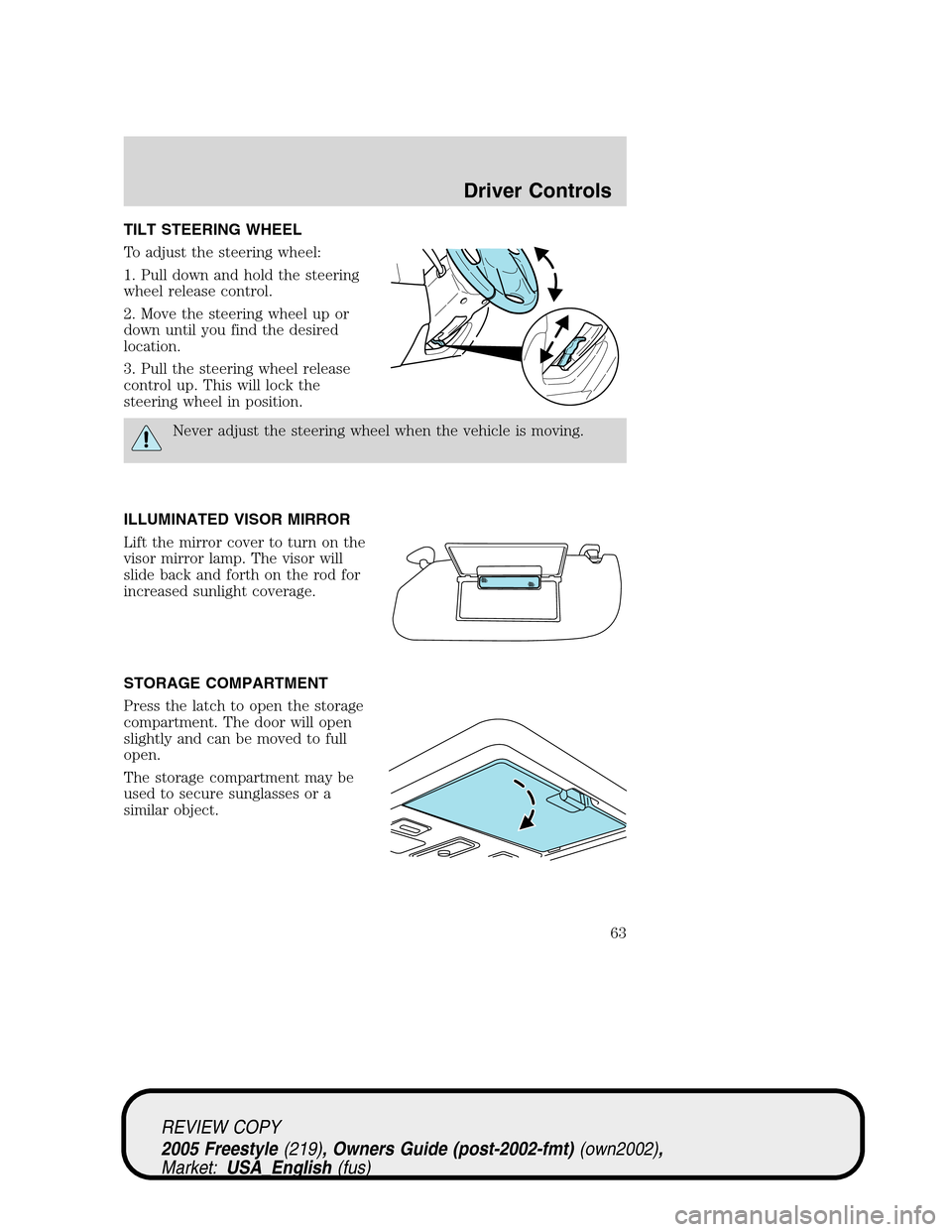
TILT STEERING WHEEL
To adjust the steering wheel:
1. Pull down and hold the steering
wheel release control.
2. Move the steering wheel up or
down until you find the desired
location.
3. Pull the steering wheel release
control up. This will lock the
steering wheel in position.
Never adjust the steering wheel when the vehicle is moving.
ILLUMINATED VISOR MIRROR
Lift the mirror cover to turn on the
visor mirror lamp. The visor will
slide back and forth on the rod for
increased sunlight coverage.
STORAGE COMPARTMENT
Press the latch to open the storage
compartment. The door will open
slightly and can be moved to full
open.
The storage compartment may be
used to secure sunglasses or a
similar object.
REVIEW COPY
2005 Freestyle(219), Owners Guide (post-2002-fmt)(own2002),
Market:USA_English(fus)
Driver Controls
63
Page 64 of 288
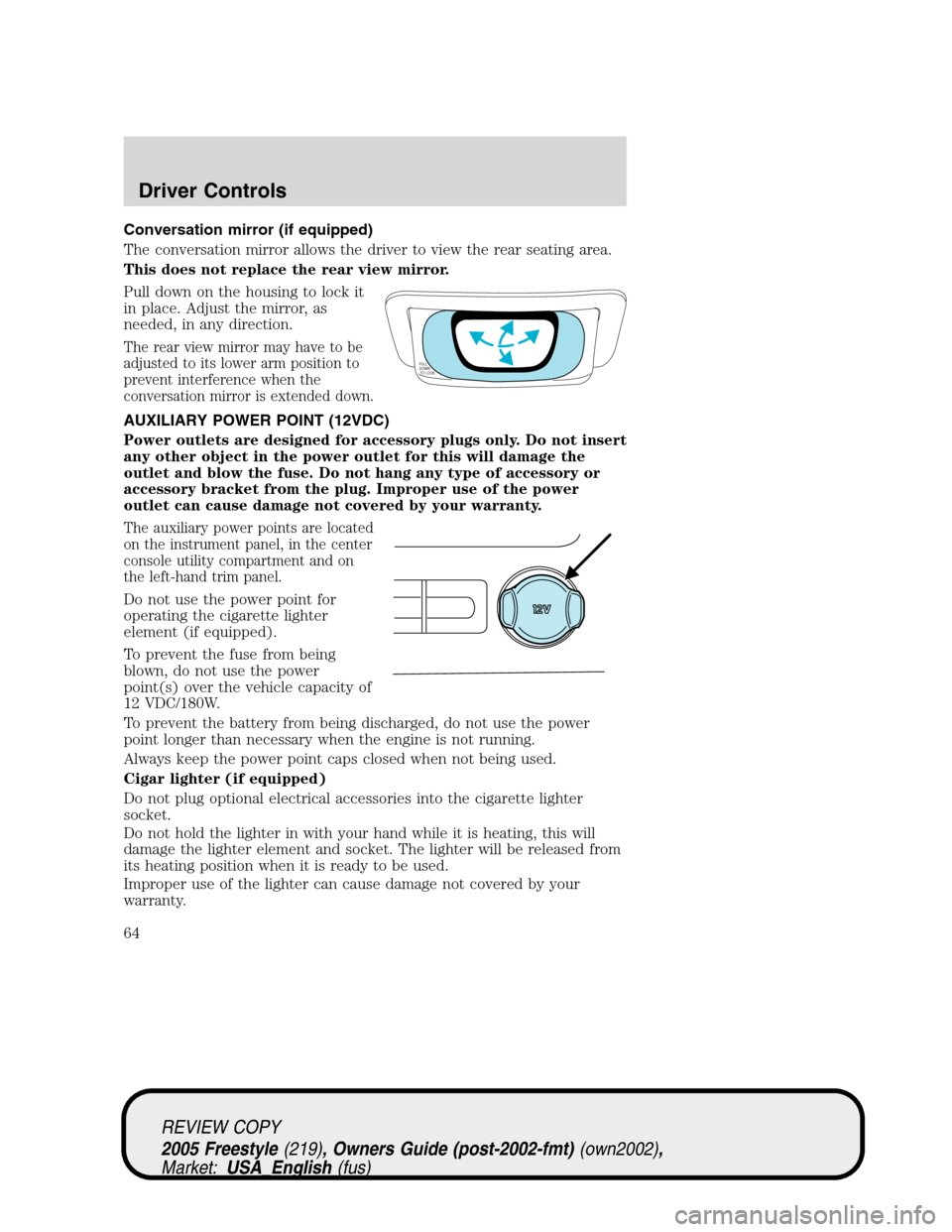
Conversation mirror (if equipped)
The conversation mirror allows the driver to view the rear seating area.
This does not replace the rear view mirror.
Pull down on the housing to lock it
in place. Adjust the mirror, as
needed, in any direction.
The rear view mirror may have to be
adjusted to its lower arm position to
prevent interference when the
conversation mirror is extended down.
AUXILIARY POWER POINT (12VDC)
Power outlets are designed for accessory plugs only. Do not insert
any other object in the power outlet for this will damage the
outlet and blow the fuse. Do not hang any type of accessory or
accessory bracket from the plug. Improper use of the power
outlet can cause damage not covered by your warranty.
The auxiliary power points are located
on the instrument panel, in the center
console utility compartment and on
the left-hand trim panel.
Do not use the power point for
operating the cigarette lighter
element (if equipped).
To prevent the fuse from being
blown, do not use the power
point(s) over the vehicle capacity of
12 VDC/180W.
To prevent the battery from being discharged, do not use the power
point longer than necessary when the engine is not running.
Always keep the power point caps closed when not being used.
Cigar lighter (if equipped)
Do not plug optional electrical accessories into the cigarette lighter
socket.
Do not hold the lighter in with your hand while it is heating, this will
damage the lighter element and socket. The lighter will be released from
its heating position when it is ready to be used.
Improper use of the lighter can cause damage not covered by your
warranty.
PULL
DOWN
TO LOCK
REVIEW COPY
2005 Freestyle(219), Owners Guide (post-2002-fmt)(own2002),
Market:USA_English(fus)
Driver Controls
64
Page 67 of 288

MIRRORS
Power side view mirrors
To adjust your mirrors:
1. Rotate the control clockwise to
adjust the right mirror and rotate
the control counterclockwise to
adjust the left mirror.
2. Move the control in the direction
you wish to tilt the mirror.
3. Return to the center position to
lock mirrors in place.
Fold-away mirrors
Pull the side mirrors in carefully
when driving through a narrow
space, like an automatic car wash.
Automatic dimming inside rear view mirror (if equipped)
Your vehicle may be equipped with
an inside rear view mirror with an
auto-dimming function. The
electronic day/night mirror will
change from the normal (high
reflective) state to the non-glare
(darkened) state when bright lights (glare) reach the mirror. When the
mirror detects bright light from behind the vehicle, it will automatically
adjust (darken) to minimize glare.
The mirror will automatically return to the normal state whenever the
vehicle is placed in R (Reverse) to ensure a bright clear view when
backing up.
Do not block the sensor on the backside of the inside rear view mirror
since this may impair proper mirror performance.
REVIEW COPY
2005 Freestyle(219), Owners Guide (post-2002-fmt)(own2002),
Market:USA_English(fus)
Driver Controls
67
Page 94 of 288
The inside lights will not turn off if:
•they have been turned on using the dimmer control or
•any door is open.
The battery saver feature will turn off the interior lamps 30 minutes after
the ignition is turned to the 1 (LOCK) position.
Locking the doors/liftgate
1. Pressand release to lock all the doors and liftgate. The
turn/parking lamps will flash.Note:If any door or the liftgate are not
closed properly, the lamps will not flash.
2. Press
and release again within three seconds to confirm that all the
doors are closed.Note:The doors will lock again, the horn will chirp and
the turn/parking lamps will flash once if all the doors and liftgate are
closed. If any door or the liftgate is not closed, the horn will chirp twice
and the lamps will not flash.
Sounding a panic alarm
Press
to activate the alarm. The horn will sound and the turn lamps
will flash for a maximum of 3 minutes. Press again or turn the ignition to
the 3 (RUN) position to deactivate, or wait for the alarm to timeout in 3
minutes.
Note:The panic alarm will only operate when the ignition is in the 1
(LOCK) or 2 (ACC) position.
Memory seats/power mirrors/adjustable pedals (if equipped)
The remote entry system can also control the memory seat /power
mirrors/adjustable pedals feature.
Press
to automatically move the seat, mirrors and adjustable pedals to
the desired memory position (the positions correspond to the transmitter
being used).
Activating the memory seat feature
To activate this feature:
1. Position the seat, mirrors and adjustable pedals to the position
desired.
REVIEW COPY
2005 Freestyle(219), Owners Guide (post-2002-fmt)(own2002),
Market:USA_English(fus)
Locks and Security
94
Page 95 of 288
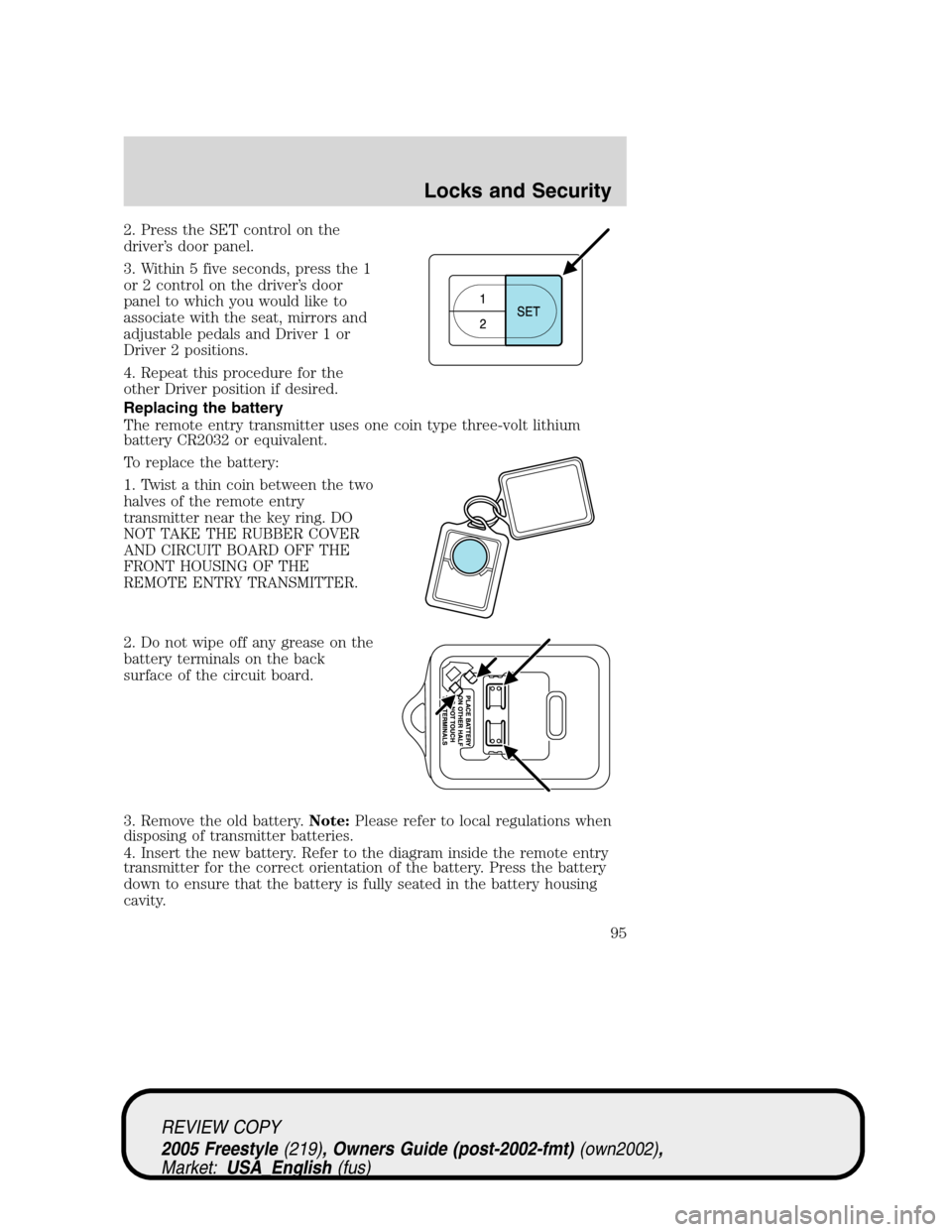
2. Press the SET control on the
driver’s door panel.
3. Within 5 five seconds, press the 1
or 2 control on the driver’s door
panel to which you would like to
associate with the seat, mirrors and
adjustable pedals and Driver 1 or
Driver 2 positions.
4. Repeat this procedure for the
other Driver position if desired.
Replacing the battery
The remote entry transmitter uses one coin type three-volt lithium
battery CR2032 or equivalent.
To replace the battery:
1. Twist a thin coin between the two
halves of the remote entry
transmitter near the key ring. DO
NOT TAKE THE RUBBER COVER
AND CIRCUIT BOARD OFF THE
FRONT HOUSING OF THE
REMOTE ENTRY TRANSMITTER.
2. Do not wipe off any grease on the
battery terminals on the back
surface of the circuit board.
3. Remove the old battery.Note:Please refer to local regulations when
disposing of transmitter batteries.
4. Insert the new battery. Refer to the diagram inside the remote entry
transmitter for the correct orientation of the battery. Press the battery
down to ensure that the battery is fully seated in the battery housing
cavity.
REVIEW COPY
2005 Freestyle(219), Owners Guide (post-2002-fmt)(own2002),
Market:USA_English(fus)
Locks and Security
95
Page 97 of 288

9. The doors will lock, then unlock, to confirm that the programming
mode has been exited.
Illuminated entry
The interior lamps illuminate when the remote entry system, the keyless
entry system keypad (if equipped) or the door lock cylinder (on vehicles
equipped with the perimeter alarm system) is used to unlock the
door(s).
The illuminated entry system will turn off the interior lights if:
•the ignition is turned to the 3 (RUN) position, or
•the remote transmitter lock control is pressed, or
•after 25 seconds of illumination.
The inside lights will not turn off if:
•they have been turned on with the dimmer control, or
•any door is open.
Battery saver
The battery saver will shut off the interior lamps 30 minutes after the
ignition has been turned to the 1 (LOCK) position.
•If the dome lamps were turned on using the panel dimmer control, the
battery saver will shut off them off 30 minutes after the ignition has
been turned to the 1 (LOCK) position.
•If the courtesy lamps were turned on because one of the vehicle doors
was opened, the battery saver will shut off them off 10 minutes after
the ignition has been turned to the 1 (LOCK) position.
•The battery saver will shut off the headlamps and foglamps 10
minutes after the ignition has been turned to the 1 (LOCK) position.
Illuminated exit
•When all vehicle doors and the liftgate are closed, and the key is
removed from the ignition, the interior dome lamps (and the exterior
mirror puddle lamps, if equipped) will illuminate.
The lights will turn off if all the doors and the liftgate remain closed and
•25 seconds elapse, or
•the key is inserted in the ignition.
REVIEW COPY
2005 Freestyle(219), Owners Guide (post-2002-fmt)(own2002),
Market:USA_English(fus)
Locks and Security
97
Page 98 of 288

KEYLESS ENTRY SYSTEM
You can use the keyless entry
keypad to:
•lock or unlock the doors without
using a key.
•activate or deactivate the
autolock feature.
The keypad can be operated with
the factory set 5–digit entry code;
this code is located on the owner’s
wallet card in the glove box, is
marked on the computer module,
and is available from your
authorized dealer. You can also
create your own 5–digit personal
entry code.
When pressing the controls on the keypad, press the middle of the
controls to ensure a good activation.
Programming a personal entry code and keypad association to
memory seats, mirrors and pedals
To create your own personal entry code:
1. Enter the factory set code.
2. Within five seconds press the 1•2 on the keypad.
3. Enter your personal 5-digit code. Each number must be entered
within five seconds of each other.
4. To associate the entry code with a memory setting, enter a sixth digit
to indicate which driver should be set in a memory recalled by the
personal entry code:
•Pressing 1•2 recalls Driver 1 settings.
•Pressing 3•4 recalls Driver 2 settings.
•Pressing other keypad buttons or not pressing a keypad button as a
sixth digit does not set a driver and will not recall a memory setting.
Note:The factory-set code cannot be associated with a memory
setting.
5. The doors will again lock then unlock to confirm that your personal
keycode has been programmed to the module.
REVIEW COPY
2005 Freestyle(219), Owners Guide (post-2002-fmt)(own2002),
Market:USA_English(fus)
Locks and Security
98