Page 55 of 272

Automatic dimming rear view mirror (if equipped)
Your vehicle may be equipped with
an inside rear view mirror with an
auto-dimming feature. When the
auto-dimming mirror is turned on,
as indicated by an illuminated green
LED to the left of the button on
mirror, it will detect bright lights
(glare) from behind the vehicle, and will change from the normal, high
reflective state, to the darkened state to minimize glare.
When the auto-dimming mirror is turned on, it will automatically return
to the normal, high reflective, state whenever the vehicle is placed in R
(reverse) to ensure a clear view while backing up.
Do not block the sensor located to the right of the mirror button or the
sensor located on the back side of the mirror as this may impair mirror
performance.
SPEED CONTROL (IF EQUIPPED)
With speed control set, you can maintain a speed of 48 km/h (30 mph)
or more without keeping your foot on the accelerator pedal. Speed
control does not work at speeds below 48 km/h (30 mph).
Do not use the speed control in heavy traffic or on roads that
are winding, slippery or unpaved.
Setting speed control
The controls for using your speed
control are located on the steering
wheel for your convenience.
1. Press the ON control and release
it.
2. Accelerate to the desired speed.
ON
OFF
2005 Escape(204)
Owners Guide (post-2002-fmt)
USA English(fus)
Driver Controls
55
Page 63 of 272

Warning messages that have been reset are divided into two categories:
•They will reappear on the display ten minutes from the reset.
•They will not reappear until an ignition OFF-ON cycle has been
completed.
This acts as a reminder that these warning conditions still exist within
the vehicle.
High engine temperature Warning cannot be reset
Driver door ajar
Passenger door ajar
Rear left door ajar
Rear right door ajar
Park brake on Warning returns after 10 minutes
Liftgate ajar Warning returns after the ignition key
is turned from OFF to ON.
Liftgate glass ajar
Service emission sys
Check fuel cap
Low brake fluid
Service brake system
Check brake lamps
Check left headlamp
Check right headlamp
Check left high beam
Check right high beam
Check left turn lamps
Check right turn lamps
Engine change oil soon
Engine oil change now
Low fuel
Service4X4
Turn signal on
4X4 locked temporarily Temporary alert
4X4 disabled temporarily
4X4 auto restored
2005 Escape(204)
Owners Guide (post-2002-fmt)
USA English(fus)
Driver Controls
63
Page 65 of 272

CHECK LEFT OR RIGHT TURN LAMPS.Displayed when the turn
signals are activated and at least one is burned out. Check the lamps as
soon as safely possible and have the burned out lamp replaced.
LOW FUEL.Displayed as an early reminder of a low fuel condition.
SERVICE 4X4.Displayed when the 4X4 is not operating properly. If the
warning stays on or continues to come on, contact your dealer as soon as
possible.
TURN SIGNAL ON.Displayed when the turn signal is activated and the
vehicle is driven more that 0.8 km (1/2 mile).
4X4 LOCKED TEMPORARILY.Displayed when the 4X4 is temporarily
locked. If the warning stays on or continues to come on, contact your
dealer as soon as possible.
4X4 DISABLED TEMPORARILY.Displayed when the 4X4 is
temporarily disabled. If the warning stays on or continues to come on,
contact your dealer as soon as possible.
4X4 AUTO RESTORED.Displayed when the 4X4 is restored to normal
operations.
ENGINE OIL CHANGE SOON/ENGINE OIL CHANGE NOW.
Displayed when the engine oil life remaining is 5% or less. When oil life
left is between 5% and 0%, the ENGINE OIL CHANGE SOON message
will be displayed. When oil life left reaches 0%, the ENGINE OIL
CHANGE NOW message will be displayed.
An oil change is required whenever indicated by the message center.
USE ONLY RECOMMENDED ENGINE OILS.
To reset the oil monitoring system to 100% after each oil change
(approximately 15,000 km or 12 months) perform the following:
1. Press the SET control to access
the system check function.
2005 Escape(204)
Owners Guide (post-2002-fmt)
USA English(fus)
Driver Controls
65
Page 71 of 272
NO BOUNDARIES RACK SYSTEM (IF EQUIPPED)
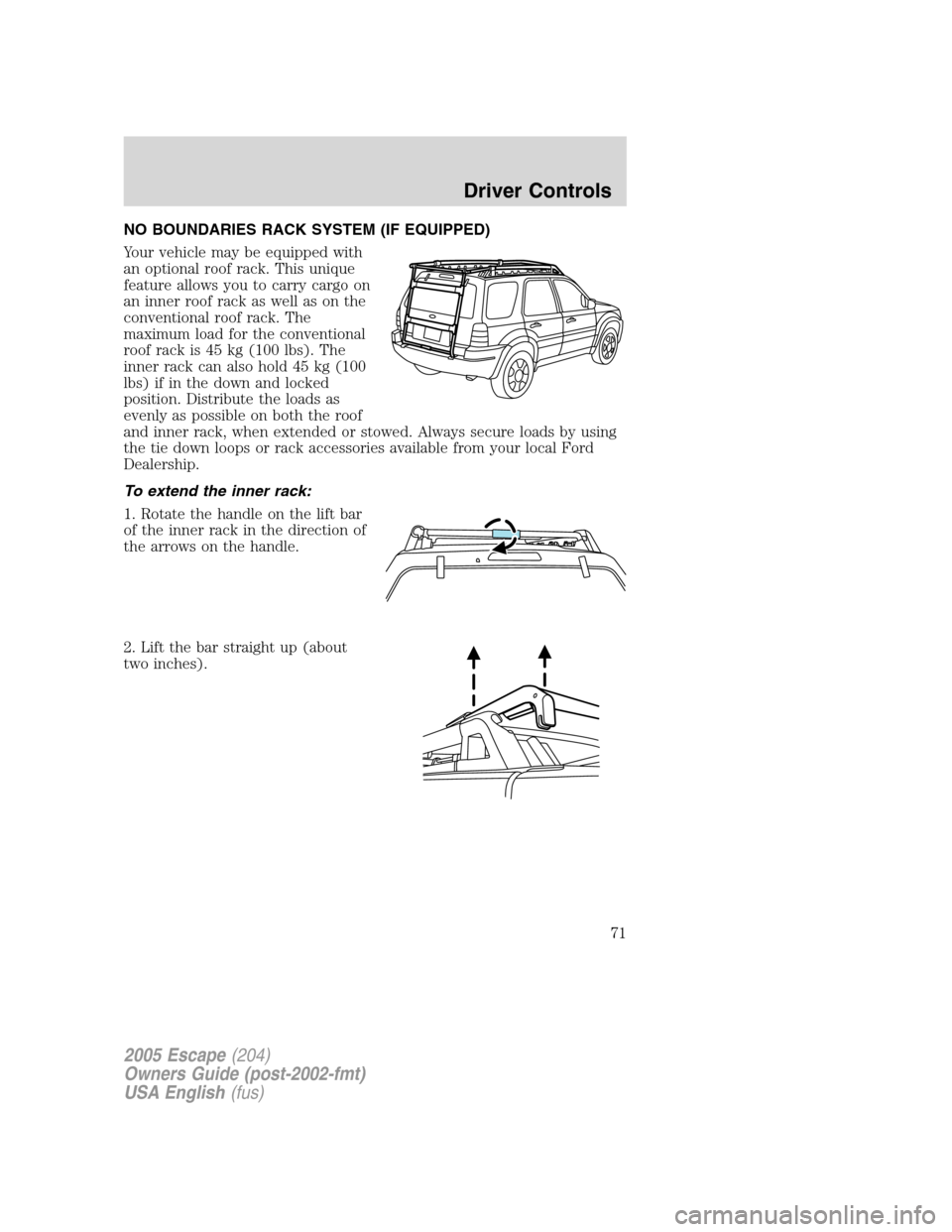
Your vehicle may be equipped with
an optional roof rack. This unique
feature allows you to carry cargo on
an inner roof rack as well as on the
conventional roof rack. The
maximum load for the conventional
roof rack is 45 kg (100 lbs). The
inner rack can also hold 45 kg (100
lbs) if in the down and locked
position. Distribute the loads as
evenly as possible on both the roof
and inner rack, when extended or stowed. Always secure loads by using
the tie down loops or rack accessories available from your local Ford
Dealership.
To extend the inner rack:
1. Rotate the handle on the lift bar
of the inner rack in the direction of
the arrows on the handle.
2. Lift the bar straight up (about
two inches).
2005 Escape(204)
Owners Guide (post-2002-fmt)
USA English(fus)
Driver Controls
71
Page 73 of 272
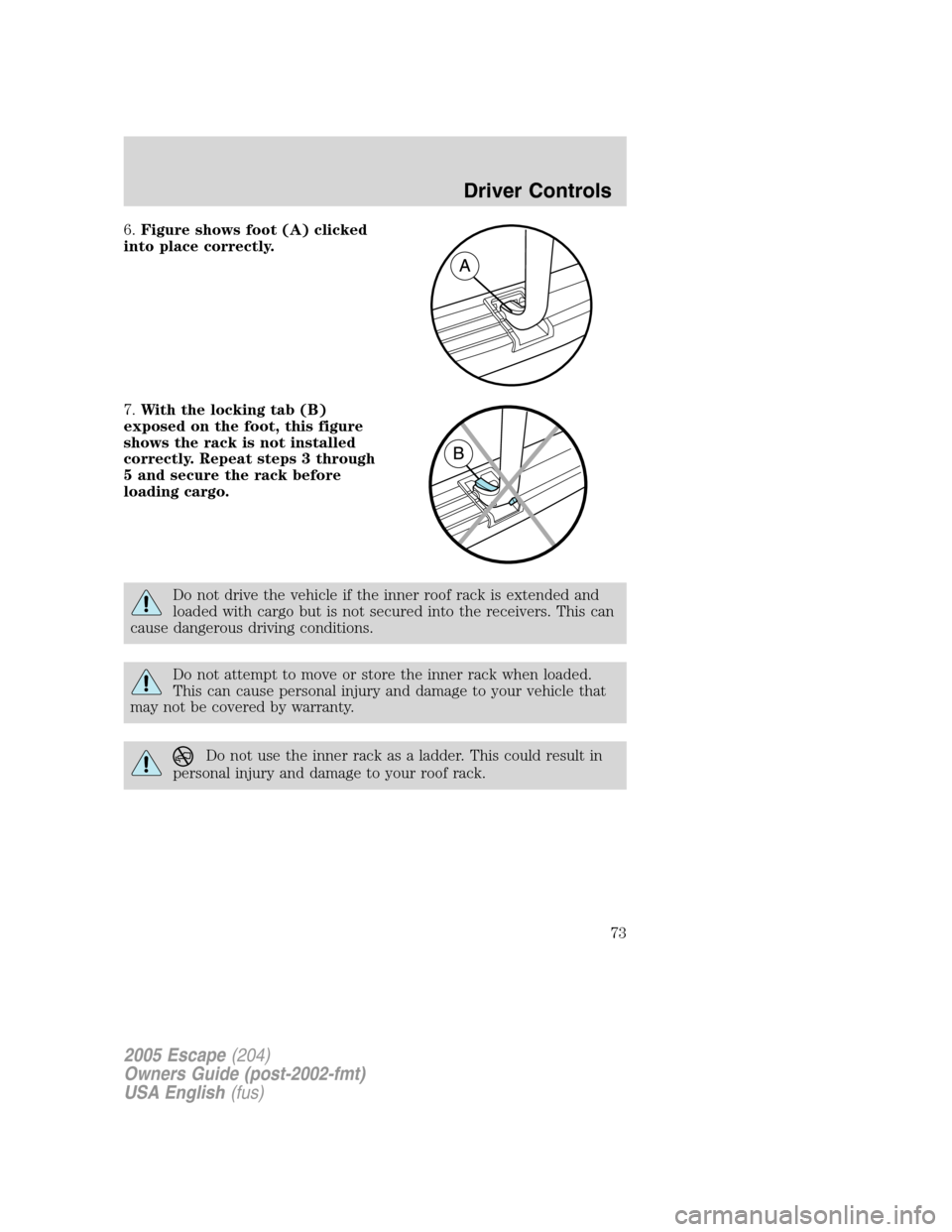
6.Figure shows foot (A) clicked
into place correctly.
7.With the locking tab (B)
exposed on the foot, this figure
shows the rack is not installed
correctly. Repeat steps 3 through
5 and secure the rack before
loading cargo.
Do not drive the vehicle if the inner roof rack is extended and
loaded with cargo but is not secured into the receivers. This can
cause dangerous driving conditions.
Do not attempt to move or store the inner rack when loaded.
This can cause personal injury and damage to your vehicle that
may not be covered by warranty.
Do not use the inner rack as a ladder. This could result in
personal injury and damage to your roof rack.
2005 Escape(204)
Owners Guide (post-2002-fmt)
USA English(fus)
Driver Controls
73
Page 75 of 272
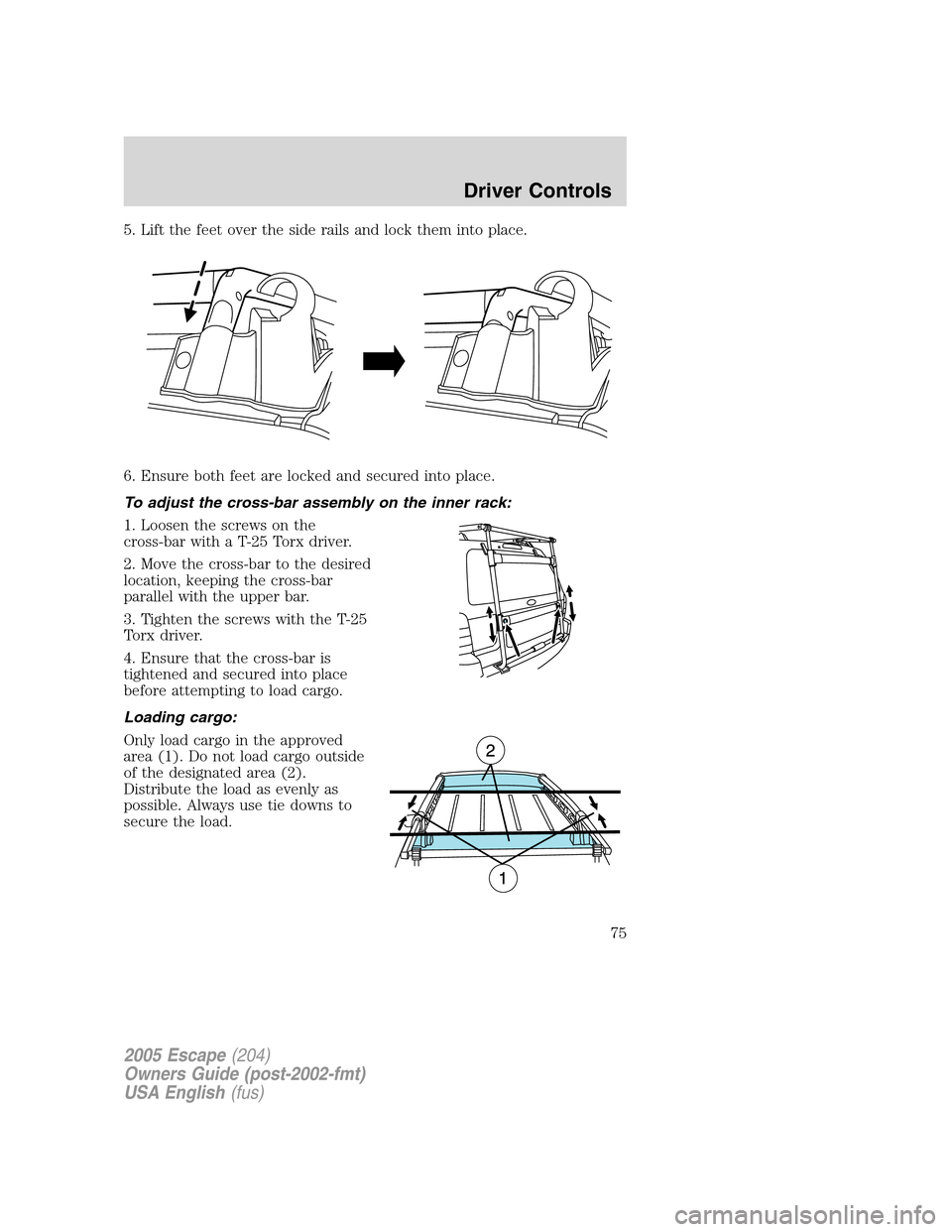
5. Lift the feet over the side rails and lock them into place.
6. Ensure both feet are locked and secured into place.
To adjust the cross-bar assembly on the inner rack:
1. Loosen the screws on the
cross-bar with a T-25 Torx driver.
2. Move the cross-bar to the desired
location, keeping the cross-bar
parallel with the upper bar.
3. Tighten the screws with the T-25
Torx driver.
4. Ensure that the cross-bar is
tightened and secured into place
before attempting to load cargo.
Loading cargo:
Only load cargo in the approved
area (1). Do not load cargo outside
of the designated area (2).
Distribute the load as evenly as
possible. Always use tie downs to
secure the load.
2005 Escape(204)
Owners Guide (post-2002-fmt)
USA English(fus)
Driver Controls
75
Page 76 of 272
Always stow the inner rack on the roof when using an automated
car wash.
Do not attempt to open the liftgate or rear window when the rack
is in the down position. This may damage the rack or your
vehicle.
To ensure proper sliding function of your rack, keep the rack
clear of debris. If debris is visible inside the roof c-channels or
side rails, spray the items clear with a water hose.
Do not load large or bulky items (i.e., plywood, mattresses) on
the rear of the vehicle so that they extend above the roof line. In
addition to blocking your rear view, they can also cause dangerous
driving situations and could result in an increase risk of loss of vehicle
control and personal injury. Use additional care when driving with
reduced visibility.
Only load cargo in the designated area. Loading outside of the
approved area could result in personal injury as well as vehicle
damage that may not be covered by warranty.
Vehicles with a higher center of gravity such as utility and
four-wheel drive vehicles handle differently than vehicles with a
lower center of gravity. Utility and four-wheel drive vehicles are not
designed for cornering at speeds as high as passenger cars any more
than low-slung sport cars are designed to perform satisfactorily under
off-road conditions. Avoid sharp turns, excessive speed and abrupt
maneuvers in these vehicles. Failure to drive cautiously could result in
an increase risk of loss of vehicle control, vehicle rollover, personal
injury and death.
2005 Escape(204)
Owners Guide (post-2002-fmt)
USA English(fus)
Driver Controls
76
Page 77 of 272

KEYS
The key operates all locks on your vehicle. In case of loss, replacement
keys are available from your dealer.
You should always carry a second key with you in a safe place in case
you require it in an emergency.
Refer toSecuriLock�Passive Anti-Theft Systemfor more information.
POWER DOOR LOCKS
The power door lock controls are
located on the driver and front
passenger door panels.
Pressing the
will unlock all the
doors. Pressing the
will lock all
the doors.
Power door lock/unlock inhibit feature
As a theft deterrent, the power door lock controls can be disabled 20
seconds after the ignition has been turned to the 1 (LOCK) position. The
door lock controls are reenabled when the vehicle is unlocked using the
key in the door lock cylinder or the by pressing
on the remote entry
transmitter. This feature can be turned on or off using the following
procedure:
Before starting, ensure the ignition is in the 1 (LOCK) position and all
vehicle doors are closed. You must complete Steps 1–7 within 30 seconds
or the procedure will have to be repeated.
1.
Place the key in the ignition and turn the ignition to the 3 (RUN) position.
2. Press the power door unlock control on the door panel three times.
3. Turn the ignition from the 3 (RUN) position to the 1 (LOCK) position.
4. Press the power door unlock control on the door panel three times.
5. Turn the ignition back to the 3 (RUN) position. The horn will chirp
one time to confirm programming mode has been entered and is active.
6. Press the power door lock control on the door panel two times. The
horn will chirp two times to confirm the feature is off; the horn will chirp
two times and honk one time to confirm the feature is on.
7. Turn the ignition from the 3 (RUN) position to the 1 (LOCK) position.
The horn will chirp one time to confirm the programming mode has been exited.
Repeat the procedure to turn the feature on or off.
2005 Escape(204)
Owners Guide (post-2002-fmt)
USA English(fus)
Locks and Security
Locks and Security
77