Page 28 of 288
28 THINGS TO KNOW BEFORE STARTING YOUR VEHICLE
From the Outside
To unlock (1)
To lock (2)
To open the door:
Pull the handle to open the door.
WARNING!
Only drive with the doors properly closed. You
could lose the load, for example, and endanger ve-
hicle occupants or other road users if the doors are
open.
Only open the doors when road and traffic
conditions permit.
Do not leave children alone in the vehicle. They
could open a locked door from the inside despite
the road and traffic conditions, thereby
endangering themselves and others.
To prevent severe personal injuries, always keep
hands and fingers away from the door opening
when closing a door. Be especially careful when
small children are around.
Page 29 of 288
THINGS TO KNOW BEFORE STARTING YOUR VEHICLE 29
2
From the Inside
To unlock (1)
To lock (2)
To unlock and open
Pull handle.
To lock:
Press the handle in. All closed doors will be locked.
The door is locked when the white patch in the handle
can be seen. If an open door is detected, refer to
"Central Locking". NOTE:
The driver’s and passenger’s doors cannot be
locked when they are open (lockout protection).
In vehicles without central locking only the respective
door will be locked or unlocked.
Please note anti-theft alarm system: The anti-theft
alarm will be triggered when the doors are manually
unlocked. Cancel alarm by pressing button Œ. The
anti-theft alarm system will not be activated when the
doors are manually locked.
CAUTION!
In case of an accident, rescue from the outside may
be more difficult if the vehicle is locked.
To unlock the vehicle after the engine is started,
refer to
"Central Locking Switch
".
Page 30 of 288

30 THINGS TO KNOW BEFORE STARTING YOUR VEHICLESliding Door
From the Outside
To unlock (1)
To lock (2)
To open the door:
Pull the handle and slide the door back to the stop.
To close the door:
Slide it forwards by the handle until it latches.
WARNING!
Only drive with the doors properly closed. You
could lose the load, for example, and endanger ve-
hicle occupants or other road users if the doors are
open.
To prevent possible personal injury, always keep
hands and fingers away from the door opening
when closing a door. Be especially careful when
small children are around.
Only open the doors when road and traffic
conditions permit.
Do not leave children alone in the vehicle. They
could open a locked door from the inside despite
the road and traffic conditions, thereby
endangering themselves and others.
Do not leave doors open on uphill or downhill
grades. Doors could be released from the door
support and slam shut. If they are not closed
properly, sliding doors can open on their own.
This could result in severe injury. Be especially
careful when small children are around.
Page 31 of 288
THINGS TO KNOW BEFORE STARTING YOUR VEHICLE 31
2
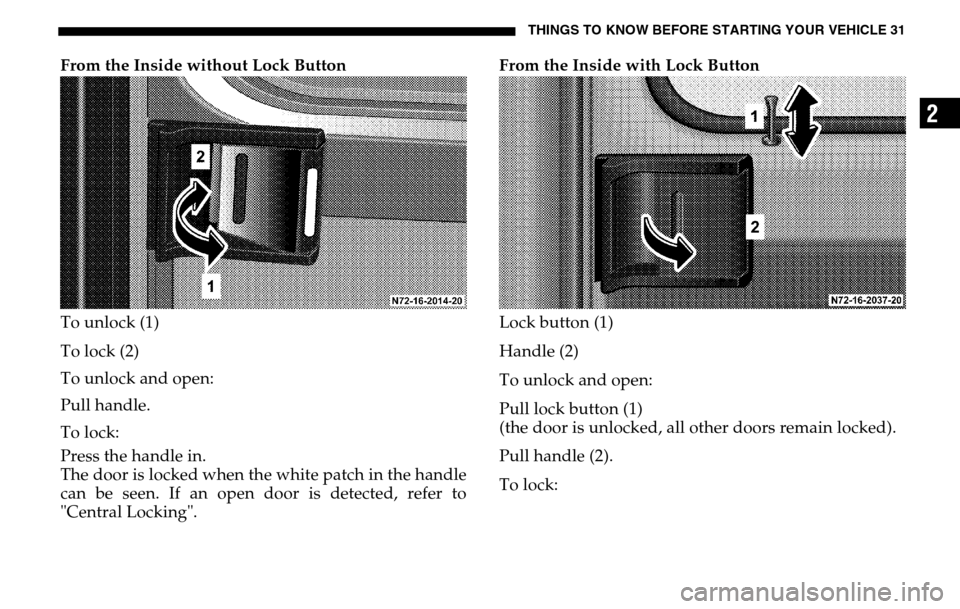
From the Inside without Lock Button
To unlock (1)
To lock (2)
To unlock and open:
Pull handle.
To lock:
Press the handle in.
The door is locked when the white patch in the handle
can be seen. If an open door is detected, refer to
"Central Locking". From the Inside with Lock Button
Lock button (1)
Handle (2)
To unlock and open:
Pull lock button (1)
(the door is unlocked, all other doors remain locked).
Pull handle (2).
To lock:
Page 32 of 288

32 THINGS TO KNOW BEFORE STARTING YOUR VEHICLEPress lock button (1)
(all doors are locked)
If the central locking automatically unlocks again after
having been locked, at least one door is closed
incorrectly.
If it then locks again within about 5 seconds, then all
closed doors are locked.
The central locking displays vehicle locking with one
or more open doors by means of a special function
sequence (locking, unlocking, locking). Once closing
has been completed, an open door will not
automatically be locked.
NOTE: If an open sliding door is locked before being
closed, then only the sliding door will be locked. In vehicles without central locking only the respective
door will be locked or unlocked.
Please note anti-theft alarm system: The anti-theft
alarm will be triggered when the doors are manually
unlocked. Cancel alarm by pressing button
Œ. The
anti-theft alarm system will not be activated when the
doors are manually locked.
CAUTION!
In case of an accident, rescue from the outside may
be more difficult if the vehicle is locked.
To unlock the vehicle after the engine is started,
refer to
"Central Locking Switch
".
Page 33 of 288
THINGS TO KNOW BEFORE STARTING YOUR VEHICLE 33
2
Rear Cargo Doors
From the Outside
To unlock (1)
To lock (2)
To open the door:
Pull the handle to open the door.
WARNING!
Only drive with the doors properly closed. You
could lose the load, for example, and endanger ve-
hicle occupants or other road users if the doors are
open.
To prevent possible personal injury, always keep
hands and fingers away from the door opening
when closing a door. Be especially careful when
small children are around.
Only open the doors when road and traffic
conditions permit.
Do not leave children alone in the vehicle. They
could open a locked door from the inside despite
the road and traffic conditions, thereby
endangering themselves and others.
When the rear cargo doors are opened to an angle
of 90
°
° °
° (catch position), more than 50% of the rear
lamps are concealed. When the door is open in this
manner, you should warn others in accordance
with legal requirements.
Page 34 of 288
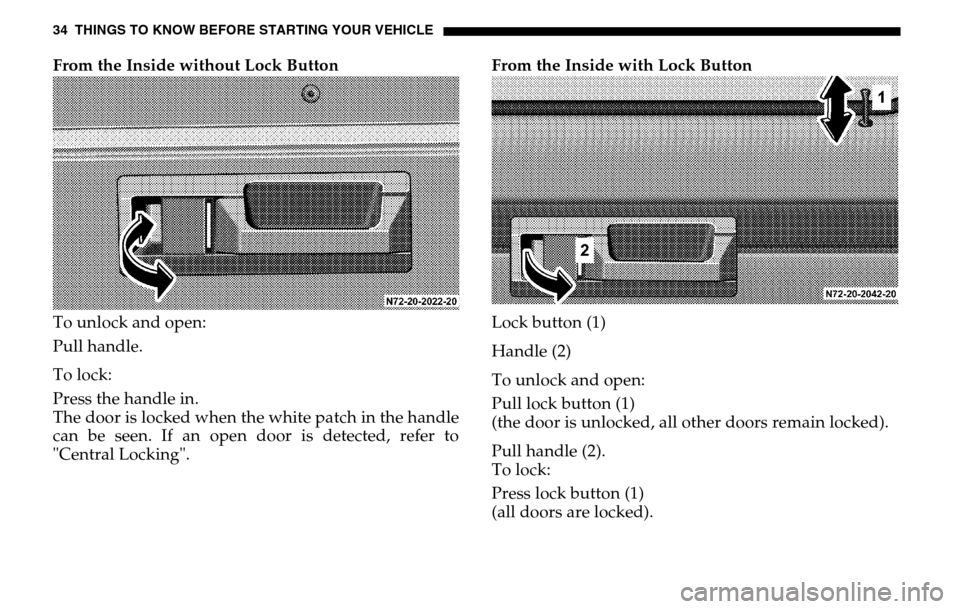
34 THINGS TO KNOW BEFORE STARTING YOUR VEHICLEFrom the Inside without Lock Button
To unlock and open:
Pull handle.
To lock:
Press the handle in.
The door is locked when the white patch in the handle
can be seen. If an open door is detected, refer to
"Central Locking". From the Inside with Lock Button
Lock button (1)
Handle (2)
To unlock and open:
Pull lock button (1)
(the door is unlocked, all other doors remain locked).
Pull handle (2).
To lock:
Press lock button (1)
(all doors are locked).
Page 35 of 288
THINGS TO KNOW BEFORE STARTING YOUR VEHICLE 35
2
If the central locking automatically unlocks again after
having been locked, at least one door is closed
incorrectly.
If it then locks again within about 5 seconds, then all
closed doors are locked.
The central locking displays vehicle locking with one
or more open doors by means of a special function
sequence (locking, unlocking, locking). Once closing
has been completed, an open door will not
automatically be locked.
NOTE: In vehicles without central locking only the
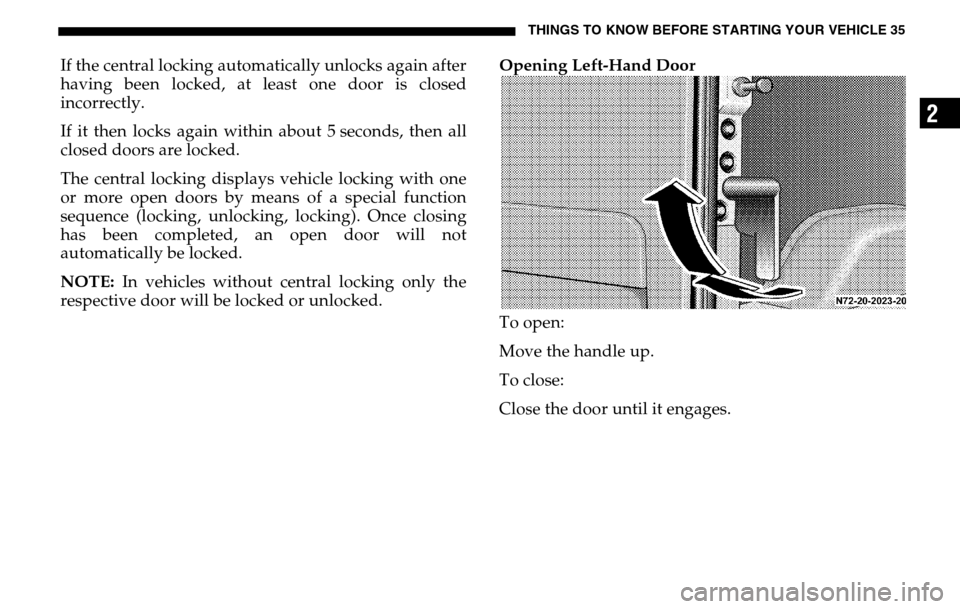
respective door will be locked or unlocked. Opening Left-Hand Door
To open:
Move the handle up.
To close:
Close the door until it engages.