Page 27 of 216
WARNING!
A frayed or torn belt could rip apart in a collision
and leave you with no protection. Inspect the belt
system periodically, checking for cuts, frays, or loose
parts. Damaged parts must be replaced immediately.
Do not disassemble or modify the system. Front seat
belt assemblies must be replaced after a collision.
Rear seat belt assemblies must be replaced after a
collision if they have been damaged (bent retractor,
torn webbing, etc.).
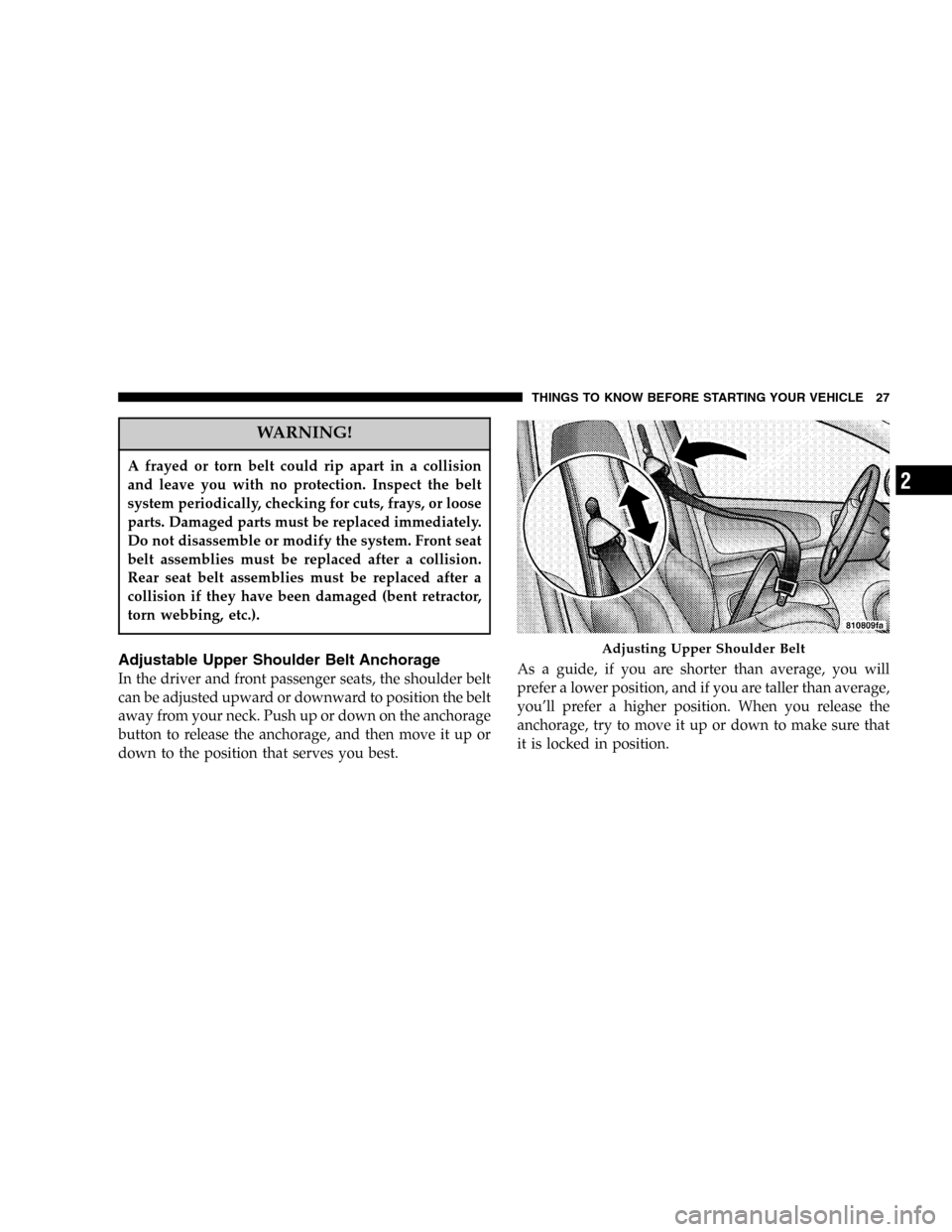
Adjustable Upper Shoulder Belt Anchorage
In the driver and front passenger seats, the shoulder belt
can be adjusted upward or downward to position the belt
away from your neck. Push up or down on the anchorage
button to release the anchorage, and then move it up or
down to the position that serves you best.As a guide, if you are shorter than average, you will
prefer a lower position, and if you are taller than average,
you’ll prefer a higher position. When you release the
anchorage, try to move it up or down to make sure that
it is locked in position.
Adjusting Upper Shoulder Belt
THINGS TO KNOW BEFORE STARTING YOUR VEHICLE 27
2
Page 37 of 216

•In moderate to severe side collisions, the side airbag
inflator on the crash side of the vehicle is triggered by
the appropriate SIACM, releasing a quantity of non-
toxic gas. The inflating side airbag exits through the
seat seam into the space between the occupant and the
door. The side airbag moves at a very high speed and
with such a high force, that it could injure you if you
are not seated properly, or if items are positioned in
the area where the side airbag inflates. This especially
applies to children.
Enhanced Accident Response Time—If Equipped
If the airbags deploy after an impact and the electrical
system remains functional, vehicles equipped with
power door locks will unlock automatically. In addition,
approximately 10 seconds after the vehicle has stopped
moving, the interior lights will light until the ignition
switch is turned off.
Maintaining Your Airbag Systems
WARNING!
•Modifications to any part of the airbag system
could cause it to fail when you need it. You could
be injured because the airbags are not there to
protect you. Do not modify the components or
wiring, including adding any kind of badges or
stickers to the steering wheel hub trim cover or
the upper right side of the instrument panel. Do
not modify the front bumper, vehicle body struc-
ture, or frame.
•You need proper knee impact protection in a
collision. Do not mount or locate any aftermarket
equipment on or behind the knee bolster.
•It is dangerous to try to repair any part of the
airbag system yourself. Be sure to tell anyone who
works on your vehicle that it has airbags.
THINGS TO KNOW BEFORE STARTING YOUR VEHICLE 37
2
Page 40 of 216

WARNING!
•Improper installation can lead to failure of an
infant or child restraint. It could come loose in a
collision. The child could be badly injured or
killed. Follow the manufacturer’s directions ex-
actly when installing an infant or child restraint.
•A rearward facing infant restraint should only be
used in a rear seat. A rearward facing infant
restraint in the front seat may be struck by a
deploying passenger airbag which may cause se-
vere or fatal injury to the infant.
Here are some tips on getting the most out of your child
restraint:
•Before buying any restraint system, make sure that it
has a label certifying that it meets all applicable Safety
Standards. We also recommend that you make sure
that you can install the child restraint in the vehicle
where you will use it before you buy it.
•The restraint must be appropriate for your child’s
weight and height. Check the label on the restraint for
weight and height limits.
•Carefully follow the instructions that come with the
restraint. If you install the restraint improperly, it may
not work when you need it.
The passenger seat belts are equipped with cinching latch
plates which are designed to keep the lap portion tight
around the child restraint so that it is not necessary to use
a locking clip. Pulling up on the shoulder portion of the
lap/shoulder belt will tighten the belt. The cinching latch
plate will keep the belt tight, however, any seat belt
system will loosen with time, so check the belt occasion-
ally and pull it tight if necessary.
•In the rear seat, you may have trouble tightening the
lap/shoulder belt on the child restraint because the
buckle or latch plate is too close to the belt path
opening on the restraint. Disconnect the latch plate
from the buckle and twist the short buckle-end belt
several times to shorten it. Insert the latch plate into
the buckle with the release button facing out.
40 THINGS TO KNOW BEFORE STARTING YOUR VEHICLE
Page 54 of 216
Use the hood prop rod to secure the hood in the open
position as shown. To prevent possible damage, do not
slam the hood to close it. Use a firm downward push at
the center of the hood to ensure that both latches engage.
WARNING!
If the hood is not fully latched it could fly up when
the vehicle is moving and block your forward vision.
You could have a collision. Be sure all hood latches
are fully latched before driving.
LIGHTS
Front Map/Reading Lights
These lights, located under the rearview mirror, can be
turned on by means of switches located at the base of the
rearview mirror.
NOTE:The map lights will remain on when the ignition
switch is in the Run or Accessory positions.
Hood Prop Rod
Front Map/Reading Lights
54 UNDERSTANDING THE FEATURES OF YOUR VEHICLE
Page 59 of 216
Intermittent Wiper System
Use the intermittent wiper when weather conditions
make a single wiping cycle, with a variable pause be-
tween cycles, desirable. Move the lever to the first detent
(DEL) position, then select the delay interval by turning
the end of the stalk. Rotate the end upward to decrease
the delay time and downward to increase it. The delay
can be regulated from a maximum of approximately 18
seconds between cycles, to a second between cycles.
Lo Speed Wipers
Move the wiper stalk upward to the 2nd detent to obtain
a low speed wiper function.
Hi Speed Wipers
Move the wiper stalk upward to the 3rd position to
obtain the fastest wiper speed.
TILT STEERING COLUMN
To tilt the column, push down on the lever below the turn
signal control and move the wheel up or down, as
desired. Pull the lever back towards you to lock the
column firmly in place.
Tilt Steering Column Control
UNDERSTANDING THE FEATURES OF YOUR VEHICLE 59
3
Page 60 of 216
WARNING!
Tilting the steering column while the vehicle is
moving is dangerous. Without a stable steering col-
umn, you could lose control of the vehicle and have
an accident. Adjust the column only while the ve-
hicle is stopped. Be sure it is locked before driving.
POWER SUNROOF—IF EQUIPPED
The sunroof control is located on the headliner between
the sun visors.
A single control“tilts”the sunroof to the vent position
and also slides the sunroof rearward to the full open
position. Move the switch rearward to move the sunroof
panel to the full vent position. The sunroof can be
stopped at any position between closed and full vent
open.
Power Sunroof Switch
60 UNDERSTANDING THE FEATURES OF YOUR VEHICLE
Page 65 of 216

UNDERSTANDING YOUR INSTRUMENT PANEL
CONTENTS
�Instrument Panel Features................67
�Instrument Cluster—Turbo................68
�Instrument Cluster Descriptions............69
�Electronic Digital Clock..................74
▫Clock Setting Procedure..................74
�Radio General Information................74
▫Radio Broadcast Signals..................74
▫Two Types Of Signals...................74
▫Electrical Disturbances...................75
▫AM Reception........................75
▫FM Reception.........................75
�Sales Code RBK—AM/ FM Stereo Radio With
CD Player And CD Changer Controls
........75
▫Radio Operation.......................75
▫CD Player Operation....................77
▫CD Changer Control Capability—
If Equipped..........................79
�Satellite Radio—If Equipped..............80
▫System Activation......................80
▫Electronic Serial Number/Sirius Identification
Number (ENS/SID).....................81
▫Selecting Satellite Mode In RBB, RAH And RBK
Radios..............................81
4
Page 69 of 216

INSTRUMENT CLUSTER DESCRIPTIONS
1. Fog Light Indicator
This light shows when the fog lights are ON.
2. Brake System Warning Light
This light monitors various brake functions,
including brake fluid level and parking brake
application. If the brake light comes on, it may
indicate that the parking brake is applied, or there is a
low brake fluid level. It may also indicate an ABS
malfunction that could lead to reduced braking per-
formance.
WARNING!
Driving a vehicle with the brake light on is danger-
ous. A significant decrease in braking performance
or vehicle stability during braking may occur. It will
take you longer to stop the vehicle or will make your
vehicle harder to control. You could have an acci-
dent. Have the vehicle checked immediately.
The operation of the Brake Warning light can be checked
by turning the ignition key from the OFF to the ON
position. The light should illuminate for three seconds, or
until the engine is started, whichever comes first. The
light should then go out unless the parking brake is
applied or a brake fault is detected. If the light does not
illuminate, have the light inspected and serviced as soon
as possible.
The light will also come on when the parking brake is
applied with the ignition in the ON position.
NOTE:This light shows only that the parking brake is
on. It does not show the degree of brake application.
If the parking brake is off and the light remains on, have
the brake system inspected as soon as possible.
3. Anti-Lock Warning Light (ABS)
This light monitors the Anti-Lock Brake System
(ABS) described elsewhere in this manual. This
light will come on when the ignition key is turned to
the ON position and may stay on for as long as four
seconds.
UNDERSTANDING YOUR INSTRUMENT PANEL 69
4