2005 DODGE NEON SRT warning light
[x] Cancel search: warning lightPage 51 of 216
WARNING!
•Adjusting a seat while the vehicle is moving is
dangerous. The sudden movement of the seat
could cause you to lose control. The seat belt
might not be properly adjusted and you could be
injured. Adjust the seat only while the vehicle is
parked.
•Do not ride with the seatback reclined so that the
shoulder belt is no longer resting against your
chest. In a collision you could slide under the seat
belt and be seriously or even fatally injured. Use
the recliner only when the vehicle is parked.
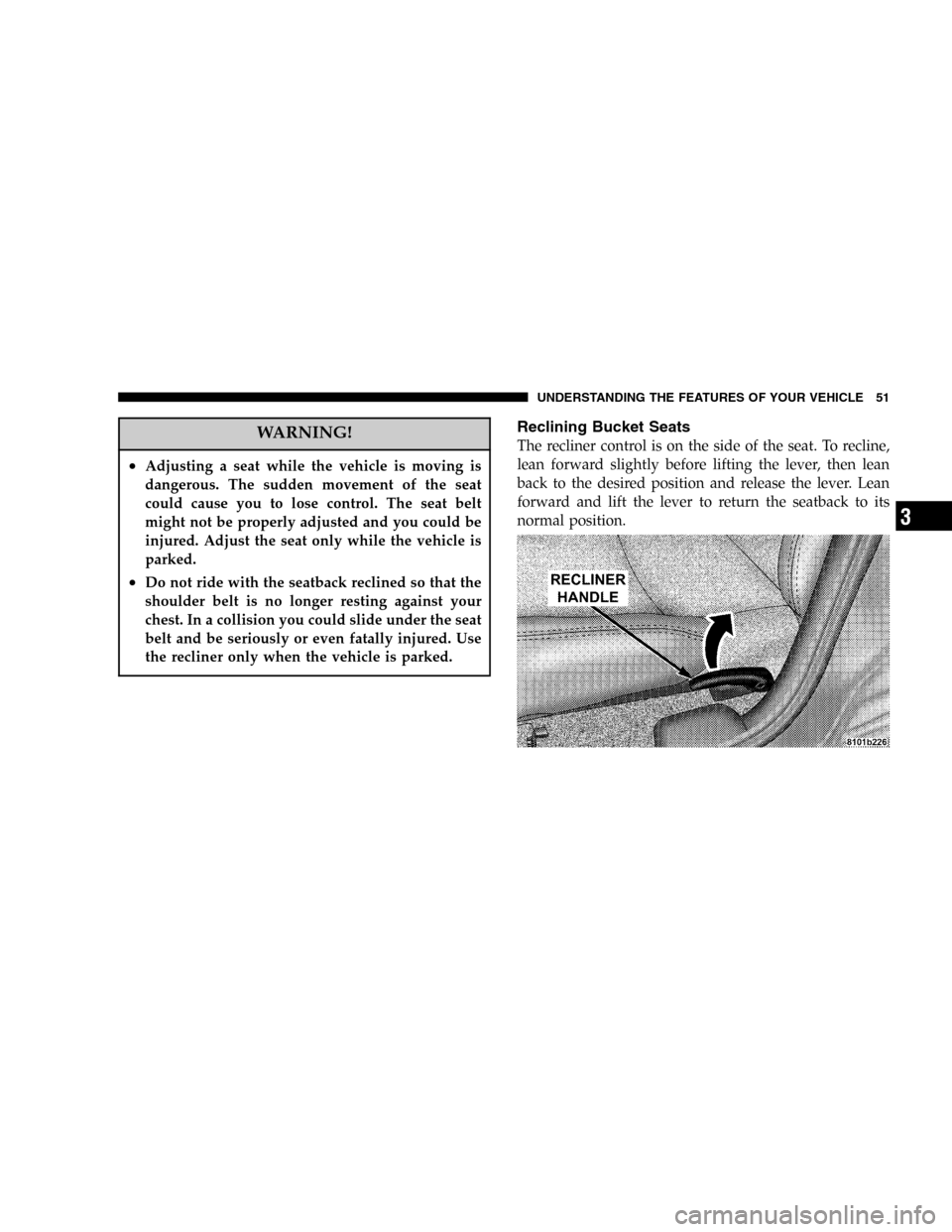
Reclining Bucket Seats
The recliner control is on the side of the seat. To recline,
lean forward slightly before lifting the lever, then lean
back to the desired position and release the lever. Lean
forward and lift the lever to return the seatback to its
normal position.
UNDERSTANDING THE FEATURES OF YOUR VEHICLE 51
3
Page 54 of 216

Use the hood prop rod to secure the hood in the open
position as shown. To prevent possible damage, do not
slam the hood to close it. Use a firm downward push at
the center of the hood to ensure that both latches engage.
WARNING!
If the hood is not fully latched it could fly up when
the vehicle is moving and block your forward vision.
You could have a collision. Be sure all hood latches
are fully latched before driving.
LIGHTS
Front Map/Reading Lights
These lights, located under the rearview mirror, can be
turned on by means of switches located at the base of the
rearview mirror.
NOTE:The map lights will remain on when the ignition
switch is in the Run or Accessory positions.
Hood Prop Rod
Front Map/Reading Lights
54 UNDERSTANDING THE FEATURES OF YOUR VEHICLE
Page 69 of 216

INSTRUMENT CLUSTER DESCRIPTIONS
1. Fog Light Indicator
This light shows when the fog lights are ON.
2. Brake System Warning Light
This light monitors various brake functions,
including brake fluid level and parking brake
application. If the brake light comes on, it may
indicate that the parking brake is applied, or there is a
low brake fluid level. It may also indicate an ABS
malfunction that could lead to reduced braking per-
formance.
WARNING!
Driving a vehicle with the brake light on is danger-
ous. A significant decrease in braking performance
or vehicle stability during braking may occur. It will
take you longer to stop the vehicle or will make your
vehicle harder to control. You could have an acci-
dent. Have the vehicle checked immediately.
The operation of the Brake Warning light can be checked
by turning the ignition key from the OFF to the ON
position. The light should illuminate for three seconds, or
until the engine is started, whichever comes first. The
light should then go out unless the parking brake is
applied or a brake fault is detected. If the light does not
illuminate, have the light inspected and serviced as soon
as possible.
The light will also come on when the parking brake is
applied with the ignition in the ON position.
NOTE:This light shows only that the parking brake is
on. It does not show the degree of brake application.
If the parking brake is off and the light remains on, have
the brake system inspected as soon as possible.
3. Anti-Lock Warning Light (ABS)
This light monitors the Anti-Lock Brake System
(ABS) described elsewhere in this manual. This
light will come on when the ignition key is turned to
the ON position and may stay on for as long as four
seconds.
UNDERSTANDING YOUR INSTRUMENT PANEL 69
4
Page 70 of 216

If the ABS light remains on or comes on during driving,
it indicates that the Anti-Lock portion of the brake system
is not functioning and that service is required, however,
the conventional brake system will continue to operate
normally provided that the BRAKE warning light is not
on.
If the ABS light is on, the brake system should be serviced
as soon as possible to restore the benefit of Anti-Lock
Brakes.
The warning light should be checked frequently to assure
that it is operating properly. Turn the ignition key to a
point midway between ON and START. The light should
come on. If the light does not come on, have the system
checked by an authorized dealer.
4. Speedometer
Indicates vehicle speed.
5. Turn Signal Indicators
The arrows will flash in unison with the exterior turn
signal, when using the turn signal lever.
6. High Beam Indicator
This light shows that the headlights are on high
beam. Pull the turn signal lever toward the
steering wheel to switch the headlights from high or
low beam.
7. Tachometer
The silver area of the scale shows the permissible engine
revolutions-per-minute (rpm x 1000) for each gear range.
Before reaching the red area, ease up on the accelerator to
prevent engine damage.
8. Oil Pressure Light
Shows low engine oil pressure. The light will
come on and remain on when the ignition key is
turned from OFF to the ON position, and the light will
turn off after the engine is started. If the bulb does not
come on during starting, have the system checked by
an authorized dealer.
If the light comes on and remains on while driving, stop
the vehicle and shut off the engine. DO NOT OPERATE
THE VEHICLE UNTIL THE CAUSE IS CORRECTED.
70 UNDERSTANDING YOUR INSTRUMENT PANEL
Page 95 of 216

STARTING PROCEDURES
Before starting your vehicle, adjust your seat, adjust both
inside and outside mirrors, and fasten your seat belts.
CAUTION!
Long periods of engine idling, especially at high
engine speeds can cause excessive exhaust tempera-
tures which can damage your vehicle. Do not leave
your vehicle unattended with the engine running.
WARNING!
Do not leave children or animals inside parked
vehicles in hot weather. Interior heat build up may
cause serious injury or death.
Manual Transaxle
Place the gear selector in NEUTRAL, press the clutch
pedal to the floor, and fully apply the parking brake
before starting the engine.
NOTE:The engine will not start unless the clutch pedal
is pressed to the floor.
Normal Starting
Normal Starting of either a cold or a warm engine does
not require pumping or depressing the accelerator pedal.
Simply turn the key to the START position and release
when the engine starts. If the engine has not started
within 5 seconds, slightly depress the accelerator pedal
while continuing to crank. If the engine fails to start
within 15 seconds, turn the key to the OFF position, wait
10 to 15 seconds, then repeat the normal starting proce-
dure.
Starting in Cold Weather (Below 32°For0°C)
Slightly depress and hold the accelerator before starting
the engine. Turn the key to the START position. When the
engine starts, release the key, then the accelerator pedal.
STARTING AND OPERATING 95
5
Page 102 of 216

BRAKE SYSTEM
Your vehicle is equipped with power assisted brakes as
standard equipment. In the event power assist is lost for
any reason (for example, repeated brake applications
with the engine off), the brakes will still function. The
effort required to brake the vehicle will be much greater
than that required with the power system operating.
WARNING!
Riding the brakes can lead to brake failure and
possibly an accident. Driving with your foot resting
or riding on the brake pedal can result in abnormally
high brake temperatures, excessive lining wear, and
possible brake damage. You wouldn’t have your full
braking capacity in an emergency.
If either of the two hydraulic systems lose normal capa-
bility, the remaining system will still function with some
loss of overall braking effectiveness. This will be evident
by increased pedal travel during application and greater
pedal force required to slow or stop. In addition, if themalfunction is caused by an internal leak, as the brake
fluid in the master cylinder drops, the brake warning
indicator will light.
Anti-Lock Brake System (ABS)
The ABS gives increased vehicle stability and brake
performance under most braking conditions. The system
automatically“pumps”the brakes during severe braking
conditions to prevent wheel lock up.
All vehicle wheels and tires must be the same size and
tires must be properly inflated to produce accurate
signals for the computer. However, the system will
compensate when the compact spare is in use.
During stops where ABS is activated, a vibration of the
brake pedal may be felt and associated system noises
may be heard.
NOTE:Pumping of the brake pedal will diminish the
effectiveness of Anti-lock brakes and may lead to an
accident. Pumping makes the stopping distance longer.
Just press firmly on your brake pedal when you need to
slow down or stop.
102 STARTING AND OPERATING
Page 123 of 216

conditions and would result in unnecessary cost. There-
fore you should not have to add anything to the fuel.
Fuel System Cautions
CAUTION!
Follow these guidelines to maintain your vehicle’s
performance:
•The use of leaded gas is prohibited by Federal law.
Using leaded gasoline can impair engine performance,
damage the emission control system.
•An out-of-tune engine, or certain fuel or ignition
malfunctions, can cause the catalytic converter to
overheat. If you notice a pungent burning odor or
some light smoke, your engine may be out of tune or
malfunctioning and may require immediate service.
Contact your dealer for service assistance.
•The use of fuel additives which are now being sold as
octane enhancers is not recommended. Most of these
products contain high concentrations of methanol.Fuel system damage or vehicle performance problems
resulting from the use of such fuels or additives is not
the responsibility of the manufacturer.
NOTE:Intentional tampering with emissions control
systems can result in civil penalties being assessed
against you.
Carbon Monoxide Warnings
WARNING!
Carbon monoxide (CO) in exhaust gases is deadly.
Follow the precautions below to prevent carbon
monoxide poisoning:
•Do not inhale exhaust gases. They contain carbon
monoxide, a colorless and odorless gas which can kill.
Never run the engine in a closed area, such as a
garage, and never sit in a parked vehicle with the
engine running for an extended period. If the vehicle is
stopped in an open area with the engine running for
more than a short period, adjust the ventilation system
to force fresh, outside air into the vehicle.
STARTING AND OPERATING 123
5
Page 125 of 216

NOTE:Tighten the gas cap about 1/4 turn until you
hear one click. This is an indication that the cap is
properly tightened.
If the gas cap is not tightened properly, the Malfunc-
tion Indicator light will come on. Be sure the gas cap is
tightened every time the vehicle is fueled.
WARNING!
•Never have any smoking materials lit in or near
the vehicle when the gas cap is removed or the
tank filled.
•Never add fuel when the engine is running.
•Turn off engine.
•Rotate the gas cap to the left to remove.
•To replace the cap, insert it into the filler neck and
tighten to the right until at least one click is heard.
WARNING!
A fire may result if gasoline is pumped into a
portable container that is inside of a vehicle. You
could be burned. Always place gas containers on the
ground while filling.
VEHICLE LOADING
Vehicle Loading Capacities
Front Seat Occupants....................... 2
Rear Seat Occupants........................ 3
Luggage....................... 115lbs. (52 kg)
Rated Vehicle Capacity............ 865lbs. (392 kg)
STARTING AND OPERATING 125
5