Page 46 of 216

Safety Checks You Should Make Inside The
Vehicle
Seat Belts
Inspect the belt system periodically, checking for cuts,
frays and loose parts. Damaged parts must be replaced
immediately. Do not disassemble or modify the system.
Front seat belt assemblies must be replaced after a
collision. Rear seat belt assemblies must be replaced after
a collision if they have been damaged (bent retractor, torn
webbing, etc.). If there is any question regarding belt or
retractor condition, replace the belt.
Airbag Light
The light should come on and remain on for 6 to
8 seconds as a bulb check when the ignition
switch is first turned to ON/RUN. If the bulb is
not lit during starting, have it replaced. If the light stays
on or comes on while driving, have the system checked
by an authorized dealer.
Defrosters
Check operation by selecting the defrost mode and place
the blower control on high speed. You should be able to
feel the air directed against the windshield.
Periodic Safety Checks You Should Make Outside
The Vehicle
Tires
Examine tires for excessive tread wear or uneven wear
patterns. Check for stones, nails, glass, or other objects
lodged in the tread. Inspect for tread cuts or sidewall
cracks. Check wheel nuts for tightness, and tires (includ-
ing spare) for proper pressure.
Lights
Have someone observe the operation of exterior lights
while you work the controls. Check turn signal and high
beam indicator lights on the instrument panel.
Fluid Leaks
Check area under vehicle after overnight parking for fuel,
water, oil, or other fluid leaks. Also, if gasoline fumes are
present, the cause should be corrected immediately.
46 THINGS TO KNOW BEFORE STARTING YOUR VEHICLE
Page 47 of 216
UNDERSTANDING THE FEATURES OF YOUR VEHICLE
CONTENTS
�Mirrors..............................49
▫Inside Day/Night Mirror.................49
▫Outside Mirror—Driver’s Side............49
▫Outside Mirror—Passenger’s Side..........49
▫Electric Remote-Control Mirrors............50
�Seats................................50
▫Front Seat Adjustment...................50
▫Reclining Bucket Seats...................51
▫Folding Rear Seat......................52
�To Open And Close The Hood.............53
�Lights...............................54▫Front Map/Reading Lights...............54
▫Interior Lights........................55
▫Multi-Function Control Lever..............56
▫Headlights, Parking Lights, Instrument Panel
Lights..............................56
▫Daytime Running Lights (Canada Only)......57
▫Lights-On Reminder....................57
▫Fog Lights...........................57
▫Turn Signals..........................57
▫Headlight Dimmer Switch................57
▫Passing Light.........................57
�Windshield Wipers And Washers...........58
3
Page 53 of 216
TO OPEN AND CLOSE THE HOOD
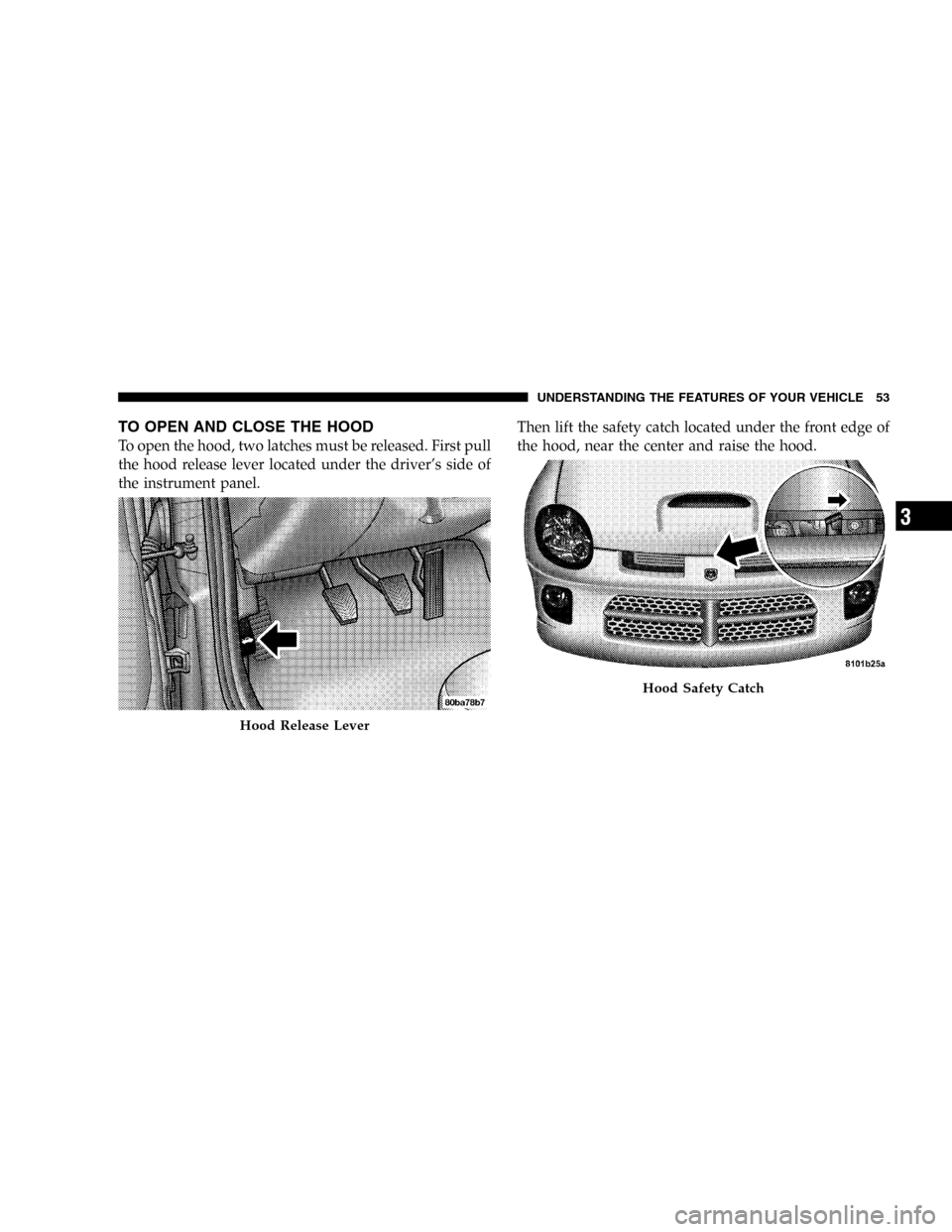
To open the hood, two latches must be released. First pull
the hood release lever located under the driver’s side of
the instrument panel.Then lift the safety catch located under the front edge of
the hood, near the center and raise the hood.
Hood Release Lever
Hood Safety Catch
UNDERSTANDING THE FEATURES OF YOUR VEHICLE 53
3
Page 55 of 216
Interior Lights
The interior lights come on when a door is opened.
The interior lights will automatically turn off in about 8
minutes if a door is left open or the dimmer control is left
in the Dome light position. Turn the ignition switch ON
to restore the interior light operation.
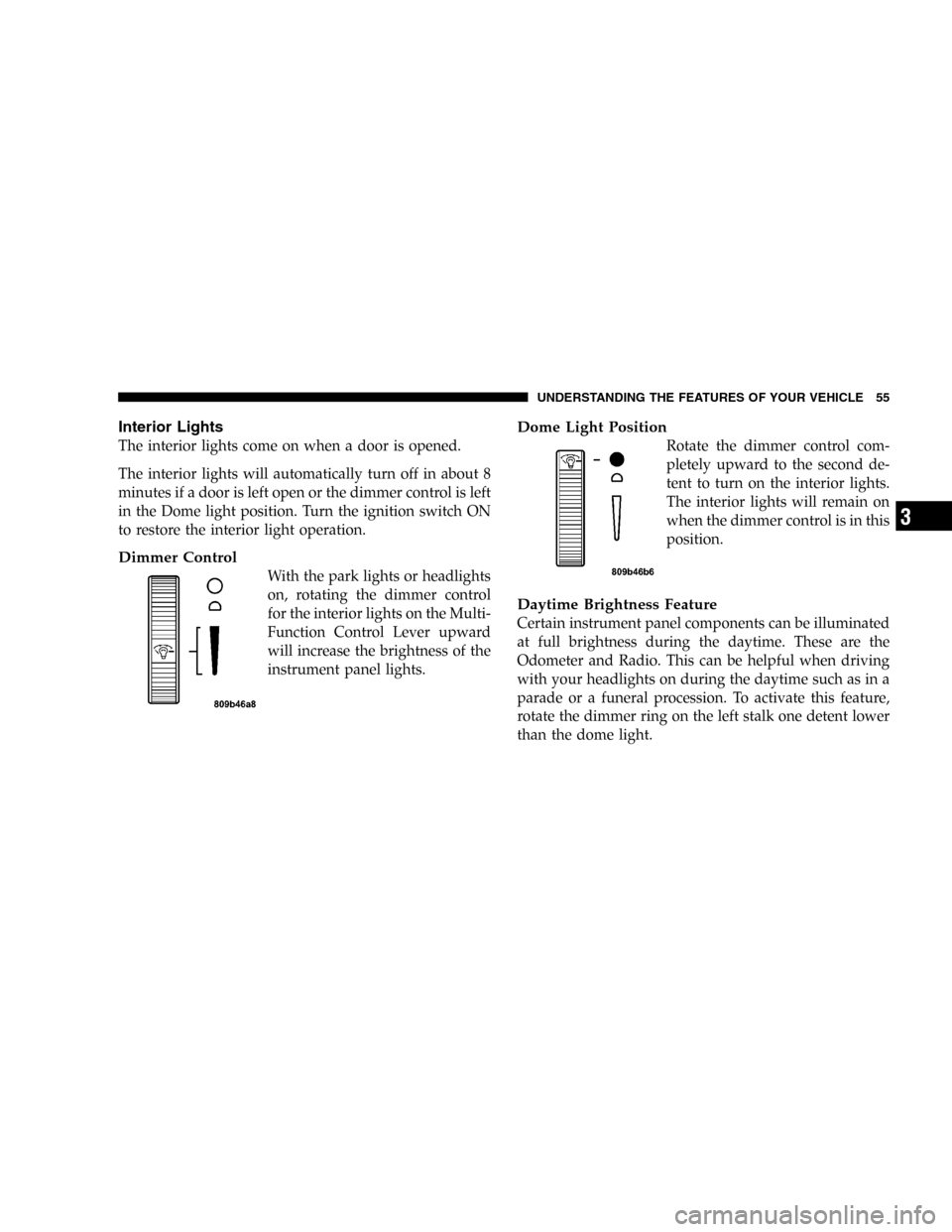
Dimmer Control
With the park lights or headlights
on, rotating the dimmer control
for the interior lights on the Multi-
Function Control Lever upward
will increase the brightness of the
instrument panel lights.
Dome Light Position
Rotate the dimmer control com-
pletely upward to the second de-
tent to turn on the interior lights.
The interior lights will remain on
when the dimmer control is in this
position.
Daytime Brightness Feature
Certain instrument panel components can be illuminated
at full brightness during the daytime. These are the
Odometer and Radio. This can be helpful when driving
with your headlights on during the daytime such as in a
parade or a funeral procession. To activate this feature,
rotate the dimmer ring on the left stalk one detent lower
than the dome light.
UNDERSTANDING THE FEATURES OF YOUR VEHICLE 55
3
Page 56 of 216
Multi-Function Control Lever
The Multi-Function Control Lever controls the operation
of the headlights, parking lights, turn signals, headlight
beam selection, instrument panel light dimming, interior
lights, the passing lights, and fog lights. The lever is
located on the left side of the steering column.
Headlights, Parking Lights, Instrument Panel
Lights
Turn the end of the Multi-Function Control Lever to the
first detent for parking light operation. Turn to the
second detent for headlight operation.
To change the brightness of the instrument panel lights,
rotate the center portion of the Multi-Function Control
Lever up or down.
Multi-Function Control Lever
56 UNDERSTANDING THE FEATURES OF YOUR VEHICLE
Page 65 of 216

UNDERSTANDING YOUR INSTRUMENT PANEL
CONTENTS
�Instrument Panel Features................67
�Instrument Cluster—Turbo................68
�Instrument Cluster Descriptions............69
�Electronic Digital Clock..................74
▫Clock Setting Procedure..................74
�Radio General Information................74
▫Radio Broadcast Signals..................74
▫Two Types Of Signals...................74
▫Electrical Disturbances...................75
▫AM Reception........................75
▫FM Reception.........................75
�Sales Code RBK—AM/ FM Stereo Radio With
CD Player And CD Changer Controls
........75
▫Radio Operation.......................75
▫CD Player Operation....................77
▫CD Changer Control Capability—
If Equipped..........................79
�Satellite Radio—If Equipped..............80
▫System Activation......................80
▫Electronic Serial Number/Sirius Identification
Number (ENS/SID).....................81
▫Selecting Satellite Mode In RBB, RAH And RBK
Radios..............................81
4
Page 66 of 216
▫Selecting Satellite Mode In RBP, RBU, RAZ, RB1
And RBQ Radios......................81
▫Selecting a Channel.....................82
▫Storing And Selecting Pre-Set Channels.......82
▫Using The PTY (Program Type) Button
(If Equipped).........................82
▫PTY Button�Scan�......................82
▫PTY Button�Seek�......................83
▫Satellite Antenna.......................83▫Reception Quality......................83
�Compact Disc Maintenance................83
�Radio Operation And Cellular Phones........84
�Climate Controls.......................84
▫Air Conditioning......................84
▫Operating Tips........................88
�Electric Rear Window Defroster............90
�Turbo Boost Gauge......................91
66 UNDERSTANDING YOUR INSTRUMENT PANEL
Page 67 of 216
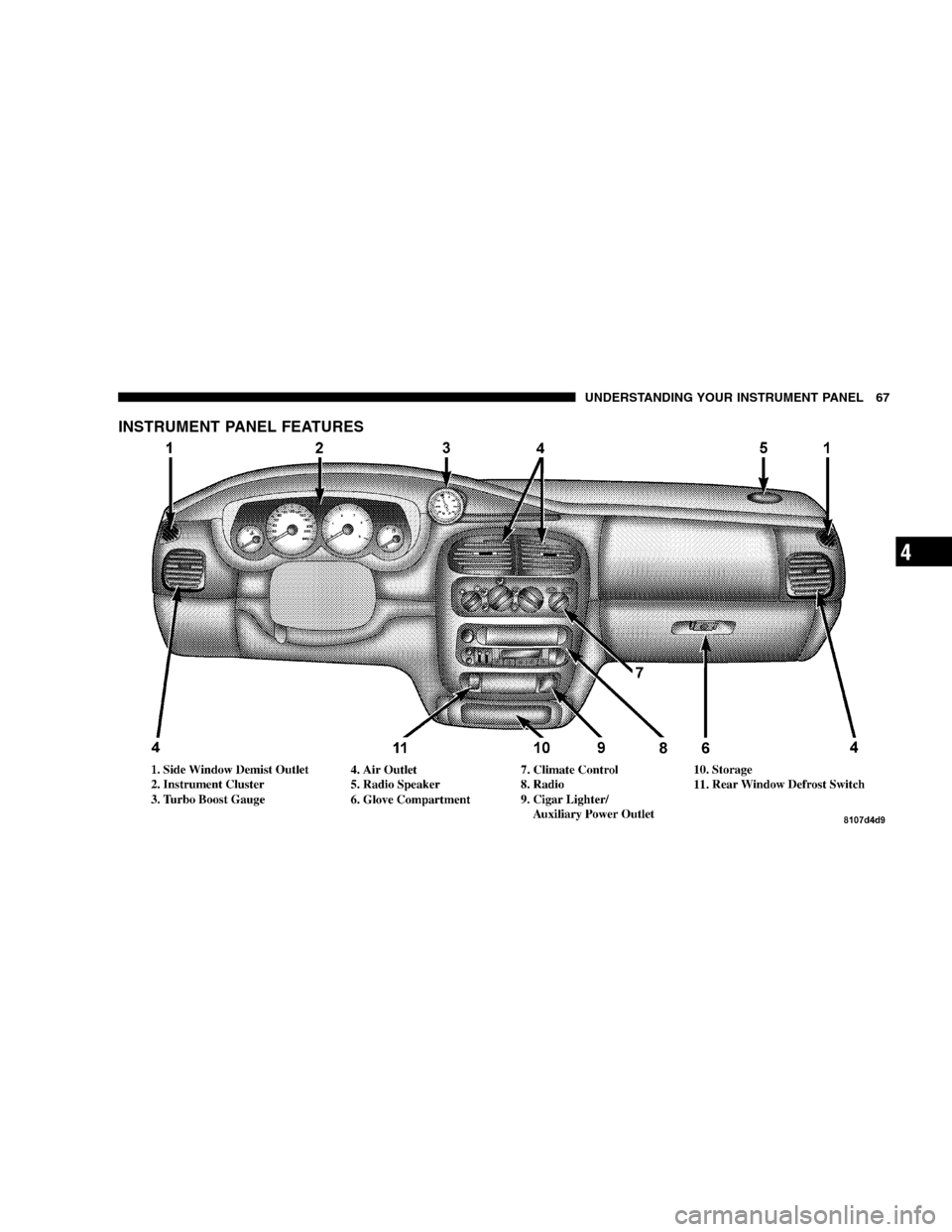
INSTRUMENT PANEL FEATURES
UNDERSTANDING YOUR INSTRUMENT PANEL 67
4