2005 CHEVROLET VENTURE ECU
[x] Cancel search: ECUPage 140 of 470
This device complies with RSS-210 of Industry Canada.
Operation is subject to the following two conditions:
1. This device may not cause interference.
2. This device must accept any interference received,
including interference that may cause undesired
operation of the device.
Changes and modications to this system by other than
an authorized service facility could void authorization
to use this equipment.
Programming the HomeLink®
Transmitter
Do not use the HomeLink®Transmitter with any garage
door opener that does not have the “stop and reverse”
feature. This includes any garage door opener model
manufactured before April 1, 1982. If you have a newer
garage door opener with rolling codes, please be
sure to follow Steps 6 through 8 to complete the
programming of your HomeLink
®Transmitter.
Read the instructions completely before attempting to
program the HomeLink
®Transmitter. Because of the
steps involved, it may be helpful to have another person
available to assist you in programming the transmitter.Keep the original transmitter for use in other vehicles as
well as for future HomeLink
®programming. It is also
recommended that upon the sale of the vehicle, the
programmed HomeLink
®buttons should be erased for
security purposes. Refer to “Erasing HomeLink®Buttons”
or, for assistance, contact HomeLink®on the Internet at:
www.homelink.com or by calling 1-800-355-3515.
Be sure that people and objects are clear of the garage
door or gate operator you are programming. When
programming a garage door, it is advised to park outside
of the garage.
It is recommended that a new battery be installed in
your hand-held transmitter for quicker and more
accurate transmission of the radio frequency.
Programming HomeLink®
Your vehicle’s engine should be turned off while
programming the transmitter. Follow these steps to
program up to three channels:
1. Press and hold down the two outside buttons,
releasing only when the indicator light begins to
ash, after 20 seconds. Do not hold down the
buttons for longer than 30 seconds and do not
repeat this step to program a second and/or third
transmitter to the remaining two HomeLink
®buttons.
2. Position the end of your hand-held transmitter about
1 to 3 inches (3 to 8 cm) away from the HomeLink
®
buttons while keeping the indicator light in view.
2-44
Page 143 of 470
Reprogramming a Single HomeLink®
Button
To program a device to HomeLink®using a HomeLink®
button previously trained, follow these steps:
1. Press and hold the desired HomeLink
®button. Do
not release the button.
2. The indicator light will begin to ash after
20 seconds. While still holding the HomeLink
®
button, proceed with Step 2 under “Programming
HomeLink®” shown earlier in this section.
Resetting Defaults
To reset HomeLink®to default settings do the following:
1. Hold down the two outside buttons for about
20 seconds until the indicator light begins to ash.
2. Continue to hold both buttons until the HomeLink
®
indicator light turns off.
3. Release both buttons.
For questions or comments, contact HomeLink
®at
1-800-355-3515, or on the Internet at
www.homelink.com.
Storage Areas
Your vehicle’s large carrying capacity can store many
items. If you have the extended wheelbase version, you
can carry even larger items. You can also use the
oor pins that are used to attach the seats, to secure
larger loads.
Glove Box
Your vehicle has a glove box below the instrument
panel. To open the glove box, lift the latch release.
The glove box door has a detent to prevent the door
from lowering too far. Open the glove box until the door
is partway open, then pull the door down if you need
it fully open. To close the glove box, the door must
be pushed up past the detent.
2-47
Page 147 of 470
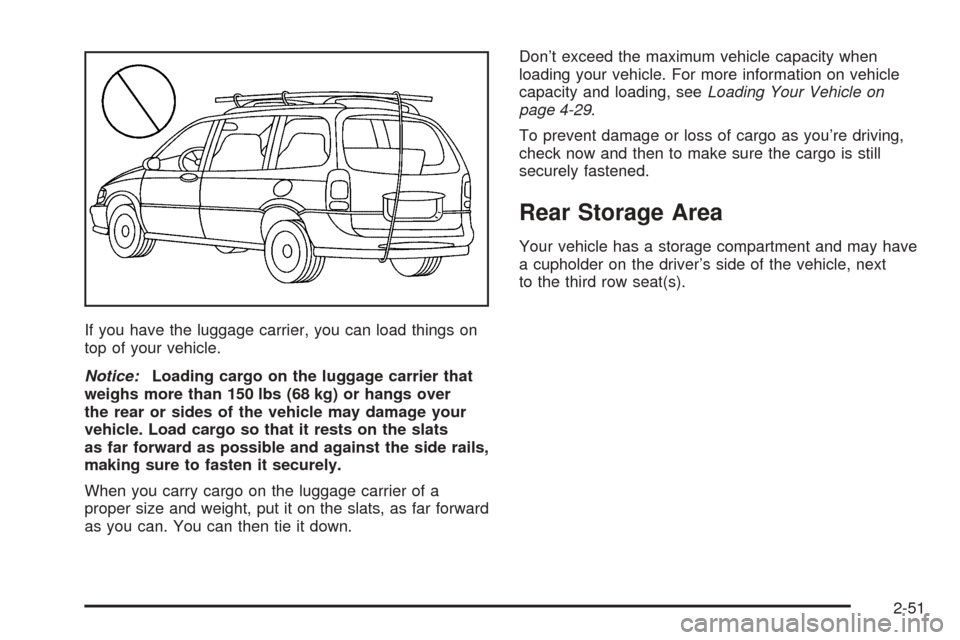
If you have the luggage carrier, you can load things on
top of your vehicle.
Notice:Loading cargo on the luggage carrier that
weighs more than 150 lbs (68 kg) or hangs over
the rear or sides of the vehicle may damage your
vehicle. Load cargo so that it rests on the slats
as far forward as possible and against the side rails,
making sure to fasten it securely.
When you carry cargo on the luggage carrier of a
proper size and weight, put it on the slats, as far forward
as you can. You can then tie it down.Don’t exceed the maximum vehicle capacity when
loading your vehicle. For more information on vehicle
capacity and loading, seeLoading Your Vehicle on
page 4-29.
To prevent damage or loss of cargo as you’re driving,
check now and then to make sure the cargo is still
securely fastened.
Rear Storage Area
Your vehicle has a storage compartment and may have
a cupholder on the driver’s side of the vehicle, next
to the third row seat(s).
2-51
Page 149 of 470
Convenience Center
{CAUTION:
If any removable convenience item is not
secured properly, it can move around in a
collision or sudden stop. People in the vehicle
could be injured. Be sure to secure any such
item properly.
Your vehicle may have a convenience center.
To open, pull up on the door latch located in the front of
the convenience center. The cover has two automatic
prop rods to hold it up and in place.
To close the convenience center cover, you must pull
one of the prop rod linkages toward you while holding
onto the door latch.
Removing the Convenience Center
1. Make sure that all items are off the convenience
center and that it is empty.
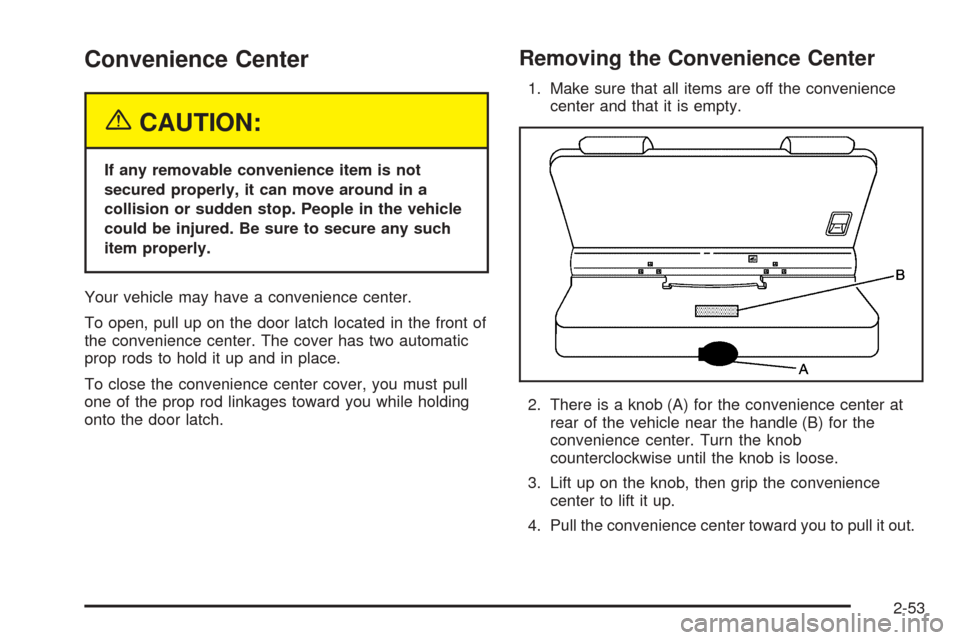
2. There is a knob (A) for the convenience center at
rear of the vehicle near the handle (B) for the
convenience center. Turn the knob
counterclockwise until the knob is loose.
3. Lift up on the knob, then grip the convenience
center to lift it up.
4. Pull the convenience center toward you to pull it out.
2-53
Page 159 of 470
Mode 2:Remote Keyless Entry Transmitter
Arm/Disarm Only
The system will arm when you lock the doors with
your remote keyless entry transmitter. The key
must be removed from the ignition when you lock
the doors or the content theft-deterrent system
will not arm.
The system will disarm when you unlock the doors
with your remote keyless entry transmitter.
While this mode provides increased security, it can be a
problem if your remote keyless entry transmitter is
damaged, lost, or if it fails to operate for any reason
while the content theft-deterrent system is armed. The
content theft-deterrent system must be disarmed for
the engine to run while in Mode 2; your key can
no longer disarm the system.
If your vehicle is equipped with the OnStar
®system,
OnStar®will not be able to remotely unlock your vehicle
if it has been programmed to Mode 2.Mode 3:Standard Arming and Disarming
The system will arm when you lock the doors using
either power door lock switch while any door or the
liftgate is open and the key is removed from the
ignition.
The system will arm when you lock the doors with
your key or remote keyless entry transmitter and
the key is removed from the ignition.
The system will disarm when you unlock the doors
with your key or remote keyless entry transmitter.
Your vehicle was originally programmed to Mode 1.
The mode may have been changed since then.
To determine the current mode, or to change the mode,
do the following:
1. Follow the instructions forEntering Programming
Mode on page 2-55.
2. Insert your spare key fully into any door key
cylinder and turn it to the unlock position.
This step is necessary to prevent accidental
programming of this feature to Mode 2. Do not
program this feature to Mode 2 without rst reading
Mode 2 entirely. The door key cylinder must
remain in the unlock position during
Steps 2 through 4.
2-63
Page 162 of 470

Message Center.............................................3-46
Service Traction System Warning Message......3-46
Traction Active Message................................3-47
Engine Coolant Temperature Warning
Message..................................................3-48
Charging System Indicator Message................3-48
Low Oil Pressure Message............................3-49
Change Engine Oil Message..........................3-50
Power Sliding Door Warning Message.............3-50
Door Ajar Warning Message...........................3-51
Rear Hatch Ajar Warning Message..................3-51
PASS-Key
®III Security Message....................3-52
Low Fuel Warning Message...........................3-52
Driver Information Center (DIC).......................3-53
Audio System(s).............................................3-56
Setting the Time for Radios without
Radio Data Systems (RDS)........................3-56
Setting the Time for Radios with Radio
Data Systems (RDS)..................................3-56
AM-FM Radio...............................................3-57Radio with CD (Base Level)...........................3-59
Radio with CD (MP3)....................................3-69
Radio with Cassette and CD..........................3-84
Radio with Six-Disc CD.................................3-94
Entertainment System..................................3-108
Rear Seat Audio (RSA) (Without
Entertainment System)..............................3-114
Rear Seat Audio (RSA) (With
Entertainment System)..............................3-116
Theft-Deterrent Feature
(Non-RDS Radios)...................................3-118
Theft-Deterrent Feature
(RDS Radios)..........................................3-118
Audio Steering Wheel Controls......................3-118
Radio Reception.........................................3-119
Care of Your Cassette Tape Player...............3-120
Care of Your CDs and DVDs........................3-121
Care of Your CD and DVD Player.................3-121
Fixed Mast Antenna....................................3-121
XM™ Satellite Radio Antenna System............3-121
Section 3 Instrument Panel
3-2
Page 165 of 470
The main components of the instrument panel are the following:
A. Side Outlets. SeeOutlet Adjustment on page 3-26.
B. Front Outlets. SeeOutlet Adjustment on page 3-26.
C. Turn Signal/Multifunction Lever. SeeTurn
Signal/Multifunction Lever on page 3-7.
D. Hazard Warning Flasher Switch. SeeHazard
Warning Flashers on page 3-6.
E. Instrument Panel Cluster. SeeInstrument Panel
Cluster on page 3-33.
F. Center Outlets. SeeOutlet Adjustment on page 3-26.
G. Audio System. SeeAudio System(s) on page 3-56.
H. Side Outlets. SeeOutlet Adjustment on page 3-26.
I. Exterior Lamps Control. SeeExterior Lamps on
page 3-14.
J. Hood Release. SeeHood Release on page 5-11.
K. Horn. SeeHorn on page 3-6.L. Ignition Switch. SeeIgnition Positions on page 2-30.
M. Climate Controls. SeeClimate Control System on
page 3-24.
N. Rear Fan Controls. SeeRear Climate Control
System (Without Entertainment System) on
page 3-27orRear Climate Control System (With
Entertainment System) on page 3-29.
O. Cupholder Tray. SeeCupholder(s) on page 2-48.
P. Accessory Power Outlet. SeeAccessory Power
Outlets on page 3-23.
Q. Instrument Panel Switchbank. SeeInstrument Panel
Switchbank on page 3-19.
R. Glove Box. SeeGlove Box on page 2-47.
S. Front Outlets. SeeOutlet Adjustment on page 3-26.
T. Instrument Panel Fuse Block. SeeFuses and
Circuit Breakers on page 5-92.
3-5
Page 183 of 470
Accessory Power Outlets
With accessory power outlets you can plug in electrical
equipment such as a cellular telephone or CB radio.
The front accessory power outlet is located below
the cupholder drawer.
Pull the cover down to use the accessory power outlet.
When not in use, keep the cover on.
The rear accessory power outlet is located in the rear
compartment on the driver’s side next to the air
inator system.
To remove the cover, pull the tab on the cover and pull
it off. To put the cover back on, line up the tabs at
the back of the cover and put the cover in place. Push
down the tab to secure the cover. When not in use,
always cover the rear accessory power outlet with the
protective cap.
Notice:Leaving electrical equipment on for
extended periods will drain the battery. Always turn
off electrical equipment when not in use and do
not plug in equipment that exceeds the maximum
amperage rating.Certain electrical accessories may not be compatible
with the accessory power outlet and could result
in blown vehicle or adapter fuses. If you experience a
problem see your dealer for additional information
on accessory power outlets.
Notice:Adding any electrical equipment to your
vehicle may damage it or keep other components
from working as they should. The repairs would not
be covered by your warranty. Check with your
dealer before adding electrical equipment.
When adding electrical equipment, be sure to follow the
proper installation instructions included with the
equipment.
Notice:Improper use of the power outlet can cause
damage not covered by your warranty. Do not
hang any type of accessory or accessory bracket
from the plug because the power outlets are
designed for accessory power plugs only.
3-23