2005 CHEVROLET VENTURE battery
[x] Cancel search: batteryPage 161 of 470

Instrument Panel Overview...............................3-4
Hazard Warning Flashers................................3-6
Other Warning Devices...................................3-6
Horn.............................................................3-6
Tilt Wheel.....................................................3-6
Turn Signal/Multifunction Lever.........................3-7
Turn and Lane-Change Signals........................3-7
Headlamp High/Low-Beam Changer..................3-8
Flash-to-Pass.................................................3-8
Windshield Wipers..........................................3-9
Windshield Washer.........................................3-9
Cruise Control..............................................3-10
Exterior Lamps.............................................3-14
Daytime Running Lamps (DRL)/Automatic
Headlamp System.....................................3-14
Instrument Panel Brightness...........................3-15
Interior Lamps Control...................................3-15
Interior Lamp Override...................................3-16
Dome Lamp.................................................3-16
Entry Lighting...............................................3-16
Delayed Lighting...........................................3-17
Exit Lighting.................................................3-17
Front Reading Lamps....................................3-18
Rear Reading Lamps....................................3-18
Cargo Lamp.................................................3-18
Battery Run-Down Protection..........................3-19
Switchbanks.................................................3-19Instrument Panel Switchbank..........................3-19
Overhead Console Switchbank.......................3-20
Ultrasonic Rear Parking Assist (URPA)............3-20
Accessory Power Outlets...............................3-23
Climate Controls............................................3-24
Climate Control System.................................3-24
Outlet Adjustment.........................................3-26
Rear Climate Control System
(Without Entertainment System)...................3-27
Rear Climate Control System
(With Entertainment System).......................3-29
Passenger Compartment Air Filter...................3-30
Warning Lights, Gages, and Indicators............3-32
Instrument Panel Cluster................................3-33
Speedometer and Odometer...........................3-35
Dual Trip Odometers.....................................3-35
Tachometer.................................................3-37
Safety Belt Reminder Light.............................3-37
Airbag Readiness Light..................................3-38
Brake System Warning Light..........................3-39
Anti-Lock Brake System Warning Light.............3-40
Traction Control System (TCS) Warning Light......3-40
Engine Coolant Temperature Gage..................3-41
Malfunction Indicator Lamp.............................3-42
Highbeam On Light.......................................3-45
Fuel Gage...................................................3-45
Section 3 Instrument Panel
3-1
Page 179 of 470
Battery Run-Down Protection
Your vehicle has a feature to help prevent you from
draining the battery, in case you accidentally leave the
interior lamps on. If you leave any interior lamps on
while the ignition is in LOCK or OFF, they will
automatically turn off after 10 minutes. The lamps will
not come back on again until you do one of the
following:
Turn the ignition to RUN or ACCESSORY.
Turn the interior lamps thumbwheel all the way to
the right, then slightly back to the left.
Open a closed door, or close and reopen a door.
If your vehicle has less than 15 miles (25 km) on
the odometer, the battery saver will turn off the lamps
after only three minutes.
Switchbanks
There are two sets of switchbanks located in the front of
the vehicle. The switches will vary with the options
that are on your vehicle.
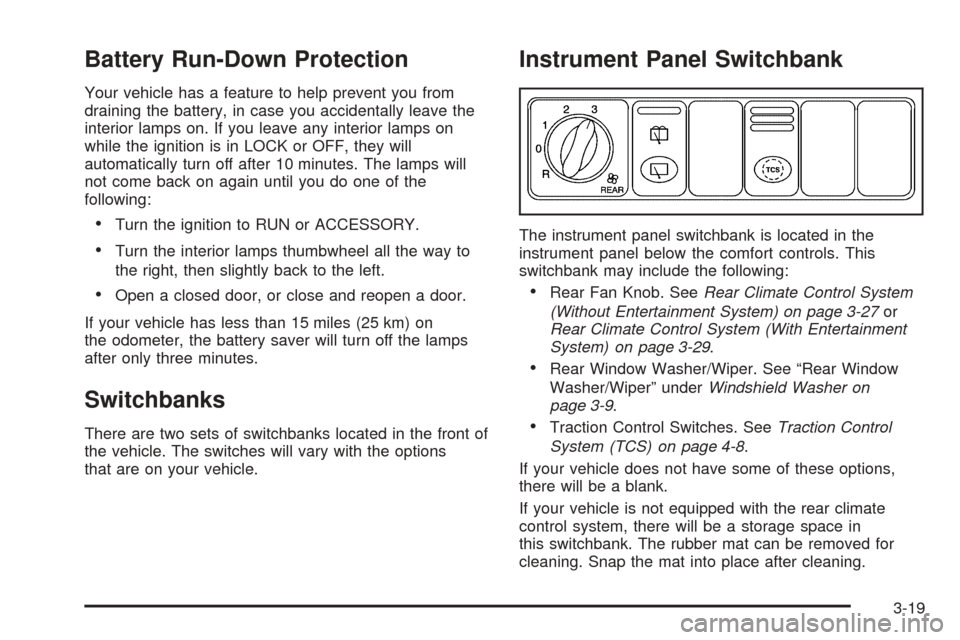
Instrument Panel Switchbank
The instrument panel switchbank is located in the
instrument panel below the comfort controls. This
switchbank may include the following:
Rear Fan Knob. SeeRear Climate Control System
(Without Entertainment System) on page 3-27or
Rear Climate Control System (With Entertainment
System) on page 3-29.
Rear Window Washer/Wiper. See “Rear Window
Washer/Wiper” underWindshield Washer on
page 3-9.
Traction Control Switches. SeeTraction Control
System (TCS) on page 4-8.
If your vehicle does not have some of these options,
there will be a blank.
If your vehicle is not equipped with the rear climate
control system, there will be a storage space in
this switchbank. The rubber mat can be removed for
cleaning. Snap the mat into place after cleaning.
3-19
Page 183 of 470
Accessory Power Outlets
With accessory power outlets you can plug in electrical
equipment such as a cellular telephone or CB radio.
The front accessory power outlet is located below
the cupholder drawer.
Pull the cover down to use the accessory power outlet.
When not in use, keep the cover on.
The rear accessory power outlet is located in the rear
compartment on the driver’s side next to the air
inator system.
To remove the cover, pull the tab on the cover and pull
it off. To put the cover back on, line up the tabs at
the back of the cover and put the cover in place. Push
down the tab to secure the cover. When not in use,
always cover the rear accessory power outlet with the
protective cap.
Notice:Leaving electrical equipment on for
extended periods will drain the battery. Always turn
off electrical equipment when not in use and do
not plug in equipment that exceeds the maximum
amperage rating.Certain electrical accessories may not be compatible
with the accessory power outlet and could result
in blown vehicle or adapter fuses. If you experience a
problem see your dealer for additional information
on accessory power outlets.
Notice:Adding any electrical equipment to your
vehicle may damage it or keep other components
from working as they should. The repairs would not
be covered by your warranty. Check with your
dealer before adding electrical equipment.
When adding electrical equipment, be sure to follow the
proper installation instructions included with the
equipment.
Notice:Improper use of the power outlet can cause
damage not covered by your warranty. Do not
hang any type of accessory or accessory bracket
from the plug because the power outlets are
designed for accessory power plugs only.
3-23
Page 204 of 470
Have you recently changed brands of fuel?
If so, be sure to fuel your vehicle with quality fuel. See
Gasoline Octane on page 5-5. Poor fuel quality will
cause your engine not to run as efficiently as designed.
You may notice this as stalling after start-up, stalling
when you put the vehicle into gear, misring, hesitation
on acceleration, or stumbling on acceleration. (These
conditions may go away once the engine is warmed up.)
This will be detected by the system and cause the
light to turn on.
If you experience one or more of these conditions,
change the fuel brand you use. It will require at least
one full tank of the proper fuel to turn the light off.
If none of the above steps have made the light turn off,
your dealer can check the vehicle. Your dealer has
the proper test equipment and diagnostic tools to x any
mechanical or electrical problems that may have
developed.Emissions Inspection and Maintenance
Programs
Some state/provincial and local governments have or
may begin programs to inspect the emission control
equipment on your vehicle. Failure to pass this
inspection could prevent you from getting a vehicle
registration.
Here are some things you need to know in order to help
your vehicle pass an inspection:
Your vehicle will not pass this inspection if the SERVICE
ENGINE SOON or check engine light is on or not
working properly.
Your vehicle will not pass this inspection if the OBD
(on-board diagnostic) system determines that critical
emission control systems have not been completely
diagnosed by the system. The vehicle would be
considered not ready for inspection. This can happen if
you have recently replaced your battery or if your
battery has run down. The diagnostic system is
designed to evaluate critical emission control systems
during normal driving. This may take several days
of routine driving. If you have done this and your vehicle
still does not pass the inspection for lack of OBD
system readiness, your GM dealer can prepare the
vehicle for inspection.
3-44
Page 208 of 470

Engine Coolant Temperature
Warning Message
This message will come on when your engine gets
too hot.
If this message comes on, it means that your engine
coolant has overheated. If you have been operating your
vehicle under normal driving conditions, you should
pull off the road, stop your vehicle and turn off the
engine as soon as possible.
SeeEngine Overheating on page 5-25.
Charging System Indicator Message
The charging system
battery symbol will come
on in the message
center when you turn on
the ignition as a check
to show you it is working.
It will remain on as long as the engine is not running. It
should go out once the engine is running. If it stays
on, or comes on while you are driving, you may have a
problem with the charging system. It could indicate
that you have problems with a generator drive belt, or
another electrical problem. Have it checked right
away. Driving while this indicator appears in the
message center could drain your battery.
If you must drive a short distance with the message on,
be certain to turn off all your accessories, such as
the radio and air conditioner. United States
Canada
3-48
Page 268 of 470

Entertainment System
Your vehicle may have a DVD entertainment system.
The entertainment system works with the vehicle’s audio
system and includes a DVD player, a video display
screen, headphones, and a remote control. The
entertainment system also integrates the rear climate
control and rear seat audio functions.
Before You Drive
The entertainment system is for passengers in the
second and third row seats only. The driver cannot
safely view the video screen while driving and should not
try to do so.
In severe or extreme weather conditions the
entertainment system will shut down until the
temperature is within the operating range. This
protection feature will keep the video components from
being damaged while the temperature is below
−4°F (−20°C) or above 140°F (60°C). To resume
operation, shut off the entertainment system, pull down
the video screen, and then heat or cool the vehicle
until the temperature is within the operating range.
Headphones
The entertainment system
includes dual channel,
wireless headphones. The
headphones have an
ON/OFF switch, a channel
A/B switch, and a volume
control.
To use the headphones, turn the switch located on the
left side to ON. An indicator light located on the right
side will illuminate. If the light does not illuminate,
the batteries may need to be replaced. See “Battery
Replacement” later in this section for more information.
Switch the headphones to OFF when not in use.
If you move too far forward, step out of the vehicle or
break the line of sight between the headphones and the
display above the video screen, the sound in the
headphones will be degraded or will cut out entirely. If the
system is shut off, or the headphones are out of the line
of sight for more than three minutes, the headphones will
shut off automatically to save battery life.
3-108
Page 269 of 470

If the channel switch, located on the right side, is on A,
the headphones will play the DVD or auxiliary device.
See “Stereo RCA Jacks” later in this section for
more information. If the channel switch is on B, the
headphones will play the rear seat audio system. See
Rear Seat Audio (RSA) (Without Entertainment System)
on page 3-114orRear Seat Audio (RSA) (With
Entertainment System) on page 3-116for more
information.
To adjust the volume on the headphones, use the
volume control located on the right side.
Notice:Do not store the headphones in heat or
direct sunlight. This could damage the headphones
and repairs would not be covered by your warranty.
Keep the headphones stored in a cool, dry place.
Battery Replacement
To change the batteries, do the following:
1. Slide open the battery door located on the left side
of the headphones.
2. Replace the two AAA batteries in the compartment.
Make sure that they are installed correctly.
3. Slide the battery door shut.
If the headphones are to be stored for a long period of
time, remove the batteries and keep them in a cool,
dry place.
Stereo RCA Jacks
The RCA jacks are located on the DVD player faceplate.
They allow audio and video signals to be connected
from an auxiliary device such as a camcorder or a video
game unit. Adapter connectors or cables, not included,
may be required to connect the auxiliary device to
the RCA jacks. Refer to the manufacturer’s instructions
for proper usage.
To use the auxiliary function, connect a camcorder or a
video game unit to the RCA jacks and turn on the
auxiliary device. If you want to view a DVD, insert the
DVD into the DVD player. The system will automatically
switch to DVD and start to play. To switch between
the auxiliary device and the DVD, press the SOURCE
button on the DVD player or on the remote control. See
“DVD Player” and “Remote Control” later in this
section for more information.
3-109
Page 274 of 470
Battery Replacement
To change the batteries, do the following:
1. Remove the screw and open the battery door
located on the back of the remote control.
2. Replace the two AAA batteries in the compartment.
Make sure that they are installed correctly.
3. Replace the battery door and screw.
If the remote control is to be stored for a long period of
time, remove the batteries and keep them in a cool,
dry place.
DVD Distortion
There may be an experience with video distortion when
operating cellular phones, scanners, CB radios,
Global Position Systems (GPS)*, two-way radios, mobile
fax, or walkie talkies.
It may be necessary to turn off the DVD player when
operating one of these devices in or near the vehicle.
*Excludes the OnStar
®System.
Cleaning the DVD Player
When cleaning the outside DVD faceplate and buttons,
use only a clean cloth dampened with clean water.
Cleaning the Video Screen
When cleaning the video screen, use only a clean cloth
dampened with clean water. Use care when directly
touching or cleaning the screen, as damage may result.
Rear Seat Audio (RSA) (Without
Entertainment System)
This feature allows rear seat passengers to listen to and
control any of the sources: radio and CDs. However,
the rear seat passengers can only control the sources
that the front seat passengers are not listening to.
For example, rear seat passengers may listen to and
control a CD through headphones, while the driver
listens to the radio through the front speakers. The rear
seat passengers have control of the volume for each
set of headphones.
The front seat audio controls always have priority over
the RSA controls. If the front seat passengers switch
the source for the main radio to a remote source,
the RSA will not be able to control the remote source.
You can operate the RSA when the main radio is off.
Primary Radio Controls
The following function is controlled by the main radio:
PWR (Power):Press this knob twice to turn RSA off.
3-114