Page 308 of 470
Remember, unless you have ABS, if you brake so hard
that your wheels stop rolling, you will just slide. Brake
so your wheels always keep rolling and you can
still steer.
Whatever your braking system, allow greater
following distance on any slippery road.
Watch for slippery spots. The road might be ne
until you hit a spot that is covered with ice. On
an otherwise clear road, ice patches may appear in
shaded areas where the sun cannot reach, such
as around clumps of trees, behind buildings,
or under bridges. Sometimes the surface of a curve
or an overpass may remain icy when the
surrounding roads are clear. If you see a patch of
ice ahead of you, brake before you are on it. Try not
to brake while you are actually on the ice, and
avoid sudden steering maneuvers.
If You Are Caught in a Blizzard
If you are stopped by heavy snow, you could be in a
serious situation. You should probably stay with
your vehicle unless you know for sure that you are near
help and you can hike through the snow. Here are
some things to do to summon help and keep yourself
and your passengers safe:
Turn on your hazard ashers.
Tie a red cloth to your vehicle to alert police that
you have been stopped by the snow.
Put on extra clothing or wrap a blanket around you.
If you do not have blankets or extra clothing, make
body insulators from newspapers, burlap bags,
rags, oor mats — anything you can wrap around
yourself or tuck under your clothing to keep warm.
4-26
Page 324 of 470
Driving on Grades
Reduce speed and shift to a lower gear before you start
down a long or steep downgrade. If you do not shift
down, you might have to use your brakes so much that
they would get hot and no longer work well.
If you are towing a trailer that weighs more than
1,000 lbs (450 kg), you may prefer to drive in THIRD (3)
instead of AUTOMATIC OVERDRIVE (D) or, as you
need to, a lower gear. This will minimize heat build-up
and extend the life of your transaxle.
Parking on Hills
{CAUTION:
You really should not park your vehicle, with a
trailer attached, on a hill. If something goes
wrong, your rig could start to move. People
can be injured, and both your vehicle and the
trailer can be damaged.But if you ever have to park your rig on a hill, do
the following:
1. Apply your regular brakes, but do not shift into
PARK (P).
2. Have someone place chocks under the trailer
wheels.
3. When the wheel chocks are in place, release the
regular brakes until the chocks absorb the load.
4. Reapply the regular brakes. Then apply your
parking brake, and shift into PARK (P).
5. Release the regular brakes.
When You Are Ready to Leave After
Parking on a Hill
1. Apply your regular brakes and hold the pedal down
while you do the following:
Start your engine.
Shift into a gear.
Release the parking brake.
2. Let up on the brake pedal.
3. Drive slowly until the trailer is clear of the chocks.
4. Stop and have someone pick up and store
the chocks.
4-42
Page 344 of 470
How to Inspect the Engine Air
Cleaner/Filter
To inspect the air cleaner/lter, remove the lter from
the vehicle and lightly shake the lter to release
loose dust and dirt. If the lter remains caked with dirt, a
new lter is required.
To inspect or replace the air cleaner/lter, do the
following:
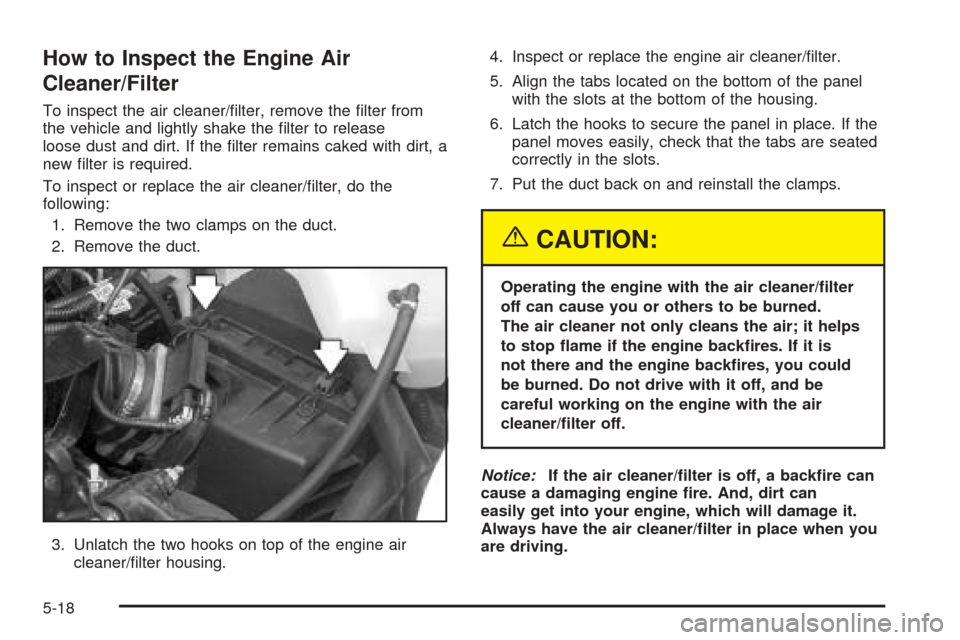
1. Remove the two clamps on the duct.
2. Remove the duct.
3. Unlatch the two hooks on top of the engine air
cleaner/lter housing.4. Inspect or replace the engine air cleaner/lter.
5. Align the tabs located on the bottom of the panel
with the slots at the bottom of the housing.
6. Latch the hooks to secure the panel in place. If the
panel moves easily, check that the tabs are seated
correctly in the slots.
7. Put the duct back on and reinstall the clamps.
{CAUTION:
Operating the engine with the air cleaner/lter
off can cause you or others to be burned.
The air cleaner not only cleans the air; it helps
to stop ame if the engine backres. If it is
not there and the engine backres, you could
be burned. Do not drive with it off, and be
careful working on the engine with the air
cleaner/lter off.
Notice:If the air cleaner/lter is off, a backre can
cause a damaging engine re. And, dirt can
easily get into your engine, which will damage it.
Always have the air cleaner/lter in place when you
are driving.
5-18
Page 368 of 470
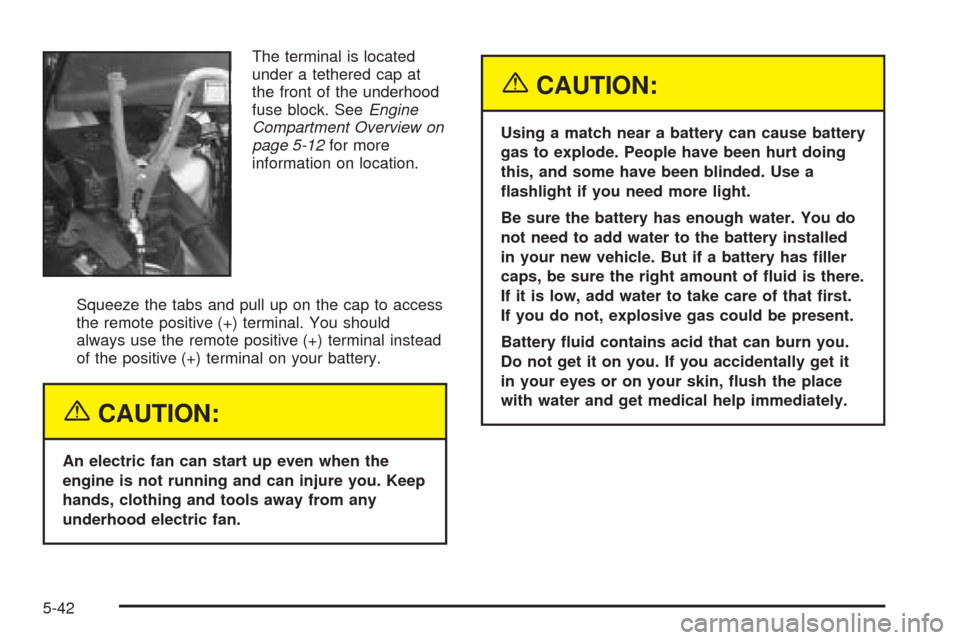
The terminal is located
under a tethered cap at
the front of the underhood
fuse block. SeeEngine
Compartment Overview on
page 5-12for more
information on location.
Squeeze the tabs and pull up on the cap to access
the remote positive (+) terminal. You should
always use the remote positive (+) terminal instead
of the positive (+) terminal on your battery.
{CAUTION:
An electric fan can start up even when the
engine is not running and can injure you. Keep
hands, clothing and tools away from any
underhood electric fan.
{CAUTION:
Using a match near a battery can cause battery
gas to explode. People have been hurt doing
this, and some have been blinded. Use a
ashlight if you need more light.
Be sure the battery has enough water. You do
not need to add water to the battery installed
in your new vehicle. But if a battery has ller
caps, be sure the right amount of uid is there.
If it is low, add water to take care of that rst.
If you do not, explosive gas could be present.
Battery uid contains acid that can burn you.
Do not get it on you. If you accidentally get it
in your eyes or on your skin, ush the place
with water and get medical help immediately.
5-42
Page 372 of 470
Headlamps
To replace a headlamp bulb, do the following:
1. Open the hood. SeeHood Release on page 5-11
for more information.
2. Remove the front turn signal/parking lamp
assembly. SeeFront Turn Signal, Sidemarker and
Parking Lamps on page 5-48.
3. Pull the assembly away from the vehicle.
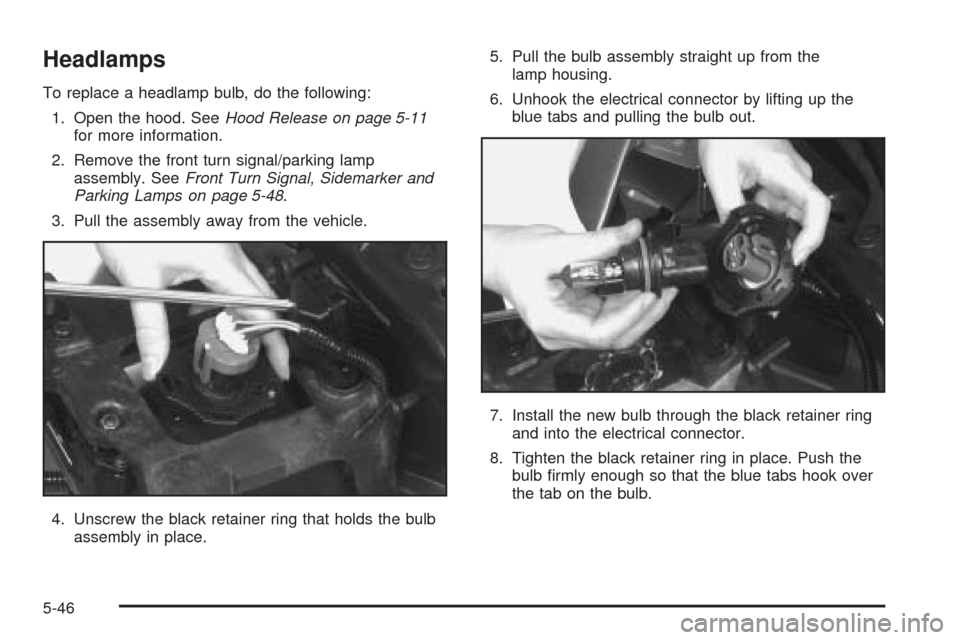
4. Unscrew the black retainer ring that holds the bulb
assembly in place.5. Pull the bulb assembly straight up from the
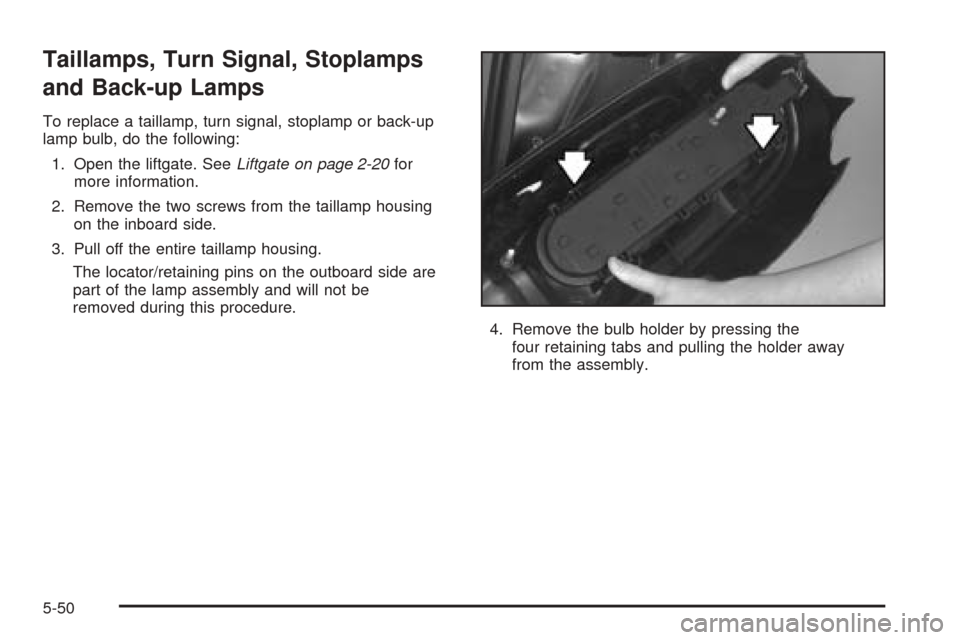
lamp housing.
6. Unhook the electrical connector by lifting up the
blue tabs and pulling the bulb out.
7. Install the new bulb through the black retainer ring
and into the electrical connector.
8. Tighten the black retainer ring in place. Push the
bulb rmly enough so that the blue tabs hook over
the tab on the bulb.
5-46
Page 375 of 470
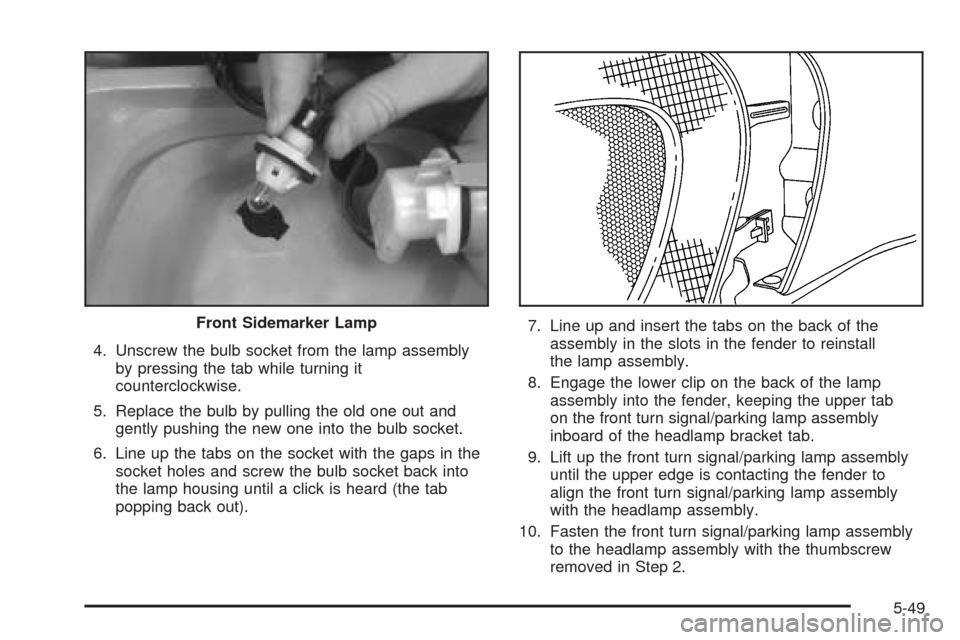
4. Unscrew the bulb socket from the lamp assembly
by pressing the tab while turning it
counterclockwise.
5. Replace the bulb by pulling the old one out and
gently pushing the new one into the bulb socket.
6. Line up the tabs on the socket with the gaps in the
socket holes and screw the bulb socket back into
the lamp housing until a click is heard (the tab
popping back out).7. Line up and insert the tabs on the back of the
assembly in the slots in the fender to reinstall
the lamp assembly.
8. Engage the lower clip on the back of the lamp
assembly into the fender, keeping the upper tab
on the front turn signal/parking lamp assembly
inboard of the headlamp bracket tab.
9. Lift up the front turn signal/parking lamp assembly
until the upper edge is contacting the fender to
align the front turn signal/parking lamp assembly
with the headlamp assembly.
10. Fasten the front turn signal/parking lamp assembly
to the headlamp assembly with the thumbscrew
removed in Step 2. Front Sidemarker Lamp
5-49
Page 376 of 470
Taillamps, Turn Signal, Stoplamps
and Back-up Lamps
To replace a taillamp, turn signal, stoplamp or back-up
lamp bulb, do the following:
1. Open the liftgate. SeeLiftgate on page 2-20for
more information.
2. Remove the two screws from the taillamp housing
on the inboard side.
3. Pull off the entire taillamp housing.
The locator/retaining pins on the outboard side are
part of the lamp assembly and will not be
removed during this procedure.
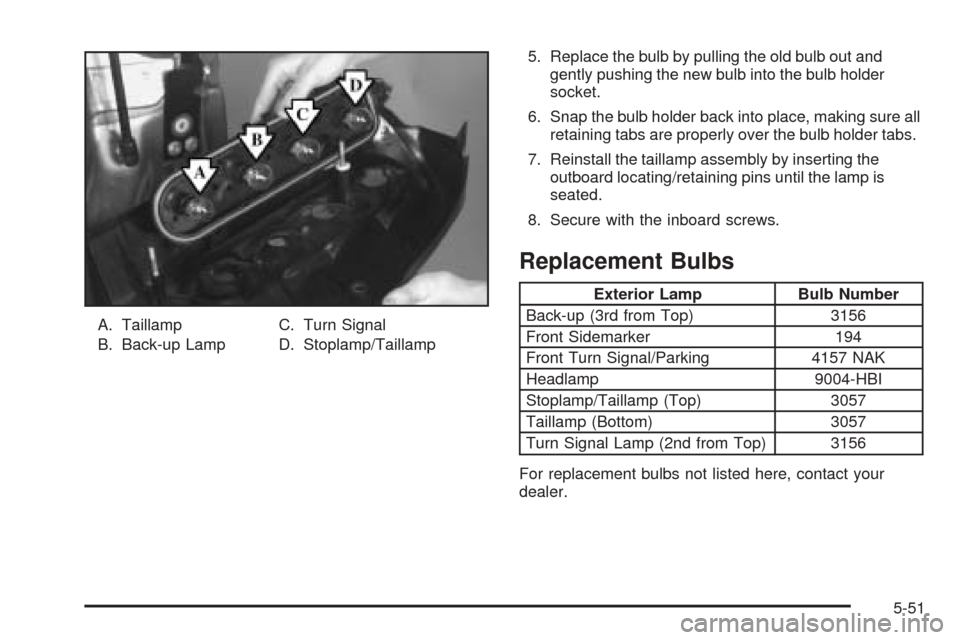
4. Remove the bulb holder by pressing the
four retaining tabs and pulling the holder away
from the assembly.
5-50
Page 377 of 470
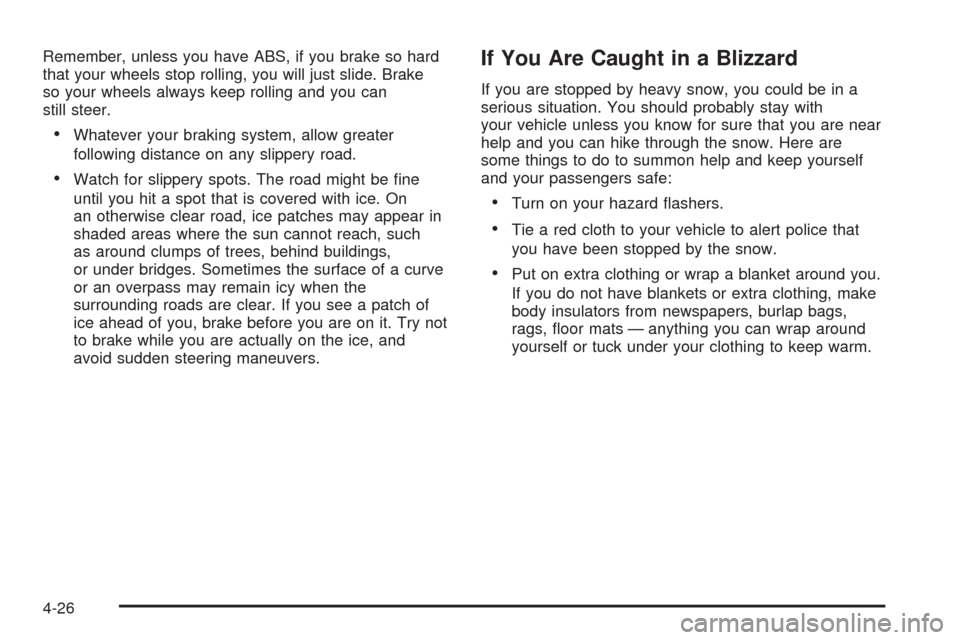
A. Taillamp
B. Back-up LampC. Turn Signal
D. Stoplamp/Taillamp5. Replace the bulb by pulling the old bulb out and
gently pushing the new bulb into the bulb holder
socket.
6. Snap the bulb holder back into place, making sure all
retaining tabs are properly over the bulb holder tabs.
7. Reinstall the taillamp assembly by inserting the
outboard locating/retaining pins until the lamp is
seated.
8. Secure with the inboard screws.
Replacement Bulbs
Exterior Lamp Bulb Number
Back-up (3rd from Top) 3156
Front Sidemarker 194
Front Turn Signal/Parking 4157 NAK
Headlamp 9004-HBI
Stoplamp/Taillamp (Top) 3057
Taillamp (Bottom) 3057
Turn Signal Lamp (2nd from Top) 3156
For replacement bulbs not listed here, contact your
dealer.
5-51