2005 CHEVROLET UPLANDER ESP
[x] Cancel search: ESPPage 32 of 460
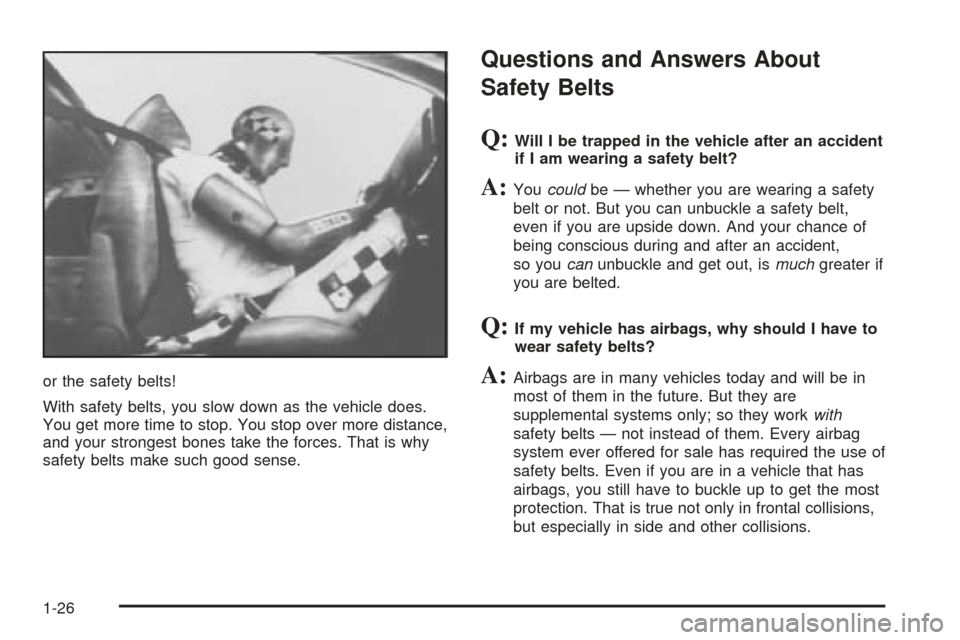
or the safety belts!
With safety belts, you slow down as the vehicle does.
You get more time to stop. You stop over more distance,
and your strongest bones take the forces. That is why
safety belts make such good sense.
Questions and Answers About
Safety Belts
Q:Will I be trapped in the vehicle after an accident
if I am wearing a safety belt?
A:Youcouldbe — whether you are wearing a safety
belt or not. But you can unbuckle a safety belt,
even if you are upside down. And your chance of
being conscious during and after an accident,
so youcanunbuckle and get out, ismuchgreater if
you are belted.
Q:If my vehicle has airbags, why should I have to
wear safety belts?
A:Airbags are in many vehicles today and will be in
most of them in the future. But they are
supplemental systems only; so they workwith
safety belts — not instead of them. Every airbag
system ever offered for sale has required the use of
safety belts. Even if you are in a vehicle that has
airbags, you still have to buckle up to get the most
protection. That is true not only in frontal collisions,
but especially in side and other collisions.
1-26
Page 105 of 460

Doors and Locks
Door Locks
{CAUTION:
Unlocked doors can be dangerous.
Passengers — especially children — can
easily open the doors and fall out of a
moving vehicle. When a door is locked, the
handle will not open it. You increase the
chance of being thrown out of the vehicle
in a crash if the doors are not locked. So,
wear safety belts properly and lock the
doors whenever you drive.
Young children who get into unlocked
vehicles may be unable to get out. A child
can be overcome by extreme heat and can
suffer permanent injuries or even death
from heat stroke. Always lock your vehicle
whenever you leave it.
Outsiders can easily enter through an
unlocked door when you slow down or
stop your vehicle. Locking your doors can
help prevent this from happening.There are several ways to lock and unlock your vehicle.
From the outside, use your key or the remote keyless
entry transmitter.
To unlock the driver’s door from the outside with the
key, insert the key and turn it toward the front of
the vehicle. To lock the driver’s door from the outside
with your key, insert the key and turn it toward the rear
of the vehicle.
If your vehicle has power door locks, you may be able
to unlock all of the doors and the liftgate when you insert
the key, turn it toward the front of the vehicle, and
hold it there for one second. You may be able to lock all
of the doors when you insert the key and turn it toward
the rear of the vehicle.
2-11
Page 118 of 460
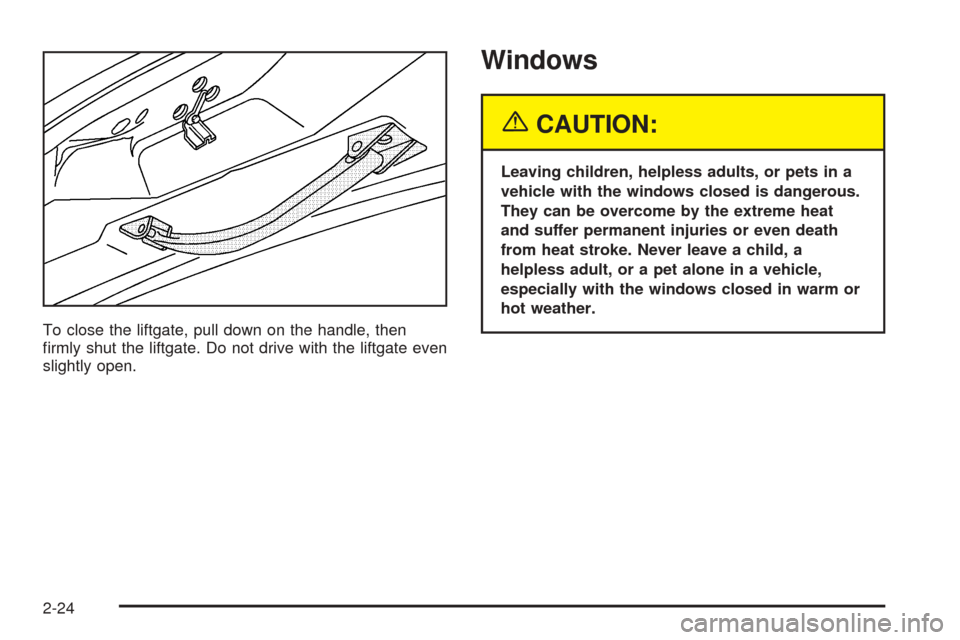
To close the liftgate, pull down on the handle, then
rmly shut the liftgate. Do not drive with the liftgate even
slightly open.
Windows
{CAUTION:
Leaving children, helpless adults, or pets in a
vehicle with the windows closed is dangerous.
They can be overcome by the extreme heat
and suffer permanent injuries or even death
from heat stroke. Never leave a child, a
helpless adult, or a pet alone in a vehicle,
especially with the windows closed in warm or
hot weather.
2-24
Page 121 of 460

Sun Visors
To block out glare, you can swing down the visors. You
can also remove them from the center mount and
swing them to the side.
Visor Vanity Mirror
Your vehicle may have a visor vanity mirror. Pull down
the sun visor to access the vanity mirror.
Lighted Vanity Mirror
Your vehicle may have a lighted vanity mirror. Pull down
the sun visor and ip up the cover to expose the
vanity mirror. The lamps will come on when you ip up
the cover.
Theft-Deterrent Systems
Vehicle theft is big business, especially in some cities.
Although your vehicle has a number of theft-deterrent
features, we know that nothing we put on it can make it
impossible to steal.
Content Theft-Deterrent
Your vehicle may have a theft-deterrent alarm system.
A light located on top of your instrument panel, near the
center of the vehicle next to the windshield, will ash
slowly to let you know that the system has been armed.
While armed, the doors will not unlock with the power
door lock switch.
Once armed, the alarm will go off if someone tries to
enter the vehicle without using the remote keyless entry
transmitter or a key, or turns the ignition to RUN. The
horn will sound and the turn signal lamps will ash for up
to two minutes.
2-27
Page 168 of 460
Daytime Running Lamps (DRL)/
Automatic Headlamp System
Daytime Running Lamps (DRL) can make it easier for
others to see the front of your vehicle during the
day. DRL can be helpful in many different driving
conditions, but they can be especially helpful in the short
periods after dawn and before sunset. Fully functional
Daytime Running Lamps are required on all vehicles rst
sold in Canada.
A light sensor on top of the instrument panel makes the
DRL work, so be sure it is not covered. The DRL
system will make front parking and turn signal lamps
come on in daylight when the following conditions
are met:
The ignition is on.
The exterior lamps control is off.
When the DRL are on, only your front turn signal lamps
will be on. Your instrument panel will not be lit up.When it is dark enough outside, the exterior lamps will
come on automatically. When it is bright enough
outside, the exterior lamps will turn off and the DRL will
turn on. Of course, you may still turn on the headlamps
any time you need to.
If you start your vehicle in a dark garage, the automatic
headlamp system will come on immediately. Once
you leave the garage, it will take approximately
30 seconds for the automatic headlamp system to
change to DRL if it is light outside. During that delay,
your instrument panel cluster may not be as bright
as usual. Make sure your instrument panel brightness
control is in the full bright position. SeeInstrument Panel
Brightness on page 3-17.
To idle your vehicle with the DRL and automatic
headlamps off, toggle the exterior lamp control to off
after starting the vehicle.
As with any vehicle, you should turn on the regular
headlamp system when you need it.
3-16
Page 201 of 460

Your vehicle’s charging system regulates voltage based
on the state of the battery. The battery voltage may
uctuate when viewing this information on the DIC. This
is normal.
Oil Life
Press the information button until OIL LIFE displays.
This mode shows an estimate of the oil’s remaining
useful life. If you see OIL LIFE 99% on the display, that
means 99% of the current oil life remains. The engine
oil life system will alert you to change your oil on a
schedule consistent with your driving conditions.
When the remaining oil life is low, the LOW OIL
PRESSURE message will appear on the display. You
should change your oil as soon as possible. SeeEngine
Oil on page 5-13. In addition to the engine oil life
system monitoring the oil life, additional maintenance is
recommended in the Maintenance Schedule in this
manual. SeeScheduled Maintenance on page 6-4for
more information.
Remember, you must reset the OIL LIFE yourself after
each oil change. It will not reset itself. Also, be
careful not to reset the OIL LIFE accidentally at any
time other than when the oil has just been changed. It
cannot be reset accurately until the next oil change.
To reset the engine oil life system, seeEngine Oil Life
System on page 5-16. The display will show 100%
when the system is reset.
Menu Button Items
q
(Menu):Press this button to scroll through the
following items:
Units
Press the menu button until UNITS displays. This mode
allows you to select between English or Metric units
of measurement. Once in this mode, press the set/reset
button to select between ENGLISH or METRIC.
Language
Press the menu button until the language screen
displays. This mode allows you to select the language
in which the DIC messages will appear. Once in
this mode, press the set/reset button to select among
the following choices:
English
Francais (French)
Espanol (Spanish)
3-49
Page 220 of 460
DIC Vehicle Personalization
(Uplevel Only)
Your vehicle may have customization capabilities that
allow you to program certain features to one preferred
setting. Customization features can only be programmed
to one setting on the vehicle and cannot be programmed
to a preferred setting for two different drivers. The
customization features include the following:
Exterior lighting delay
Interior lighting delay
Delayed locking
Content theft
Remote keyless entry feedback
Remote start
Rear park chime
Your vehicle may also have personalization capabilities
that allow you to program certain features to a
preferred setting for up to two drivers. The rst
personalized key corresponds to driver 1 and the second
personalized key corresponds to driver 2. The
personalization features include the following:
Radio station presets
Auto door unlock preferences
Remote keyless entry unlock preferencesAll of the customization and personalization options may
not be available on your vehicle. Only the options
available will be displayed on your DIC.
The default settings for the customization and
personalization features were set when your vehicle left
the factory, but may have been changed from their
default setting since then.
The customization preferences are automatically
recalled.
The driver’s personalization preferences are recalled by
using the key programmed for driver 1 or 2.
To change customization and personalization
preferences, use the following procedure.
Entering the Personal Program Menu
1. Turn the ignition on and place the vehicle in
PARK (P).
2. Press the menu button until PERSONAL
PROGRAM displays.
If the vehicle is not in PARK (P), PERSONAL
PROGRAM ONLY IN PARK will display.
If the vehicle is not able to enter the personal
program menu, PERSONAL PROGRAM NOT
AVAILABLE will display.
3-68
Page 225 of 460

Press the menu button until REMOTE START appears
on the DIC display. Press the set/reset button to
scroll through the following choices:
OFF:The remote start feature will be disabled.
ON (default):The remote start feature will be enabled.
Choose one of the available settings and press the
menu button while it is displayed on the DIC to select it
and move on to the next feature.
REAR PARK CHIME
If your vehicle has the Ultrasonic Rear Parking Assist
(URPA) system, this feature allows the URPA system’s
chime to be turned OFF or ON. SeeUltrasonic Rear
Parking Assist (URPA) on page 3-21for more
information.
Press the option button until REAR PARK CHIME
appears on the DIC display. Press the set/reset button
to scroll through the following choices:
OFF:The URPA system’s chime will be disabled.
ON (default):The URPA system’s chime will be
enabled.
Choose one of the available settings and press the
menu button while it is displayed on the DIC to select it
and move on to the next feature.
Personalization Menu Items
The following are personalization features that allow you
to program setting for up to two drivers:
PERSONALIZE KEY
If you are using a key that has already been
personalized to be recognized as key 1 or 2, this screen
will not display. This feature allows you to personalize
a key to be recognized as key 1 or 2. A personalized key
allows you to program personalization features to a
preferred setting to correspond to key 1 or 2.
Press the menu button until PERSONALIZE KEY
appears on the DIC display. Press the set/reset button
to scroll through the following choices:
NO (default):The key will not be personalized.
YES:The key will be personalized.
Choose one of the available settings and press the
menu button while it is displayed on the DIC to select it
and move on to the next feature.
3-73