2005 CHEVROLET UPLANDER ECU
[x] Cancel search: ECUPage 110 of 460
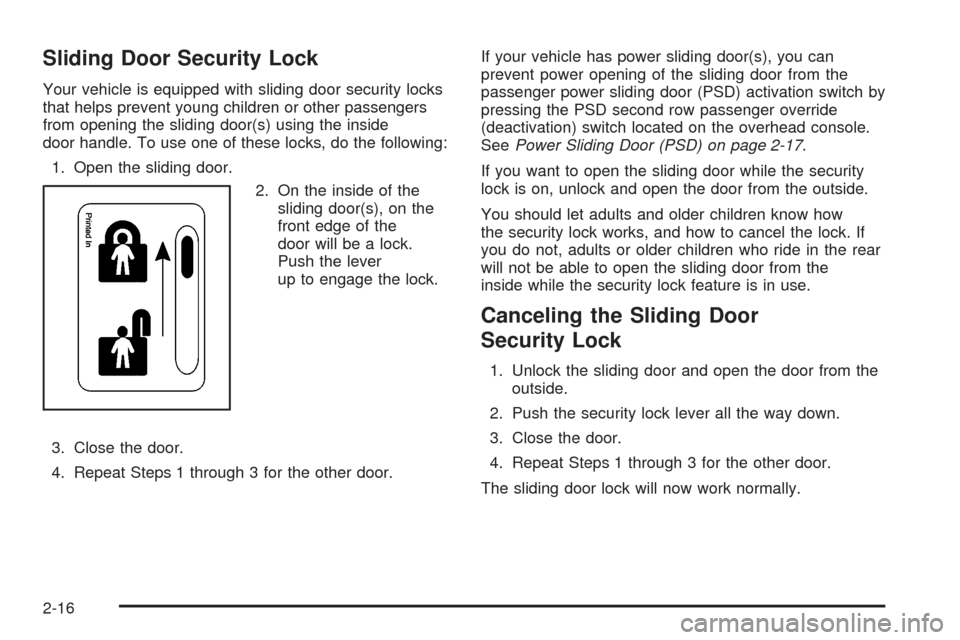
Sliding Door Security Lock
Your vehicle is equipped with sliding door security locks
that helps prevent young children or other passengers
from opening the sliding door(s) using the inside
door handle. To use one of these locks, do the following:
1. Open the sliding door.
2. On the inside of the
sliding door(s), on the
front edge of the
door will be a lock.
Push the lever
up to engage the lock.
3. Close the door.
4. Repeat Steps 1 through 3 for the other door.If your vehicle has power sliding door(s), you can
prevent power opening of the sliding door from the
passenger power sliding door (PSD) activation switch by
pressing the PSD second row passenger override
(deactivation) switch located on the overhead console.
SeePower Sliding Door (PSD) on page 2-17.
If you want to open the sliding door while the security
lock is on, unlock and open the door from the outside.
You should let adults and older children know how
the security lock works, and how to cancel the lock. If
you do not, adults or older children who ride in the rear
will not be able to open the sliding door from the
inside while the security lock feature is in use.
Canceling the Sliding Door
Security Lock
1. Unlock the sliding door and open the door from the
outside.
2. Push the security lock lever all the way down.
3. Close the door.
4. Repeat Steps 1 through 3 for the other door.
The sliding door lock will now work normally.
2-16
Page 116 of 460

Power Sliding Door Second Row
Passenger Override (Deactivation)
To help avoid accidental operation of the sliding door(s)
by using the passenger PSD activation switch, press
the override (deactivation) part of the overhead console
switch. The door can still be manually opened from
the inside or outside with the override (deactivation) on.
To open a power sliding door(s) manually when the
overhead console switch is in override (deactivation)
position, pull the inside or outside door handle and slide
the door all the way back.
To close the door(s) manually when the override
switch(es) is in the override (deactivation) position, pull
the inside or outside door handle and slide the door
all the way forward to the latched position.
To stop the door(s) immediately while the door(s) is
opening or closing, press the PSD override
(deactivation) part of the switch.
Pressing the PSD button(s) on the remote keyless entry
will open and close the door unless the door has
been manually locked using the mechanical slider.
Resetting the Power Sliding Door
The power sliding door may operate incorrectly or not at
all because of the following conditions:
A low voltage or dead battery
A disconnected battery
If the instrument panel PSD/fuse 21, LHPSD/fuse
24 or RHPSD/fuse 25 are removed or blown.
SeeFuses and Circuit Breakers on page 5-96for more
information about your fuse panel.
If any of these conditions occur, the power sliding door
may need to be reset. If your vehicle has the dual
power sliding doors, both doors will have to be reset. To
reset a door, do the following:
1. Check to be sure the power sliding door is unlocked
and securely closed.
2. Turn the ignition to LOCK.
3. If the power sliding door overhead console switch is
in the override (deactivation) position, return to the
activation position.
4. Open the sliding door using the remote keyless entry
transmitter, overhead console switch, or passenger
switch. Allow the door to travel fully open.
2-22
Page 120 of 460
Manual Rear Quarter Windows
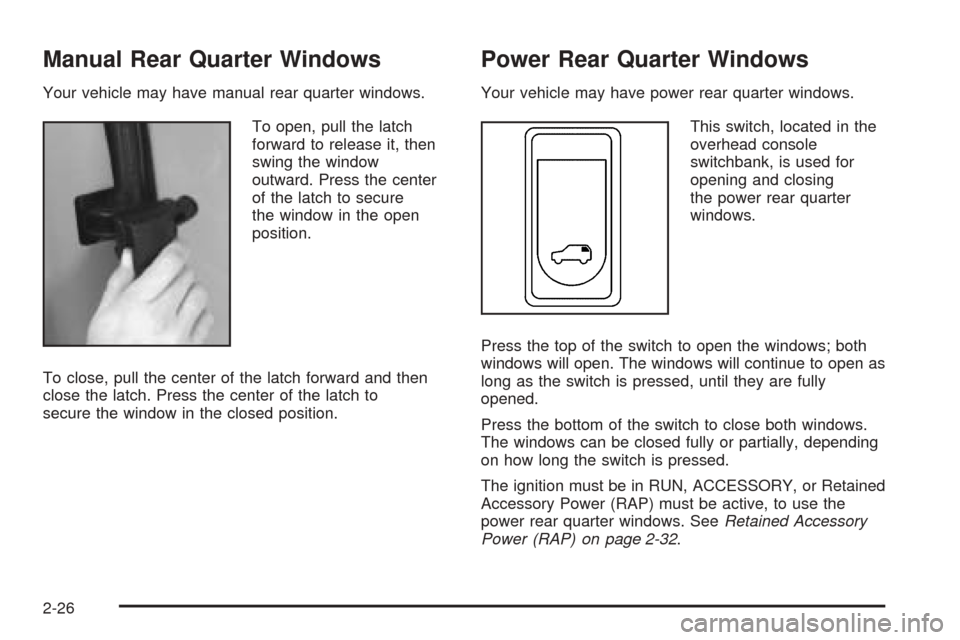
Your vehicle may have manual rear quarter windows.
To open, pull the latch
forward to release it, then
swing the window
outward. Press the center
of the latch to secure
the window in the open
position.
To close, pull the center of the latch forward and then
close the latch. Press the center of the latch to
secure the window in the closed position.
Power Rear Quarter Windows
Your vehicle may have power rear quarter windows.
This switch, located in the
overhead console
switchbank, is used for
opening and closing
the power rear quarter
windows.
Press the top of the switch to open the windows; both
windows will open. The windows will continue to open as
long as the switch is pressed, until they are fully
opened.
Press the bottom of the switch to close both windows.
The windows can be closed fully or partially, depending
on how long the switch is pressed.
The ignition must be in RUN, ACCESSORY, or Retained
Accessory Power (RAP) must be active, to use the
power rear quarter windows. SeeRetained Accessory
Power (RAP) on page 2-32.
2-26
Page 122 of 460

Arming with the Power Lock Switch
Your alarm system will arm when the key is removed
from the ignition and you use the driver’s power
door lock switch, with the driver’s door open or the
passenger’s door power door lock switch with the
passenger’s door open to lock the vehicle. If you would
like to turn on power door lock switch arming, see
DIC Vehicle Personalization (Uplevel Only) on
page 3-68.
When the security light ashes quickly the system is
arming. After all doors and the liftgate are closed
and locked, the security light will begin ashing at a
very slow rate to let you know the system is armed.
Arming with the Remote Keyless Entry
Transmitter
Your alarm system will arm if the key is not in the
ignition and you use your remote keyless entry
transmitter to lock the doors. The security light will ash
to let you know the system is arming. If you press
the transmitter’s lock button twice within 5 seconds, the
horn will sound. After all doors and the liftgate are
closed and locked, the security light will begin ashing
at a very slow rate to let you know the system is armed.
Arming with Your Key
Your alarm system will arm when you use your key to
lock the driver’s door. The security light will ash to
let you know the system is arming. After all doors and
the liftgate are closed and locked, the security light
will begin ashing at a very slow rate to let you know the
system is armed. If you would like your key not to
arm the system, seeDIC Vehicle Personalization
(Uplevel Only) on page 3-68.
Arming Conrmation
If remote unlock conrmation is on, the turn signal
lamps will ash briey to let you know when your alarm
system has disarmed. If you would not like the turn
signal lamps to ash, seeDIC Vehicle Personalization
(Uplevel Only) on page 3-68.
2-28
Page 123 of 460

Disarming with the Remote Keyless
Entry Transmitter
Your alarm system will disarm when you use your
remote keyless entry transmitter to unlock the doors.
The security light will stop ashing to let you know the
system is no longer armed.
Disarming with Your Key
Your alarm system will disarm when you use your key
to unlock the driver’s door. The security light will
stop ashing to let you know the system is no longer
armed. If you would like your key not to disarm the alarm
system, seeDIC Vehicle Personalization (Uplevel
Only) on page 3-68.
PASS-Key®III
Your PASS-Key®III system operates on a radio
frequency subject to Federal Communications
Commission (FCC) Rules and with Industry Canada.
This device complies with Part 15 of the FCC Rules.
Operation is subject to the following two conditions:
1. This device may not cause harmful interference.
2. This device must accept any interference received,
including interference that may cause undesired
operation.
This device complies with RSS-210 of Industry Canada.
Operation is subject to the following two conditions:
1. This device may not cause interference.
2. This device must accept any interference received,
including interference that may cause undesired
operation of the device.
Changes or modications to this system by other than
an authorized service facility could void authorization to
use this equipment.
PASS-Key
®III uses a radio frequency transponder in
the key that matches a decoder in your vehicle.
2-29
Page 124 of 460

PASS-Key®III Operation
Your vehicle is equipped
with the PASS-Key®III
(Personalized Automotive
Security System)
theft-deterrent system.
PASS-Key
®III is a passive
theft deterrent system.
This means you do
not have to do anything
different to arm or disarm
the system. It works
when you insert or remove
the key from the ignition.
When the PASS-Key
®III system senses that someone
is using the wrong key, it shuts down the vehicle’s
starter and fuel systems. The starter will not work and
fuel will stop being delivered to the engine. Anyone
using a trial-and-error method to start the vehicle will be
discouraged because of the high number of electrical
key codes.If the engine does not start and the security message
comes on, the key may have a damaged transponder.
Turn the ignition off and try again.
If the engine still does not start, and the key appears to
be undamaged, try another ignition key. At this time,
you may also want to check the instrument panel PASS
KEY fuse. If the engine still does not start with the
other key, your vehicle needs service. If your vehicle
does start, the rst key may be faulty. See your dealer or
a locksmith who can service the PASS-Key
®III to
have a new key made. SeeFuses and Circuit Breakers
on page 5-96.
It is possible for the PASS-Key
®III decoder to learn the
transponder value of a new or replacement key. Up
to 10 keys may be programmed for the vehicle.
This procedure is for learning additional keys only. If all
the currently programmed keys are lost or do not
operate, you must see your dealer or a locksmith who
can service PASS-Key
®III to have keys made and
programmed to the system.
See your dealer or a locksmith who can service
PASS-Key
®III to get a new key blank that is cut exactly
as the ignition key that operates the system.
2-30
Page 125 of 460

To program the new key, do the following:
1. Verify the new key has PK3 stamped on it.
2. Insert the original, already programmed key into the
ignition lock cylinder and start the engine. If the
engine will not start, see your dealer for service.
3. After the engine has started, turn the key to OFF
and remove the key.
4. Insert the key to be programmed and turn it to RUN
within 10 seconds of removing the previous key.
5. The security message will turn off once the key has
been programmed. It may not be apparent that the
security message went on due to how quickly
the key is programmed.
6. Repeat Steps 1 through 4 if additional keys are to
be programmed.
If you are ever driving and the security message comes
on and stays on, you will be able to restart your
engine if you turn it off. Your PASS-Key
®III system,
however, is not working properly and must be serviced
by your dealer. Your vehicle is not protected by the
PASS-Key
®III system at this time.
If you lose or damage a PASS-Key
®III key, see your
dealer or a locksmith who can service PASS-Key®III to
have a new key made.
Starting and Operating Your
Vehicle
New Vehicle Break-In
Notice:Your vehicle does not need an elaborate
break-in. But it will perform better in the long run if
you follow these guidelines:
Do not drive at any one speed, fast or slow, for
the rst 500 miles (805 km). Do not make
full-throttle starts.
Avoid making hard stops for the rst 200 miles
(322 km) or so. During this time your new
brake linings are not yet broken in. Hard stops
with new linings can mean premature wear
and earlier replacement. Follow this breaking-in
guideline every time you get new brake
linings.
Do not tow a trailer during break-in. SeeTowing
a Trailer on page 4-41for more information.
2-31
Page 138 of 460
Outside Convex Mirror
{CAUTION:
A convex mirror can make things (like other
vehicles) look farther away than they really are.
If you cut too sharply into the right lane, you
could hit a vehicle on your right. Check your
inside mirror or glance over your shoulder
before changing lanes.
The passenger’s side mirror is convex. A convex
mirror’s surface is curved so more can be seen from the
driver’s seat. It also makes things appear farther
away than they really are.
Outside Heated Mirrors
If the vehicle has outside heated rearview mirrors, they
are activated when the rear window defogger is
turned on. See “Rear Window Defogger” inClimate
Control System on page 3-25.
OnStar®System
OnStar®uses global positioning system (GPS) satellite
technology, wireless communications, and call centers
to provide you with a wide range of safety, security,
information, and convenience services.
A complete OnStar
®user’s guide and the terms and
conditions of the OnStar®Subscription Service
Agreement are included in the vehicle’s glove box
literature. For more information, visit www.onstar.com or
www.onstarcanada.com. Contact OnStar
®at
1-888-4-ONSTAR (1-888-466-7827), or press the
OnStar
®button to speak to an OnStar®advisor 24 hours
a day, 7 days a week.
Terms and conditions of the Subscription Service
Agreement can be found at www.onstar.com or
www.onstarcanada.com.
OnStar®Services
For new vehicles equipped with OnStar®, the Safe and
Sound Plan is included for the rst year. You can
extend this plan beyond the rst year, or upgrade to the
Directions and Connections Plan to meet your needs.
For more information, press the OnStar
®button to speak
with an advisor.
2-44