2005 CHEVROLET TAHOE four wheel drive
[x] Cancel search: four wheel drivePage 209 of 536

DIC Operation and Displays
The Driver Information Center (DIC) comes on when the
ignition is on. After a short delay, the DIC will display
the information that was last displayed before the engine
was turned off.
The DIC has different modes which can be accessed by
pressing the four DIC buttons located on the steering
wheel. These buttons are trip information, fuel
information, customization and select. The button
functions are detailed in the following pages.
Trip Information Button
3
(Trip Information):Press the trip information
button to scroll through the ODOMETER, TRIP A,
TRIP B, TIRE PRESSURES, TIMER and
ENGINE HOURS.
Odometer:Press the trip information button until
ODOMETER appears on the display. This mode shows
the total distance the vehicle has been driven in
either miles or kilometers. Pressing the reset stem
located on the instrument cluster with the vehicle off will
also display the odometer.Trip A:Press the trip information button until TRIP A
appears on the display. This mode shows the current
distance traveled since the last reset for TRIP A in either
miles or kilometers.
Trip B:Press the trip information button until TRIP B
appears on the display. This mode shows the current
distance traveled since the last reset for TRIP B in either
miles or kilometers.
To reset TRIP A or TRIP B information, press and hold
the select button for one second while in one of the
trip modes. This will reset the information for TRIP A
or TRIP B.
You can also reset TRIP A or TRIP B while they are
displayed by pressing the reset stem on the cluster.
If you press and hold the reset stem or the select button
for four seconds, the display will show the distance
traveled since the last ignition cycle for TRIP A or
TRIP B.
SeeTrip Odometer on page 3-38for more information.
3-57
Page 212 of 536

DIC Warnings and Messages
Warning messages are displayed on the Driver
Information Center (DIC) to notify the driver that the
status of the vehicle has changed and that some action
may be needed by the driver to correct the condition.
If there is more than one message that needs to
be displayed, they will appear one after another. Some
messages may not require immediate action, but
you should press any of the four DIC buttons on the
steering wheel, if equipped, to acknowledge that
you received the messages and clear them from the
display. If your vehicle is not equipped with DIC buttons
on the steering wheel, press the trip odometer reset
stem located on the instrument panel cluster to
acknowledge messages and clear them from the display.
Some messages cannot be cleared from the display
because they are more urgent. These messages require
action before they can be removed from the DIC
display. You should take any messages that appear on
the display seriously and remember that clearing the
messages will only make the messages disappear, not
correct the problem. The following are the possible
messages that can be displayed and some information
about them.
BATTERY NOT CHARGING
On some vehicles, if the battery is not charging during
operation, this message will appear on the DIC.
Driving with this problem could drain your battery. Have
the electrical system checked by your GM dealer as
soon as possible. SeeBattery Warning Light on
page 3-42andVoltmeter Gage on page 3-42. Pressing
any of the four DIC buttons, if equipped, will
acknowledge the message and clear it from the DIC
display. If your vehicle is not equipped with the four DIC
buttons, pressing the trip odometer reset stem will
acknowledge the message and clear it from the DIC
display.
BUCKLE PASSENGER
If your vehicle is equipped with the passenger sensing
system, this message reminds you to buckle the
passenger’s seat belt. SeePassenger Sensing System
on page 1-78.
This message will display and a chime will sound when
the ignition is on, the driver’s seat belt is buckled, the
passenger’s seat belt is unbuckled with the passenger
airbag enabled, and the vehicle is in motion. You should
have the passenger buckle their seat belt.
3-60
Page 218 of 536

RIGHT REAR DOOR AJAR
If the passenger’s side rear door is not fully closed, this
message will appear on the display and you will hear
a chime. Stop and turn off the vehicle, check the door for
obstacles, and close the door again. Check to see if
the message still appears on the DIC. Pressing any of
the four DIC buttons, if equipped, will acknowledge
the message and clear it from the DIC display. If your
vehicle is not equipped with the four DIC buttons,
pressing the trip odometer reset stem will acknowledge
the message and clear it from the DIC display.
SERVICE 4WD (Four-Wheel-Drive)
If a problem occurs with the four-wheel-drive system
this message will appear on the DIC. If this message
appears, stop as soon as possible and turn off the
vehicle. Restart the vehicle and check for the message
on the DIC display. If the message is still displayed
or appears again when you begin driving, the
four-wheel-drive system needs service. See your
GM dealer. Pressing any of the four DIC buttons, if
equipped, will acknowledge the message and clear it
from the DIC display. If your vehicle is not equipped with
the four DIC buttons, pressing the trip odometer reset
stem will acknowledge the message and clear it from the
DIC display.
SERVICE 4 WHEEL STEER
If a problem occurs with the four-wheel steer system,
this message will appear on the DIC. If the message
appears, stop as soon as possible and turn off the
vehicle. Restart the vehicle and check for the message
on the DIC display. If the message is still displayed
or appears again when you begin driving, the four-wheel
steer system needs service. See your GM dealer. See
QUADRASTEER™ on page 4-16. Pressing any of
the four DIC buttons, if equipped, will acknowledge the
message and clear it from the DIC display. If your
vehicle is not equipped with the four DIC buttons,
pressing the trip odometer reset stem will acknowledge
the message and clear it from the DIC display.
SERVICE AIR BAG
If there is a problem with the airbag system, this
message will be displayed on the DIC. Have your
GM dealer inspect the system for problems. SeeAirbag
Readiness Light on page 3-39andAirbag System on
page 1-68for more information. Pressing any of the
four DIC buttons, if equipped, will acknowledge
the message and clear it from the DIC display. If your
vehicle is not equipped with the four DIC buttons,
pressing the trip odometer reset stem will acknowledge
the message and clear it from the DIC display.
3-66
Page 301 of 536
StabiliTrak®System
Your vehicle may be equipped with the StabiliTrak®
system which combines antilock brake, traction
and stability control systems and helps the driver
maintain directional control of the vehicle in most
driving conditions.
When you rst start your vehicle and begin to drive
away, the system performs several diagnostic checks to
ensure there are no problems. You may hear or feel
the system working. This is normal and does not mean
there is a problem with your vehicle. The system
should initialize before the vehicle reaches 20 mph
(32 km/h). In some cases, it may take approximately
two miles of driving before the system initializes.
If the system fails to turn on or activate, the STABILITY
SYS DISABLED or SERVICE STABILITY message
will be displayed. If the vehicle has gone through heavy
acceleration or braking during the rst two miles after
starting your vehicle, the STABILITY SYS DISABLED
message may appear. If this is the case, your
vehicle does not need servicing. Turn your vehicle off
and back on again to reset the system. If either message
appears on the Driver Information Center (DIC), and
your vehicle hasn’t gone through hard acceleration
or braking in the rst two miles, your vehicle should be
taken in for service.The STABILITY SYS ACTIVE message will appear on
the Driver Information Center (DIC) only when the
system is both on and activated. You may also feel or
hear the system working; this is normal. For more
information on the stability messages, seeDriver
Information Center (DIC) on page 3-56.
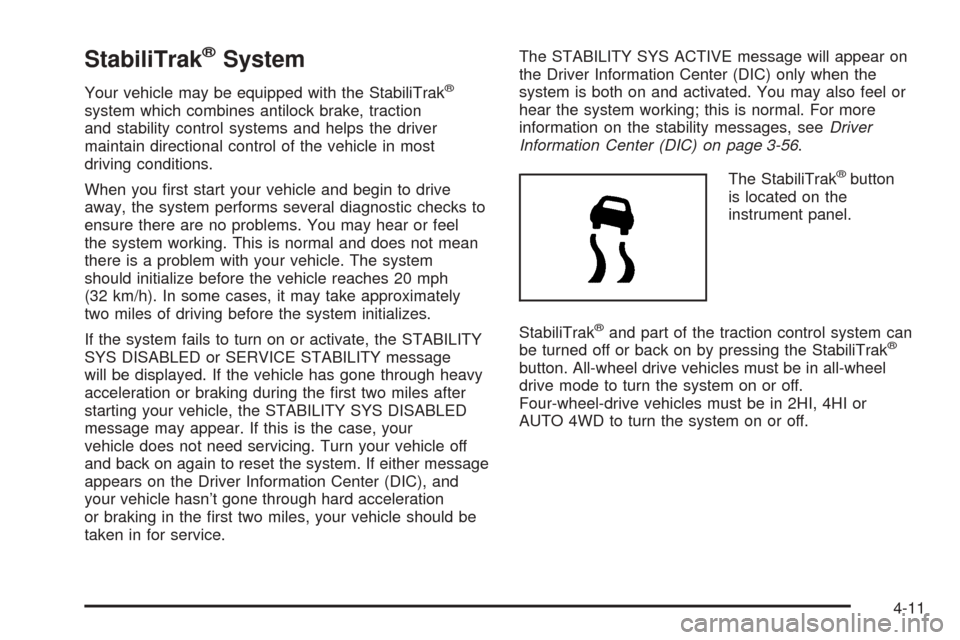
The StabiliTrak
®button
is located on the
instrument panel.
StabiliTrak
®and part of the traction control system can
be turned off or back on by pressing the StabiliTrak®
button. All-wheel drive vehicles must be in all-wheel
drive mode to turn the system on or off.
Four-wheel-drive vehicles must be in 2HI, 4HI or
AUTO 4WD to turn the system on or off.
4-11
Page 312 of 536
Off-Road Driving
This off-road guide is for vehicles that have four-wheel
drive or all-wheel drive. Also, seeBraking on page 4-6.
If your vehicle does not have four-wheel drive or
all-wheel drive, you should not drive off-road unless you
are on a level, solid surface.
Off-road driving can be great fun. But it does have
some denite hazards. The greatest of these is
the terrain itself.
“Off-roading” means you have left the great North
American road system behind. Traffic lanes are not
marked. Curves are not banked. There are no
road signs. Surfaces can be slippery, rough, uphill or
downhill. In short, you have gone right back to nature.
Off-road driving involves some new skills. And that
is why it is very important that you read this guide. You
will nd many driving tips and suggestions. These
will help make your off-road driving safer and more
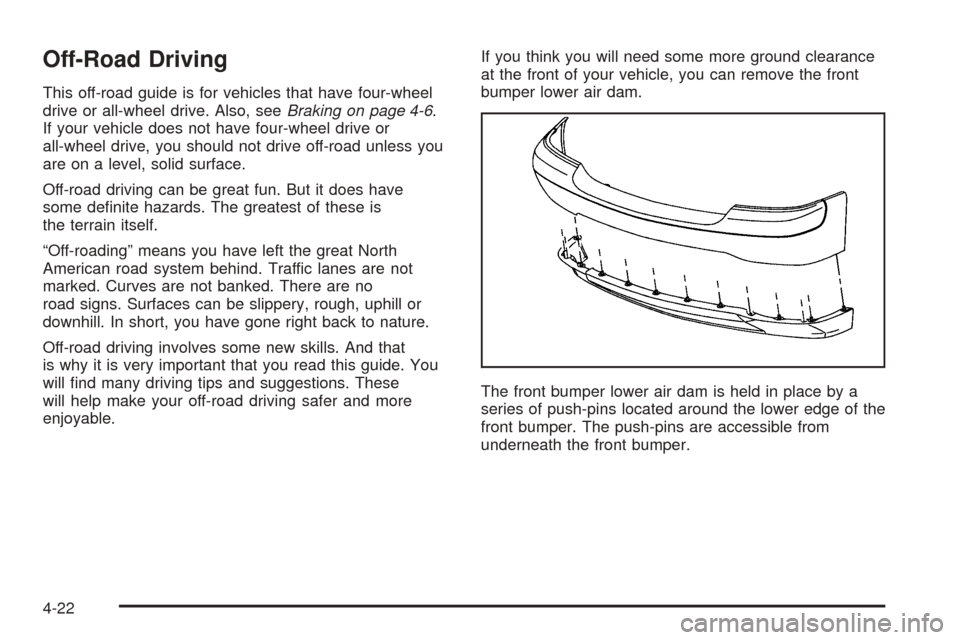
enjoyable.If you think you will need some more ground clearance
at the front of your vehicle, you can remove the front
bumper lower air dam.
The front bumper lower air dam is held in place by a
series of push-pins located around the lower edge of the
front bumper. The push-pins are accessible from
underneath the front bumper.
4-22
Page 314 of 536
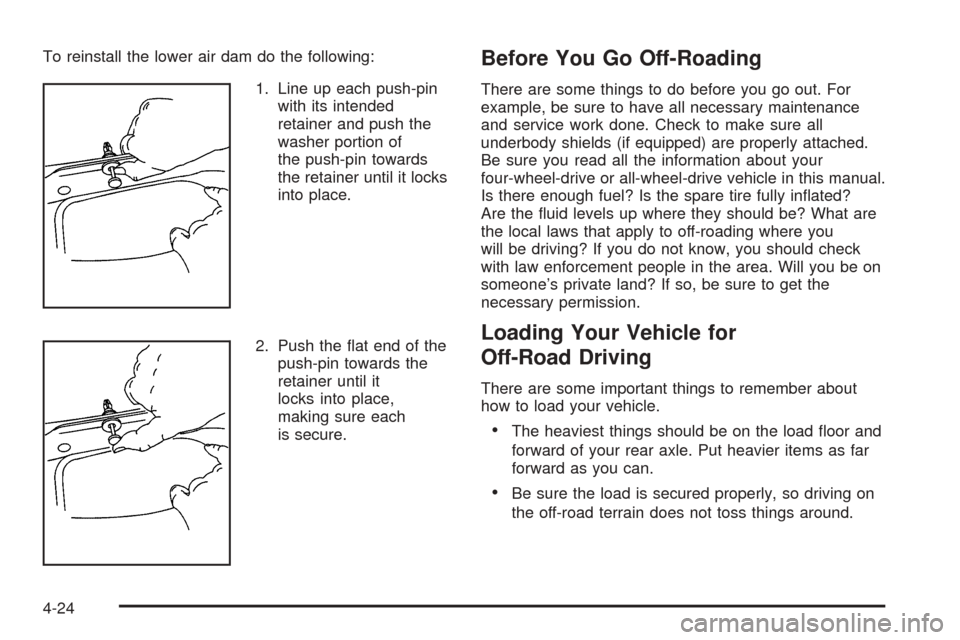
To reinstall the lower air dam do the following:
1. Line up each push-pin
with its intended
retainer and push the
washer portion of
the push-pin towards
the retainer until it locks
into place.
2. Push the at end of the
push-pin towards the
retainer until it
locks into place,
making sure each
is secure.Before You Go Off-Roading
There are some things to do before you go out. For
example, be sure to have all necessary maintenance
and service work done. Check to make sure all
underbody shields (if equipped) are properly attached.
Be sure you read all the information about your
four-wheel-drive or all-wheel-drive vehicle in this manual.
Is there enough fuel? Is the spare tire fully inated?
Are the uid levels up where they should be? What are
the local laws that apply to off-roading where you
will be driving? If you do not know, you should check
with law enforcement people in the area. Will you be on
someone’s private land? If so, be sure to get the
necessary permission.
Loading Your Vehicle for
Off-Road Driving
There are some important things to remember about
how to load your vehicle.
The heaviest things should be on the load oor and
forward of your rear axle. Put heavier items as far
forward as you can.
Be sure the load is secured properly, so driving on
the off-road terrain does not toss things around.
4-24
Page 340 of 536
If Your Vehicle is Stuck in Sand,
Mud, Ice or Snow
In order to free your vehicle when it is stuck, you will
need to spin the wheels, but you do not want to
spin your wheels too fast. The method known as rocking
can help you get out when you are stuck, but you
must use caution.
{CAUTION:
If you let your tires spin at high speed, they can
explode, and you or others could be injured.
And, the transmission or other parts of the
vehicle can overheat. That could cause an
engine compartment re or other damage.
When you are stuck, spin the wheels as little as
possible. Do not spin the wheels above 35 mph
(55 km/h) as shown on the speedometer.
Notice:Spinning your wheels can destroy parts of
your vehicle as well as the tires. If you spin the
wheels too fast while shifting your transmission
back and forth, you can destroy your transmission.
For more information about using tire chains on your
vehicle, seeTire Chains on page 5-76.
Rocking Your Vehicle to Get It Out
First, turn your steering wheel left and right. That
will clear the area around your front wheels. If you have
a four-wheel-drive vehicle, shift into 4HI or 4LO. If
your vehicle has the Traction Assist System (TAS), you
should turn it off by pressing the TAS on/off button. If
your vehicle has the StabiliTrak
®System, turn the
StabiliTrak®System off by pressing the
StabiliTrak®button so that the STABILITY SYSTEM
DISABLED and TRACTION OFF lights are illuminated
on the instrument panel cluster. Then shift back and
forth between REVERSE (R) and a forward gear,
spinning the wheels as little as possible. Release the
accelerator pedal while you shift, and press lightly on the
accelerator pedal when the transmission is in gear.
By slowly spinning your wheels in the forward and
reverse directions, you will cause a rocking motion that
may free your vehicle. If that does not get you out
after a few tries, you may need to be towed out. Or, you
can use your recovery hooks if your vehicle has
them. If you do need to be towed out, seeTowing Your
Vehicle on page 4-62.
4-50
Page 352 of 536
Towing
Towing Your Vehicle
Consult your dealer or a professional towing service if
you need to have your disabled vehicle towed. See
Roadside Assistance Program on page 7-6.
If you want to tow your vehicle behind another vehicle
for recreational purposes (such as behind a motorhome),
see “Recreational Vehicle Towing” following.
Recreational Vehicle Towing
Recreational vehicle towing means towing your vehicle
behind another vehicle – such as behind a motorhome.
The two most common types of recreational vehicle
towing are known as dinghy towing, towing your vehicle
with all four wheels on the ground, and dolly towing,
towing your vehicle with two wheels on the ground and
two wheels up on a device known as a “dolly”.
With the proper preparation and equipment, many
vehicles can be towed in these ways. See “Dinghy
Towing” and “Dolly Towing”, following.Here are some important things to consider before you
do recreational vehicle towing:
What’s the towing capacity of the towing vehicle?
Be sure you read the tow vehicle manufacturer’s
recommendations.
How far will you tow? Some vehicles have
restrictions on how far and how long they can tow.
Do you have the proper towing equipment?
See your dealer or trailering professional for
additional advice and equipment recommendations.
Is your vehicle ready to be towed? Just as you
would prepare your vehicle for a long trip, you’ll
want to make sure your vehicle is prepared to be
towed. SeeBefore Leaving on a Long Trip on
page 4-42.
Dinghy Towing
Two-Wheel-Drive Vehicles
Notice:If you tow a two-wheel-drive vehicle with all
four wheels on the ground, the transmission could be
damaged. The repairs would not be covered by your
warranty. Do not tow a two-wheel-drive vehicle with
all four wheels on the ground.
Two-wheel-drive vehicles should not be towed with all
four wheels on the ground. Two-wheel-drive
transmissions have no provisions for internal lubrication
while being towed.
4-62