2005 CHEVROLET SILVERADO four wheel drive
[x] Cancel search: four wheel drivePage 220 of 580
DIC Warnings and Messages
Warning messages are displayed on the Driver
Information Center (DIC) to notify the driver that the
status of the vehicle has changed and that some action
may be needed by the driver to correct the condition.
If there is more than one message that needs to
be displayed, they will appear one after another. Some
messages may not require immediate action, but
you should press any of the four DIC buttons on the
steering wheel, if equipped, to acknowledge that
you received the messages and clear them from the
display. If your vehicle is not equipped with DIC buttons
on the steering wheel, press the trip odometer reset
stem located on the instrument panel cluster to
acknowledge messages and clear them from the display.
Some messages cannot be cleared from the display
because they are more urgent. These messages
require action before they can be removed from the DIC
display. You should take any messages that appear
on the display seriously and remember that clearing the
messages will only make the messages disappear,
not correct the problem.
The following are the possible messages that can be
displayed and some information about them.
BATTERY NOT CHARGING
On some vehicles, if the battery is not charging during
operation, this message will appear on the DIC.
Driving with this problem could drain your battery. Have
the electrical system checked by your GM dealer as
soon as possible. Pressing any of the four DIC buttons,
if equipped, will acknowledge the message and clear
it from the DIC display. If your vehicle is not equipped
with the four DIC buttons, pressing the trip odometer
reset stem will acknowledge the message and clear it
from the DIC display. SeeBattery Warning Light
on page 3-38andVoltmeter Gage on page 3-39.
BUCKLE PASSENGER
If your vehicle is equipped with the passenger sensing
system, this message reminds you to buckle the
passenger’s seat belt. SeePassenger Sensing System
on page 1-73.
This message will display and a chime will sound when
the ignition is on, the driver’s seat belt is buckled, the
passenger’s seat belt is unbuckled with the passenger
airbag enabled, and the vehicle is in motion. You should
have the passenger buckle their seat belt.
This reminder will be repeated if the ignition is on, the
vehicle is in motion, the driver is buckled, and the
passenger is still unbuckled and the passenger airbag
is enabled. If the passenger’s seat belt is already
buckled, this message and chime will not come on.
3-54
Page 225 of 580

RANGE SHIFT INHIBITED
(Allison Transmission®Only)
If the transmission is unable to shift into a selected
gear, this message will appear on the DIC. The
electronic shift position indicator on the instrument panel
cluster may blink when this occurs. To make the
vehicle shift to the requested gear, you may have to
shift back to PARK (P) or NEUTRAL (N) and re-select
the desired gear.
REDUCED ENGINE POWER
This message is displayed when the cooling system
temperature gets too hot and the engine further enters
the engine coolant protection mode.
SeeEngine Overheating on page 5-38for additional
information.
RIGHT REAR DOOR AJAR (Crew Cab)
If the passenger’s side rear door is not fully closed,
this message will appear on the display and you
will hear a chime. Stop and turn off the vehicle, check
the door for obstacles, and close the door again.
Check to see if the message still appears on the DIC.
Pressing any of the four DIC buttons, if equipped,
will acknowledge the message and clear it from the
DIC display. If your vehicle is not equipped with the
four DIC buttons, pressing the trip odometer reset stem
will acknowledge the message and clear it from the
DIC display.
SERVICE 4WD (Four-Wheel-Drive)
If a problem occurs with the four-wheel-drive system,
this message will appear on the DIC. If this message
appears, stop as soon as possible and turn off the
vehicle. Restart the vehicle and check for the message
on the DIC display. If the message is still displayed
or appears again when you begin driving, the
four-wheel-drive system needs service. See your
GM dealer.
SERVICE 4 WHEEL STEER
If a problem occurs with the four-wheel steer system,
this message will appear on the DIC. If this message
appears, stop as soon as possible and turn off the
vehicle. Restart the vehicle and check for the message
on the DIC display. If the message is still displayed
or appears again when you begin driving, the four-wheel
steer system needs service. See your GM dealer. See
QUADRASTEER™ on page 4-14for more information.
Pressing any of the four DIC buttons, if equipped,
will acknowledge the message and clear it from the
DIC display. If your vehicle is not equipped with the
four DIC buttons, pressing the trip odometer reset stem
will acknowledge the message and clear it from the
DIC display.
3-59
Page 227 of 580

SERVICE BRAKE SYSTEM
If there is a problem with the brake system, this
message will be displayed on the DIC. If this message
appears, stop as soon as possible and turn off the
vehicle. Restart the vehicle and check for the message
on the DIC display. If the message is still displayed
or appears again when you begin driving, the brake
system needs service. See your GM dealer.
SERVICE CHARGING SYSTEM
On some vehicles, if there is a problem with the battery
charging system, this message will appear on the
DIC. Under certain conditions, the battery warning light
may also turn on in the instrument panel cluster.
SeeBattery Warning Light on page 3-38. The battery
will not be charging at an optimal rate and the vehicle
will lose the ability to enter the fuel economy mode.
The vehicle is safe to drive, however you should have
the electrical system checked by your GM dealer.
Pressing any of the four DIC buttons, if equipped,
will acknowledge the message and clear it from the
DIC display. If your vehicle is not equipped with the
four DIC buttons, pressing the trip odometer reset stem
will acknowledge the message and clear it from the
DIC display.
SERVICE RIDE CONTROL
If a problem occurs with the suspension system, this
message will appear on the DIC. If this message
appears, stop and turn off the vehicle. Restart the
vehicle and check for the message on the DIC display.
If this message is still displayed or appears again
when you begin driving, the air suspension system
needs service. See your GM dealer.
TIGHTEN FUEL CAP
If the vehicle’s fuel cap is not tightened properly, this
message may appear along with the check engine
light on the instrument panel cluster. SeeMalfunction
Indicator Lamp on page 3-44. Reinstall the fuel cap
fully. SeeFilling the Tank on page 5-10. The diagnostic
system can determine if the fuel cap has been left
off or improperly installed. A loose or missing fuel cap
will allow fuel to evaporate into the atmosphere.
A few driving trips with the cap properly installed
should turn this light and message off.
TRACTION ACTIVE
When the traction control system had detected that
any of the vehicle’s wheels are slipping, the traction
control system will activate and this message will appear
on the DIC. SeeTraction Assist System (TAS) on
page 4-8for more information.
3-61
Page 314 of 580
Off-Road Driving
This off-road guide is for vehicles that have four-wheel
drive. Also, seeBraking on page 4-6. If your vehicle
is an SS Model or does not have four-wheel drive, you
should not drive off-road unless you are on a level,
solid surface. If your vehicle is equipped with 20-inch
tire/wheel assemblies, do not use your vehicle for
off-road driving. SeeTires on page 5-73.
Off-road driving can be great fun. But it does have
some denite hazards. The greatest of these is
the terrain itself.
“Off-roading” means you have left the great North
American road system behind. Traffic lanes are not
marked. Curves are not banked. There are no
road signs. Surfaces can be slippery, rough, uphill or
downhill. In short, you have gone right back to nature.
Off-road driving involves some new skills. And that
is why it is very important that you read this guide.
You will nd many driving tips and suggestions.
These will help make your off-road driving safer and
more enjoyable.
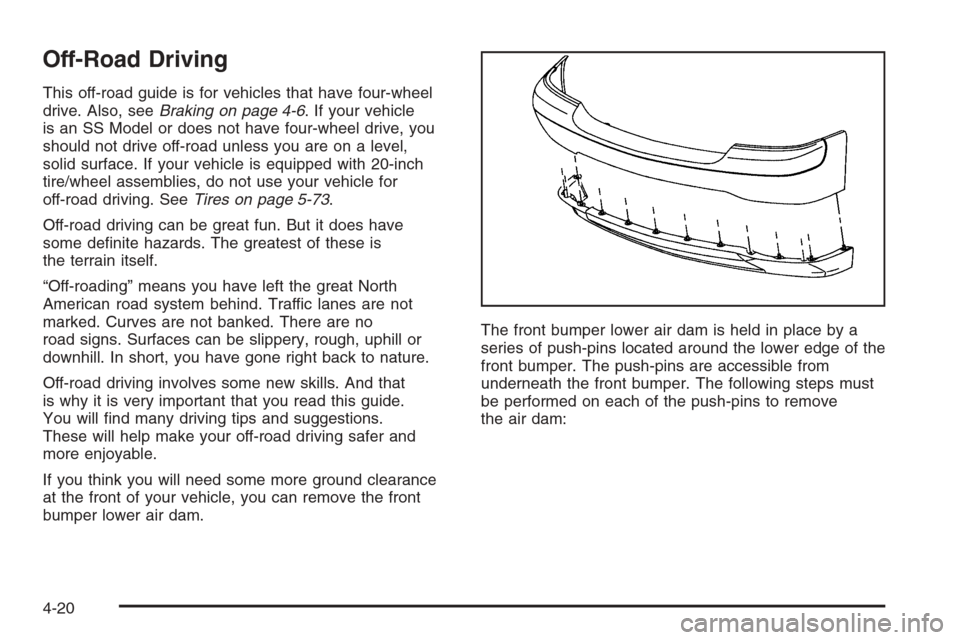
If you think you will need some more ground clearance
at the front of your vehicle, you can remove the front
bumper lower air dam.The front bumper lower air dam is held in place by a
series of push-pins located around the lower edge of the
front bumper. The push-pins are accessible from
underneath the front bumper. The following steps must
be performed on each of the push-pins to remove
the air dam:
4-20
Page 316 of 580
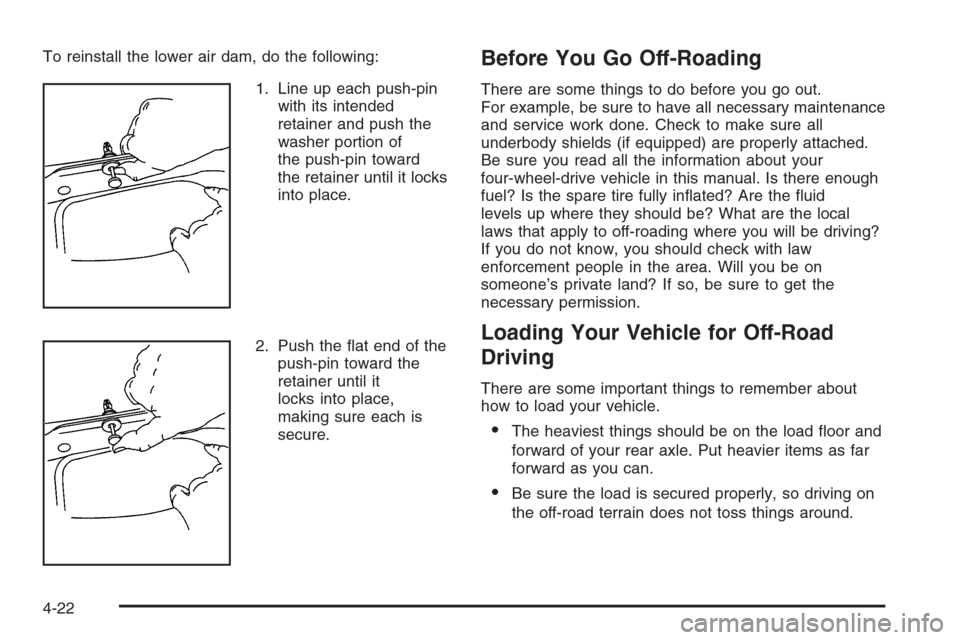
To reinstall the lower air dam, do the following:
1. Line up each push-pin
with its intended
retainer and push the
washer portion of
the push-pin toward
the retainer until it locks
into place.
2. Push the at end of the
push-pin toward the
retainer until it
locks into place,
making sure each is
secure.Before You Go Off-Roading
There are some things to do before you go out.
For example, be sure to have all necessary maintenance
and service work done. Check to make sure all
underbody shields (if equipped) are properly attached.
Be sure you read all the information about your
four-wheel-drive vehicle in this manual. Is there enough
fuel? Is the spare tire fully inated? Are the uid
levels up where they should be? What are the local
laws that apply to off-roading where you will be driving?
If you do not know, you should check with law
enforcement people in the area. Will you be on
someone’s private land? If so, be sure to get the
necessary permission.
Loading Your Vehicle for Off-Road
Driving
There are some important things to remember about
how to load your vehicle.
The heaviest things should be on the load oor and
forward of your rear axle. Put heavier items as far
forward as you can.
Be sure the load is secured properly, so driving on
the off-road terrain does not toss things around.
4-22
Page 342 of 580
If Your Vehicle is Stuck in Sand,
Mud, Ice or Snow
In order to free your vehicle when it is stuck, you will
need to spin the wheels, but you do not want to
spin your wheels too fast. The method known as rocking
can help you get out when you are stuck, but you
must use caution.
{CAUTION:
If you let your tires spin at high speed, they can
explode, and you or others could be injured.
And, the transmission or other parts of the
vehicle can overheat. That could cause an
engine compartment re or other damage.
When you are stuck, spin the wheels as little as
possible. Do not spin the wheels above 35 mph
(55 km/h) as shown on the speedometer.
Notice:Spinning your wheels can destroy parts of
your vehicle as well as the tires. If you spin the
wheels too fast while shifting your transmission back
and forth, you can destroy your transmission.
For more information about using tire chains on your
vehicle, seeTire Chains on page 5-89.
Rocking Your Vehicle to Get It Out
First, turn your steering wheel left and right. That will
clear the area around your front wheels. If you have a
four-wheel-drive vehicle, shift into 4HI. If your vehicle
has the traction assist system, you should turn it off by
pressing the TAS on/off button. Then shift back and
forth between REVERSE (R) and a forward gear,
or with a manual transmission, between FIRST (1) or
SECOND (2) and REVERSE (R), spinning the wheels as
little as possible. Release the accelerator pedal while
you shift, and press lightly on the accelerator pedal
when the transmission is in gear. By slowly spinning
your wheels in the forward and reverse directions,
you will cause a rocking motion that may free your
vehicle. If that does not get you out after a few tries,
you may need to be towed out. If your vehicle is not an
SS model, you can use your recovery hooks if your
vehicle has them. If you do need to be towed out,
seeTowing Your Vehicle on page 4-63.
4-48
Page 358 of 580
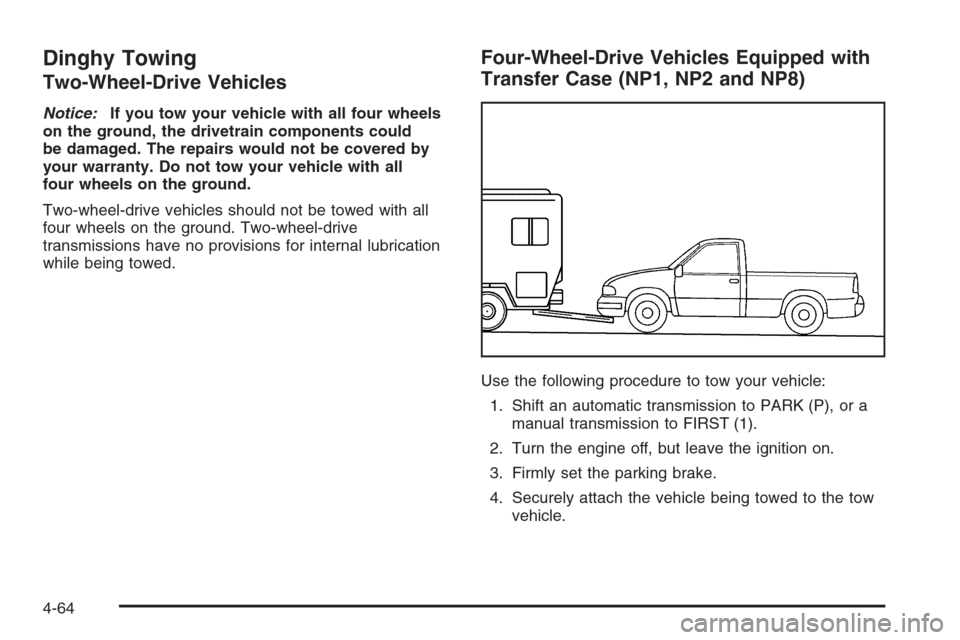
Dinghy Towing
Two-Wheel-Drive Vehicles
Notice:If you tow your vehicle with all four wheels
on the ground, the drivetrain components could
be damaged. The repairs would not be covered by
your warranty. Do not tow your vehicle with all
four wheels on the ground.
Two-wheel-drive vehicles should not be towed with all
four wheels on the ground. Two-wheel-drive
transmissions have no provisions for internal lubrication
while being towed.
Four-Wheel-Drive Vehicles Equipped with
Transfer Case (NP1, NP2 and NP8)
Use the following procedure to tow your vehicle:
1. Shift an automatic transmission to PARK (P), or a
manual transmission to FIRST (1).
2. Turn the engine off, but leave the ignition on.
3. Firmly set the parking brake.
4. Securely attach the vehicle being towed to the tow
vehicle.
4-64
Page 359 of 580
{CAUTION:
Shifting a four-wheel-drive vehicle’s transfer
case into NEUTRAL can cause your vehicle to
roll even if the transmission is in PARK (P) for
an automatic transmission, or if your vehicle is
in gear, for a manual transmission. You or
others could be injured. Make sure the parking
brake is rmly set before you shift the transfer
case to NEUTRAL.
5. Shift the transfer case to NEUTRAL. See
Four-Wheel Drive on page 2-37for the proper
procedure to select the neutral position for
your vehicle.
6. Release the parking brake only after the vehicle
being towed is rmly attached to the towing
vehicle.
7. Turn the ignition off and leave the steering column
unlocked.
All-Wheel-Drive Vehicles
Notice:Towing an all-wheel-drive vehicle with all
four wheels on the ground, or even with only two of
its wheels on the ground, will damage drivetrain
components. Do not tow an all-wheel-drive vehicle if
any of its wheels will be on the ground.
If your vehicle is equipped with all-wheel-drive, and the
Silverado SS package, your vehicle was not designed
to be towed with any of its wheels on the ground. If your
vehicle must be towed, seeTowing Your Vehicle on
page 4-63.
4-65