Page 441 of 580
How to Add Coolant to the Coolant
Surge Tank for Gasoline Engines
If you have not found a problem yet, check to see if
coolant is visible in the surge tank. If coolant is visible
but the coolant level is not at or above the FULL COLD
mark, add a 50/50 mixture of clean, drinkable water
and DEX-COOL
®coolant at the coolant surge tank,
but be sure the cooling system, including the coolant
surge tank pressure cap, is cool before you do it.
SeeEngine Coolant on page 5-35for more information.
If no coolant is visible in the surge tank, add coolant
as follows:
{CAUTION:
Steam and scalding liquids from a hot cooling
system can blow out and burn you badly. They
are under pressure, and if you turn the coolant
surge tank pressure cap — even a little — they
can come out at high speed. Never turn the
cap when the cooling system, including the
coolant surge tank pressure cap, is hot. Wait
for the cooling system and coolant surge tank
pressure cap to cool if you ever have to turn
the pressure cap.
{CAUTION:
Adding only plain water to your cooling system
can be dangerous. Plain water, or some other
liquid such as alcohol, can boil before the
proper coolant mixture will. Your vehicle’s
coolant warning system is set for the proper
coolant mixture. With plain water or the wrong
mixture, your engine could get too hot but
you would not get the overheat warning.
Your engine could catch re and you or others
could be burned. Use a 50/50 mixture of clean,
drinkable water and a proper coolant.
Notice:In cold weather, water can freeze and crack
the engine, radiator, heater core and other parts.
Use the recommended coolant and the proper
coolant mixture.
5-43
Page 442 of 580
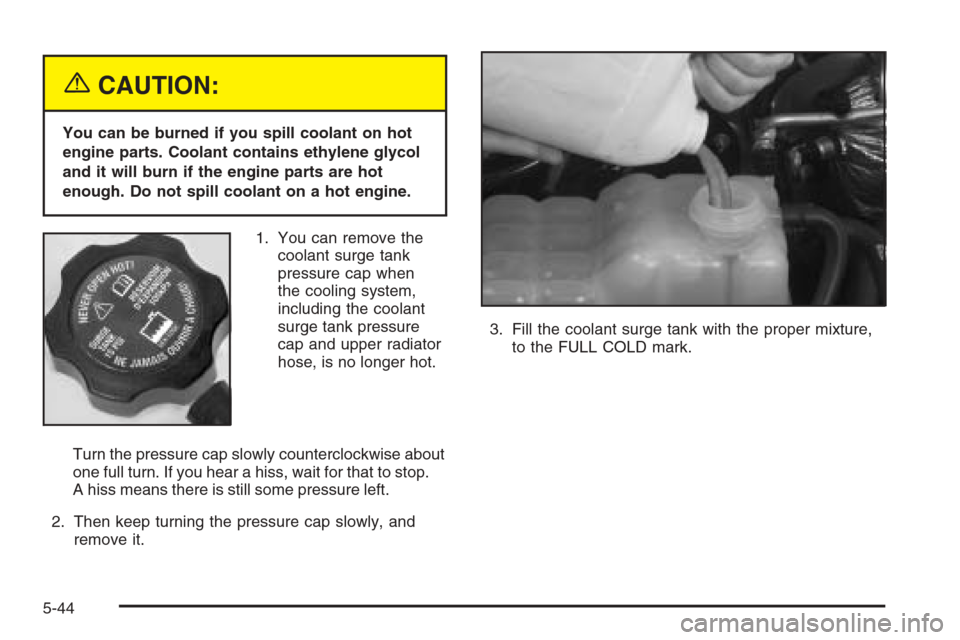
{CAUTION:
You can be burned if you spill coolant on hot
engine parts. Coolant contains ethylene glycol
and it will burn if the engine parts are hot
enough. Do not spill coolant on a hot engine.
1. You can remove the
coolant surge tank
pressure cap when
the cooling system,
including the coolant
surge tank pressure
cap and upper radiator
hose, is no longer hot.
Turn the pressure cap slowly counterclockwise about
one full turn. If you hear a hiss, wait for that to stop.
A hiss means there is still some pressure left.
2. Then keep turning the pressure cap slowly, and
remove it.3. Fill the coolant surge tank with the proper mixture,
to the FULL COLD mark.
5-44
Page 443 of 580
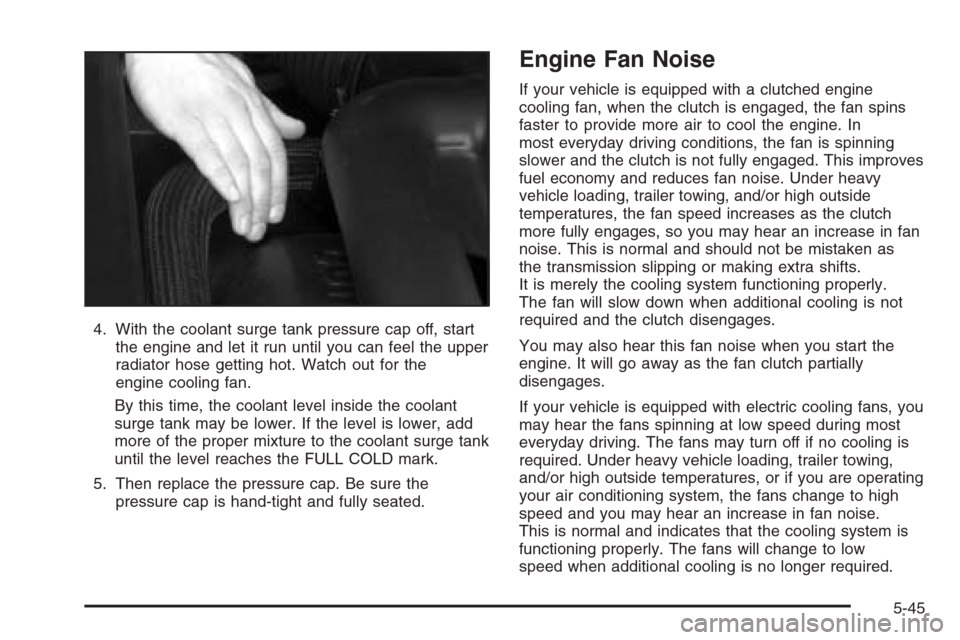
4. With the coolant surge tank pressure cap off, start
the engine and let it run until you can feel the upper
radiator hose getting hot. Watch out for the
engine cooling fan.
By this time, the coolant level inside the coolant
surge tank may be lower. If the level is lower, add
more of the proper mixture to the coolant surge tank
until the level reaches the FULL COLD mark.
5. Then replace the pressure cap. Be sure the
pressure cap is hand-tight and fully seated.
Engine Fan Noise
If your vehicle is equipped with a clutched engine
cooling fan, when the clutch is engaged, the fan spins
faster to provide more air to cool the engine. In
most everyday driving conditions, the fan is spinning
slower and the clutch is not fully engaged. This improves
fuel economy and reduces fan noise. Under heavy
vehicle loading, trailer towing, and/or high outside
temperatures, the fan speed increases as the clutch
more fully engages, so you may hear an increase in fan
noise. This is normal and should not be mistaken as
the transmission slipping or making extra shifts.
It is merely the cooling system functioning properly.
The fan will slow down when additional cooling is not
required and the clutch disengages.
You may also hear this fan noise when you start the
engine. It will go away as the fan clutch partially
disengages.
If your vehicle is equipped with electric cooling fans, you
may hear the fans spinning at low speed during most
everyday driving. The fans may turn off if no cooling is
required. Under heavy vehicle loading, trailer towing,
and/or high outside temperatures, or if you are operating
your air conditioning system, the fans change to high
speed and you may hear an increase in fan noise.
This is normal and indicates that the cooling system is
functioning properly. The fans will change to low
speed when additional cooling is no longer required.
5-45
Page 486 of 580
Each new wheel should have the same load-carrying
capacity, diameter, width, offset and be mounted
the same way as the one it replaces.
If you need to replace any of your wheels, wheel bolts or
wheel nuts, replace them only with new GM original
equipment parts. This way, you will be sure to have the
right wheel, wheel bolts and wheel nuts for your vehicle.
{CAUTION:
Using the wrong replacement wheels, wheel
bolts or wheel nuts on your vehicle can be
dangerous. It could affect the braking and
handling of your vehicle, make your tires lose
air and make you lose control. You could have
a collision in which you or others could be
injured. Always use the correct wheel, wheel
bolts and wheel nuts for replacement.
Notice:The wrong wheel can also cause problems
with bearing life, brake cooling, speedometer or
odometer calibration, headlamp aim, bumper height,
vehicle ground clearance and tire or tire chain
clearance to the body and chassis.Whenever a wheel, wheel bolt or wheel nut is replaced
on a dual wheel setup, check the wheel nut torque
after 100, 1,000 and 6,000 miles (160, 1 600 and
10 000 km) of driving. For proper torque, see “Wheel
Nut Torque” underCapacities and Specications
on page 5-133.
SeeChanging a Flat Tire on page 5-91for more
information.
Used Replacement Wheels
{CAUTION:
Putting a used wheel on your vehicle is
dangerous. You cannot know how it has been
used or how far it has been driven. It could fail
suddenly and cause a crash. If you have to
replace a wheel, use a new GM original
equipment wheel.
5-88
Page 530 of 580
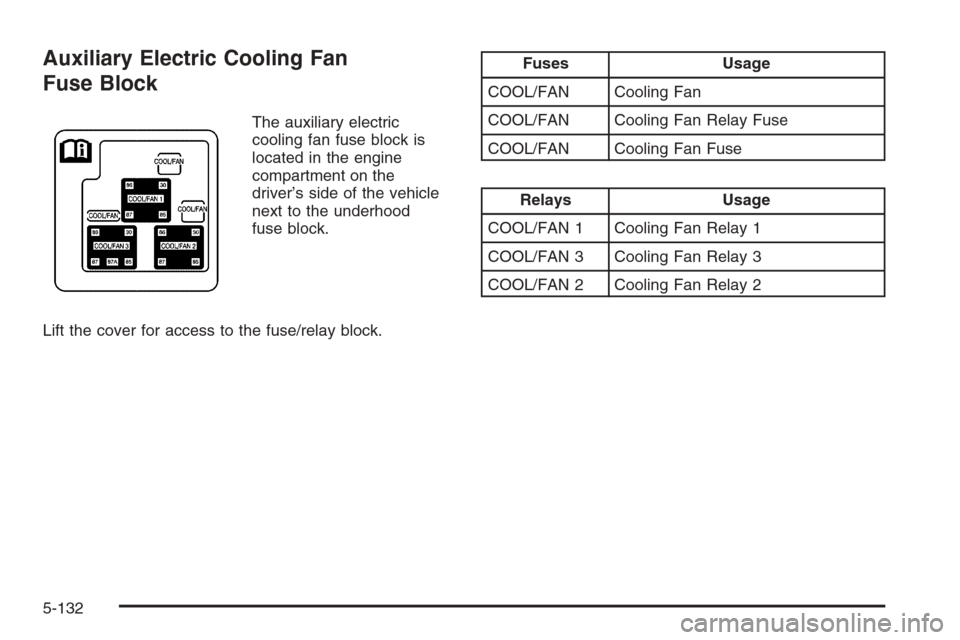
Auxiliary Electric Cooling Fan
Fuse Block
The auxiliary electric
cooling fan fuse block is
located in the engine
compartment on the
driver’s side of the vehicle
next to the underhood
fuse block.
Lift the cover for access to the fuse/relay block.
Fuses Usage
COOL/FAN Cooling Fan
COOL/FAN Cooling Fan Relay Fuse
COOL/FAN Cooling Fan Fuse
Relays Usage
COOL/FAN 1 Cooling Fan Relay 1
COOL/FAN 3 Cooling Fan Relay 3
COOL/FAN 2 Cooling Fan Relay 2
5-132
Page 531 of 580
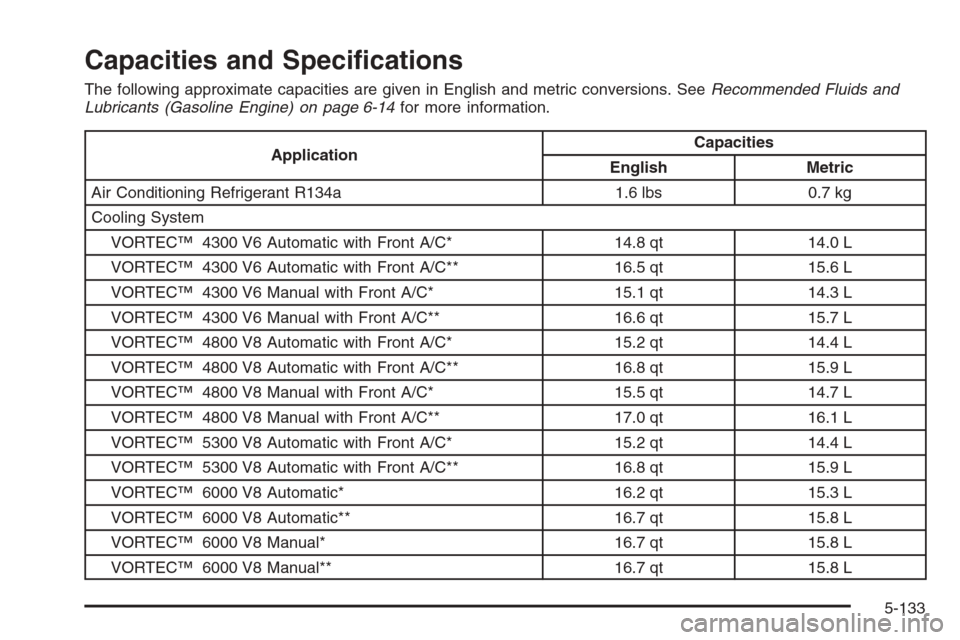
Capacities and Specications
The following approximate capacities are given in English and metric conversions. SeeRecommended Fluids and
Lubricants (Gasoline Engine) on page 6-14for more information.
ApplicationCapacities
English Metric
Air Conditioning Refrigerant R134a 1.6 lbs 0.7 kg
Cooling System
VORTEC™ 4300 V6 Automatic with Front A/C* 14.8 qt 14.0 L
VORTEC™ 4300 V6 Automatic with Front A/C** 16.5 qt 15.6 L
VORTEC™ 4300 V6 Manual with Front A/C* 15.1 qt 14.3 L
VORTEC™ 4300 V6 Manual with Front A/C** 16.6 qt 15.7 L
VORTEC™ 4800 V8 Automatic with Front A/C* 15.2 qt 14.4 L
VORTEC™ 4800 V8 Automatic with Front A/C** 16.8 qt 15.9 L
VORTEC™ 4800 V8 Manual with Front A/C* 15.5 qt 14.7 L
VORTEC™ 4800 V8 Manual with Front A/C** 17.0 qt 16.1 L
VORTEC™ 5300 V8 Automatic with Front A/C* 15.2 qt 14.4 L
VORTEC™ 5300 V8 Automatic with Front A/C** 16.8 qt 15.9 L
VORTEC™ 6000 V8 Automatic* 16.2 qt 15.3 L
VORTEC™ 6000 V8 Automatic** 16.7 qt 15.8 L
VORTEC™ 6000 V8 Manual* 16.7 qt 15.8 L
VORTEC™ 6000 V8 Manual** 16.7 qt 15.8 L
5-133
Page 532 of 580
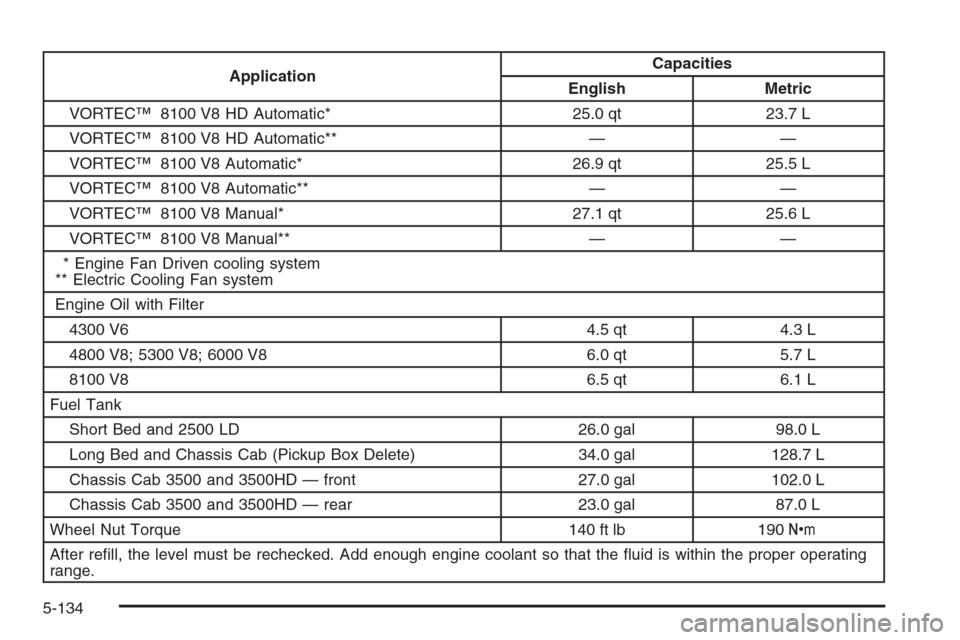
ApplicationCapacities
English Metric
VORTEC™ 8100 V8 HD Automatic* 25.0 qt 23.7 L
VORTEC™ 8100 V8 HD Automatic** — —
VORTEC™ 8100 V8 Automatic* 26.9 qt 25.5 L
VORTEC™ 8100 V8 Automatic** — —
VORTEC™ 8100 V8 Manual* 27.1 qt 25.6 L
VORTEC™ 8100 V8 Manual** — —
* Engine Fan Driven cooling system
** Electric Cooling Fan system
Engine Oil with Filter
4300 V6 4.5 qt 4.3 L
4800 V8; 5300 V8; 6000 V8 6.0 qt 5.7 L
8100 V8 6.5 qt 6.1 L
Fuel Tank
Short Bed and 2500 LD 26.0 gal 98.0 L
Long Bed and Chassis Cab (Pickup Box Delete) 34.0 gal 128.7 L
Chassis Cab 3500 and 3500HD — front 27.0 gal 102.0 L
Chassis Cab 3500 and 3500HD — rear 23.0 gal 87.0 L
Wheel Nut Torque 140 ft lb 190Y
After rell, the level must be rechecked. Add enough engine coolant so that the uid is within the proper operating
range.
5-134
Page 540 of 580
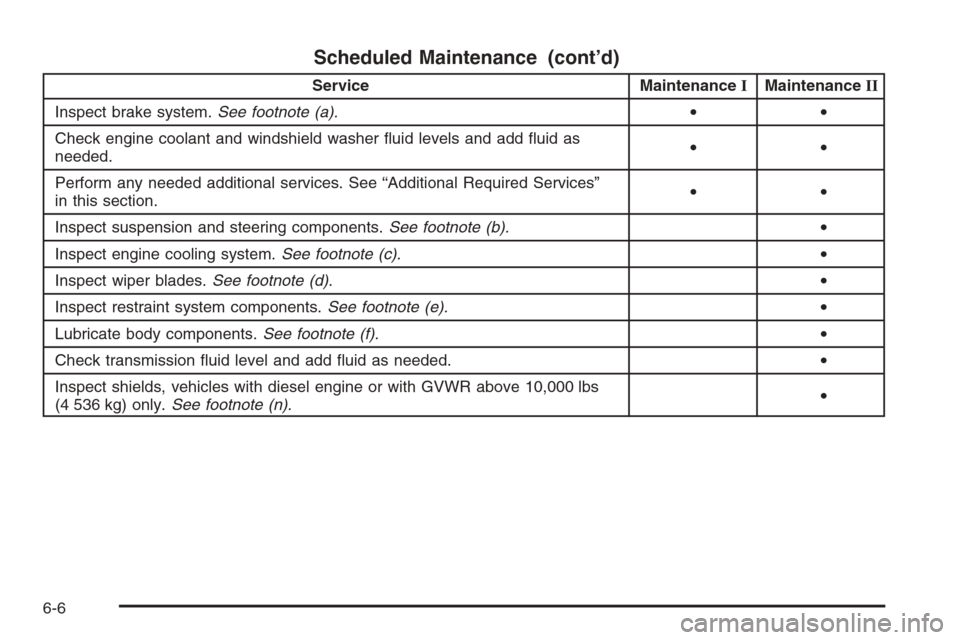
Scheduled Maintenance (cont’d)
Service MaintenanceIMaintenanceII
Inspect brake system.See footnote (a).••
Check engine coolant and windshield washer uid levels and add uid as
needed.••
Perform any needed additional services. See “Additional Required Services”
in this section.••
Inspect suspension and steering components.See footnote (b).•
Inspect engine cooling system.See footnote (c).•
Inspect wiper blades.See footnote (d).•
Inspect restraint system components.See footnote (e).•
Lubricate body components.See footnote (f).•
Check transmission uid level and add uid as needed.•
Inspect shields, vehicles with diesel engine or with GVWR above 10,000 lbs
(4 536 kg) only.See footnote (n).•
6-6