2005 CHEVROLET EPICA display
[x] Cancel search: displayPage 159 of 340
Root Directory
The root directory will be treated as a folder. If the root
directory has compressed audio files, the directory
will be displayed as F1 ROOT. All files contained directly
under the root directory will be accessed prior to any
root directory folders. However, playlists (Px) will always
be accessed before root folders or files.
Empty Directory or Folder
If a root directory or a folder exists somewhere in the
file structure that contains only folders/subfolders and no
compressed files directly beneath them, the player will
advance to the next folder in the file structure that
contains compressed audio files and the empty folder
will not be displayed or numbered.
No Folder
When the CD contains only compressed files, the files
will be located under the root folder. The next and
previous folder functions will have no function on a
CD that was recorded without folders or playlists.
When displaying the name of the folder the radio will
display ROOT.When the CD contains only playlists and compressed
audio files, but no folders, all files will be located under
the root folder. The folder down and the folder up
buttons will search playlists (Px) first and then go to the
root folder. When the radio displays the name of the
folder the radio will display ROOT.
Order of Play
Tracks will be played in the following order:
•Play will begin from the first track in the first playlist
and will continue sequentially through all tracks in
each playlist. When the last track of the last playlist
has been played, play will continue from the first
track of the first playlist.
•If the CD does not contain any playlists, then play
will begin from the first track under the root
directory. When all tracks from the root directory
have been played, play will continue from files
according to their numerical listing. After playing the
last track from the last folder, play will begin
again at the first track of the first folder or root
directory.
3-55
Page 160 of 340
File System and Naming
The song name that will be displayed will be the
song name that is contained in the ID3 tag. If the
song name is not present in the ID3 tag, then the
radio will display the file name without the extension
(such as .mp3) as the track name.
Track names longer than 32 characters or 4 pages will
be shortened. The display will not show parts of
words on the last page of text and the extension of the
filename will not be displayed.
Preprogrammed Playlists
You can access preprogrammed playlists which were
created by WinAmp™, MusicMatch™, or Real
Jukebox™ software, however, you will not have editing
capability. These playlists will be treated as special
folders containing compressed audio song files.
Playing an MP3
With the ignition on, insert a CD partway into the slot,
label side up. The player will pull it in, Loading, then
Filecheck, then MP3 will appear on the display. The CD
should begin playing. You can insert a CD with the
ignition off.As each new track starts to play, F001, the track
number, and the song name will appear on the display.
If you turn off the ignition or radio with a CD in the
player, it will stay in the player. When you turn on the
ignition or radio, the CD will start playing where it
stopped, if it was the last selected audio source.
The CD player can play the smaller 3 inch (8 cm) single
CDs with an adapter ring. Full-size CDs and the
smaller CDs are loaded in the same manner.
If playing a CD-R the sound quality may be reduced
due to CD-R quality, the method of recording, the quality
of the music that has been recorded, and the way the
CD-R has been handled. There may be an increase
in skipping, difficulty in finding tracks, and/or difficulty in
loading and ejecting. If these problems occur try a
known good CD.
Do not add paper labels to CDs, they could get caught
in the CD player.
If an error appears on the display, see “CD Messages”
later in this section.
All of the CD functions work the same while playing an
MP3, except for those listed here. See “Playing a
CD” earlier for more information.
3-56
Page 161 of 340
5 DN (Down):Press this pushbutton to go to the
previous directory.
6 UP:Press this pushbutton to go to the next directory.
TRACK (Previous/Next File):Turn this knob
one notch to go to the first track in the previous or to go
to the next folder. The player will continue moving
backward or forward through the CD with each turn of
the knob.
DIR (Directory):Press and release this button to
repeat the tracks in the current directory. DIR will appear
on the display.
Press and release this button twice to repeat the tracks
in all of the directories. ALL will appear on the display.
Press and release this button again to turn off
repeat play.CD Messages
CHECK CD:If this message appears on the display
and/or the CD comes out, it could be for one of the
following reasons:
•It is very hot. When the temperature returns to
normal, the CD should play.
•You are driving on a very rough road. When the
road becomes smoother, the CD should play.
•The CD is dirty, scratched, wet, or upside down.
•The air is very humid. If so, wait about an hour and
try again.
•The format of the CD may not be compatible.
See “MP3 Format” earlier in this section.
•There may have been a problem while burning
the CD.
•The label may be caught in the CD player.
If the CD is not playing correctly, for any other reason,
try a known good CD.
If any error occurs repeatedly or if an error cannot be
corrected, contact your dealer. If the radio displays
an error message, write it down and provide it to your
dealer when reporting the problem.
3-57
Page 163 of 340
Remember to keep the door closed whenever possible
to keep dirt and dust from getting inside the changer.
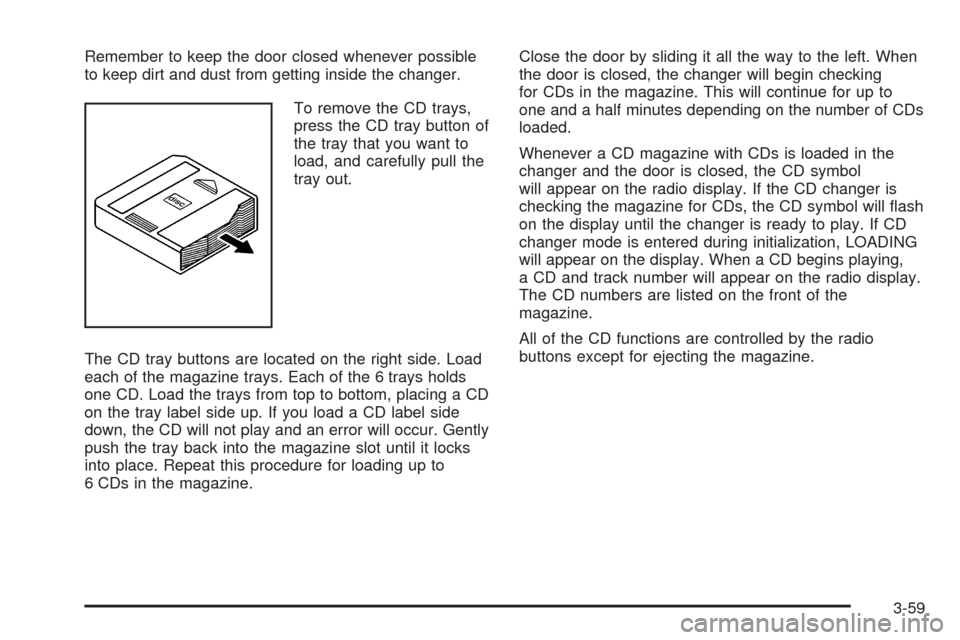
To remove the CD trays,
press the CD tray button of
the tray that you want to
load, and carefully pull the
tray out.
The CD tray buttons are located on the right side. Load
each of the magazine trays. Each of the 6 trays holds
one CD. Load the trays from top to bottom, placing a CD
on the tray label side up. If you load a CD label side
down, the CD will not play and an error will occur. Gently
push the tray back into the magazine slot until it locks
into place. Repeat this procedure for loading up to
6 CDs in the magazine.Close the door by sliding it all the way to the left. When
the door is closed, the changer will begin checking
for CDs in the magazine. This will continue for up to
one and a half minutes depending on the number of CDs
loaded.
Whenever a CD magazine with CDs is loaded in the
changer and the door is closed, the CD symbol
will appear on the radio display. If the CD changer is
checking the magazine for CDs, the CD symbol will flash
on the display until the changer is ready to play. If CD
changer mode is entered during initialization, LOADING
will appear on the display. When a CD begins playing,
a CD and track number will appear on the radio display.
The CD numbers are listed on the front of the
magazine.
All of the CD functions are controlled by the radio
buttons except for ejecting the magazine.
3-59
Page 164 of 340
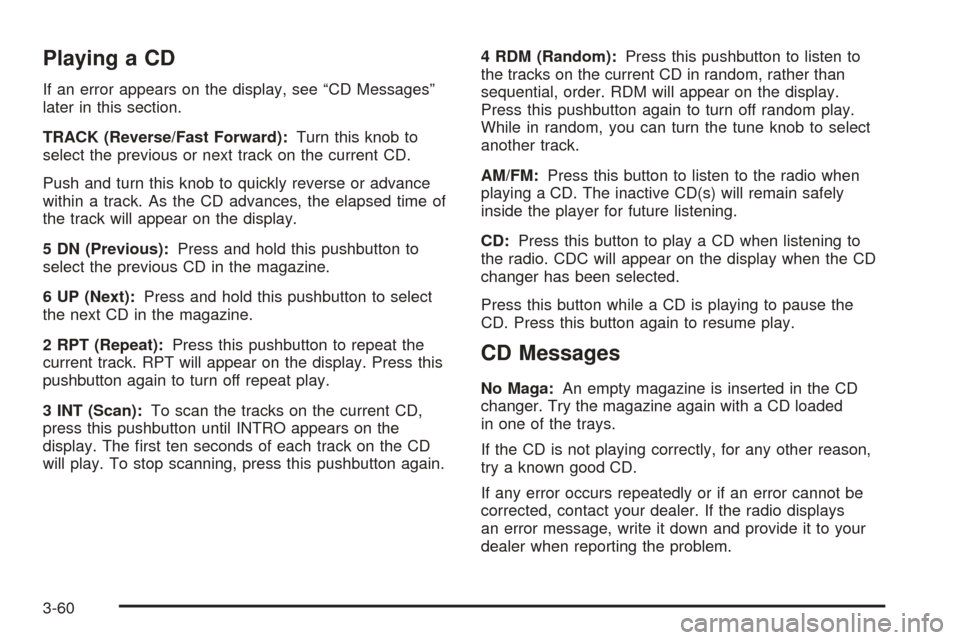
Playing a CD
If an error appears on the display, see “CD Messages”
later in this section.
TRACK (Reverse/Fast Forward):Turn this knob to
select the previous or next track on the current CD.
Push and turn this knob to quickly reverse or advance
within a track. As the CD advances, the elapsed time of
the track will appear on the display.
5 DN (Previous):Press and hold this pushbutton to
select the previous CD in the magazine.
6 UP (Next):Press and hold this pushbutton to select
the next CD in the magazine.
2 RPT (Repeat):Press this pushbutton to repeat the
current track. RPT will appear on the display. Press this
pushbutton again to turn off repeat play.
3 INT (Scan):To scan the tracks on the current CD,
press this pushbutton until INTRO appears on the
display. The first ten seconds of each track on the CD
will play. To stop scanning, press this pushbutton again.4 RDM (Random):Press this pushbutton to listen to
the tracks on the current CD in random, rather than
sequential, order. RDM will appear on the display.
Press this pushbutton again to turn off random play.
While in random, you can turn the tune knob to select
another track.
AM/FM:Press this button to listen to the radio when
playing a CD. The inactive CD(s) will remain safely
inside the player for future listening.
CD:Press this button to play a CD when listening to
the radio. CDC will appear on the display when the CD
changer has been selected.
Press this button while a CD is playing to pause the
CD. Press this button again to resume play.
CD Messages
No Maga:An empty magazine is inserted in the CD
changer. Try the magazine again with a CD loaded
in one of the trays.
If the CD is not playing correctly, for any other reason,
try a known good CD.
If any error occurs repeatedly or if an error cannot be
corrected, contact your dealer. If the radio displays
an error message, write it down and provide it to your
dealer when reporting the problem.
3-60
Page 311 of 340
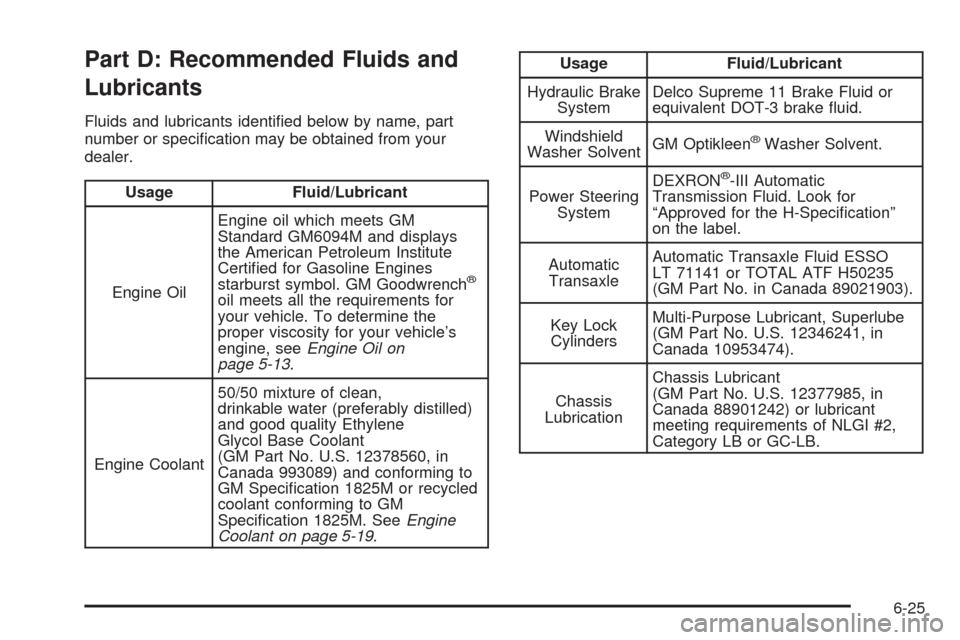
Part D: Recommended Fluids and
Lubricants
Fluids and lubricants identified below by name, part
number or specification may be obtained from your
dealer.
Usage Fluid/Lubricant
Engine OilEngine oil which meets GM
Standard GM6094M and displays
the American Petroleum Institute
Certified for Gasoline Engines
starburst symbol. GM Goodwrench
®
oil meets all the requirements for
your vehicle. To determine the
proper viscosity for your vehicle’s
engine, seeEngine Oil on
page 5-13.
Engine Coolant50/50 mixture of clean,
drinkable water (preferably distilled)
and good quality Ethylene
Glycol Base Coolant
(GM Part No. U.S. 12378560, in
Canada 993089) and conforming to
GM Specification 1825M or recycled
coolant conforming to GM
Specification 1825M. SeeEngine
Coolant on page 5-19.
Usage Fluid/Lubricant
Hydraulic Brake
SystemDelco Supreme 11 Brake Fluid or
equivalent DOT-3 brake fluid.
Windshield
Washer SolventGM Optikleen
®Washer Solvent.
Power Steering
SystemDEXRON
®-III Automatic
Transmission Fluid. Look for
“Approved for the H-Specification”
on the label.
Automatic
TransaxleAutomatic Transaxle Fluid ESSO
LT 71141 or TOTAL ATF H50235
(GM Part No. in Canada 89021903).
Key Lock
CylindersMulti-Purpose Lubricant, Superlube
(GM Part No. U.S. 12346241, in
Canada 10953474).
Chassis
LubricationChassis Lubricant
(GM Part No. U.S. 12377985, in
Canada 88901242) or lubricant
meeting requirements of NLGI #2,
Category LB or GC-LB.
6-25