2005 CHEVROLET BLAZER AUX
[x] Cancel search: AUXPage 144 of 436
Ashtrays and Cigarette Lighter
Your vehicle may be equipped with a cigarette lighter
receptacle.
To use the lighter, push it in all the way and let go.
When it is ready, it will pop back out by itself.
This receptacle can also be used as an Auxiliary Power
Outlet to connect electrical equipment such as a
cellular phone or CB radio.
Notice:Leaving electrical equipment on for
extended periods will drain the battery. Always turn
off electrical equipment when not in use and do
not plug in equipment that exceeds the maximum
amperage rating.
Certain electrical accessories may not be compatible
with the cigarette lighter power outlet and could result in
blown vehicle or adapter fuses.Notice:Adding any electrical equipment to your
vehicle may damage it or keep other components
from working as they should. The repairs would not
be covered by your warranty. Check with your
dealer before adding electrical equipment.
When adding electrical equipment, be sure to follow the
installation instructions included with the equipment.
Notice:Improper use of the cigarette lighter power
outlet can cause damage not covered by your
warranty. Do not hang any type of accessory or
accessory bracket from the plug. The cigarette
lighter power outlet is designed for accessory or as
a cigarette lighter only.
3-18
Page 176 of 436
6 RDM (Random):Press this pushbutton to hear the
tracks in random, rather than sequential, order. RDM ON
will appear on the display. RDM T and the track
number will appear on the display when each track
starts to play. Press this pushbutton again to turn
off random play. RDM OFF will appear on the display.
©SEEK¨:Press the left arrow to go to the start
of the current or to the previous track. Press the
right arrow to go to the start of the next track. If either
arrow is held or pressed more than once, the player will
continue moving backward or forward through the CD.
©SCAN¨:Press and hold either the SCAN or
the TYPE arrows for more than two seconds until SCAN
appears on the display and you hear a beep. The
radio will go to the next track, play for 10 seconds, then
go on to the next track. Press either the SCAN or the
TYPE arrows again, to stop scanning.INFO (Information):Press this knob to see how long
the current track has been playing. ET and the elapsed
time will appear on the display. To change the default
on the display, track or elapsed time, press the
knob until you see the display you want, then hold the
knob for two seconds. The radio will produce one
beep and the selected display will now be the default.
BAND:Press this button to listen to the radio when
a CD is playing. The inactive CD will remain safely
inside the radio for future listening.
CD AUX (Auxiliary):Press this button to play a CD
when listening to the radio. The inactive CD will remain
safely inside the radio for future listening.
Z(Eject):Press this button to stop a CD when it is
playing or to eject a CD when it is not playing. Eject
may be activated with either the ignition or radio off. CDs
may be loaded with the radio and ignition off if this
button is pressed rst.
3-50
Page 196 of 436
LOAD:Press this button to load CDs into the CD
player. This CD player will hold up to six CDs.
To insert one CD, do the following:
1. Turn the ignition on.
2. Press and release the LOAD button.
3. Wait for the indicator light, located to the right of the
slot, to turn green.
4. Load a CD. Insert the CD partway into the slot,
label side up. The player will pull the CD in.
To insert multiple CDs, do the following:
1. Turn the ignition on.
2. Press and hold the LOAD button for two seconds.
You will hear a beep and the indicator light, located
to the right of the slot, will begin to ash and
MULTI LOAD # will appear on the display.
3. Once the light stops ashing and turns green,
INSERT CD # will appear on the display, load
a CD. Insert the CD partway into the slot, label side
up. The player will pull the CD in.
Once the CD is loaded, the indicator light will begin
ashing again. Once the light stops ashing and
turns green, you can load another CD. The CD player
takes up to six CDs. Do not try to load more than six.To load more than one CD but less than six, complete
Steps 1 through 3. When nished loading CDs,
press the LOAD button to cancel the loading function.
The radio will begin to play the last CD loaded.
If more than one CD has been loaded, a number for
each CD will appear on the display.
Playing a Specic Loaded CD
For every CD loaded, a number will appear on the
display. To play a specic CD, rst press the CD AUX
button, then press the numbered pushbutton that
corresponds to the CD. A small bar will appear under
the CD number that is playing and the track number will
appear on the display.
If an error appears on the display, see “CD Messages”
later in this section.
CD
Z(Eject): Press this button to eject CD(s).
To eject the CD that is currently playing, press and
release this button.
To eject multiple CDs, do the following:
1. Press and hold the CD eject button for ve seconds.
You will hear a beep and the indicator light, located
to the right of the slot, will begin to ash and
EJECT ALL will appear on the display.
3-70
Page 272 of 436
Maintenance When Trailer Towing
Your vehicle will need service more often when you’re
pulling a trailer. See the Maintenance Schedule for more
on this. Things that are especially important in trailer
operation are automatic transmission uid (don’t overll),
engine oil, axle lubricant, belt, cooling system and
brake system. Each of these is covered in this manual,
and the Index will help you nd them quickly. If
you’re trailering, it’s a good idea to review these sections
before you start your trip.
Check periodically to see that all hitch nuts and bolts
are tight.
Trailer Wiring Harness
The light-duty trailer wiring is a six-wire harness
assembly. The optional heavy-duty trailer wiring is an
eight-wire harness assembly. The harnesses are stored
under the vehicle, along the passenger-side frame
crossmember on two-door vehicles or on the driver’s
side corner frame rear crossmember on four-door
vehicles. The heavy-duty trailer wiring is fused in the
engine compartment fuse block. SeeFuses and Circuit
Breakers on page 5-97. Both harnesses have no
connector and should be wired by a qualied electrical
technician. The technician can use the following
color code chart when connecting the wiring harness to
your trailer.
Dark Blue: Use for electric trailer brakes or auxiliary
wiring (eight-wire harness only).
Red: Use for battery charging; it connects to the
starter solenoid (eight-wire harness only).
Light Green: Back-up lamps.
Brown: Taillamps and parking lamps.
Yellow: Driver’s side stoplamp and turn signal.
Dark Green: Passenger’s side stoplamp and turn
signal.
White: Ground wire.
Light Blue: Auxiliary stoplamp.
Securely attach the harness to the trailer, then tape or
strap it to your vehicle’s frame rail. Be sure you
leave it loose enough so the wiring doesn’t bend or
break, but not so loose that it drags on the ground. Store
the harness in its original place. Wrap the harness
together and tie it neatly so it won’t be damaged.
4-70
Page 371 of 436
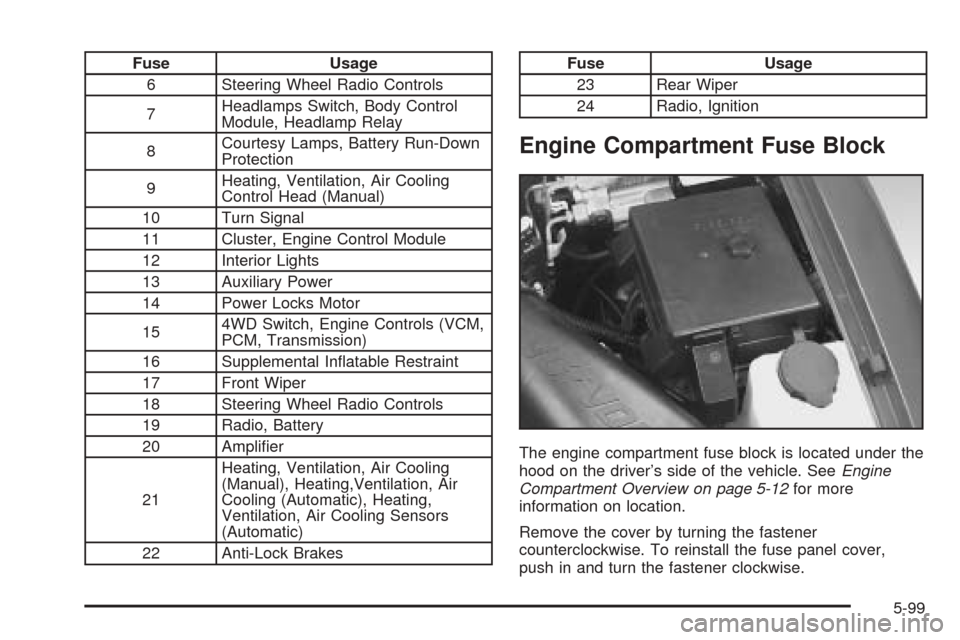
Fuse Usage
6 Steering Wheel Radio Controls
7Headlamps Switch, Body Control
Module, Headlamp Relay
8Courtesy Lamps, Battery Run-Down
Protection
9Heating, Ventilation, Air Cooling
Control Head (Manual)
10 Turn Signal
11 Cluster, Engine Control Module
12 Interior Lights
13 Auxiliary Power
14 Power Locks Motor
154WD Switch, Engine Controls (VCM,
PCM, Transmission)
16 Supplemental Inatable Restraint
17 Front Wiper
18 Steering Wheel Radio Controls
19 Radio, Battery
20 Amplier
21Heating, Ventilation, Air Cooling
(Manual), Heating,Ventilation, Air
Cooling (Automatic), Heating,
Ventilation, Air Cooling Sensors
(Automatic)
22 Anti-Lock BrakesFuse Usage
23 Rear Wiper
24 Radio, Ignition
Engine Compartment Fuse Block
The engine compartment fuse block is located under the
hood on the driver’s side of the vehicle. SeeEngine
Compartment Overview on page 5-12for more
information on location.
Remove the cover by turning the fastener
counterclockwise. To reinstall the fuse panel cover,
push in and turn the fastener clockwise.
5-99