2005 CHEVROLET AVALANCHE tow
[x] Cancel search: towPage 200 of 496

Highbeam On Light
This light will come on
when the high-beam
headlamps are in use.
SeeHeadlamp High/Low-Beam Changer on page 3-8.
Tow/Haul Mode Light
This light is displayed
when the tow/haul mode
has been activated.
For more information, see “Tow/Haul Mode” under
Towing a Trailer on page 4-64.
Fuel Gage
When the ignition is on, the fuel gage tells you about
how much fuel you have left in your tank.
The gage will rst indicate empty before you are out of
fuel, and you should get more fuel as soon as possible.
When the fuel tank is low the FUEL LEVEL LOW
message will appear. SeeDIC Warnings and Messages
on page 3-49for more information.
United StatesCanada
3-44
Page 213 of 496

TRACTION SYS (System) LIMITED
If the brake traction control system activates constantly
or if the brakes have heated up due to high-speed
braking, brake traction control will be disabled and the
TRACTION SYS LIMITED message will be displayed.
For more information on the StabiliTrak
®system
and traction control, seeStabiliTrak®System on
page 4-10.
TRANS (Transmission) HOT IDLE
ENGINE
If the transmission uid gets hot, this message will
appear on the DIC along with a continuous chime.
Driving with the transmission uid temperature high can
cause damage to the vehicle. Stop the vehicle and
let it idle to allow the transmission to cool. This message
will clear and the chime will stop when the uid
temperature reaches a safe level. SeeTransmission
Temperature Gage on page 3-38.
Notice:If you drive your vehicle while the
transmission uid is overheating and the
transmission temperature warning is displayed on
the instrument panel cluster and/or DIC, you
can damage the transmission. This could lead to
costly repairs that would not be covered byyour warranty. Do not drive your vehicle with
overheated transmission uid or while transmission
temperature warning is displayed.
TRANSMISSION HOT
If the transmission uid temperature becomes high, this
message will appear on the DIC display.
When the transmission enters the protection mode, you
may notice a change in the transmission shifting
patterns. When the transmission uid temperature
returns to normal, the display will turn off and the
transmission shifting patterns will return to normal.
Notice:If you drive your vehicle while the
transmission uid is overheating and the
transmission temperature warning is displayed on
the instrument panel cluster and/or DIC, you
can damage the transmission. This could lead to
costly repairs that would not be covered by
your warranty. Do not drive your vehicle with
overheated transmission uid or while transmission
temperature warning is displayed.
The following situations can cause the transmission to
operate at higher temperatures:
Towing a trailer
Hot outside air temperatures
Hauling a large or heavy load
3-57
Page 225 of 496

Adjusting the Speakers (Balance/Fade)
AUDIO:To adjust the balance between the right
and the left speakers, push and release the AUDIO
knob until BAL appears on the display. Turn the knob to
move the sound toward the right or the left speakers.
To adjust the fade between the front and the rear
speakers, push and release the AUDIO knob until FADE
appears on the display. Turn the knob to move the
sound toward the front or the rear speakers.
To adjust the balance or fade to the middle position,
while it is displayed, push the AUDIO knob, then push it
again and hold it until the radio produces one beep.
The balance and fade will be adjusted to the middle
position and the display will show the speaker balance.
To adjust all tone and speaker controls to the middle
position, push and hold the AUDIO knob when no tone
or speaker control is displayed. ALL CENTERED will
appear on the display, you will hear a beep, and
the display level will be adjusted to the middle position.
Finding a Program Type (PTY) Station
(RDS and XM™)
To select and nd a desired PTY perform the following:
1. Press the TYPE button to activate program type
select mode. TYPE and a PTY will appear on the
display.
2. Turn the TYPE knob or press and release the
TYPE button to select a PTY.
3. Once the desired PTY is displayed, press and
release either the TYPE or the SEEK arrows to
select and to take you to the PTY’s rst station.
4. To go to another station within that PTY and the
PTY is displayed, press either the TYPE or the
SEEK arrows once. If the PTY is not displayed, go
back to Step 1.
5. Press either the TYPE or the SEEK arrows to exit
program type select mode.
If the radio cannot nd the desired program type, NONE
will appear on the display and the radio will return to
the last station you were listening to.
3-69
Page 236 of 496

Adjusting the Speakers (Balance/Fade)
AUDIO:To adjust the balance between the right
and the left speakers, push and release the AUDIO
knob until BAL appears on the display. Turn the knob to
move the sound toward the right or the left speakers.
To adjust the fade between the front and rear speakers,
push and release the AUDIO knob until FAD appears
on the display. Turn the knob to move the sound toward
the front or the rear speakers.
To adjust the balance or fade to the middle position
while it is displayed, push and hold the AUDIO knob.
The radio will produce one beep and adjust the display
level to the middle position.
To adjust all tone and speaker controls to the middle
position, push and hold the AUDIO knob when no tone
or speaker controls are displayed. ALL CENTERED
will appear on the display and you will hear a beep.
Finding a Program Type (PTY) Station
(RDS and XM™)
To select and nd a desired PTY perform the following:
1. Press the TYPE button to activate program type
select mode. P-TYPE and the last selected PTY
will appear on the display.
2. Turn the TYPE knob or press and release the
TYPE button to select a PTY.3. Once the desired PTY is displayed, press either the
TYPE or the SEEK arrows to select and to take you
to the PTY’s rst station.
4. To go to another station within that PTY, press the
TYPE button then, press either the TYPE or the
SEEK arrows once.
5. Press either the TYPE or the SEEK arrows twice to
exit program type select mode.
SCAN:Scan the stations within a PTY by performing
the following:
1. Press the TYPE button to activate program type
select mode. P-TYPE and the last selected PTY
will appear on the display.
2. Turn the TYPE knob or press and release the
TYPE button to select a PTY.
3. Once the desired PTY is displayed, press and
hold either the TYPE or the SCAN arrows for
two seconds, and the radio will begin scanning the
stations in the PTY.
4. Press either the TYPE or the SCAN arrows to stop
scanning.
BAND (Alternate Frequency):Alternate frequency
allows the radio to switch to a stronger station with the
same program type. To turn alternate frequency on,
press and hold BAND for two seconds. AF ON will
appear on the display. The radio may switch to stations
with a stronger frequency.
3-80
Page 255 of 496

Problem Recommended Action
The remote control does
not work.Check to make sure there
is no obstruction between
the remote control and the
transmitter window.
Check the batteries to
make sure they are not
dead or installed
incorrectly.
The parental control
button might have been
turned on. The power
indicator light will ash.
After stopping the player, I
push Play but sometimes
the DVD starts where I
left off and sometimes at
the beginning.If the stop button was
pressed one time, the
DVD player will resume
playing where the DVD
was stopped. If the stop
button was pressed two
times the DVD player will
begin to play from the
beginning of the DVD.Problem Recommended Action
The auxiliary source is
running but there is no
picture or sound.Check that the DVD
player is in the auxiliary
source mode.
Check the auxiliary input
connections at both
devices.
My disc is stuck in the
player. The Load/Eject
button does not work.Turn the DVD power off,
then on, then press the
load/eject button on the
DVD player.
Do not attempt to forcibly
remove the disc from the
DVD player. This could
permanently damage the
disc and DVD player.
Sometimes the wireless
headphone audio cuts out
or buzzes.Check for obstructions,
low batteries, reception
range, and interference
from cellular telephone
towers or by using your
cellular telephone in the
vehicle.
Check that the
headphones are facing
the front of the vehicle.
3-99
Page 261 of 496
Your Driving, the Road, and Your Vehicle..........4-2
Defensive Driving...........................................4-2
Drunken Driving.............................................4-2
Control of a Vehicle........................................4-5
Braking.........................................................4-5
Anti-Lock Brake System (ABS).........................4-6
Braking in Emergencies...................................4-8
Traction Assist System (TAS)...........................4-8
Locking Rear Axle........................................4-10
StabiliTrak
®System......................................4-10
Steering......................................................4-13
Off-Road Recovery.......................................4-15
Passing.......................................................4-15
Loss of Control.............................................4-16
Off-Road Driving with Your Four-Wheel-Drive
Vehicle....................................................4-18
Driving at Night............................................4-31
Driving in Rain and on Wet Roads..................4-32
City Driving..................................................4-35Freeway Driving...........................................4-36
Before Leaving on a Long Trip.......................4-38
Highway Hypnosis........................................4-38
Hill and Mountain Roads................................4-39
Winter Driving..............................................4-41
If Your Vehicle is Stuck in Sand, Mud,
Ice or Snow..............................................4-45
Rocking Your Vehicle to Get It Out.................4-46
Recovery Hooks...........................................4-46
Loading Your Vehicle....................................4-47
Adding a Snow Plow or Similar Equipment.......4-54
Towing..........................................................4-58
Towing Your Vehicle.....................................4-58
Recreational Vehicle Towing...........................4-58
Level Control...............................................4-63
Truck-Camper Loading Information..................4-63
Trailer Recommendations...............................4-64
Towing a Trailer...........................................4-64
Section 4 Driving Your Vehicle
4-1
Page 306 of 496
Rocking Your Vehicle to Get It Out
First, turn your steering wheel left and right. That will
clear the area around your front wheels. If you have a
four-wheel-drive vehicle, shift into 4HI or 4LO. If your
vehicle has the Traction Assist System (TAS), you should
turn it off by pressing the TAS on/off button. If your
vehicle has the StabiliTrak
®System, turn the system off
by pressing the StabiliTrak®button so that the
STABILITY SYS DISABLED message and the traction off
light are illuminated on the instrument panel cluster. Then
shift back and forth between REVERSE (R) and a
forward gear, spinning the wheels as little as possible.
Release the accelerator pedal while you shift, and press
lightly on the accelerator pedal when the transmission is
in gear. By slowly spinning your wheels in the forward
and reverse directions, you will cause a rocking motion
that may free your vehicle. If that does not get you out
after a few tries, you may need to be towed out. Or, you
can use your recovery hooks if your vehicle has them.
If you do need to be towed out, seeTowing Your Vehicle
on page 4-58.
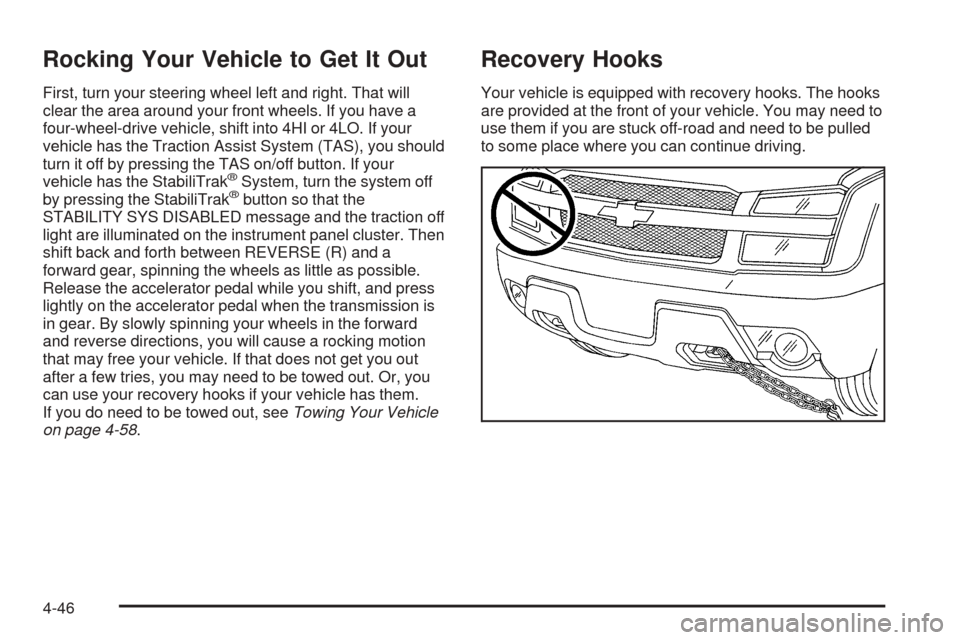
Recovery Hooks
Your vehicle is equipped with recovery hooks. The hooks
are provided at the front of your vehicle. You may need to
use them if you are stuck off-road and need to be pulled
to some place where you can continue driving.
4-46
Page 307 of 496
{CAUTION:
These hooks, when used, are under a lot of
force. Always pull the vehicle straight out.
Never pull on the hooks at a sideways angle.
The hooks could break off and you or others
could be injured from the chain or cable
snapping back.
Notice:Never use recovery hooks to tow the
vehicle. Your vehicle could be damaged and it would
not be covered by warranty.
Loading Your Vehicle
It is very important to know how much weight your
vehicle can carry. This weight is called the vehicle
capacity weight and includes the weight of all occupants,
cargo and all nonfactory-installed options. Two labels
on your vehicle show how much weight it was designed
to carry, the Tire and Loading Information label and
the Certication/Tire label.
{CAUTION:
Do not load your vehicle any heavier than the
Gross Vehicle Weight Rating (GVWR), or either
the maximum front or rear Gross Axle Weight
Rating (GAWR). If you do, parts on your
vehicle can break, and it can change the way
your vehicle handles. These could cause you
to lose control and crash. Also, overloading
can shorten the life of your vehicle.
4-47