2005 CADILLAC CTS instrument panel
[x] Cancel search: instrument panelPage 131 of 432

The main components of the instrument panel are the following:
A. Air Outlets. SeeOutlet Adjustment on page 3-31.
B. Turn Signal/Multifunction Lever. SeeTurn
Signal/Multifunction Lever on page 3-8.
C. Recongurable Steering Wheel Controls (CTS). See
Recongurable Steering Wheel Controls (SWC)
(CTS) on page 3-7or Message Center Controls
(CTS-V) seeMessage Center (CTS-V) on page 3-51.
D. Instrument Panel Cluster. SeeInstrument Panel
Cluster on page 3-35.
E. Windshield Wiper Lever. SeeWindshield Wipers on
page 3-10.
F. Hazard Warning Flasher Button. SeeHazard
Warning Flashers on page 3-6.
G. Audio/Navigation System. SeeNavigation/Radio
System on page 3-105.
H. OnStar
®Button (Base Radio) or Voice Recognition
Button (Navigation System) (CTS). SeeAudio
Steering Wheel Controls (CTS) on page 3-105or
Cruise Controls (CTS-V) seeCruise Control
(CTS) on page 3-12orCruise Control (CTS-V) on
page 3-16.I. Audio Volume Knob and Source Button. SeeAudio
Steering Wheel Controls (CTS) on page 3-105
or Cruise Controls (CTS-V) seeCruise Control (CTS)
on page 3-12orCruise Control (CTS-V) on
page 3-16.
J. Storage Compartment or Ashtray. SeeAshtrays and
Cigarette Lighter on page 3-26.
K. Transmission Shift Lever. SeeAutomatic
Transmission Operation on page 2-26orManual
Transmission Operation on page 2-31.
L. Accessory Power Outlet or Cigarette Lighter. See
Accessory Power Outlets on page 3-25orAshtrays
and Cigarette Lighter on page 3-26.
M. Climate Control System. SeeDual Climate Control
System on page 3-27.
N. Glove Box. SeeGlove Box on page 2-50.
3-5
Page 132 of 432

Hazard Warning Flashers
Your hazard warning ashers let you warn others. They
also let police know you have a problem. Your front
and rear turn signal lamps will ash on and off.
The hazard warning
asher button is located
near the center of the
instrument panel.
Your hazard warning ashers work no matter what
position your key is in, and even if the key is not in.
Press the button to make the front and rear turn signal
lamps ash on and off. Press the button again to
turn the ashers off.
When the hazard warning ashers are on, your turn
signals will not work.
Other Warning Devices
If you carry reective triangles, you can set them up at
the side of the road about 300 feet (100 m) behind
your vehicle.
Horn
Press near or on the horn symbols on your steering
wheel pad to sound the horn.
Tilt Wheel
A tilt wheel allows you to adjust the steering wheel
before you drive. You can raise it to the highest level to
give your legs more room when you exit and enter
the vehicle.
The lever that allows you to tilt the steering wheel is
located on the left side of the steering column.
To tilt the wheel, hold the steering wheel and pull the
lever. Then move the steering wheel to a comfortable
position and release the lever to lock the wheel in place.
3-6
Page 135 of 432

Flash-To-Pass Feature. SeeFlash-to-Pass on
page 3-10.
-Fog Lamps. SeeFog Lamps on page 3-23.
ICruise Control. SeeCruise Control (CTS) on
page 3-12orCruise Control (CTS-V) on page 3-16.
Turn and Lane-Change Signals
To signal a turn, move the lever all the way up or down.
The lever returns automatically when the turn is
complete.
An arrow on the instrument
panel cluster will ash in
the direction of the
turn or lane change.
Raise or lower the lever until the arrow starts to ash to
signal a lane change. Hold it there until the lane
change is complete. The lever returns to its original
position when it’s released.Arrows that ash rapidly when signaling for a turn or
lane change may be caused by a burned-out signal bulb.
Other driver’s won’t see the signal.
Replace burned-out bulbs to help avoid possible
accidents. Check the fuse and for burned-out bulbs if
the arrow fails to work when signaling a turn. SeeFuses
and Circuit Breakers on page 5-96for more information.
Turn Signal On Chime
If the turn signal is left on for about 1 mile (1.6 km), a
warning chime will sound and the Turn Signal On
message will appear on the Driver Information Center
(DIC) display. See “Turn Signal On” underDIC Warnings
and Messages on page 3-65for more information.
Headlamp High/Low-Beam Changer
Push forward on the turn signal/multifunction lever
to change the headlamps from low to high beam. Pull
the lever back and then release it to change from high to
low beam.
This light on the
instrument panel cluster
will be on, indicating
high-beam usage.
3-9
Page 139 of 432

With cruise control, you can maintain a speed of about
25 mph (40 km/h) or more without keeping your foot
on the accelerator. This can really help on long
trips. Cruise control does not work at speeds below
about 25 mph (40 km/h).
If you apply your brakes, the cruise control will shut off.
{CAUTION:
Cruise control can be dangerous where you
cannot drive safely at a steady speed. So, do
not use your cruise control on winding roads
or in heavy traffic.
Cruise control can be dangerous on slippery
roads. On such roads, fast changes in tire
traction can cause needless wheel spinning,
and you could lose control. Do not use cruise
control on slippery roads.
If your vehicle is in cruise control when the traction
control system begins to limit wheel spin, the cruise
control will automatically disengage. SeeTraction
Control System (TCS) (CTS) on page 4-8orTraction
Control System (TCS) (CTS-V) on page 4-9and
StabiliTrak
®System on page 4-11. When road
conditions allow you to safely use it again, you may turn
the cruise control back on.
Setting Cruise Control
{CAUTION:
If you leave your cruise control on when you
are not using cruise, you might hit a button
and go into cruise when you do not want to.
You could be startled and even lose control.
Keep the cruise control switch off until you
want to use cruise control.
1. Move the cruise control switch to on.
2. Get up to the speed you want.
3. Press in the set button at the end of the lever and
release it.
4. Take your foot off the accelerator pedal.
This light on the instrument
panel cluster will come
on while cruise control
is on.
3-13
Page 143 of 432

Setting Cruise Control
{CAUTION:
If you leave your cruise control on when you
are not using cruise, you might hit a button
and go into cruise when you do not want to.
You could be startled and even lose control.
Keep the cruise control switch off until you
want to use cruise control.
1. Press the cruise control on/off button to turn cruise
control on. An indicator light on the button will come
on to show that the cruise control is on.
2. Accelerate to the speed you want.
3. Press the set button and release it. This will set the
cruise control.
4. Remove your foot from the accelerator pedal.This light on the instrument
panel cluster will come on
when cruise control is
on. It will go out when
cruise control is turned off.
Resuming a Set Speed
Suppose you set your cruise control at a desired speed
and then you apply the brake. This shuts off the
cruise control. But you don’t need to reset it.
Once the vehicle is traveling approximately 25 mph
(40 km/h) or more, you can press the plus
(resume/accelerate) button to return to your
desired preset speed. The cruise control light will be
displayed again.
The vehicle will return to and stay at your preset speed.
If you press and hold the plus (resume/accelerate)
button, the vehicle speed will increase until you release
the button or apply the brake. Unless you want to go
faster, do not press and hold the plus
(resume/accelerate) button.
3-17
Page 146 of 432

;(Parking Lamps):Turn the control to this
position to turn on the parking lamps together with
the following:
Sidemarker Lamps
Taillamps
License Plate Lamps
Instrument Panel Lights
5(Headlamps):Turn the control to this position to
turn on the headlamps, together with the previously
listed lamps and lights.
CTS-V
The exterior lamp control for the CTS-V has the
following four positions:
9(Off):Turning the control to this position turns off
all lamps except the Daytime Running Lamps (DRL).
;(Parking Lamps):Turning the control to this
position turns on the parking lamps together with
the following:
Sidemarker Lamps
Taillamps
License Plate Lamps
Instrument Panel Lights
5(Headlamps):Turning the control to this position
turns on the headlamps, together with the previously
listed lamps and lights.
AUTO (Automatic):Turning the control to this position
puts the headlamps in automatic mode. AUTO mode
will turn the exterior lamps on and off depending
upon how much light is available outside of the vehicle.
Wiper Activated Headlamps
This feature activates the headlamps and parking lamps
after the windshield wipers have been in use for
about six seconds. For this feature to work, the exterior
lamp control must be in AUTO.
When the exterior lamp control is off or in the parking
lamp position and the windshield wiper control is in any
position except off, the Headlamps Suggested
message will appear on the DIC display. See
“Headlamps Suggested Message” underDIC Warnings
and Messages on page 3-65for more information.
When the ignition is turned to OFF, the wiper-activated
headlamps will immediately turn off. They will also
turn off if the windshield wiper control is turned off.
3-20
Page 147 of 432

Headlamps on Reminder
A warning chime will sound if the exterior lamp control
is left on in either the headlamp or parking lamp position
and the driver’s door is opened with the ignition off.
SeeLights On Reminder on page 3-49for additional
information.
Daytime Running Lamps (DRL)
Daytime Running Lamps (DRL) can make it easier for
others to see the front of your vehicle during the
day. DRL can be helpful in many different driving
conditions, but they can be especially helpful in the short
periods after dawn and before sunset. Fully functional
daytime running lamps are required on all vehicles
rst sold in Canada.
The DRL system will make the turn signal lamps come
on when the following conditions are met:
It is still daylight and the ignition is in ON
or START,
the exterior lamp control is in off or AUTO with the
headlamps off, and
an automatic transmission is not in PARK (P) or the
parking brake is not set on a manual transmission.When DRL are on, only your front turn signal lamps will
be on. No other exterior lamps will be on when the
DRL are being used. Your instrument panel won’t be lit
up either.
When the exterior lamp control is in AUTO and it’s dark
enough outside, the DRL will turn off and the low-beam
headlamps will turn on. When it’s bright enough
outside, the low-beam headlamps will go off, and the
DRL will turn back on. If you start your vehicle in a dark
garage, the automatic headlamp system will come on
immediately. Once you leave the garage, it will take
about one minute for the automatic headlamp system to
change to DRL if it is light outside. During that delay,
your instrument panel cluster may not be as bright
as usual. Make sure your instrument panel brightness
lever is in the full bright position. SeeInstrument
Panel Brightness on page 3-24.
3-21
Page 148 of 432
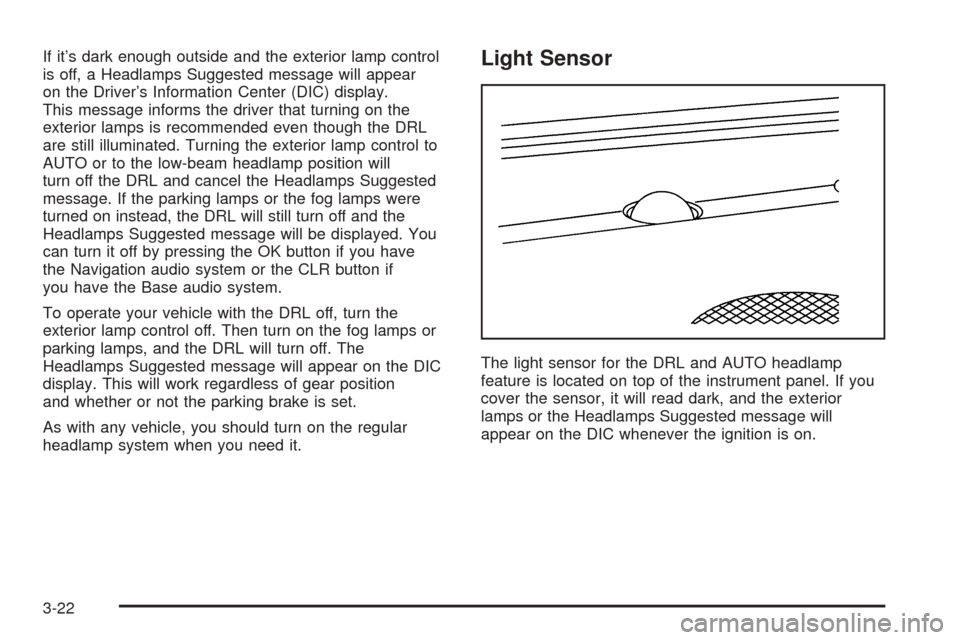
If it’s dark enough outside and the exterior lamp control
is off, a Headlamps Suggested message will appear
on the Driver’s Information Center (DIC) display.
This message informs the driver that turning on the
exterior lamps is recommended even though the DRL
are still illuminated. Turning the exterior lamp control to
AUTO or to the low-beam headlamp position will
turn off the DRL and cancel the Headlamps Suggested
message. If the parking lamps or the fog lamps were
turned on instead, the DRL will still turn off and the
Headlamps Suggested message will be displayed. You
can turn it off by pressing the OK button if you have
the Navigation audio system or the CLR button if
you have the Base audio system.
To operate your vehicle with the DRL off, turn the
exterior lamp control off. Then turn on the fog lamps or
parking lamps, and the DRL will turn off. The
Headlamps Suggested message will appear on the DIC
display. This will work regardless of gear position
and whether or not the parking brake is set.
As with any vehicle, you should turn on the regular
headlamp system when you need it.Light Sensor
The light sensor for the DRL and AUTO headlamp
feature is located on top of the instrument panel. If you
cover the sensor, it will read dark, and the exterior
lamps or the Headlamps Suggested message will
appear on the DIC whenever the ignition is on.
3-22