2005 BUICK LESABRE service
[x] Cancel search: servicePage 297 of 392

Tire Size
The following illustration shows an example of a typical
passenger vehicle tire size.
(A) Passenger (P-Metric) Tire:The United States
version of a metric tire sizing system. The letter P as the
rst character in the tire size means a passenger
vehicle tire engineered to standards set by the U.S. Tire
and Rim Association.
(B) Tire Width:The three-digit number indicates the
tire section width in millimeters from sidewall to sidewall.
(C) Aspect Ratio:A two-digit number that indicates
the tire height-to-width measurements. For example, if
the tire size aspect ratio is 60, as shown in item C of
the illustration, it would mean that the tire’s sidewall is
60 percent as high as it is wide.(D) Construction Code:A letter code is used to
indicate the type of ply construction in the tire. The letter
R means radial ply construction; the letter D means
diagonal or bias ply construction; and the letter B means
belted-bias ply construction.
(E) Rim Diameter:Diameter of the wheel in inches.
(F) Service Description:These characters represent
the load range and speed rating of the tire. The load
index represents the load carry capacity a tire is certied
to carry. The load index can range from 1 to 279. The
speed rating is the maximum speed a tire is certied
to carry a load. Speed ratings range from A to Z.
Tire Terminology and Denitions
Air Pressure:The amount of air inside the tire pressing
outward on each square inch of the tire. Air pressure
is expressed in pounds per square inch (psi) or
kiloPascal (kPa).
Accessory Weight:This means the combined weight
of optional accessories. Some examples of optional
accessories are, automatic transmission, power steering,
power brakes, power windows, power seats, and air
conditioning.
5-57
Page 302 of 392

Check Tire Pressure System
If your vehicle has the check tire pressure system, it
can alert you to a large change in the pressure of one
tire. The system will not alert you before you drive
that a tire is low or at. You must begin driving before
the system will work properly.
The CHECK TIRE PRESSURE message will appear on
the Driver Information Center (DIC) if pressure
difference (low pressure) is detected in one tire. The
check tire pressure system may not alert you if:
More than one tire is low.
The vehicle is moving faster than
65 mph (105 km/h).
The system is not yet calibrated.
The tire treadwear is uneven.
The compact spare tire is installed.
Tire chains are being used.
The vehicle is being driven on a rough or
frozen road.
If the anti-lock brake system warning light comes on,
the check tire pressure system may not be working
properly. See your dealer for service. Also, see
Anti-Lock Brake System Warning Light on page 3-39.The check tire pressure system detects differences in
tire rotation speeds that are caused by changes in
tire pressure. The system can alert you about a
low tire — but it does not replace normal tire
maintenance. SeeTires on page 5-54.
When the CHECK TIRE PRESSURE message appears
on the Driver Information Center, you should stop as
soon as you can and check all your tires for damage. If
a tire is at, seeIf a Tire Goes Flat on page 5-69.
Also check the tire pressure in all four tires as soon as
you can. SeeInation - Tire Pressure on page 5-60.
Any time you adjust a tire’s pressure or have one
or more tires repaired or replaced, you will need to reset
(calibrate) the check tire pressure system. You will
also need to reset the system whenever you rotate the
tires, buy new tires and install or remove the compact
spare tire.
Do not reset the check tire pressure system without rst
correcting the cause of the problem and checking
and adjusting the pressure in all four tires. If you reset
the system when the tire pressures are incorrect,
the check tire pressure system will not work properly
and may not alert you when a tire is low or high.
5-62
Page 303 of 392
To reset (calibrate) the system:
1. Turn the ignition switch to RUN.
2. Press the GAGE INFO button on the DIC until TIRE
PRESSURE appears on the display.
3. Press and hold the DIC RESET button for about
ve seconds. After ve seconds, the display will
show TIRE PRESSURE RESET. If TIRE
PRESSURE RESET does not appear in the display
after about ve seconds repeat the procedure. If it
does not work after two tries, see your dealer for
service. After you release the DIC RESET button,
TIRE PRESSURE NORMAL will appear in the
display.
The system completes the calibration process during
driving. Calibration time can take 45 to 90 minutes,
depending on your driving habits. After the system has
been calibrated, the system will alert the driver that
a tire is low, up to a maximum speed of 65 mph
(105 km/h).
Tire Inspection and Rotation
Tires should be rotated every 5,000 to 8,000 miles
(8 000 to 13 000 km).Any time you notice unusual wear rotate your tires as
soon as possible and check wheel alignment. Also
check for damaged tires or wheels. SeeWhen It Is Time
for New Tires on page 5-64andWheel Replacement
on page 5-67for more information.
The purpose of regular rotation is to achieve more
uniform wear for all tires on the vehicle. The rst rotation
is the most important. SeePart A: Scheduled
Maintenance Services on page 6-4, for scheduled
rotation intervals.
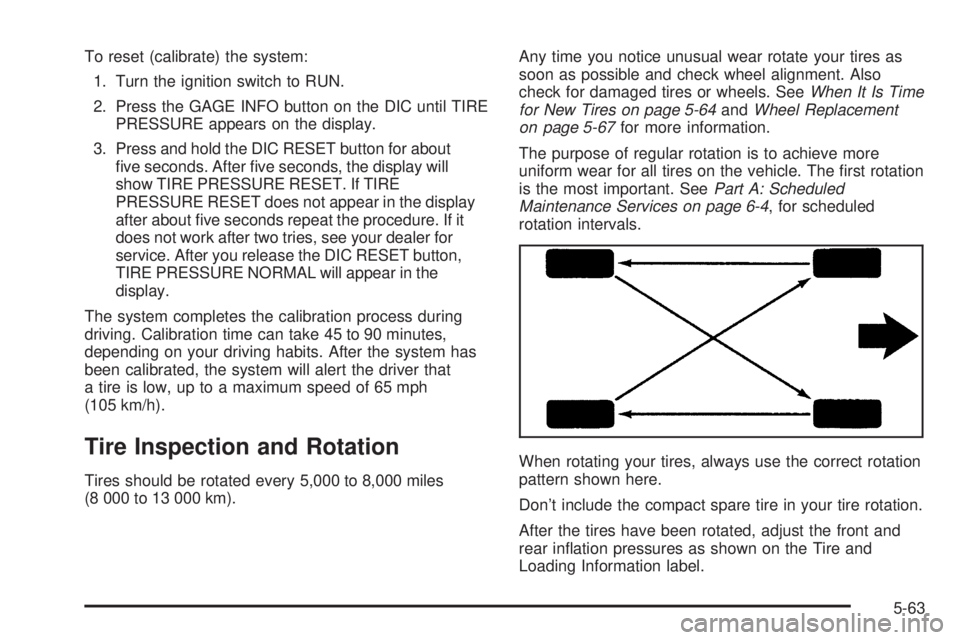
When rotating your tires, always use the correct rotation
pattern shown here.
Don’t include the compact spare tire in your tire rotation.
After the tires have been rotated, adjust the front and
rear ination pressures as shown on the Tire and
Loading Information label.
5-63
Page 305 of 392

Buying New Tires
To nd out what kind and size of tires your vehicle
needs, look at the tire and loading information label. For
more information about this label and its location on
your vehicle, seeLoading Your Vehicle on page 4-31.
The tires installed on your vehicle when it was new had
a Tire Performance Criteria Specication (TPC Spec)
number on each tire’s sidewall. When you get new tires,
GM recommends that you get tires with that same
TPC Spec number. That way your vehicle will continue
to have tires that are designed to give proper
endurance, handling, speed rating, load range, traction,
ride and other things during normal service on your
vehicle. If your tires have an all-season tread design,
the TPC number will be followed by an “MS” (for mud
and snow).
If you ever replace your tires with those not having a
TPC Spec number, make sure they are the same size,
load range, speed rating and construction type (bias,
bias-belted or radial) as your original tires.{CAUTION:
Mixing tires could cause you to lose control
while driving. If you mix tires of different sizes
or types (radial and bias-belted tires), the
vehicle may not handle properly, and you
could have a crash. Using tires of different
sizes may also cause damage to your vehicle.
Be sure to use the same size and type tires on
all wheels. It’s all right to drive with your
compact spare temporarily, it was developed
for use on your vehicle. SeeCompact Spare
Tire on page 5-78.
{CAUTION:
If you use bias-ply tires on your vehicle, the
wheel rim anges could develop cracks after
many miles of driving. A tire and/or wheel
could fail suddenly, causing a crash. Use only
radial-ply tires with the wheels on your vehicle.
5-65
Page 306 of 392

Uniform Tire Quality Grading
Quality grades can be found where applicable on the
tire sidewall between tread shoulder and maximum
section width. For example:
Treadwear 200 Traction AA Temperature A
The following information relates to the system
developed by the United States National Highway
Traffic Safety Administration, which grades tires by
treadwear, traction and temperature performance. (This
applies only to vehicles sold in the United States.)
The grades are molded on the sidewalls of most
passenger car tires. The Uniform Tire Quality Grading
system does not apply to deep tread, winter-type
snow tires, space-saver or temporary use spare tires,
tires with nominal rim diameters of 10 to 12 inches
(25 to 30 cm), or to some limited-production tires.
While the tires available on General Motors passenger
cars and light trucks may vary with respect to these
grades, they must also conform to federal safety
requirements and additional General Motors Tire
Performance Criteria (TPC) standards.
Treadwear
The treadwear grade is a comparative rating based on
the wear rate of the tire when tested under controlled
conditions on a specied government test course.
For example, a tire graded 150 would wear one and
a half (1.5) times as well on the government course as
a tire graded 100. The relative performance of tires
depends upon the actual conditions of their use,
however, and may depart signicantly from the norm
due to variations in driving habits, service practices and
differences in road characteristics and climate.
Traction – AA, A, B, C
The traction grades, from highest to lowest, are AA, A,
B, and C. Those grades represent the tire’s ability
to stop on wet pavement as measured under controlled
conditions on specied government test surfaces of
asphalt and concrete. A tire marked C may have poor
traction performance. Warning: The traction grade
assigned to this tire is based on straight-ahead braking
traction tests, and does not include acceleration,
cornering, hydroplaning, or peak traction characteristics.
5-66
Page 327 of 392

Vehicle Identication
Vehicle Identication Number (VIN)
This is the legal identier for your vehicle. It appears on
a plate in the front corner of the instrument panel, on
the driver’s side. You can see it if you look through the
windshield from outside your vehicle. The VIN also
appears on the Vehicle Certication and Service Parts
labels and the certicates of title and registration.
Engine Identication
The 8th character in your VIN is the engine code. This
code will help you identify your engine, specications
and replacement parts.
Service Parts Identication Label
You will nd this label on your spare tire cover. It is very
helpful if you ever need to order parts. On this label,
you will nd the following:
VIN
Model designation
Paint information
Production options and special equipment
Be sure that this label is not removed from the vehicle.
5-87
Page 328 of 392

Electrical System
Add-On Electrical Equipment
Notice:Don’t add anything electrical to your
vehicle unless you check with your dealer rst.
Some electrical equipment can damage your
vehicle and the damage wouldn’t be covered by
your warranty. Some add-on electrical equipment
can keep other components from working as
they should.
Your vehicle has an airbag system. Before attempting to
add anything electrical to your vehicle, seeServicing
Your Airbag-Equipped Vehicle on page 1-56.
Power Windows and Other
Power Options
Circuit breakers in the rear fuse block protect the power
windows and other power accessories. When the
current load is too heavy, the circuit breaker opens and
closes, protecting the circuit until the problem is xed
or goes away.
Fuses and Circuit Breakers
The wiring circuits in your vehicle are protected from
short circuits by a combination of fuses and circuit
breakers. This greatly reduces the chance of res
caused by electrical problems.
Look at the silver-colored band inside the fuse. If the
band is broken or melted, replace the fuse. Be sure you
replace a bad fuse with a new one of the identical
size and rating.
You will nd a fuse puller clipped in both of the fuse
blocks. Snap the wide end of the fuse puller at the side
indentations and pull the fuse out.
The MaxiFuses are located in two fuse blocks,
one located in the engine compartment on the
passenger’s side and the other under the rear seat on
the driver’s side. If a MaxiFuse should blow, have
your vehicle serviced by your dealer immediately.
5-88
Page 339 of 392

Maintenance Schedule......................................6-2
Introduction...................................................6-2
Maintenance Requirements..............................6-2
Your Vehicle and the Environment....................6-2
How This Section is Organized.........................6-3
Part A: Scheduled Maintenance Services...........6-4
Using Your Maintenance Schedule....................6-4
Selecting the Right Schedule...........................6-5
Short Trip/City Scheduled Maintenance..............6-6
Long Trip/Highway Scheduled Maintenance......6-13
Part B: Owner Checks and Services................6-18
At Each Fuel Fill..........................................6-18
At Least Once a Month.................................6-18At Least Twice a Year...................................6-19
At Least Once a Year...................................6-19
Part C: Periodic Maintenance Inspections.........6-22
Steering, Suspension and Front Drive Axle
Boot and Seal Inspection............................6-22
Exhaust System Inspection............................6-22
Fuel System Inspection..................................6-23
Engine Cooling System Inspection...................6-23
Throttle System Inspection.............................6-23
Brake System Inspection................................6-23
Part D: Recommended Fluids and Lubricants. . . .6-24
Part E: Maintenance Record...........................6-25
Section 6 Maintenance Schedule
6-1