Page 205 of 394

�µ
They do not have the saf ety f eature
that causes the motor to stop and
reverse if an obstacle is detected
during closing, increasing the risk of
injury.
For quick and accurate training,
make sure the remote control
transmitter for the device (garage
door, automatic gate, security
system, etc.) has a fresh battery.
If you just
received your vehicle and have not
trained any of the buttons in
HomeLink bef ore, you should erase
any previously learned codes bef ore
training the first button.
HomeLink
is a registered
trademark of Johnson Controls .
The HomeLink
Universal
Transceiver built into your vehicle
canbeprogrammedtooperateupto
three remote controlled devices
around your home, such as garage
doors, lighting, or home security
systems.
If you are training HomeLink to
operate a garage door or gate, you
should unplug the motor f or that
device during training. Repeatedly
pressing the remote control button
could burn out the motor.
The HomeLink transceiver stores
the code in a permanent memory.
There should be no need to retrain
the transmitter if your vehicle’s
battery goes dead or is disconnected.
If your garage door opener was
manuf actured bef ore April 1982, you
may not be able to program
HomeLink to operate it. Always ref er to the operating
instructions and saf ety inf ormation
that came with your garage door
opener or other equipment you
intend to operate with HomeLink. If
you do not have this inf ormation,
contact the manuf acturer of the
equipment.
Todothis,pressandholdthefront
and rear buttons on HomeLink f or
about 20 seconds, or until the red
indicator f lashes. Release the
buttons,thengotostep1.
If you are training the second or
third buttons, go directly to step 1. T raining HomeL ink
Important Saf ety Precautions
General Inf ormation
Bef ore you begin
HomeL ink Universal T ransceiver
204
TM
Page 206 of 394
CONT INUED
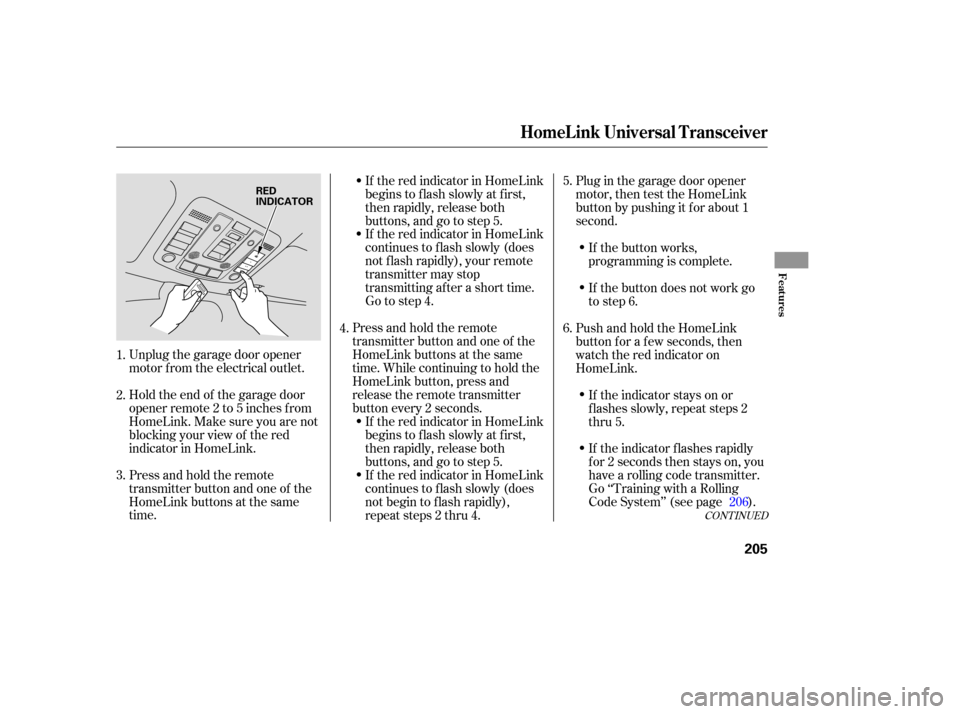
Unplug the garage door opener
motor f rom the electrical outlet.
Holdtheendof thegaragedoor
opener remote 2 to 5 inches f rom
HomeLink.Makesureyouarenot
blocking your view of the red
indicator in HomeLink.
Press and hold the remote
transmitter button and one of the
HomeLink buttons at the same
time.If the red indicator in HomeLink
begins to f lash slowly at f irst,
then rapidly, release both
buttons, and go to step 5.
If the red indicator in HomeLink
continues to f lash slowly (does
not f lash rapidly), your remote
transmitter may stop
transmitting after a short time.
Go to step 4.
Press and hold the remote
transmitter button and one of the
HomeLink buttons at the same
time. While continuing to hold the
HomeLink button, press and
release the remote transmitter
button every 2 seconds. If the red indicator in HomeLink
begins to f lash slowly at f irst,
then rapidly, release both
buttons, and go to step 5.
If the red indicator in HomeLink
continues to f lash slowly (does
not begin to f lash rapidly),
repeat steps 2 thru 4. Plug in the garage door opener
motor, then test the HomeLink
button by pushing it f or about 1
second.
If the indicator f lashes rapidly
f or 2 seconds then stays on, you
have a rolling code transmitter.
Go ‘‘Training with a Rolling
Code System’’ (see page ). If the indicator stays on or
flashes slowly, repeat steps 2
thru 5.
PushandholdtheHomeLink
button f or a f ew seconds, then
watch the red indicator on
HomeLink.
If the button does not work go
to step 6. If the button works,
programming is complete.
2.
3. 4.
1. 5.
6.
206
HomeL ink Universal T ransceiver
Features
205
RED
INDICATOR
Page 207 of 394
Repeat these steps to train the
other two HomeLink buttons to
operate any other compatible
remotely controlled devices
around your home (lighting,
automatic gate, security system,
etc.).Make sure you have properly
completed the ‘‘training
HomeLink’’ procedure.
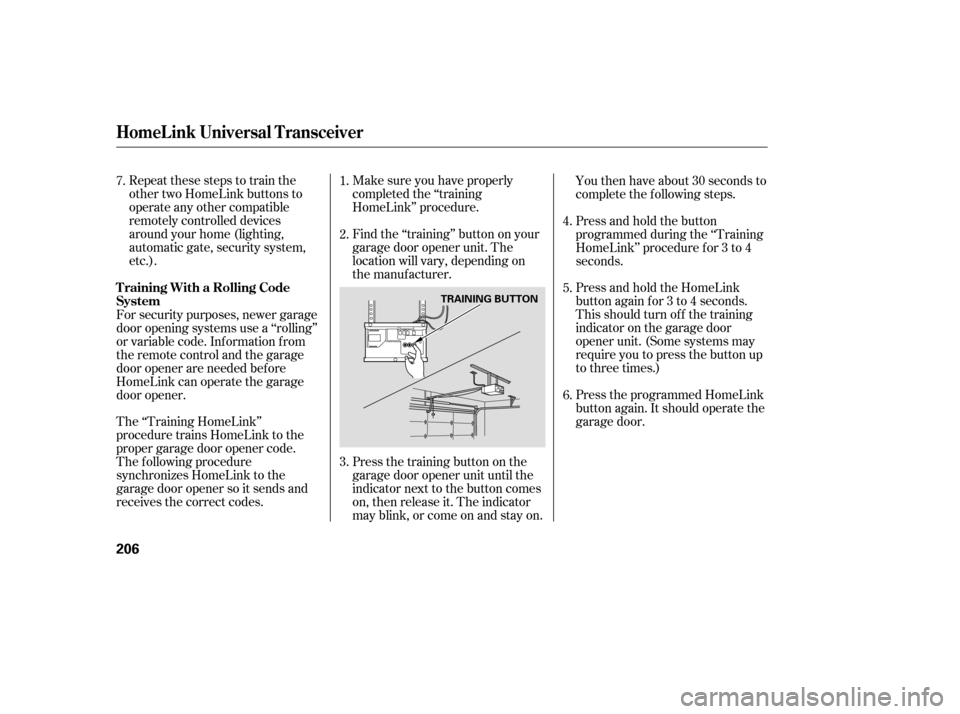
Find the ‘‘training’’ button on your
garage door opener unit. The
location will vary, depending on
the manufacturer.
Press the training button on the
garage door opener unit until the
indicator next to the button comes
on, then release it. The indicator
may blink, or come on and stay on.You then have about 30 seconds to
complete the f ollowing steps.
Press and hold the button
programmed during the ‘‘Training
HomeLink’’ procedure f or 3 to 4
seconds.
Press and hold the HomeLink
button again f or 3 to 4 seconds.
This should turn of f the training
indicator on the garage door
opener unit. (Some systems may
require you to press the button up
to three times.)
Press the programmed HomeLink
button again. It should operate the
garage door.
The ‘‘Training HomeLink’’
procedure trains HomeLink to the
proper garage door opener code.
The f ollowing procedure
synchronizes HomeLink to the
garage door opener so it sends and
receives the correct codes. For security purposes, newer garage
door opening systems use a ‘‘rolling’’
or variable code. Inf ormation f rom
the remote control and the garage
door opener are needed bef ore
HomeLink can operate the garage
door opener. 6.
2.
4.
5.
1.
3.
7.
HomeL ink Universal T ransceiver
T raining With a Rolling Code
System
206
TRAINING BUTTON