Page 125 of 394

Store a driving position only when
the vehicle is parked.Turn the ignition switch to ON (II).
You cannot add a new driving
position in the memory unless the
ignition switch is in the ON (II)
position. You can recall a
memorized position with the
ignition switch in any position.
Adjust the steering wheel to a
comf ortable position (see page ).
Adjust the outside mirrors f or best
visibility (see page ). Adjust the seat to a comfortable
position (see page ).
Your vehicle has a memory feature
f or the steering wheel, driver’s seat,
and outside mirror positions.
Two seat, steering wheel, and
outside mirror positions can be
stored in separate memories. You
select a memorized position by
pushing the appropriate button.
Press the MEMO button on the
driver’s door. You will hear a beep.
The indicator in the memory
buttons (1 and 2) will blink.
Immediately press one of the
memory buttons (1 or 2) until you
hear two beeps. The indicator in
the memory button will stay on.
The current positions of the
driver’s seat, steering wheel, and
outside mirrors are now stored.
3.
1.
2.
119
123
111
Storing a Driving Position in
Memory
Driving Posit ion Memory Syst em
124
MEMORY
BUTTONS
MEMO BUTTON
Page 126 of 394

To select a memorized position, do
this:Press the desired memory button
(1 or 2) until you hear a beep.
The system will move the seat,
steering wheel, and outside mirrors
to the memorized positions. The
indicator in the selected memory
button will f lash during movement.
When the adjustments are complete,
you will hear two beeps, and the
indicator will remain on.
Make sure the shif t lever is in
Park. To change the ‘‘MEMORY
POSITION LINK’’ setting, see page
.
To cancel the storing procedure
after pressing the MEMO button:
Do not press a memory button
within 5 seconds.
Readjust the outside mirror
position.
Each memory button stores only one
driving position. Storing a new
position erases the previous setting
stored in that button’s memory.
All stored driving positions will be
lost if your vehicle’s battery goes
dead or is disconnected. Readjust the seat or steering
position.
1. 2.
86
CONT INUED
Selecting a Memorized Position
Driving Posit ion Memory Syst em
Inst rument s and Cont rols
125
MEMORY BUTTONS
Page 127 of 394
Press any button on the control
panel: MEMO, 1, or 2.
Adjust the outside mirrors. Shif t out of Park. Push any of the adjustment
switches f or the seat or steering
wheel.
If you select a memorized position
without pushing the ignition switch
knob or inserting the built-in key in
the ignition switch, only the seat and
outside mirrors will adjust. To get
the system to also adjust the steering
wheel, push and turn the ignition
switch or insert the built-in key in
the ignition switch. You will hear two
beeps when it is complete. You can use the adjustment switches
to change the positions of the seat,
steering wheel, or outside mirrors
af ter they are in their memorized
position. If you change the
memorized position, the indicator in
the memory button will go out. To
keep this driving position f or later
use, you must store it in the driving
position memory.
To stop the system’s automatic
adjustment, do any of the f ollowing:
Driving Posit ion Memory Syst em
126
Page 138 of 394

When you push the ignition switch,
theremoteandthevehiclerecognize
each other. Af ter the recognition,
the remote indicator f lashes, and a
beeper sounds once. Af ter the beep,
turn the ignition switch.
When the remote is out of the
operating range, the ignition switch
is locked.
If the ignition switch cannot be
turned f rom the LOCK (0) position
to the ACCESSORY (I) position afterthe beep, the steering wheel is
locked. To unlock the steering wheel,
turn it right and lef t while turning
the ignition switch at the same time.
If theremoteandthevehicledonot
recognize each other, turn the
ignition switch to the LOCK (0)
position, remove the ignition switch
cover, insert the built-in key, and
turn the switch (see pages and
). To turn the ignition switch to the
LOCK (0) position, put the
transmission in Park, press the
switch in, and turn it to LOCK (0).
When the transmission is not in Park,
you cannot turn the ignition switch
to the LOCK (0) position.
Bef ore leaving the vehicle, make
sure the ignition switch is in the
LOCK (0) position.
If you open the driver’s door with the
ignition switch in the ACCESSORY
(I) position, the beeper will sound.
Also, if you close the door when the
ignition switch is not in the LOCK
(0) position and the remote is not
inside the vehicle, the keyless access
alarm sounds outside the vehicle, a
message appears on the multi-
inf ormation display, and the beeper
sounds if the ignition switch is in the
ON (II) position.
115
138
CONT INUED
Ignition Switch
K eyless A ccess System
Inst rument s and Cont rols
137
Page 199 of 394
�Û�Ý�´
�µ �´
�µ
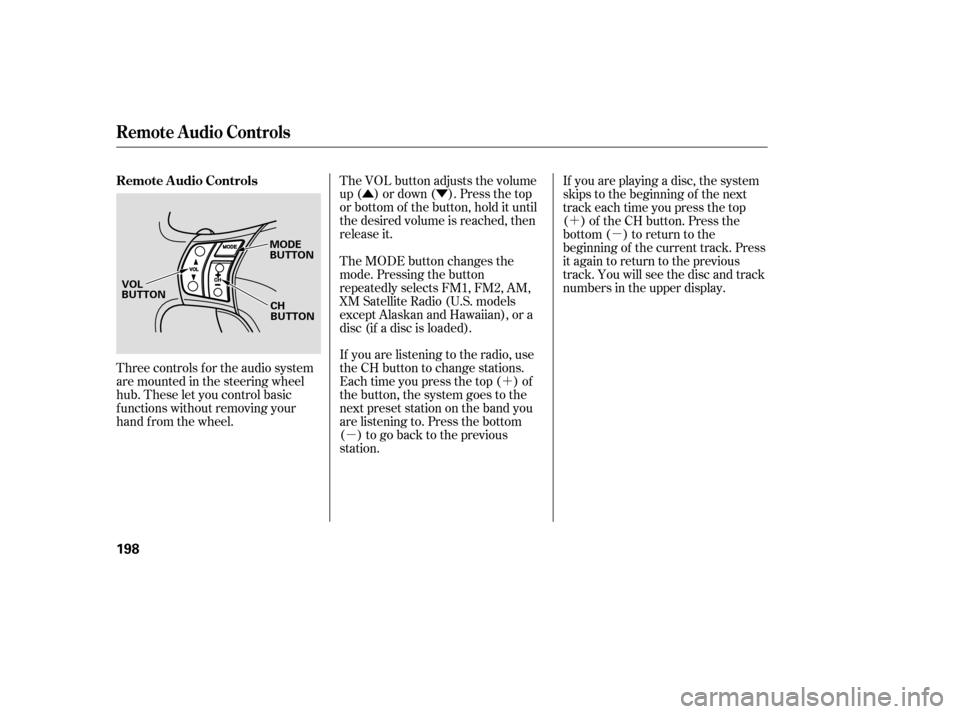
Three controls f or the audio system
are mounted in the steering wheel
hub. These let you control basic
f unctions without removing your
hand f rom the wheel. The VOL button adjusts the volume
up ( ) or down ( ). Press the top
or bottom of the button, hold it until
the desired volume is reached, then
release it.
If you are listening to the radio, use
the CH button to change stations.
Each time you press the top ( ) of
the button, the system goes to the
next preset station on the band you
are listening to. Press the bottom
( ) to go back to the previous
station.If you are playing a disc, the system
skips to the beginning of the next
track each time you press the top
( ) of the CH button. Press the
bottom ( ) to return to the
beginning of the current track. Press
it again to return to the previous
track. You will see the disc and track
numbers in the upper display.
The MODE button changes the
mode. Pressing the button
repeatedly selects FM1, FM2, AM,
XM Satellite Radio (U.S. models
except Alaskan and Hawaiian), or a
disc (if a disc is loaded).
Remote Audio Controls
Remote Audio Controls
198
MODE
BUTTON
CH
BUTTON
VOL
BUTTON
Page 202 of 394

Cruise control allows you to maintain
asetspeedabove25mph(40km/h)
without keeping your f oot on the
accelerator pedal. It should be used
f or cruising on straight, open
highways. It is not recommended f or
city driving, winding roads, slippery
roads, heavy rain, or bad weather.Press and release the DECEL/
SET button on the steering wheel.
The CRUISE CONTROL icon
appears on the multi-inf ormation
display to show the system is now
activated.
Accelerate to the desired cruising
speedabove25mph(40km/h). Push in the CRUISE button on the
steering wheel. The CRUISE
MAIN indicator on the instrument
panel comes on. When cruise control is on while
driving, the SH-AWD torque
distribution monitor and the tire
pressure monitor are not shown
on the multi-information display.
1.
2. 3.
CONT INUED
Cruise Control
Using Cruise Control
Features
201
RES/
ACCEL
BUTTON
DECEL/SET BUTTON
CRUISE BUTTON
Improper use of the cruise
control can lead to a crash.
Use the cruise control only
when traveling on open
highways in good weather.
Page 204 of 394
Tap the brake pedal.
Push the CANCEL button on the
steering wheel.
Resting your f oot on the brake pedal
causes cruise control to cancel. Even with cruise control on, you can
still use the accelerator pedal to
speed up f or passing. Af ter
completing the pass, take your foot
of f the accelerator pedal. The vehicle
will return to the set cruising speed.
You can cancel cruise control in any
of these ways:Push the CRUISE button. When you push the CANCEL button
or tap the brake pedal, the system
remembers the previously set speed.
To return to that speed, accelerate to
above25mph(40km/h),thenpress
and release the RES/ACCEL button.
The CRUISE CONTROL indicator
comes on. The vehicle accelerates to
thesamespeedasbefore.
Pressing the CRUISE button turns
the system completely of f and erases
the previous cruising speed. Resuming the Set Speed
Cancelling Cruise Control
Cruise Control
Features
203
CANCEL BUTTON CRUISE BUTTON
Page 219 of 394

To record a message:
You can record up to 5 minutes of
inf ormation f rom your OnStar
advisor or the virtual advisor. This is
helpf ul f or reviewing the route, hotel,
or restaurant inf ormation you
receive f rom the OnStar center. A microphone is located in the base
of the OnStar control panel so you
can speak to the advisor without
taking your hands of f the steering
wheel or diverting your attention
from the road. The OnStar advisor’s
voice comes f rom the audio system’s
speakers. Use the volume control on
the audio system or on the steering
wheel to adjust the volume.
Depending on which service you
request, you may need to give your
Personal Identification Number
(PIN) to the advisor. Your PIN is a
number you make up and provide
when you establish your OnStar
service.
If cellular telephone service is not
available in the area you are driving
in, you will hear a f ast busy signal.
The system will retry the connection
several times bef ore returning to the
ready mode. Press this button to contact an
OnStar advisor. You will hear a
chime, f ollowed by the
announcement, ‘‘Connecting to
OnStar.’’ The connection should take
about 15 seconds. The advisor will
assist you with any of the services
included in your plan. To cancel the retry, press the white
phone button.
During your call to the advisor or
virtual advisor, press and release
the OnStar button. The system
beeps to indicate that it is
recording.
When you are f inished recording,
press and release the OnStar
button again. The system beeps
and stops recording.
When you are f inished listening,
press the white phone button. The
system responds with ‘‘Goodbye.’’ Say ‘‘Advisor playback.’’ The
recorded message is played
through the audio system
speakers. Press the white phone button. The
system responds with ‘‘OnStar
ready.’’
To hear the first playback of a
message:
OnSt ar
OnStar Services Button
Recording an A dvisor or Virtual
Advisor Message
218