2004 VOLVO XC90 lights
[x] Cancel search: lightsPage 99 of 245
: Press this button when approaching the car at night to light up the
interior courtesy light, parking lights, license plate lights and the li\
ghts in th")
2004 VOLVO XC90
Button 3 (Approach lighting): Press this button when approaching the car at night to light up the
interior courtesy light, parking lights, license plate lights and the li\
ghts in the sideview mirrors.
Button 4 (Panic): See
page 78 for more information on this function.
Button 5 (Tailgate unlock): Press this button twice within 3 seconds to unlock the tailgate (witho\
ut
unlocking the other doors).
Button 6 (Unlock): Press this button once to unlock the driver's door only. Wait for at le\
ast 1 second
and press the button again (within 10 seconds) to unlock all doors, an\
d the tailgate.
NOTE:
l Airbag deployment will automatically unlock the doors.
l The keys may also be used to lock and unlock the doors, and to activate \
and deactivate the alarm
system.
l To avoid leaving your keys in the vehicle, make a habit of always lockin\
g the vehicle with the remote
control.
Automatic re-locking If the doors are unlocked, the locks will automatically reengage (re-l\
ock) and the
alarm will rearm after 2 minutes unless a door or the tailgate has been \
opened.
pg. 74 Locks and Alarms
l FCC ID:LQNP2T-APU This device complies with part 15 of the FCC rules. Op\
eration is subject to
the following conditions: (1) This device may not cause harmful interf\
erence, and (2) this device must
accept any interference received, including interference that may cause \
undesired operation.
l Canadian 2306104388 Model 504 2927 by Donnelly Operation is subject to t\
he following conditions:
(1) this device may not cause interference, and (2) this device must\
accept any interference, including
interference that may cause undesired operation of the device.
l Canadian 2306104388A Model 509 977 by Connaught Electronics Operation is\
subject to the
following conditions: (1) this device may not cause interference, and \
(2) this device must accept any
interference, including interference that may cause undesired operation \
of the device.
file:///K|/ownersdocs/2004/2004_XC90/04xc90_05.htm (5 of 12)12/30/2006\
4:35:20 PM
Page 104 of 245

2004 VOLVO XC90
l A door is forced open.
l The ignition switch is tampered with.
l If there is movement in the passenger compartment (if the vehicle is eq\
uipped with the optional
movement sensor).
l The vehicle is lifted or towed (if the vehicle is equipped with the opt\
ional inclination sensor).
l The battery is disconnected (while the alarm is armed).
l The siren is disconnected when the alarm is disarmed.
Arming the alarm
Press the LOCK button on the remote control, lock the vehicle using the \
key in the driver's door or press
the central lock button on one of the front doors with the door open. On\
e long flash of the turn signals
will confirm that the alarm is armed.
Disarming the alarm
Press the UNLOCK button on the remote control or unlock the doors with t\
he key.
Turning off (stopping) the alarm
If the alarm is sounding, it can be stopped by pressing the UNLOCK butto\
n on the remote control or by
unlocking the driver's door with the key.
Audible/visual alarm signal
An audible alarm signal is given by a battery powered siren. The alarm c\
ycle lasts for 25 seconds.
The visual alarm signal is given by flashing all turn signals and turnin\
g on the interior lighting for
approximately 5 minutes.
"Panic" button
In an emergency situation, this feature can be used to attract attention\
.
Activate the "panic" button by pressing the red button on the remote con\
trol (see illustration on
page 73)
for at least 3 seconds or by pressing this button twice within 3 seconds\
. The turn signals will flash, the
interior lights will go on and the vehicle's horn will sound.
The function can be turned off by pressing any of the buttons on the rem\
ote control or will stop
automatically after 25 seconds. When a button is pressed, there is a 5 s\
econd delay before the panic
alarm is deactivated.
NOTE: This button will NOT unlock the vehicle.
pg. 79 Locks and Alarms
file:///K|/ownersdocs/2004/2004_XC90/04xc90_05.htm (10 of 12)12/30/200\
6 4:35:20 PM
Page 123 of 245

2004 VOLVO XC90
Driving in rain and slush or passing through an automatic car wash can c\
ause water to collect on the
brake discs and pads. This will cause a delay in braking effect when the\
pedal is depressed. To avoid
such a delay when the brakes are needed, depress the pedal occasionally \
when driving through rain,
slush, etc. This will remove the water from the brakes. Check that brake\
application feels normal. This
should also be done after washing or starting in very damp or cold weath\
er.
Severe strain on the brake system
The brakes will be subject to severe strain when driving in mountains or\
hilly areas, or when towing a
trailer. Vehicle speed is usually slower, which means that the cooling o\
f the brakes is less efficient than
when driving on level roads. To reduce the strain on the brakes, shift i\
nto a lower gear and let the engine
help with the braking. Do not forget that if you are towing a trailer, t\
he brakes will be subjected to a
greater than normal load.
pg. 94 Starting and driving
Brake system (contd)
Anti-lock brakes (ABS)
If the warning lamp lights up there is a malfunction of the ABS system (\
the standard braking system will
however function) and the vehicle should be driven cautiously to a Volv\
o retailer for inspection. The
Anti-lock Braking System (ABS) helps to improve vehicle control (stop\
ping and steering) during severe
braking conditions by limiting brake lockup. When the system "senses" im\
pending lockup, braking
pressure is automatically modulated in order to help prevent lockup, whi\
ch could lead to a skid.
This system performs a self-diagnostic test when the engine is started a\
nd when the vehicle first
reaches a speed of approximately 12 mph (20 km/h). The brake pedal will pulsate several times and a
sound may be audible from the ABS control module. This is normal.
To obtain optimal effect from the ABS system, constant pressure should b\
e kept on the brake pedal,
keep constant pressure on the brake pedal. Do not pump the brake pedal.
The switching of the ABS modulator will be audible and the brake pedal w\
ill pulsate during braking.
Please be aware that ABS does not increase the absolute braking potentia\
l of the vehicle. While control
will be enhanced, ABS will not shorten stopping distances on slippery su\
rfaces.
ABS with EBD (Electronic Brake Force Distribution)
EBD is an integrated part of the ABS system. EBD regulates the hydraulic\
pressure to the rear brakes to
help provide optimal braking capacity. The brake pedal will pulsate duri\
ng braking, which is normal.
file:///K|/ownersdocs/2004/2004_XC90/04xc90_06b.htm (2 of 17)12/30/200\
6 4:35:23 PM
Page 124 of 245

2004 VOLVO XC90
If the BRAKE and ABS warning lights come on at the same time, this could\
indicate a fault in the brake
system.
l Stop the vehicle in a suitable place and switch off the engine.
l Restart the engine.
l If both warning lights go off, no further action is required.
l If both lights are still on after the engine has been restarted, switch \
off the engine again and check the
brake fluid level (see
page 126 for the location of the brake fluid reservoir).
l If the brake fluid level is above the MIN mark, drive carefully to an au\
thorized Volvo retailer and
have the brake system inspected.
WARNING!
If the fluid level is below the MIN mark in the reservoir or if a "Brake\
failure - Service urgent"
message is displayed in the text window: DO NOT DRIVE. Have the vehicle \
towed to a Volvo
retailer and have the brake system inspected.
pg. 95 Starting and driving
Dynamic Stability Traction Control (DSTC)
The DSTC system on the Volvo XC90 consists of a number of functions:
1. Traction control (TC)
This function is designed to help reduce wheel spin by transferring powe\
r from a drive wheel that begins
to lose traction to the wheel on the opposite side of the vehicle (on t\
he same axle). TC monitors and
compares the rotational speed of the drive wheels. If one of the drive w\
heels shows a tendency to spin,
the difference in speed is immediately detected. This triggers the Anti-\
lock Brake System, which brakes
the spinning wheel until the difference in rotational speed is corrected\
.
TC is most active at low speeds, and a pulsating sound will be audible w\
hen the system is regulating
wheel spin. This is quite normal.
This is one of the DSTC system's permanent functions and is not affected\
when the DSTC button on the
center control panel is pressed.
2. Spin control (SC)
The spin control function is designed to help prevent the drive wheels f\
rom spinning while the vehicle is
accelerating. This is done by temporarily reducing engine torque to the \
drive wheels, which helps
file:///K|/ownersdocs/2004/2004_XC90/04xc90_06b.htm (3 of 17)12/30/200\
6 4:35:23 PM
Page 138 of 245

2004 VOLVO XC90
l Check all lights, including high beams.
l Reflective warning triangles are legally required in some states/provinc\
es.
l Have a word with your Volvo retailer if you intend to drive in countries\
where it may be difficult to
obtain the correct fuel.
l Consider your destination. If you will be driving through an area where \
snow or ice are likely to
occur, consider snow tires.
* To prevent injury from contact with hot surfaces, do not inspect your \
vehicle's transmission fluid
yourself. Have your vehicle's transmission fluid level inspected by a qu\
alified Volvo service technician.
Contents | Top of Page
file:///K|/ownersdocs/2004/2004_XC90/04xc90_06b.htm (17 of 17)12/30/20\
06 4:35:23 PM
Page 176 of 245

10. Fog lights, front 55W H1
11. Fog light, rear 21W BA5
12. Pa")
2004 VOLVO XC90
9. License plate lighting/parking light in headlight/side marker light, \
rear W5W
Side turn signal W5W (amber bulb)
10. Fog lights, front 55W H1
11. Fog light, rear 21W BA5
12. Parking lights, rear P21/4W
l Never touch the glass of bulbs 1, 2, 3, 10 with your fingers. Grease and\
oils from
your fingers evaporate in the heat and will leave a deposit on the refle\
ctor, quickly
damaging it.
l Bi-Xenon headlight bulbs (option) contain trace amounts of mercury. Th\
ese
bulbs should always be disposed of by an authorized Volvo retailer.
WARNING!
Bi-Xenon headlights (option) - due to the high voltage used by these h\
eadlights, these bulbs should
only be replaced by an authorized Volvo service technician.
pg. 136 Maintenance
Retaining pins
Replacing high/low beams/turn signal/parking light bulbs
The entire lamp housing must be lifted out when replacing these bulbs.
To lift out the lamp housing:
1. Switch off the ignition.
2. Open the hood.
3. Pull up the retaining pins (see the illustration above).
file:///K|/ownersdocs/2004/2004_XC90/04xc90_09b.htm (6 of 23)12/30/200\
6 4:35:28 PM
Page 181 of 245

2004 VOLVO XC90
Front fog lights
Avoid touching the glass on the bulb with your fingers.
1. Switch off the ignition.
2. Turn the bulb holder slightly counterclockwise to release it.
3. Replace the bulb. The shape of the foot of the bulb corresponds to th\
e shape of the bulb holder.
4. Reinstall the bulb holder by turning it slightly clockwise. The side \
of the holder marked "TOP" should
face upward.
pg. 139 Maintenance
Location of tail light bulbs A - Turn signal PY 21 W (amber)
file:///K|/ownersdocs/2004/2004_XC90/04xc90_09b.htm (11 of 23)12/30/20\
06 4:35:28 PM
Page 182 of 245
2004 VOLVO XC90
B - Brake light 21W BA 15
C - Back-up
light 21 W BA 15
D - Parking
light P21 4W
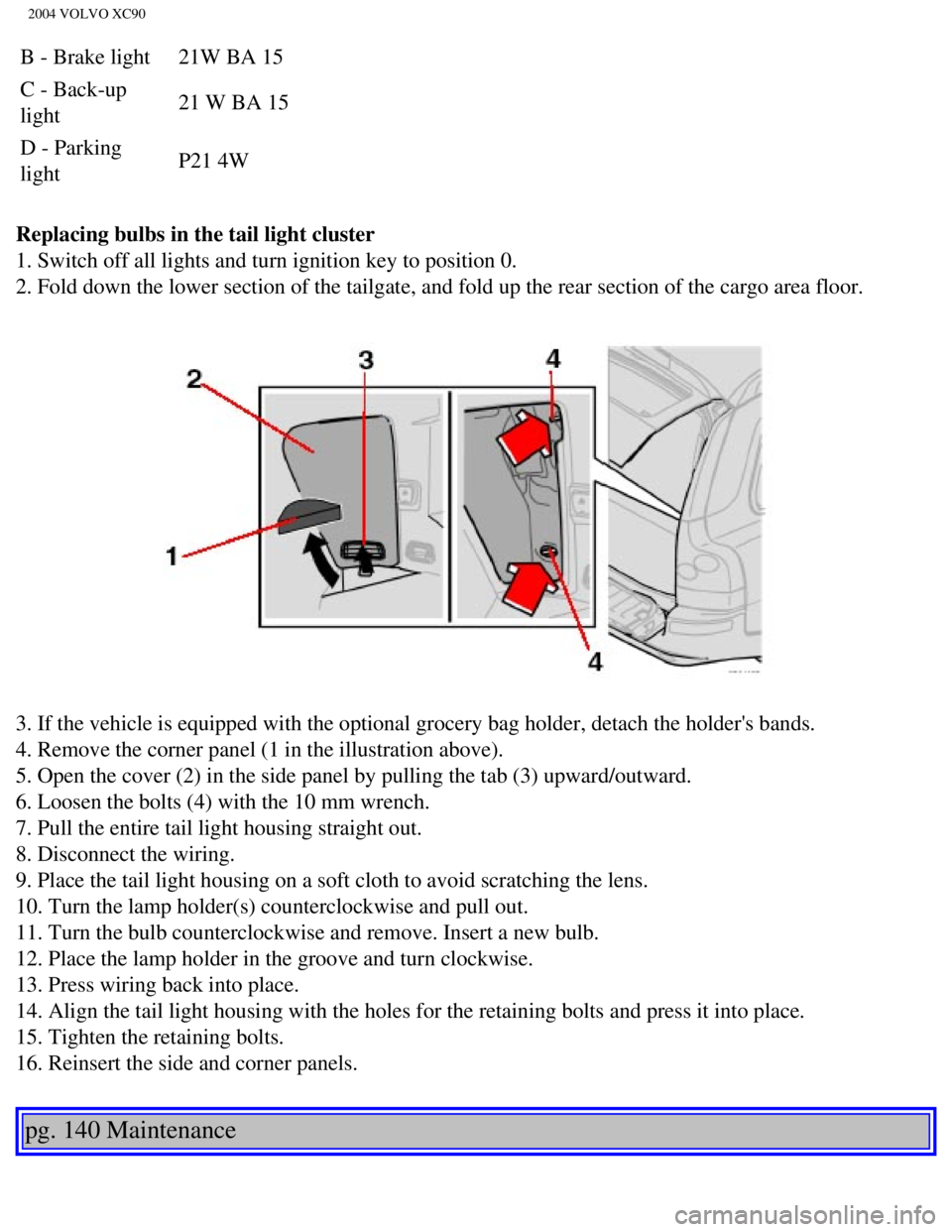
Replacing bulbs in the tail light cluster
1. Switch off all lights and turn ignition key to position 0.
2. Fold down the lower section of the tailgate, and fold up the rear sec\
tion of the cargo area floor.
3. If the vehicle is equipped with the optional grocery bag holder, deta\
ch the holder's bands.
4. Remove the corner panel (1 in the illustration above).
5. Open the cover (2) in the side panel by pulling the tab (3) upwar\
d/outward.
6. Loosen the bolts (4) with the 10 mm wrench.
7. Pull the entire tail light housing straight out.
8. Disconnect the wiring.
9. Place the tail light housing on a soft cloth to avoid scratching the \
lens.
10. Turn the lamp holder(s) counterclockwise and pull out.
11. Turn the bulb counterclockwise and remove. Insert a new bulb.
12. Place the lamp holder in the groove and turn clockwise.
13. Press wiring back into place.
14. Align the tail light housing with the holes for the retaining bolts \
and press it into place.
15. Tighten the retaining bolts.
16. Reinsert the side and corner panels.
pg. 140 Maintenance
file:///K|/ownersdocs/2004/2004_XC90/04xc90_09b.htm (12 of 23)12/30/20\
06 4:35:28 PM