Page 201 of 241
2004 VOLVO XC70
17. Traffic information
18. Automatic presetting of radio stations
19. Display
pg. 156 Audio systems HU-613/HU-803
Switch on/off
Press the knob to switch on or turn off the radio.
Volume control
Turn the knob clockwise to increase volume. Volume control is electronic\
and does not have an end
stop. If you have a key pad in the steering wheel, increase or decrease \
the volume with the + or -
buttons.
Bass
Adjust the bass by pressing the button to extend the control and turning\
it to the left (less bass) or to the
right (more bass). A "detent" indicates "equalized" bass. Press the bu\
tton back in when you have made
the adjustment.
file:///K|/ownersdocs/2004/2004_XC70/04xc70_10a.htm (4 of 10)12/30/200\
6 4:33:08 PM
Page 203 of 241

2004 VOLVO XC70
indicates "equalized" balance. Press the button back in when you have ma\
de the adjustment.
Balance right/left
Adjust left/right speaker balance by pressing the button to extend the c\
ontrol, pulling it out as far as
possible and then turning it to the left (more sound from the left spea\
kers) or to the right (more sound
from the right speakers). A "detent" indicates "equalized" balance. Pre\
ss the button back in when you
have made the adjustment.
A - Setting station
Press the left side of the button to select lower frequencies and the ri\
ght side for higher frequencies. Set
frequencies are displayed.
B - Station seek up/down
Press the left side (lower frequency) or right side (higher frequency\
) of the button to start the seek
function. The radio seeks the next audible station and tunes it in. Repe\
at the procedure to continue the
seek function.
Audio system controls on the steering wheel
Station seek up/down
file:///K|/ownersdocs/2004/2004_XC70/04xc70_10a.htm (6 of 10)12/30/200\
6 4:33:08 PM
Page 204 of 241
 or the SOURCE button (HU-8")
2004 VOLVO XC70
If you have a key pad in the steering wheel press the right or left arro\
w to switch between preset stations.
Scan function
Press the SCAN button (HU-613) or the SOURCE button (HU-803) to star\
t the station scan function.
When a station is found, scanning stops for several seconds, after which\
scanning will continue.
Press the SCAN or SOURCE button when a station has been found if you wou\
ld like to listen to that
station and to discontinue the scan function.
pg. 158 Audio systems HU-613/HU-803 - radio
A - Automatic station preset
This function seeks and stores up to 10 strong AM or FM stations in a se\
parate memory. This function is
especially useful in areas where you are not familiar with the radio sta\
tions.
1. Press in the "AUTO" button for at least 2 seconds. A number of strong\
signal stations (max. 10) from
the currently selected waveband are now stored automatically in the memo\
ry. An "A" and "AUTO" is
displayed. If there is no station with sufficient signal strength "NO ST\
ATION" is displayed.
2. Turn "1-20/DISC" button if you wish to change to another of the auto-\
stored stations.
Another auto-stored station is selected with each turn.
file:///K|/ownersdocs/2004/2004_XC70/04xc70_10a.htm (7 of 10)12/30/200\
6 4:33:08 PM
Page 212 of 241
2004 VOLVO XC70
Turn the "1-20/DISC" knob. The number of the disc and track is displayed\
.
CD eject
HU-613: If you press this button the CD stops playing and the disc is ejected. \
HU-803: The CD currently playing will be ejected. If more than one CD has been i\
nserted, turn the "1-
20/DISC" to display the number of the CD you would like to eject and pre\
ss the CD eject button.
NOTE: For traffic safety reasons, the ejected CD must be removed within 12 sec\
onds or it will be
automatically reinserted into the CD player.
Fast winding
Press " " or " " to seek within a track.
Next/previous track
Press " " to skip to the next track or " " to skip to the previous track. The track number is shown
in the display. If you have the key pad in the steering wheel you can al\
so use these arrows in the same
way.
file:///K|/ownersdocs/2004/2004_XC70/04xc70_10b.htm (5 of 13)12/30/200\
6 4:33:08 PM
Page 214 of 241
2004 VOLVO XC70
Selecting a disc
Turn the "1-20/DISC" knob. The number of the disc and track is displayed\
.
Fast winding
Press " " or " " to seek within a track.
Next/previous track
Press " " to skip to the next track or " " to skip to the previous track. Disc and track number are
displayed. If you have the key pad in the steering wheel you can also us\
e these arrows in the same way.
Random
Press "RND" to connect in the random function. A randomly selected track\
is chosen from a randomly
selected disc. Then a new track is selected in the same way. "RND" (ran\
dom) is displayed as long as the
function is activated.
pg. 164 Audio system HU-613 - cassette deck
file:///K|/ownersdocs/2004/2004_XC70/04xc70_10b.htm (7 of 13)12/30/200\
6 4:33:08 PM
Page 216 of 241
 respectively \"REW\" (backward) is displayed. Fast wind\
ing is interrupt")
2004 VOLVO XC70
Fast winding
The tape can be wound forward with " " and backwards with " ". During fast winding
"FF" (forward) respectively "REW" (backward) is displayed. Fast wind\
ing is interrupted if you press the
button again.
Next/Previous track
If you press " " button the tape automatically winds forward to the next track. If you\
press " "
button the tape automatically rewinds to the previous track. This featur\
e requires at least a 5 second
break between tracks. If you have the key pad in the steering wheel you \
can also use these arrows in the
same way.
pg. 165 Dolby Surround Pro Logic HU-803 (option)
Dolby Surround Pro Logic (HU-803 only)
During CD playback, Dolby Surround Pro Logic, together with the speaker \
in the center of the
dashboard, offers you very clear and realistic sound.
The Dolby unit divides the normal stereo channels from left - right to l\
eft - center - right. In addition,
ambient surround sound is produced by the rear speakers. This ambient su\
rround sound mirrors the
resonance of a recording studio.
Most recordings today are made so that the vocalist/soloist is heard fro\
m the center foreground while the
orchestra is heard over the entire left-right panorama as well as from b\
ehind. This enables the Dolby
Surround Pro Logic system to provide a unique listening experience.
file:///K|/ownersdocs/2004/2004_XC70/04xc70_10b.htm (9 of 13)12/30/200\
6 4:33:08 PM
Page 226 of 241
2004 VOLVO XC70
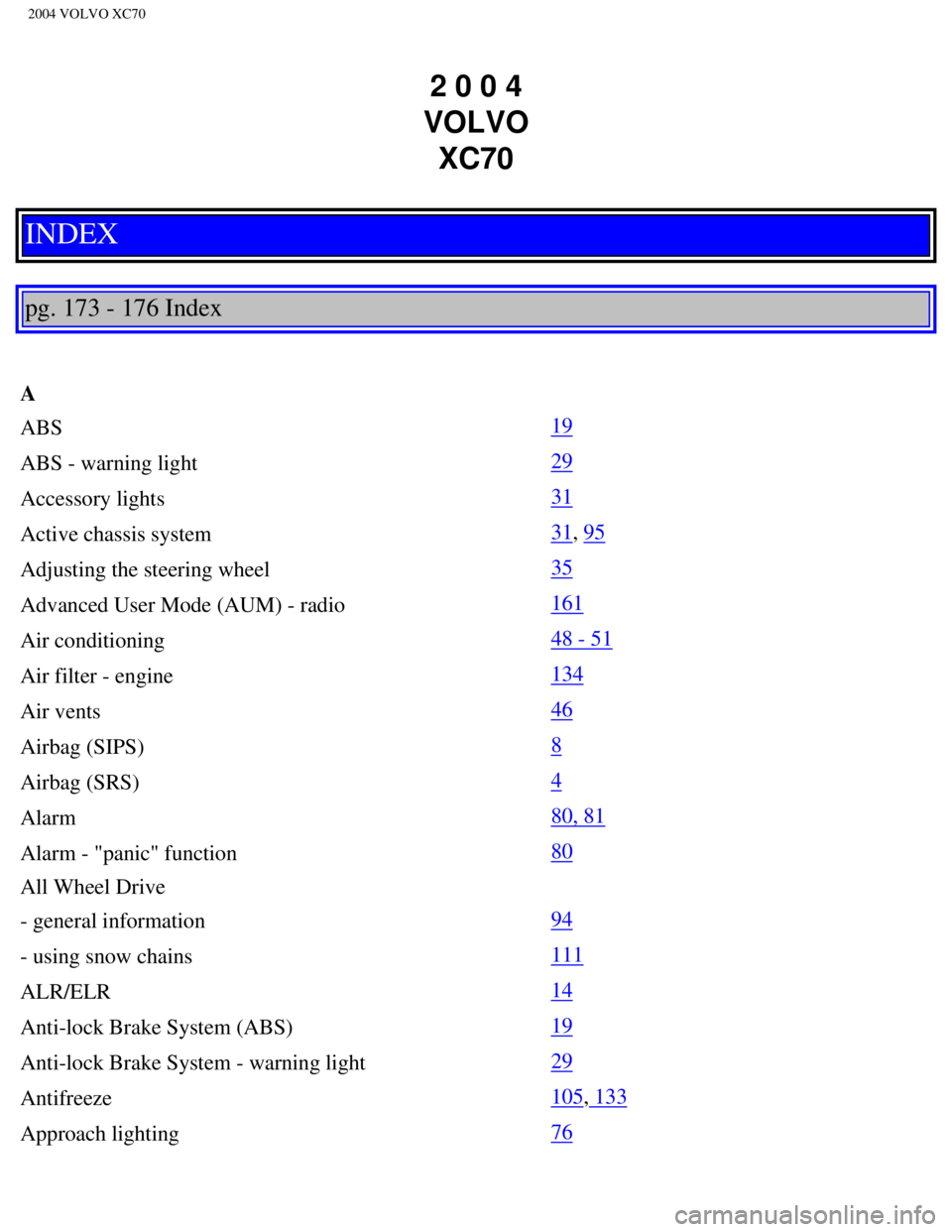
2 0 0 4
VOLVO XC70
INDEX
pg. 173 - 176 Index
A
ABS
19
ABS - warning light
29
Accessory lights
31
Active chassis system
31, 95
Adjusting the steering wheel
35
Advanced User Mode (AUM) - radio
161
Air conditioning
48 - 51
Air filter - engine
134
Air vents
46
Airbag (SIPS)
8
Airbag (SRS)
4
Alarm
80, 81
Alarm - "panic" function
80
All Wheel Drive
- general information
94
- using snow chains
111
ALR/ELR
14
Anti-lock Brake System (ABS)
19
Anti-lock Brake System - warning light
29
Antifreeze
105, 133
Approach lighting
76
file:///K|/ownersdocs/2004/2004_XC70/04xc70_12.htm (1 of 12)12/30/2006\
4:33:10 PM
Page 232 of 241
2004 VOLVO XC70
Indicator lights 28, 29
Inflatable curtain (IC)
9
Instrument illumination
34
Instrument panel
27
Instruments
26
Integrated booster cushion
12
Interior Air Quality system
51
Interior features - overview
24
Interior lighting
74
J
Jack
72, 114
Jump starting
104
K
Key - removing from ignition switch
87
Keyless entry system
77, 78
Keyless entry system - replacing batteries
78
Keylock
87
Keys
76
Kickdown
91, 92
L
Label information
144
License plate lights - replacing
126
Lifting the car
135
Lights - accessory
31
Load carriers
98
Locking and unlocking the car
76
Locking steering wheel
35
Long distance trip
106
Long loads
57
M
Maintenance service
131
Malfunction indicator lamp
29
file:///K|/ownersdocs/2004/2004_XC70/04xc70_12.htm (7 of 12)12/30/2006\
4:33:10 PM