2004 VOLVO S60 lock
[x] Cancel search: lockPage 19 of 113

Warning symbol in center of dashboard
This symbol shines as a red or yellow light depending on the severity of the discovered fault.
Red symbol - Stop the car as soon as possible in a suitable location and read the message shown in the text window.
Yellow symbol - Follow the instructions shown in the text window.
Anti-lock brake system ABS
If the warning light comes on, there is a malfunction of the ABS system (the standard braking system will still
function). The vehicle should be driven to a Volvo retailer for inspection. See page 93
for additional information.
Stability Traction Control (STC)* system or Dynamic Stability Traction Control (DSTC) system**
This indicator light will flash when STC or DSTC is actively working to stabilize the car. See page 94
for more
detailed information.
BRAKE Brake failure warning light
If the light comes on while driving or braking, stop immediately, open the hood and check the brake fluid level in the
reservoir. See page 124
for reservoir position and page 127 for instructions.
Canadian models are equipped with this warning light:
If the BRAKE and ABS warning lights come on at the same time, this could indicate a fault in the brake system.
Stop the car in a suitable place and switch off the engine.
Restart the engine.
If both warning lights go off, no further action is required.
If both lights are still on after the engine has been restarted, switch off the engine again and check the brake fluid
level (see page 124
for the location of the brake fluid reservoir).
* Standard on all models except the T5 turbo.
** Standard on the T5 turbo, option on all other models.
pg. 24 Instruments and controls
Indicator and warning symbols (Contd)
WARNING!
If the fluid level is below the MIN mark in the reservoir or if a "Brake failure - Service urgent" message is displayed
in the text window: DO NOT DRIVE. Have the car towed to an authorized Volvo retailer and have the brake system
inspected.
ProCarManuals.com
Page 22 of 113

- SEE
MANUAL*
page 125
* These messages apply to R-line models only.
1) Orange warning symbol, see page 23.
2) Red warning symbol, see page 23.
pg. 27 Instruments and controls
Switches in the center console
The positions of these buttons may vary, depending on the specifications of your car
1. Folding head restraints
This button is used to fold down the outboard rear head restraints. The ignition key must be in position I or II or the
engine must be running.
NOTE: If the head restraints have been folded down, they must be returned to their original position manually.
The head restraints should be in the upright position before the rear seat backrests are folded down.
WARNING!
For safety reasons, no one should be allowed to sit in the outboard rear seat positions if the head restraints are folded
down. If these positions are occupied, the head restraints should be in the upright (fixed) position.
2. Valet lock (trunk lock)
Pressing this switch locks the trunk, even if the doors are unlocked. The trunk will remain locked even if the doors are
locked/unlocked using the master key or the remote control.
To use this function:
Turn the master key to position II.
Press the "Valet lock" button. An LED in the button will light up and "VALET LOCK ON" will be displayed on the
text window to indicate that this function is activated.
The function can be turned off (deactivated) by turning the ignition key to position II and pressing the "Valet lock"
button again (the LED in the button will go out and "VALET LOCK OFF" will be displayed in the text window).
3. Not in use
4. Stability Traction Control (STC)/Dynamic Stability Traction Control (DSTC) (option)
Press this switch for at least half a second to turn the Spin Control (SC) function of the STC/ DSTC system on or off.
An LED in the switch will light up to indicate that the system is on. See page 94
for more information on STC/ DSTC.
The SC function should be switched off if you, for any reason, temporarily have to drive with tires of different
dimensions (e.g., spare tire).
ProCarManuals.com
Page 23 of 113

pg. 28 Instruments and controls
Switches in the center console (Contd)
R-models only:
The Active Yaw Control function can be deactivated. See page 94
for more information.
Note: To help reduce the risk that the SC function is turned off inadvertently, the switch must be held in for at least
half a second to disable this function. "STC/DSTC SPIN CONTROL OFF" will be displayed in the text window.
This function will be automatically reactivated when the engine is restarted.
WARNING!
Please be aware that the car's handling characteristics may be affected if Spin Control function is switched off.
5. Not in Use
6. Temporarily disconnecting the alarm sensors (option)
See page 75
for more details.
7. Not in use
8. 12 volt socket
This 12 volt socket can be used to plug in certain accessories such as cellular telephones, etc. The ignition key must be
in position 1 (or higher) for the auxiliary socket to function.
NOTE: The auxiliary sockets can also be used for cigarette lighters, which are available at your Volvo retailer.
Four-C active chassis system
(R-models only)
Please see page 91 for information on adjusting the active chassis settings.
pg. 29 Instruments and controls
Steering wheel adjustment
Both the height and the reach of the steering wheel can be adjusted to a comfortable position for the driver. Pull down
the lever on the left of the steering column. Adjust the steering wheel to a suitable position and press the lever back
into place to lock the steering wheel in the new position. Check that the steering wheel is locked in the new position.
ProCarManuals.com
Page 25 of 113

The symbols have maximum illumination in daylight (only the background lighting can be adjusted). At night, both the
symbol light and background lighting can be adjusted.
C - Unlocking the fuel filler door
Press this button when the car is at a standstill to unlock the fuel filler door. Please note that the fuel filler door will
remain unlocked until the car begins to move forward. An audible click will be heard when the fuel filler door relocks.
See also page 80
.
NOTE: If the fuel filler door does not unlock after the button has been pressed, please see page 31
for information on
manually unlocking this door.
D - Front fog lights *
The front fog lights will function only in combination with the low beam headlights.
An LED in the switch indicates when the front fog lights are on.
* Standard on T5, R models/accessory on the other models.
These lights will be automatically switched off the next time the car is started.
Contents | Top of Page
ProCarManuals.com
Page 29 of 113

These controls are used to individually set the temperature for both sides of the passenger compartment.
Please note that the compartment will not be heated or cooled faster by setting the temperature higher or lower than
necessary.
Set the control to the temperature you prefer.
Defroster
This function defrosts/ de -ices the windshield and front side windows. The LED in the switch will light up to indicate
that the defrost function is engaged. Blower speed increases automatically and the air in the passenger compartment is
dehumidified. Recirculation will not function while defrost is engaged.
Blower control
Turn the control clockwise to increase or counterclockwise to decrease the blower speed. Pressing the AUTO switch
will automatically regulate blower speed and override manual adjustment.
NOTE: Turning the blower control counter-clockwise until an orange LED comes on will turn both the blower and the
air conditioning off.
pg. 48 Climate control
Electronic climate control, ECC (contd)
Air distribution
Press AUTO to automatically regulate air flow or press any combination of the controls shown in the illustration to
manually adjust air flow. An LED in the switch will light up if an air flow control has been pressed.
Heated front seats (option)
Press the switch once for maximum seat heating. Both LEDs in the switch will be lit.
Press the switch a second time for comfort heating. One LED in the switch will be lit.
Press the switch a third time to turn the heating off completely. The LED will go off. The seat heating for the
passenger seat should be switched off when the seat is not occupied.
A/C - ON/OFF
Press the switch to turn the air conditioning on or off. The "ON" or "OFF" LED will light up to indicate if the system
is switched on or off. Other functions will still be regulated automatically (if the AUTO switch is on).
The air conditioning functions only at temperatures above 32° F (0° C).
ProCarManuals.com
Page 34 of 113

2 0 0 4
VOLVO S60
Interior
pg. 53 Interior
Front seats 54
Interior lighting58
Floor mats59
Storage compartments60
Rear seat and trunk63
Spare wheel, tools and jack65
pg. 54 Interior
Front seats
Manual height adjustment - front seat
The front edges of the driver and passenger seat cushions can be adjusted to seven different settings and the rear edges
to nine different settings.
Lever (A) - adjusting the front edge of the seat.
Lever (B) - adjusting the rear edge of the seat.
Manual front-rear adjustment
The seat can be moved forward or rearward by pulling up on the front -rear adjustment bar.
Check that the seat is securely locked into position after adjusting.
WARNING!
Do not adjust the seat while driving. The seat should be adjusted so that the brake pedal can be depressed fully. In
addition, position the seat as far rearward as comfort and control allow.
ProCarManuals.com
Page 36 of 113
1. Within 40 seconds of the ignition key being turned to position 0 or removed from the ignition switch.
2. After you have unlocked the driver's door with the key or remote control, the driver's seat can be adjusted during a
10 minute period if the door remains open. If the door is closed, the seat can be adjusted for 40 seconds. The ignition
key can be in position 0 or not yet inserted in the ignition switch.
Remote keyless entry system and driver's seat
The remote control transmitter also controls the electrically operated driver's seat in the following way:
Adjust the seat to your preferences.
When you leave your car, lock it using the remote control.
The next time you unlock the driver's door with the same remote control (the one you used to lock the doors with) and
open the driver's door, the driver's seat will automatically move to the position in which you left it.
The seat will move to this position even if someone else has adjusted it since you last unlocked the car with the same
remote control.
NOTE! This feature will work in the same way with all of the remote control transmitters (up to 3) that you use with
your car.
This feature will not function if you lock your car with the key.
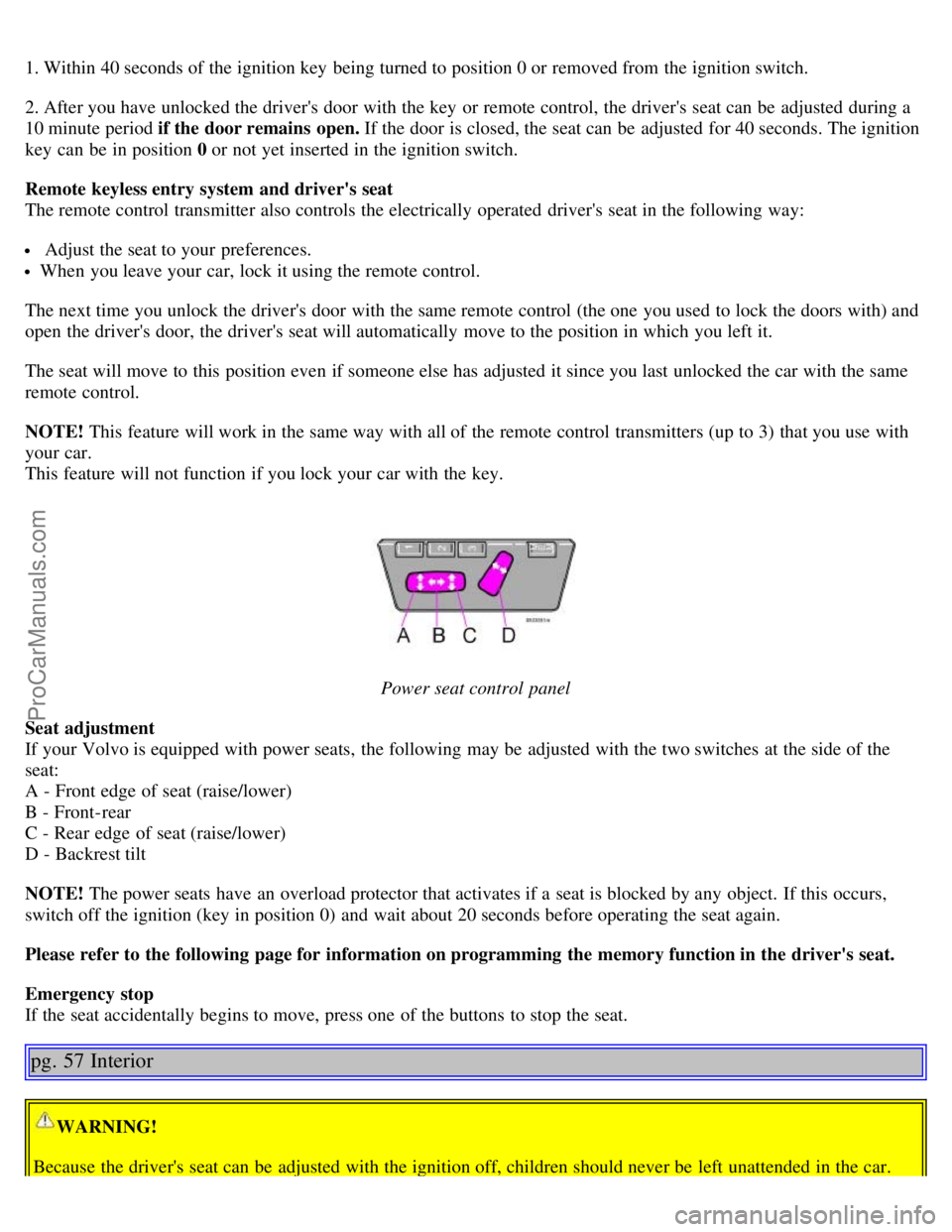
Power seat control panel
Seat adjustment
If your Volvo is equipped with power seats, the following may be adjusted with the two switches at the side of the
seat:
A - Front edge of seat (raise/lower)
B - Front-rear
C - Rear edge of seat (raise/lower)
D - Backrest tilt
NOTE! The power seats have an overload protector that activates if a seat is blocked by any object. If this occurs,
switch off the ignition (key in position 0) and wait about 20 seconds before operating the seat again.
Please refer to the following page for information on programming the memory function in the driver's seat.
Emergency stop
If the seat accidentally begins to move, press one of the buttons to stop the seat.
pg. 57 Interior
WARNING!
Because the driver's seat can be adjusted with the ignition off, children should never be left unattended in the car.
ProCarManuals.com
Page 38 of 113

You unlock the car from the outside with the key or remote control.
You switch off the ignition (turn the key to position 0).
The courtesy light stays on for 10 minutes if one of the doors is left open after the car is unlocked.
The courtesy light switches off if:
The engine is started.
The car is locked from the outside with the key or remote control.
The courtesy light can be switched off or on in all situations by briefly pressing the button.
When you switch the light on, it remains lit for 10 minutes.
You can disconnect the automatic function by pressing the courtesy light button for more than 3 seconds. Briefly
pressing the courtesy light button again automatically reconnects the function.
The courtesy light timer periods can be changed. Contact your Volvo retailer.
Rear reading lights
Reading lights - front/rear
The reading lights can be switched on or off by pressing the respective buttons. These lights switch off automatically
after 10 minutes if the engine is not running. If the engine is running, the lights stay on indefinitely. The lights can be
switched off at any time by pressing the button.
pg. 59 Interior
Vanity mirror
The light comes on when you open the cover.
ProCarManuals.com