Page 145 of 479

’04 TUNDRA_U (L/O 0309)
136
2004 TUNDRA from Sep. ’03 Prod. (OM34426U)
HEADLIGHTS
To turn on the following lights: Twist
the headlight/turn signal lever knob.
Position 1—Parking, tail, license plate and
instrument panel lights
Position 2—Headlights and all of the
above
The lights automatically turn off when the
driver ’s door is opened with the ignition
turned off. To turn them on again, turn the
key to the “ON” position or actuate the
headlight switch. If you are going to park
for over one week, make sure the head-
light switch is off.
NOTICE
To prevent the battery from being dis-
charged, do not leave the lights on
for a long period when the engine is
not running.
Daytime running light system (on some
models)
The headlights turn on at reduced intensi-
ty when the parking brake is released with
the engine started, even with the light
switch in the “OFF” position. They will not
go off until the ignition switch is turned
off.
To turn on the other exterior lights and
instrument panel lights, twist the knob to
the position 1.
Twist the knob to the position 2 to turn
the headlights to full intensity for driving
at night.
HighLow beams— For high beams, turn
the headlights on and push the lever away
from you (position 1). Pull the lever to-
ward you (position 2) for low beams.
The headlight high beam indicator light
(blue light) on the instrument panel will
tell you that the high beams are on.
Flashing the high beam headlights
(position 3)—Pull the lever all the way
back. The high beam headlights turn off
when you release the lever.
You can flash the high beam headlights
with the knob turned to “OFF”.
Headlights and turn signals
Page 220 of 479
’04 TUNDRA_U (L/O 0309)
211
2004 TUNDRA from Sep. ’03 Prod. (OM34426U)
TYPE (Program Types)
When you push the “TYPE” button while
receiving an RDS station, the current pro-
gram type appears on the display.
Each time you push this button, the pro-
gram type changes as in the following:
�ROCK
�EASY LIS (Easy listening)
�CLS/JAZZ (Classical music and Jazz)
�R&B (Rhythm and Blues)
�INFORM (Information)
�RELIGION
�MISC (Miscellaneous)
�ALERT (Emergency message)
Page 241 of 479
’04 TUNDRA_U (L/O 0309)
232
2004 TUNDRA from Sep. ’03 Prod. (OM34426U)
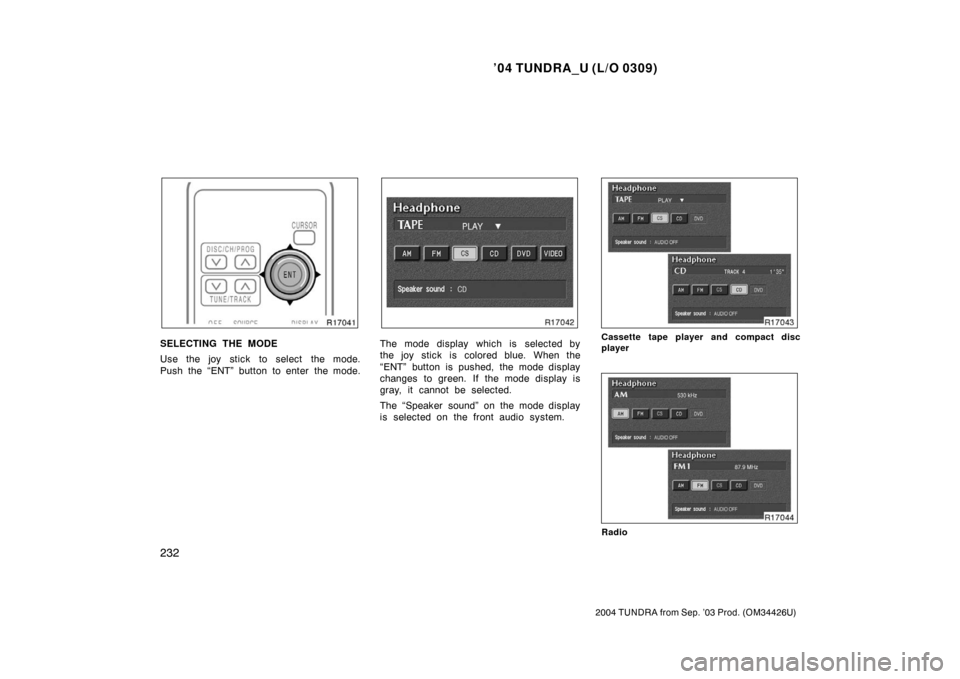
SELECTING THE MODE
Use the joy stick to select the mode.
Push the “ENT” button to enter the mode.The mode display which is selected by
the joy stick is colored blue. When the
“ENT” button is pushed, the mode display
changes to green. If the mode display is
gray, it cannot be selected.
The “Speaker sound” on the mode display
is selected on the front audio system.Cassette tape player and compact disc
player
Radio
Page 248 of 479
’04 TUNDRA_U (L/O 0309)
239
2004 TUNDRA from Sep. ’03 Prod. (OM34426U)
To select the DVD mode, push the
“DVD” button on the controller.
You can also select the DVD mode on the
mode selection screen mentioned above.
The DVD player can be operated with the
controller buttons directly.
1. “DVD” button
2. “MENU” button
3. “TOP MENU” button
4. “RETURN” button
5. “SET UP” button
6. “SEARCH” button
7. “ANGLE” button
8. “AUDIO” button
9. “SUB TITLE” button
10. “
”, “ �”, “ �� ” and “�� ” buttons
The player can also be operated with the
switches on the screen.
To operate the switches on the screen,
select the switch by the joy stick and
push the “ENT” button. You cannot select
the switches on the screen by touching
them directly.
When the switch is selected by the joy
stick, the outline of the switch changes to
blue. Push the “ENT” button, and the
switch will be highlighted in green.
—DVD player operation
switches
Page 291 of 479

’04 TUNDRA_U (L/O 0309)
282
2004 TUNDRA from Sep. ’03 Prod. (OM34426U)
�If following another vehicle on a dusty
road, or driving in windy and dusty
conditions, it is recommended that the
air intake selector be temporarily set to
RECIRCULATE, which will close off the
outside passage and prevent outside
air and dust from entering the vehicle
interior.
Heating
For best results, set controls to:
Fan speed— Any setting except “OFF”
Temperature— To w a r d s WARM
(red zone)
Air intake—FRESH (outside air)
Air flow—FLOOR
Lower vent—CLOSED
Air conditioning—OFF
�For quick heating, select recirculated
air for a few minutes. To keep the
windows from fogging, select fresh af-
ter the vehicle interior has been
warmed.
�Press the “A/C” button on for dehumidi-
fied heating.
�Choose floor/windshield air flow to heat
the vehicle interior while defrosting or
defogging the windshield. Air conditioning
For best results, set controls to:
Fan speed— Any setting except “OFF”
Temperature— To w a r d s COLD
(blue zone)
Air intake—FRESH (outside air)
Air flow—PANEL
Air conditioning—ON
�For quick cooling, move the air intake
selector to recirculate for a few min-
utes.
Ventilation
For best results, set controls to:
Fan speed— Any setting except “OFF”
Temperature— To w a r d s COLD
(blue zone)
Air intake—FRESH (outside air)
Air flow—PANEL
Air conditioning—OFF
Defogging
The inside of the windshield
For best results, set controls to:
Fan speed— Any setting except “OFF”
Temperature— To w a r d s WARM (red
zone) to heat; COLD
(blue zone) to cool
Air intake—FRESH (outside air)
Air flow—WINDSHIELD
Lower vent—CLOSED
Turning the air flow selector to the wind-
shield or floor/windshield position turns on
the defogging function with the purpose of
clearing the front view.
When turning the air flow selector to wind-
shield or floor/windshield position, the air
intake selects FRESH automatically. This
is to clean up the front view more quickly.
Vehicles with “A/C” button—
Press the “A/C” button for dehumidified
heating or cooling. This setting clears the
front view more quickly.
�On humid days, do not blow cold air
on the windshield—the difference be-
tween the outside and inside tempera-
tures could make the fogging worse.
Page 440 of 479

’04 TUNDRA_U (L/O 0309)
431
2004 TUNDRA from Sep. ’03 Prod. (OM34426U)
NOTICE
�Be sure the engine and all accesso-
ries are off before performing main-
tenance.
� When checking the battery, remove
the ground cable from the negative
terminal (“” mark) first and rein-
stall it last.
� Be careful not to cause a short cir-
cuit with tools.
� Take care no solution gets into the
battery when washing it.
Ty p e A
Green Dark Clear or
light yellow
Ty p e B Blue White Red
CHECKING BY INDICATOR
Check the battery condition by the indi-
cator color.
Indicator color
ConditionTy p e ATy p e B
GreenBlueGood
DarkWhite
Charging necessary.
Have battery checked
by your Toyota deal-
er.
Clear orLight
Ye l l o w
Red
Have battery
checked by your
Toyota dealer.
During recharging, the battery is pro-
ducing hydrogen gas.
Therefore, before recharging:
1. If recharging with the battery installed on the vehicle, be sure to disconnect
the ground cable.
2. Be sure the power switch on the re- charger is off when connecting the
charger cables to the battery and when
disconnecting them.
CAUTION
�Always charge the battery in an un-
confined area. Do not charge the
battery in a garage or closed room
where there is not sufficient ventila-
tion.
�Only do a slow charge (5 A or
less). Charging at a quicker rate is
dangerous. The battery may ex-
plode, causing personal injuries.
NOTICE
Never recharge the battery while the
engine is running. Also, be sure all
accessories are turned off.
—Checking battery c ondition Battery recharging pr ecautions