Page 228 of 479

’04 TUNDRA_U (L/O 0309)
219
2004 TUNDRA from Sep. ’03 Prod. (OM34426U)
Cassette tape player
This button has the following features—
To fast forward or reverse:
Push and hold the “
” (TUNE/TRACK)
button until “FF” will appears on the dis-
play to forward a tape. Push and hold the
“
” (TUNE/TRACK) button until “REW”
appears on the display to rewind a tape.
To stop the tape while it is fast forward-
ing, push the “
” (TUNE/TRACK) button.
To stop the tape while it is rewinding,
push the “
” (TUNE/TRACK) button.
If a tape rewinds completely, the cassette
player will stop and then play that same
side. If a tape fast forwards completely,
the cassette will play the other side of the
tape using the auto −reverse feature.
To skip up or down to locate a song or
recording:
You can select up to nine recordings (in-
cluding current one).
Push the “
” or “” (TUNE/TRACK) but-
ton. “FF 1” or “REW 1” will appear on the
display.
Next, push either side of the track button
until the number on the display reaches
the number of tracks you want to skip. If
you push the button 10 times, the skip
feature will be turned off. For the skip feature to work correctly a
blank space of at least 3 seconds is con-
sidered to be a start of a recording.
When a beginning of a tape is reached,
the player automatically resumes play.
When the end of the tape is reached, the
player automatically reverses sides and
resumes normal play.
In addition, the feature may not work well
with some spoken, live, or classical re-
cordings.
Compact disc player
This button has the following features—
To skip up or down to a different track:
Push the “
” or “” (TUNE/TRACK) but-
ton until the number of the track you want
to listen to appears on the display. If you
want to return to the beginning of the
current track, quickly push the “
”
(TUNE/TRACK) button one time.
To fast forward or reverse:
Push and hold the “
” or “” (TUNE/
TRACK) button to fast forward or reverse
within a compact disc. When you release
the button, the compact disc player will
resume playing. 3. “ON/SOURCE” button
Push “ON/SOURCE” button to turn on the
rear seat audio system.
Use “ON/SOURCE” button to select an
audio mode when the rear seat audio sys-
tem is on. Each time you push this but-
ton, the system changes between the ra-
dio, cassette player and compact disc
player.
When you change the mode, the display
indicates which mode is selected.
When a cassette tape and compact discs
are not loaded in the front audio system,
only a radio mode can be selected in the
rear seat audio system.
If you push “ON/SOURCE” button to se-
lect the casette tape player mode or com-
pact disc player mode in that case, a
beep sounds from front audio system and
“INVALID” flashes on the screen for 6
seconds, and then the rear audio system
returns to the radio mode.
If you push “ON/SOURCE” button while
receiving an emergency broadcast, a beep
sounds and “INVALID” appears on the
screen to indicate that no button can be
operated.
Page 229 of 479
’04 TUNDRA_U (L/O 0309)
220
2004 TUNDRA from Sep. ’03 Prod. (OM34426U)
Radio
AM mode
When you select the AM mode, “AM” will
appear on the screen.
FM mode
When you select the FM mode, “FM1” or
“FM2” will appear on the display.
If the front audio system receives a traffic
announcement (TA) while the rear seat
audio system is in the radio mode,
“TRAF” will flash on the screen and the
rear seat audio system will turn off. When
the front audio receives a traffic an-
nouncement (TA), the rear seat audio sys-
tem cannot select the AM/FM mode.
Tape mode
“TAPE” appears on the screen while this
mode is selected. Compact disc mode
“CD” appears on the screen while this
mode is selected.
The screen shows the track, or track and
disc number currently being played.
Error messages
If the player malfunctions, your audio sys-
tem will screen one of the four following
error messages.
“WAIT”:
The compact disc player unit
may be too hot. Allow the player to cool
down.
“ERR 1”: The disc may be dirty, damaged
or inserted incorrectly (up −side down).
Clean the disc and re −insert it.
“ERR 3”: There is a problem inside the
system. Eject the disc. Set the disc again.
“ERR 4”: Over−current. Ask your Toyota
dealer to inspect.
If the malfunction still exists, take your
vehicle to your Toyota dealer.
4. “OFF” button
Push “OFF” button to turn off the rear
seat audio system. REPLACING CONTROLLER BATTERY
For replacement, use a CR2025 lithium
battery or equivalent.
CAUTION
Special care should be taken that
small children do not swallow the re-
moved battery or components.
NOTICE
�
When replacing the battery, be care-
ful not to lose the components.
� Replace only with the same or
equivalent type of battery recom-
mended by a Toyota dealer.
� Dispose of used batteries according
to the local regulations.
Page 232 of 479
’04 TUNDRA_U (L/O 0309)
223
2004 TUNDRA from Sep. ’03 Prod. (OM34426U)
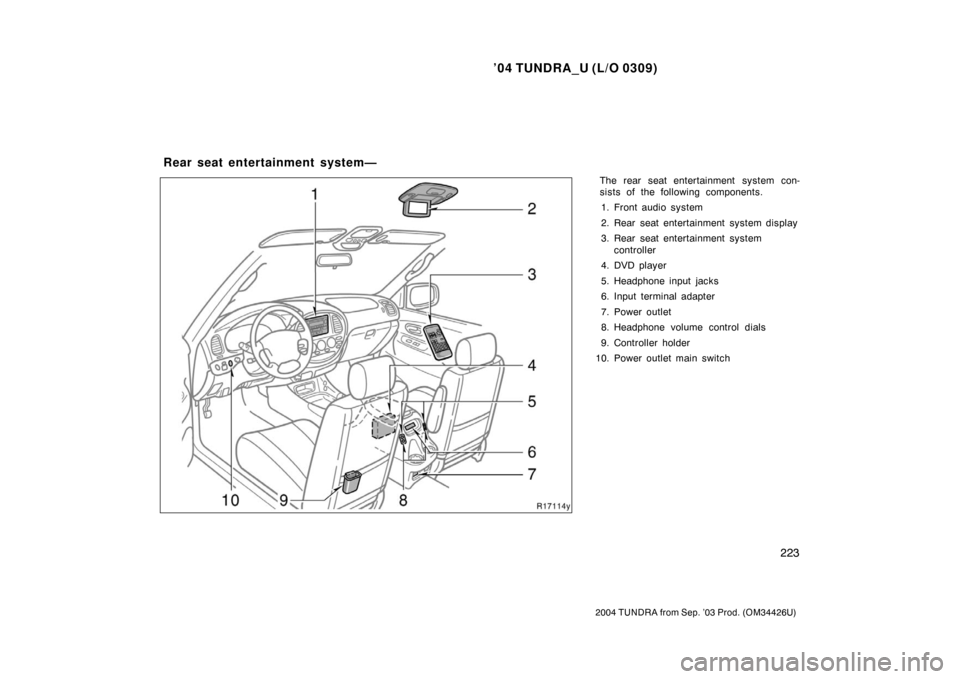
The rear seat entertainment system con-
sists of the following components.
1. Front audio system
2. Rear seat entertainment system display
3. Rear seat entertainment system controller
4. DVD player
5. Headphone input jacks
6. Input terminal adapter
7. Power outlet
8. Headphone volume control dials
9. Controller holder
10. Power outlet main switch
Rear seat entertainment system—
Page 234 of 479
’04 TUNDRA_U (L/O 0309)
225
2004 TUNDRA from Sep. ’03 Prod. (OM34426U)
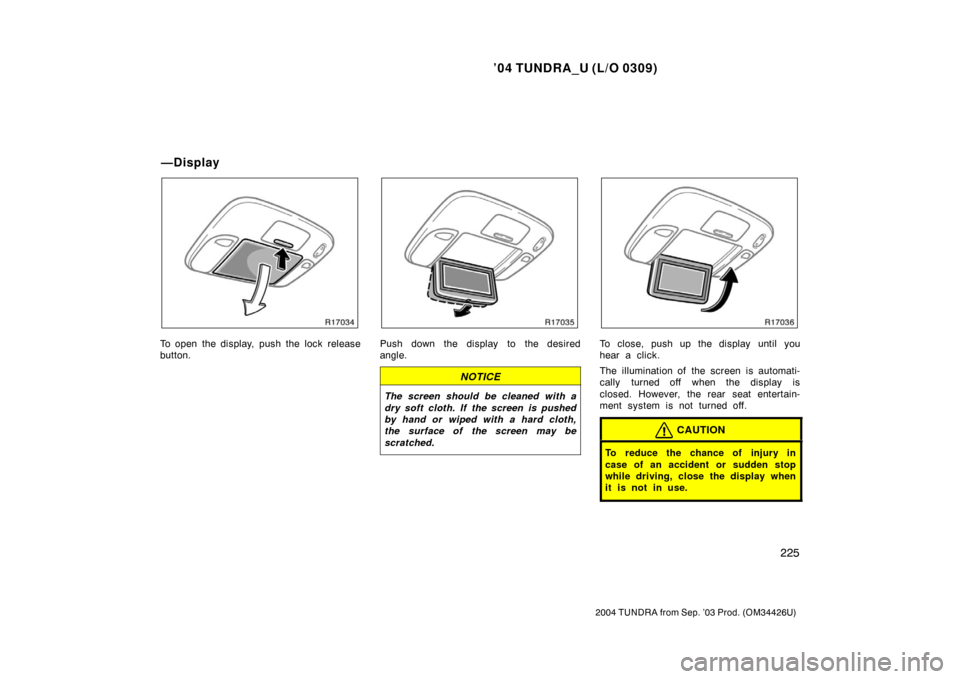
To open the display, push the lock release
button.Push down the display to the desired
angle.
NOTICE
The screen should be cleaned with a
dry soft cloth. If the screen is pushed
by hand or wiped with a hard cloth,
the surface of the screen may be
scratched.
To close, push up the display until you
hear a click.
The illumination of the screen is automati-
cally turned off when the display is
closed. However, the rear seat entertain-
ment system is not turned off.
CAUTION
To reduce the chance of injury in
case of an accident or sudden stop
while driving, close the display when
it is not in use.
—Display
Page 236 of 479
’04 TUNDRA_U (L/O 0309)
227
2004 TUNDRA from Sep. ’03 Prod. (OM34426U)
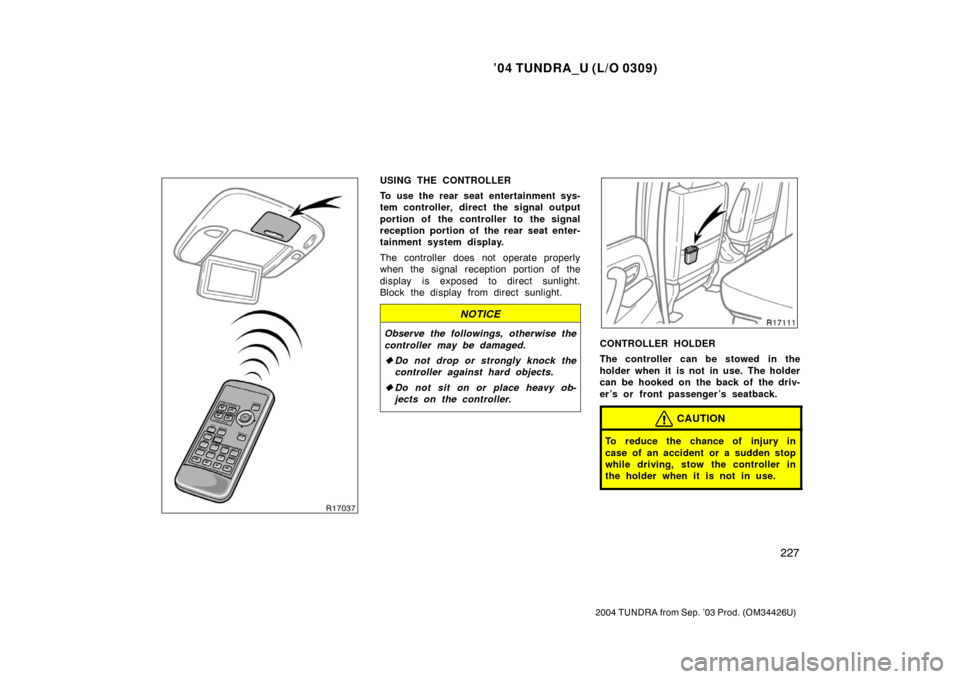
USING THE CONTROLLER
To use the rear seat entertainment sys-
tem controller, direct the signal output
portion of the controller to the signal
reception portion of the rear seat enter-
tainment system display.
The controller does not operate properly
when the signal reception portion of the
display is exposed to direct sunlight.
Block the display from direct sunlight.
NOTICE
Observe the followings, otherwise the
controller may be damaged.
�Do not drop or strongly knock the
controller against hard objects.
� Do not sit on or place heavy ob-
jects on the controller.CONTROLLER HOLDER
The controller can be stowed in the
holder when it is not in use. The holder
can be hooked on the back of the driv-
er ’s or front passenger ’s seatback.
CAUTION
To reduce the chance of injury in
case of an accident or a sudden stop
while driving, stow the controller in
the holder when it is not in use.
Page 238 of 479
’04 TUNDRA_U (L/O 0309)
229
2004 TUNDRA from Sep. ’03 Prod. (OM34426U)
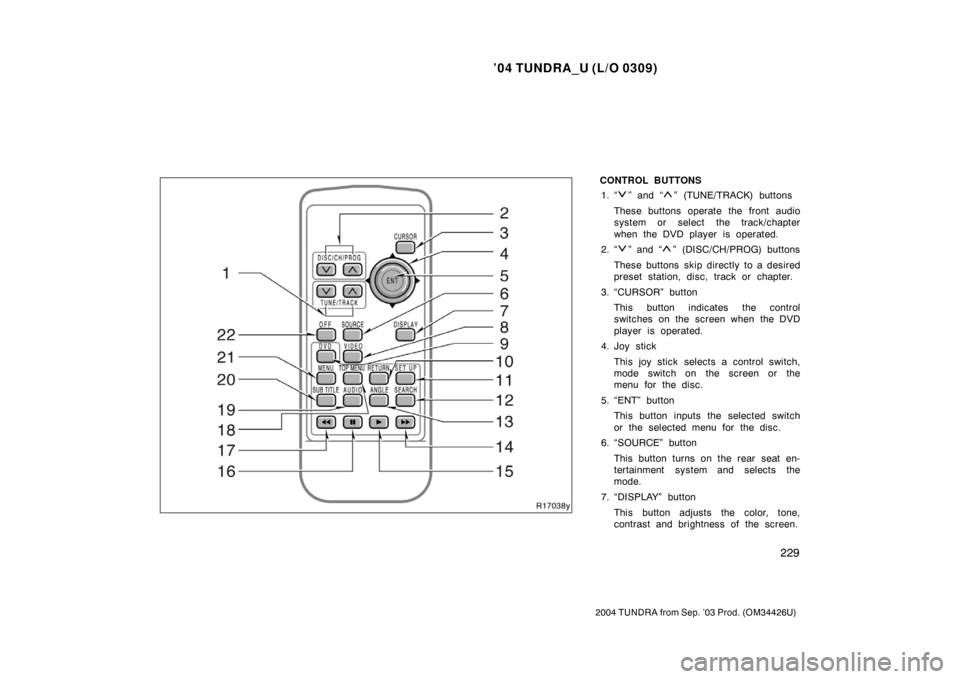
CONTROL BUTTONS
1. “
” and “” (TUNE/TRACK) buttons
These buttons operate the front audio
system or select the track/chapter
when the DVD player is operated.
2. “
” and “” (DISC/CH/PROG) buttons
These buttons skip directly to a desired
preset station, disc, track or chapter.
3. “CURSOR” button This button indicates the control
switches on the screen when the DVD
player is operated.
4. Joy stick
This joy stick selects a control switch,
mode switch on the screen or the
menu for the disc.
5. “ENT” button This button inputs the selected switch
or the selected menu for the disc.
6. “SOURCE” button
This button turns on the rear seat en-
tertainment system and selects the
mode.
7. “DISPLAY” button This button adjusts the color, tone,
contrast and brightness of the screen.
Page 241 of 479
’04 TUNDRA_U (L/O 0309)
232
2004 TUNDRA from Sep. ’03 Prod. (OM34426U)
SELECTING THE MODE
Use the joy stick to select the mode.
Push the “ENT” button to enter the mode.The mode display which is selected by
the joy stick is colored blue. When the
“ENT” button is pushed, the mode display
changes to green. If the mode display is
gray, it cannot be selected.
The “Speaker sound” on the mode display
is selected on the front audio system.Cassette tape player and compact disc
player
Radio
Page 242 of 479
’04 TUNDRA_U (L/O 0309)
233
2004 TUNDRA from Sep. ’03 Prod. (OM34426U)
When you select a mode, the screen indi-
cates which is selected.
Radio
AM mode:
When you select the AM mode, “AM” will
appear on the screen.
FM mode:
When you select the FM mode, “FM1” or
“FM2” will appear on the screen.
Tape mode
“TAPE” appears on the screen while this
mode is selected.
Compact disc mode
“CD” appears on the screen while this
mode is selected.
The screen shows the track, or track and
disc number currently being played.
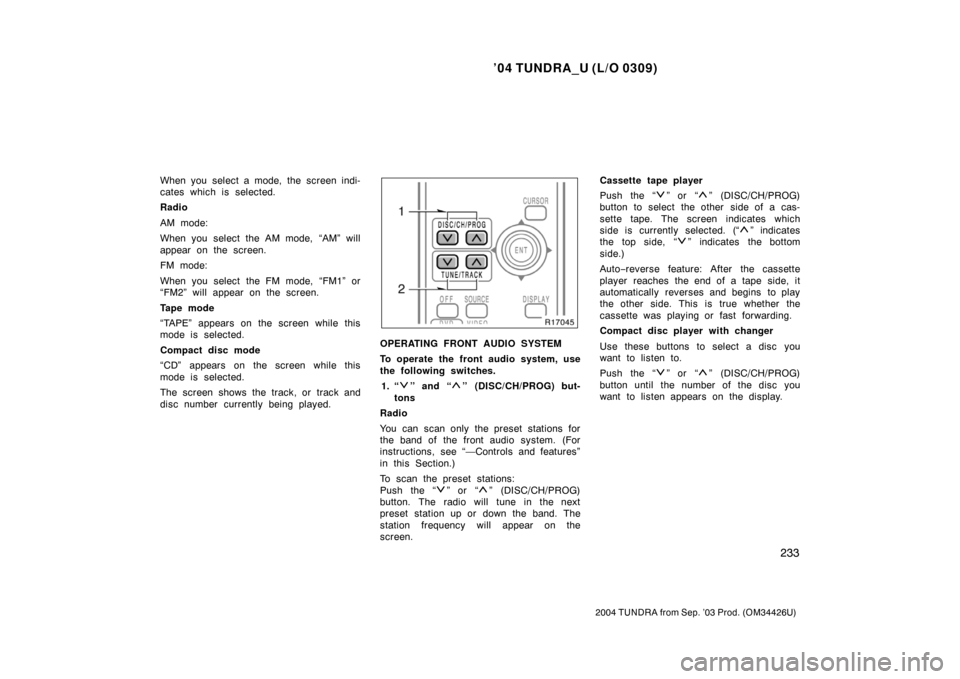
OPERATING FRONT AUDIO SYSTEM
To operate the front audio system, use
the following switches.
1. “
” and “” (DISC/CH/PROG) but-
tons
Radio
You can scan only the preset stations for
the band of the front audio system. (For
instructions, see “—Controls and features”
in this Section.)
To scan the preset stations:
Push the “
” or “” (DISC/CH/PROG)
button. The radio will tune in the next
preset station up or down the band. The
station frequency will appear on the
screen. Cassette tape player
Push the “
” or “” (DISC/CH/PROG)
button to select the other side of a cas-
sette tape. The screen indicates which
side is currently selected. (“
” indicates
t he top si de, “
” indicates the bottom
side.)
Auto −reverse feature: After the cassette
player reaches the end of a tape side, it
automatically reverses and begins to play
the other side. This is true whether the
cassette was playing or fast forwarding.
Compact disc player with changer
Use these buttons to select a disc you
want to listen to.
Push the “
” or “” (DISC/CH/PROG)
button until the number of the disc you
want to listen appears on the display.