Page 36 of 479

’04 TUNDRA_U (L/O 0309)
27
2004 TUNDRA from Sep. ’03 Prod. (OM34426U)
“PANIC” SWITCH
Pushing the “PANIC” switch blows the
horn intermittently and flashes the
headlights and tail lights.
The “PANIC” switch is used to deter ve-
hicle theft when you witness anyone at-
tempting to break into or damage your
vehicle.
The alarm will last for one minute. To stop
alarm midway, do the following:
�Push any of the switches on the wire-
less remote control transmitter.
�Unlock any of the doors with the key.
�Turn the ignition key from the “LOCK”
to the “ON” position. The “PANIC” mode does not work when
the ignition key is in the “ON” position.
This alarm function can be disabled. For
details, contact your Toyota dealer.
WIRELESS REMOTE CONTROL
TRANSMITTER
The wireless remote control transmitter is
an electronic component. Observe the fol-
lowing instructions in order not to cause
damage to the transmitter.
�Do not leave the transmitter on places
where the temperature becomes high
such as on the dashboard.
�Do not disassemble it.
�Avoid knocking it hard against other
objects or dropping it.
�Avoid putting it in water.
You can use up to 4 wireless remote con-
trol transmitters for the same vehicle.
Contact your Toyota dealer for detailed
information. If the wireless remote control transmitter
does not actuate the doors or alarm, or
operate from a normal distance:
�Check for closeness to a radio trans-
mitter such as a radio station or an
airport which can interfere with normal
operation of the transmitter.
�The battery may have been consumed.
Check the battery in the transmitter. To
replace the battery, see following
“REPLACING THE BATTERY”.
If you lose your transmitter, contact your
Toyota dealer as soon as possible to
avoid the possibility of theft, or an acci-
dent. (See “If you lose your wireless re-
mote control transmitter” in Section 4.)
Page 50 of 479

’04 TUNDRA_U (L/O 0309)
41
2004 TUNDRA from Sep. ’03 Prod. (OM34426U)
SETTING THE SYSTEM
1. Turn the ignition key to the “LOCK” position and remove it.
The indicator light will start flashing when
the key is removed from the ignition
switch.
2. Have all passengers get out of the vehicle.
3. Close and lock all the doors and hood.
The indicator light will remain on when all
the doors and hood are closed and
locked. The system will automatically be set after
30 seconds. When the system is set, the
indicator light will start flashing again.
4. After making sure the indicator light starts flashing, you may leave the ve-
hicle.
Never leave anyone in the vehicle when
you set the system, because unlocking
from the inside will activate the system.
WHEN THE SYSTEM IS SET
Activating the system
The system will sound the alarm under
the following conditions:�If any of the doors is unlocked or
opened without the key or wireless re-
mote control transmitter, or if the hood
is forcibly opened
�If the battery terminal is disconnected
and then reconnected
The indicator light will come on when the
system is activated.
If the alarm has been activated and the
key is not in the ignition switch, all the
doors will re −lock automatically.
After one minute, the alarm will automati-
cally stop and the indicator light will starts
flashing again. Reactivating the alarm
Once set, the system automatically resets
the alarm after the alarm stops.
The alarm will activate again under the
same circumstances described in
“Activating the system”.
Stopping the alarm
The alarm will be stopped by the following
two ways:
�Turn the ignition key from the “LOCK”
to “ON” position.
�Unlock any of the doors with the key
or wireless remote control transmitter.
These ways cancel the system at the
same time.
Page 51 of 479
’04 TUNDRA_U (L/O 0309)
42
2004 TUNDRA from Sep. ’03 Prod. (OM34426U)
TESTING THE SYSTEM
1. Open all the windows.
2. Set the system as described above. The doors should be locked with the
key or wireless remote control transmit-
ter. Be sure to wait until the indicator
light goes off or starts flashing.
3. Unlock any door from the inside. The system s hould activate the alarm.
4. Stopping the alarm as described above.
5. Repeat this operation for the other doors and hood. When testing the
hood, also check that the system is
activated when the battery terminal is
disconnected and then reconnected.
If the system does not work properly,
have it checked by your Toyota dealer.
Without tachometer
With tachometer
This indicates that the fuel filler door
is on the left side of your vehicle.
Fuel tank cap
Page 149 of 479
’04 TUNDRA_U (L/O 0309)
140
2004 TUNDRA from Sep. ’03 Prod. (OM34426U)
Ty p e A
Ty p e B
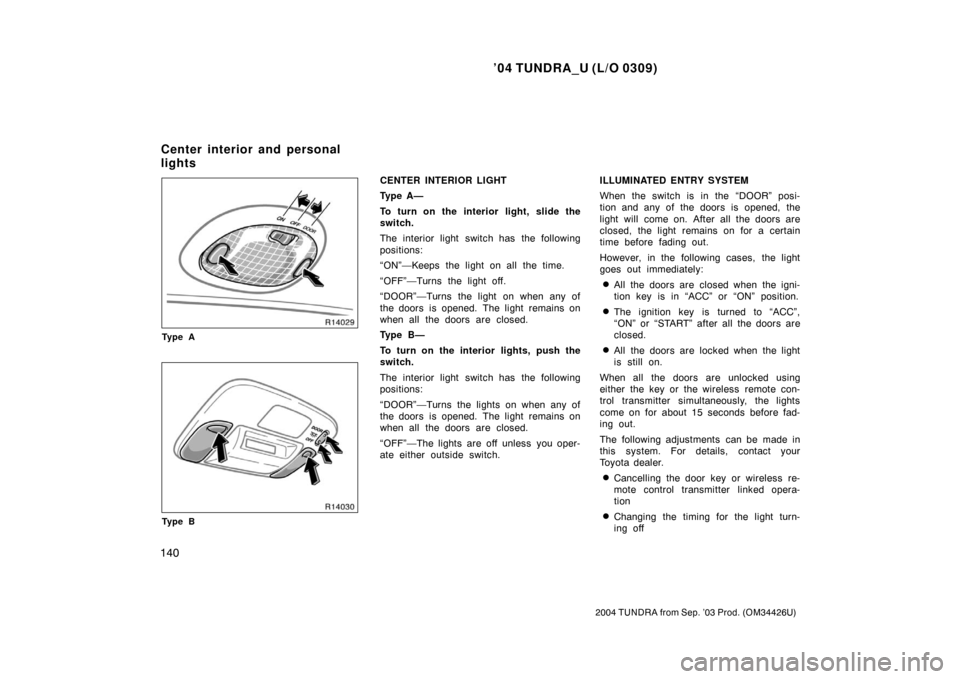
CENTER INTERIOR LIGHT
Ty p e A —
To turn on the interior light, slide the
switch.
The interior light switch has the following
positions:
“ON”—Keeps the light on all the time.
“OFF”—Turns the light off.
“DOOR”—Turns the light on when any of
the doors is opened. The light remains on
when all the doors are closed.
Ty p e B —
To turn on the interior lights, push the
switch.
The interior light switch has the following
positions:
“DOOR”—Turns the lights on when any of
the doors is opened. The light remains on
when all the doors are closed.
“OFF”—The lights are off unless you oper-
ate either outside switch. ILLUMINATED ENTRY SYSTEM
When the switch is in the “DOOR” posi-
tion and any of the doors is opened, the
light will come on. After all the doors are
closed, the light remains on for a certain
time before fading out.
However, in the following cases, the light
goes out immediately:
�All the doors are closed when the igni-
tion key is in “ACC” or “ON” position.
�The ignition key is turned to “ACC”,
“ON” or “START” after all the doors are
closed.
�All the doors are locked when the light
is still on.
When all the doors are unlocked using
either the key or the wireless remote con-
trol transmitter simultaneously, the lights
come on for about 15 seconds before fad-
ing out.
The following adjustments can be made in
this system. For details, contact your
Toyota dealer.
�Cancelling the door key or wireless re-
mote control transmitter linked opera-
tion
�Changing the timing for the light turn-
ing off
Center interior and personal
lights
Page 150 of 479

’04 TUNDRA_U (L/O 0309)
141
2004 TUNDRA from Sep. ’03 Prod. (OM34426U)
To prevent the battery being discharged,
the light will automatically turn off when
the key is removed and the door is left
opened with the switch at “DOOR” position
for 20 minutes or more.
CENTER PERSONAL LIGHTS
To turn on the center personal light,
push the switch. To turn the light off,
push the switch once again.
Standard and access cab models—
For easy access to the ignition switch,
the ignition switch light comes on when
the driver’s door is opened. The step
light also comes on when the driver’s
door is opened.
The ignition switch light remains on for
some time after the driver’s door is
closed.
Double cab models—
For easy access to the ignition switch,
the ignition switch light comes on when
any of the doors are opened. The step
light also comes on when the any of
the doors are opened. The lights remain on for some time after
all the doors are closed.
However, in the following cases, the lights
go off immediately.
�All the doors are closed when the igni-
tion key is in the “ACC” or “ON” posi-
tion.
�The ignition key is turned to the “ACC”,
“ON”, or “START” position after all the
doors are closed.
�All the doors are closed and locked.
When all the doors are unlocked using
either the key or the wireless remote con-
trol transmitter simultaneously, the lights
will come on and remain on for about 15
seconds before fading out.
To prevent the battery being discharged,
the lights will automatically turn off when
the key is removed and the door is left
opened for 20 minutes or more.
The following adjustments can be made in
this system. For details, contact your
Toyota dealer.
�Cancelling the door key or wireless re-
mote control transmitter linked opera-
tion
�Changing the timing for the light turn-
ing off
Ignition switch and step lights
Page 151 of 479
’04 TUNDRA_U (L/O 0309)
142
2004 TUNDRA from Sep. ’03 Prod. (OM34426U)
Standard and access cab modelsDouble cab models
The cargo lamp is designed to light up
the rear deck of your vehicle.
CARGO LAMP OPERATION
By pushing the “CARGO LAMP” switch
To turn on: Push the “CARGO LAMP”
switch once.
At this time, the indicator light on the
instrument panel will come on.
To turn off: Push the “CARGO LAMP”
switch once again.
By locking and unlocking the doors (ve-
hicles with the power door lock system)
You can operate the cargo lump by this
method when all the doors are closed and
the ignition switch is in the “ACC” or
“LOCK” position or the key is removed.
To turn on: Unlock the doors with the key,
the power door lock switch or the wireless
remote control transmitter.
The cargo lamp will automatically turn off
after 20 seconds.
To turn off: Lock the doors with the key,
the power door lock switch or the wireless
remote control transmitter.
Cargo lamp
Page 198 of 479
’04 TUNDRA_U (L/O 0309)
189
2004 TUNDRA from Sep. ’03 Prod. (OM34426U)
OPERATION OF INSTRUMENTS AND
CONTROLS
Car audio system
Reference 190
. . . . . . . . . . . . . . . . . . . . . . . . . . . . . . . . . . . . .\
. . . . . . . . . . . .
Using your audio system 191
. . . . . . . . . . . . . . . . . . . . . . . . . . . . . . . . . . . . \
Audio remote controls 212
. . . . . . . . . . . . . . . . . . . . . . . . . . . . . . . . . . . . \
. . .
Rear seat audio system 214
. . . . . . . . . . . . . . . . . . . . . . . . . . . . . . . . . . . . \
.
Rear seat entertainment system 223
. . . . . . . . . . . . . . . . . . . . . . . . . . . . . .
Car audio/video system operating hints 270
. . . . . . . . . . . . . . . . . . . . . . .
SECTION 1 8
Page 221 of 479
’04 TUNDRA_U (L/O 0309)
212
2004 TUNDRA from Sep. ’03 Prod. (OM34426U)
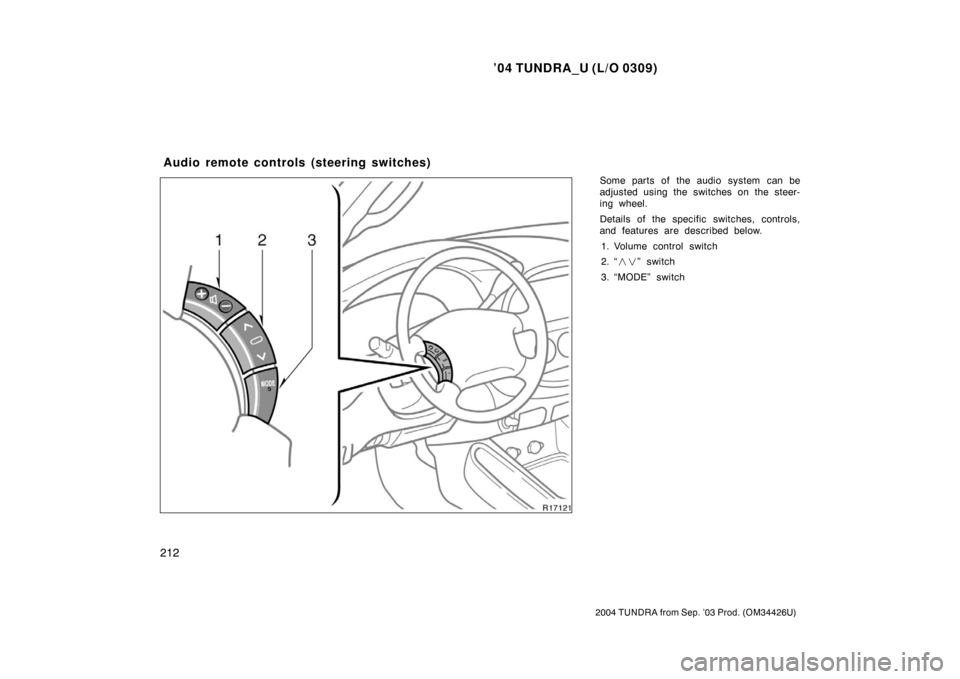
Some parts of the audio system can be
adjusted using the switches on the steer-
ing wheel.
Details of the specific switches, controls,
and features are described below.
1. Volume control switch
2. “ ��” switch
3. “MODE” switch
Audio remote controls (steering switches)