Page 154 of 506
04 SIENNA_U (L/O 0408)
148
2004 SIENNA from Aug. ’04 Prod. (OM45422U)
You can cancel the cut off operation by:
�Turning the key to the “ACC” position.
�Opening or closing any of front and
sliding doors.
�Turning off all the “ON” lights.
All the lights are cut off when all the side
doors and back door are locked by key or
wireless remote control transmitter.
The ignition switch must be turned off.
Page 156 of 506
04 SIENNA_U (L/O 0408)
150
2004 SIENNA from Aug. ’04 Prod. (OM45422U)
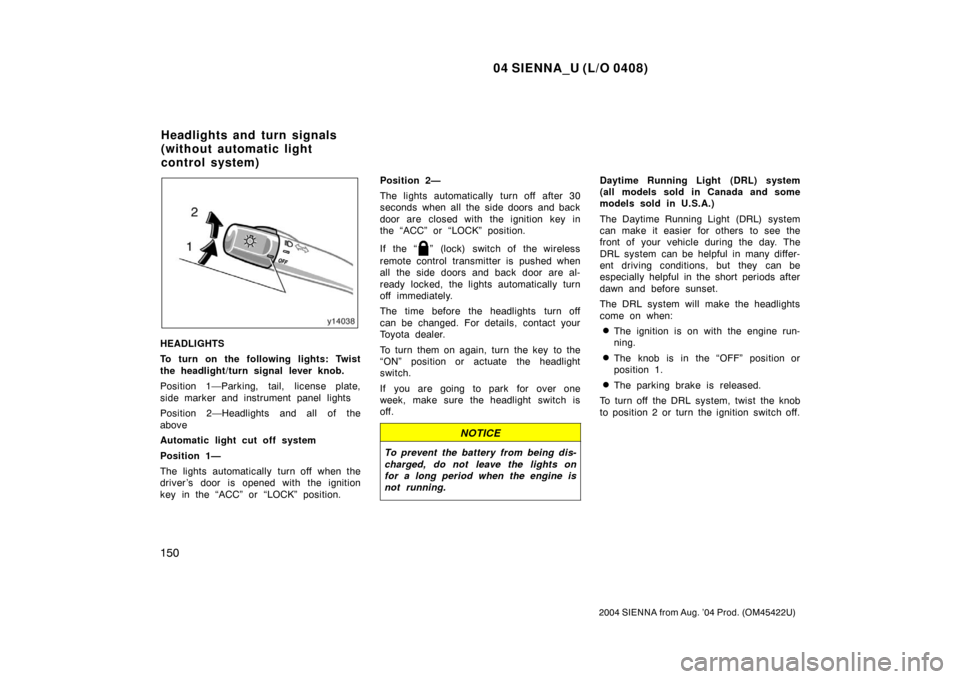
HEADLIGHTS
To turn on the following lights: Twist
the headlight/turn signal lever knob.
Position 1—Parking, tail, license plate,
side marker and instrument panel lights
Position 2—Headlights and all of the
above
Automatic light cut off system
Position 1—
The lights automatically turn off when the
driver ’s door is opened with the ignition
key in the “ACC” or “LOCK” position.Position 2—
The lights automatically turn off after 30
seconds when all the side doors and back
door are closed with the ignition key in
the “ACC” or “LOCK” position.
If the “
” (lock) switch of the wireless
remote control transmitter is pushed when
all the side doors and back door are al-
ready locked, the lights automatically turn
off immediately.
The time before the headlights turn off
can be changed. For details, contact your
Toyota dealer.
To turn them on again, turn the key to the
“ON” position or actuate the headlight
switch.
If you are going to park for over one
week, make sure the headlight switch is
off.
NOTICE
To prevent the battery from being dis-
charged, do not leave the lights on
for a long period when the engine is
not running.
Daytime Running Light (DRL) system
(all models sold in Canada and some
models sold in U.S.A.)
The Daytime Running Light (DRL) system
can make it easier for others to see the
front of your vehicle during the day. The
DRL system can be helpful in many differ-
ent driving conditions, but they can be
especially helpful in the short periods after
dawn and before sunset.
The DRL system will make the headlights
come on when:
�The ignition is on with the engine run-
ning.
�The knob is in the “OFF” position or
position 1.
�The parking brake is released.
To turn off the DRL system, twist the knob
to position 2 or turn the ignition switch off.
Headlights and turn signals
(without automatic light
control system)
Page 158 of 506
04 SIENNA_U (L/O 0408)
152
2004 SIENNA from Aug. ’04 Prod. (OM45422U)
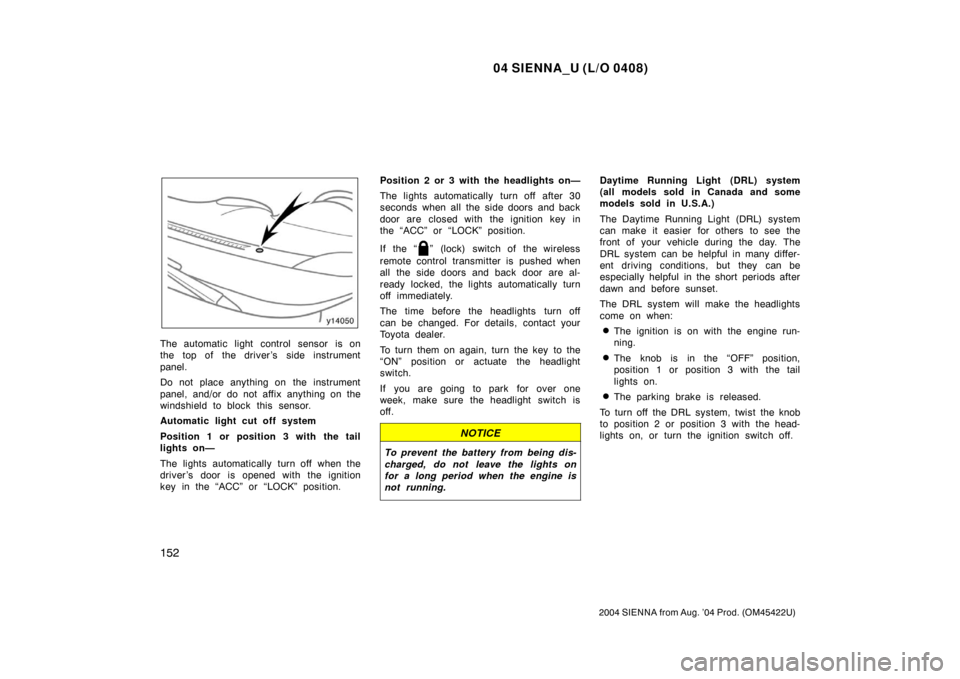
The automatic light control sensor is on
the top of the driver’s side instrument
panel.
Do not place anything on the instrument
panel, and/or do not affix anything on the
windshield to block this sensor.
Automatic light cut off system
Position 1 or position 3 with the tail
lights on—
The lights automatically turn off when the
driver ’s door is opened with the ignition
key in the “ACC” or “LOCK” position.Position 2 or 3 with the headlights on—
The lights automatically turn off after 30
seconds when all the side doors and back
door are closed with the ignition key in
the “ACC” or “LOCK” position.
If the “
” (lock) switch of the wireless
remote control transmitter is pushed when
all the side doors and back door are al-
ready locked, the lights automatically turn
off immediately.
The time before the headlights turn off
can be changed. For details, contact your
Toyota dealer.
To turn them on again, turn the key to the
“ON” position or actuate the headlight
switch.
If you are going to park for over one
week, make sure the headlight switch is
off.
NOTICE
To prevent the battery from being dis-
charged, do not leave the lights on
for a long period when the engine is
not running.
Daytime Running Light (DRL) system
(all models sold in Canada and some
models sold in U.S.A.)
The Daytime Running Light (DRL) system
can make it easier for others to see the
front of your vehicle during the day. The
DRL system can be helpful in many differ-
ent driving conditions, but they can be
especially helpful in the short periods after
dawn and before sunset.
The DRL system will make the headlights
come on when:
�The ignition is on with the engine run-
ning.
�The knob is in the “OFF” position,
position 1 or position 3 with the tail
lights on.
�The parking brake is released.
To turn off the DRL system, twist the knob
to position 2 or position 3 with the head-
lights on, or turn the ignition switch off.
Page 162 of 506
04 SIENNA_U (L/O 0408)
156
2004 SIENNA from Aug. ’04 Prod. (OM45422U)
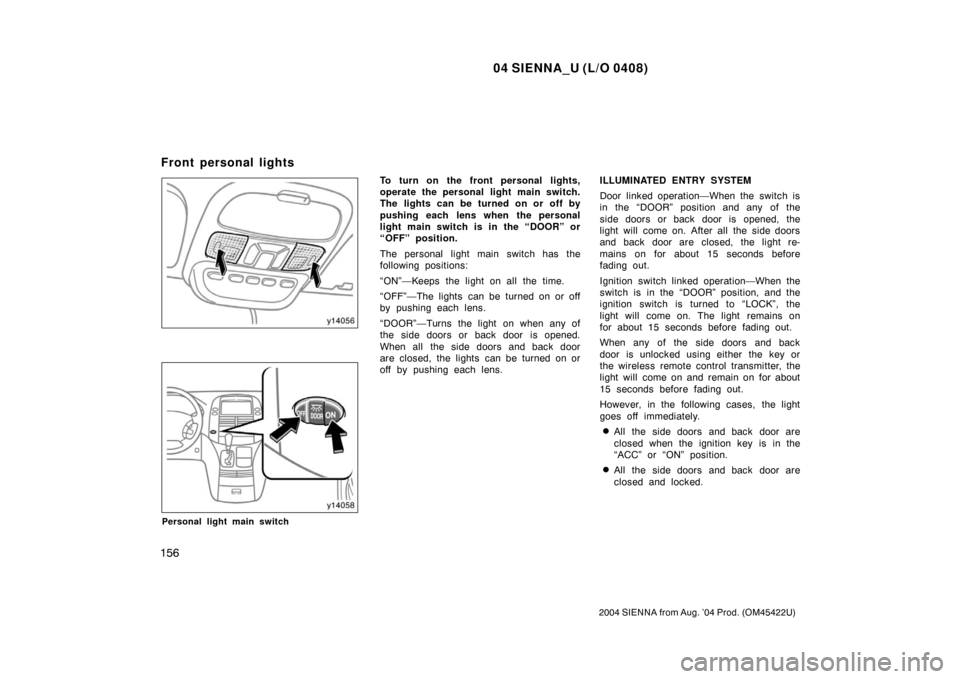
Personal light main switch
To turn on the front personal lights,
operate the personal light main switch.
The lights can be turned on or off by
pushing each lens when the personal
light main switch is in the “DOOR” or
“OFF” position.
The personal light main switch has the
following positions:
“ON”—Keeps the light on all the time.
“OFF”—The lights can be turned on or off
by pushing each lens.
“DOOR”—Turns the light on when any of
the side doors or back door is opened.
When all the side doors and back door
are closed, the lights can be turned on or
off by pushing each lens.ILLUMINATED ENTRY SYSTEM
Door linked operation—When the switch is
in the “DOOR” position and any of the
side doors or back door is opened, the
light will come on. After all the side doors
and back door are closed, the light re-
mains on for about 15 seconds before
fading out.
Ignition switch linked operation—When the
switch is in the “DOOR” position, and the
ignition switch is turned to “LOCK”, the
light will come on. The light remains on
for about 15 seconds before fading out.
When any of the side doors and back
door is unlocked using either the key or
the wireless remote control transmitter, the
light will come on and remain on for about
15 seconds before fading out.
However, in the following cases, the light
goes off immediately.
�All the side doors and back door are
closed when the ignition key is in the
“ACC” or “ON” position.
�All the side doors and back door are
closed and locked.
Front personal lights
Page 163 of 506
04 SIENNA_U (L/O 0408)
157
2004 SIENNA from Aug. ’04 Prod. (OM45422U)
The following adjustments can be made in
this system. For details, contact your
Toyota dealer.
�Cancelling the door key or the wireless
remote control transmitter linked opera-
tion
�Cancelling the ignition switch linked op-
eration.
�Changing the duration of lighting
To prevent the battery being discharged,
the lights will automatically turn off when
the key is removed and the door is left
opened with the switch at “DOOR” position
for 20 minutes or more.
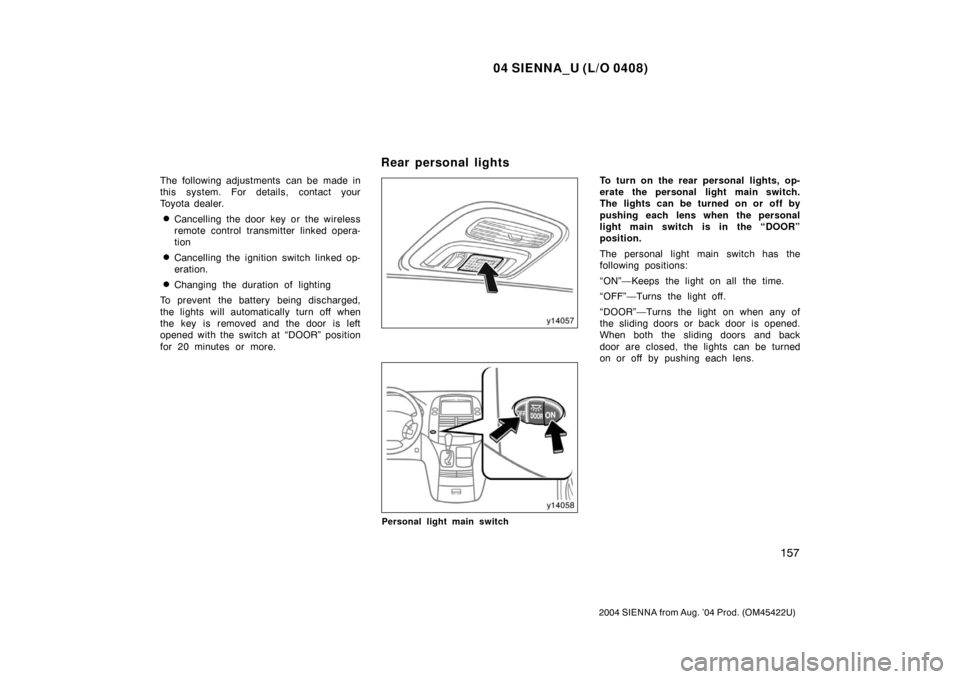
Personal light main switch
To turn on the rear personal lights, op-
erate the personal light main switch.
The lights can be turned on or off by
pushing each lens when the personal
light main switch is in the “DOOR”
position.
The personal light main switch has the
following positions:
“ON”—Keeps the light on all the time.
“OFF”—Turns the light off.
“DOOR”—Turns the light on when any of
the sliding doors or back door is opened.
When both the sliding doors and back
door are closed, the lights can be turned
on or off by pushing each lens.
Rear personal lights
Page 165 of 506
04 SIENNA_U (L/O 0408)
159
2004 SIENNA from Aug. ’04 Prod. (OM45422U)
When any of the side doors or back door
is unlocked using either the key or the
wireless remote control transmitter, the
light will come on and remain on for about
15 seconds before fading out.
The following adjustments can be made in
this system. For details, contact your
Toyota dealer.
�Cancelling the door key or the wireless
remote control transmitter linked opera-
tion
�Changing the duration of lighting
To prevent the battery being discharged,
the light will automatically turn off when
the key is removed and the door is left
opened for 20 minutes or more.
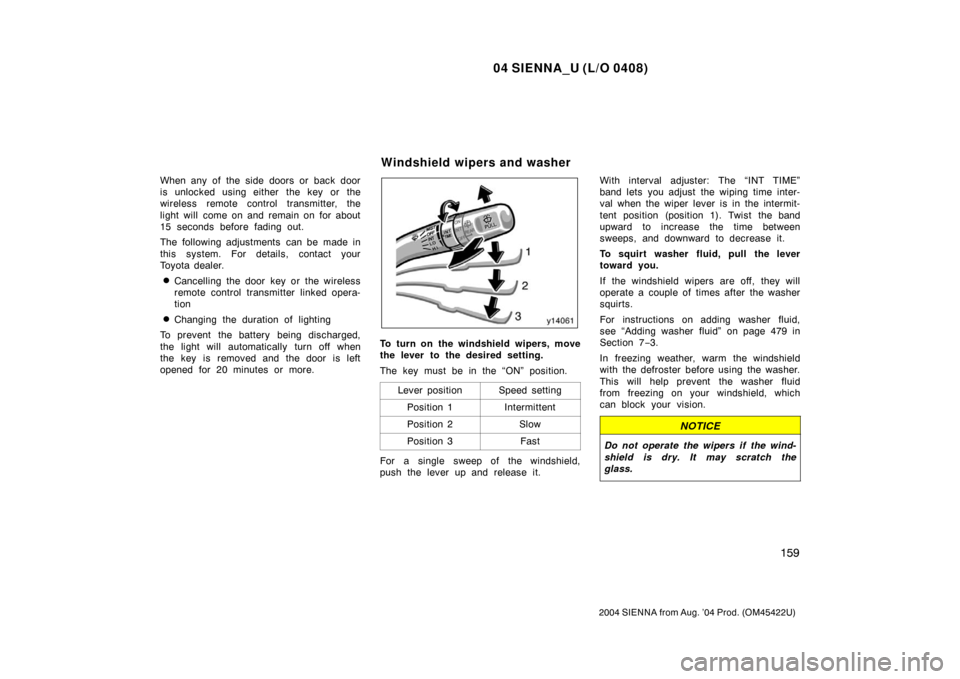
To turn on the windshield wipers, move
the lever to the desired setting.
The key must be in the “ON” position.
Lever position
Speed setting
Position 1Intermittent
Position 2Slow
Position 3Fast
For a single sweep of the windshield,
push the lever up and release it. With interval adjuster: The “INT TIME”
band lets you adjust the wiping time inter-
val when the wiper lever is in the intermit-
tent position (position 1). Twist the band
upward to increase the time between
sweeps, and downward to decrease it.
To squirt washer fluid, pull the lever
toward you.
If the windshield wipers are off, they will
operate a couple of times after the washer
squirts.
For instructions on adding washer fluid,
see “Adding washer fluid” on page 479 in
Section 7
−3.
In freezing weather, warm the windshield
with the defroster before using the washer.
This will help prevent the washer fluid
from freezing on your windshield, which
can block your vision.
NOTICE
Do not operate the wipers if the wind-
shield is dry. It may scratch the
glass.
Windshield wipers and washer
Page 217 of 506
04 SIENNA_U (L/O 0408)
211
2004 SIENNA from Aug. ’04 Prod. (OM45422U)
OPERATION OF INSTRUMENTS AND
CONTROLS
Car audio system
Reference212
. . . . . . . . . . . . . . . . . . . . . . . . . . . . . . . . . . . . .\
. . . . . . . . . . . .
Using your audio system 213
. . . . . . . . . . . . . . . . . . . . . . . . . . . . . . . . . . . . \
Audio remote controls 230
. . . . . . . . . . . . . . . . . . . . . . . . . . . . . . . . . . . . \
. . .
Rear seat audio system 232
. . . . . . . . . . . . . . . . . . . . . . . . . . . . . . . . . . . . \
.
Rear seat entertainment system 241
. . . . . . . . . . . . . . . . . . . . . . . . . . . . . .
Car audio/video system operating hints 292
. . . . . . . . . . . . . . . . . . . . . . .
For vehicle equipped with Navigation system, please refer to the
separate “Navigation System Owner’s Manual”.
SECTION 1 7
Page 236 of 506
04 SIENNA_U (L/O 0408)
230
2004 SIENNA from Aug. ’04 Prod. (OM45422U)
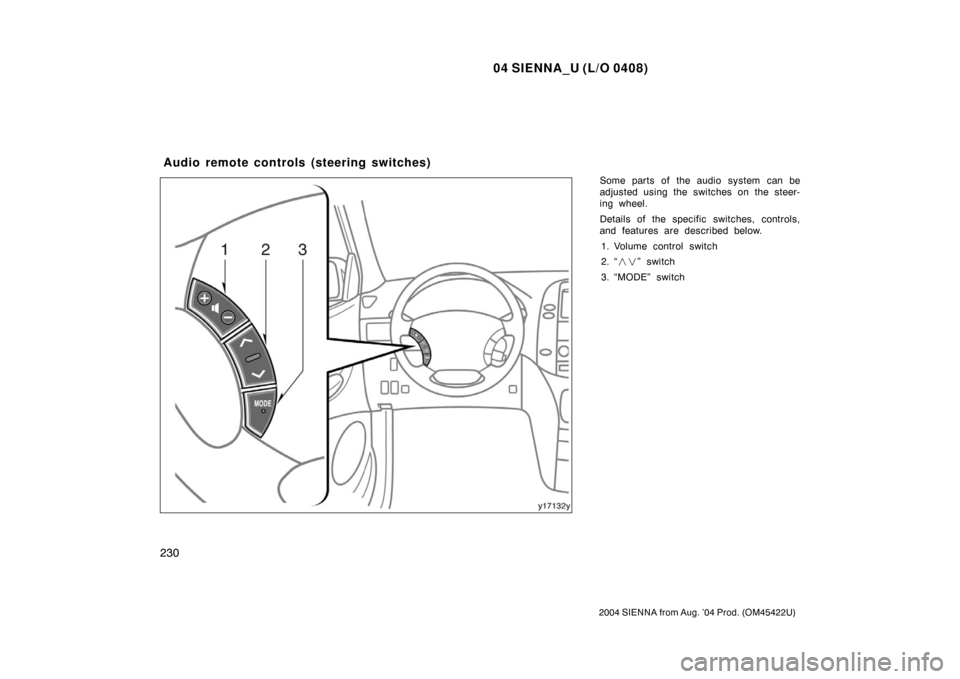
Some parts of the audio system can be
adjusted using the switches on the steer-
ing wheel.
Details of the specific switches, controls,
and features are described below.1. Volume control switch
2. “ ��” switch
3. “MODE” switch
Audio remote controls (steering switches)