Page 243 of 506

04 SIENNA_U (L/O 0408)
237
2004 SIENNA from Aug. ’04 Prod. (OM45422U)
Compact disc player
Compact disc changer only—
Use this button to select a disc you want
to listen to.
Push the “
” or “” (DISC/CH/PROG)
button until the number of the disc you
want to listen to appears on the display.
2. “
” and “” (TUNE/TRACK) buttons
Radio
Push the “
” or “” (TUNE/TRACK) but-
ton to tune or seek.
Tuning:
Quickly push and release the “
” or “”
(TUNE/TRACK) button. Each time you
push the button, the radio will step up or
down to another frequency. If you push
and hold the button, and the radio will go
into the seek mode.
Seeking:
Push and hold the “
” or “” (TUNE/
TRACK) button. The radio will seek up or
down for a station of the nearest frequen-
cy and will stop on reception. Each time
you push the button, the stations will be
searched one after another. Cassette tape player
This button has the following features—
To fast forward or reverse:
Push and hold the “
” (TUNE/TRACK)
button until “FF” will appears on the dis-
play to forward a tape. Push and hold the
“
” (TUNE/TRACK) button until “REW”
appears on the display to rewind a tape.
To stop the tape while it is fast forward-
ing, push “
” (TUNE/TRACK) button. To
stop the tape while it is rewinding, push
“
” (TUNE/TRACK) button.
If a tape rewinds completely, the cassette
player will stop and then play that same
side. If a tape fast forwards completely,
the cassette will play the other side of the
tape using the auto −reverse feature.
To skip up or down to locate a song or
recording.
You can select up to nine recordings (in-
cluding current one).
Push the “
” or “” (TUNE/TRACK) but-
ton. “FF 1” or “REW 1” will appear on the
display.
Next, push either side of the track button
until the number on the display reaches
the number of tracks you want to skip. If
you push the button 10 times, the skip
feature will be turned off. For the skip feature to work correctly a
blank space of at least 3 seconds is con-
sidered to be a start of a recording.
When a beginning of a tape is reached,
the player automatically resumes play.
When the end of the tape is reached, the
player automatically reverses sides and
resumes normal play.
In addition, the feature may not work well
with some spoken, live, or classical re-
cordings.
Compact disc player
This button has the following features—
To skip up or down to a different track:
Push the “
” or “” (TUNE/TRACK) but-
ton until the number of the track you want
to listen to appears on the display. If you
want to return to the beginning of the
current track, quickly push the “
”
(TUNE/TRACK) button one time.
To fast forward or reverse:
Push and hold the “
” or “” (TUNE/
TRACK) button to fast forward or reverse
within a compact disc. When you release
the button, the compact disc player will
resume playing.
Page 248 of 506
04 SIENNA_U (L/O 0408)
242
2004 SIENNA from Aug. ’04 Prod. (OM45422U)
The rear seat entertainment system is de-
signed for the rear passengers to enjoy
audio and DVD video separately from the
front audio system.
The rear seat entertainment system can
be operated when the ignition key is in
the “ACC” or “ON” position.
The rear passengers can enjoy all modes
(AM and FM radio, cassette tape player,
compact disc player with changer and
DVD player) on the rear seat entertain-
ment system only if a cassette tape and
a compact disc are loaded in the front
audio system.
The rear seat entertainment system can
play DVD video, audio CD, video CD, CD
text, dts−CD or DVD audio only when a
disc is loaded in the DVD player.
You can enjoy videos and sound when
your personal audio system is connected
to the input terminal adapter. For details,
refer to the manufacturer ’s instructions. You can enjoy the rear seat entertainment
system with commercial hea
dphone. See
“—Headphone input ja cks” on page 291 in
this Section for details.
You can also enjoy the rear seat enter-
tainment system with a wireless head-
phone. The wireless headphone can be
used within rear seat. If the signal be-
comes weak, the headphone will mute.
For details, refer to the manufacturer’s
instructions.
With some wireless headphone generally
available in the market, it may be difficult
to catch sound properly. Toyota recom-
mends the use of Toyota genuine wireless
headphone.
You can purchase a wireless headphone
at a Toyota dealer.CAUTION
�Do not drive with using the head-
phone. Otherwise, you may be hard
to hear the sound from the outside
while using the headphone and may
cause an accident.
�With DVD player:
Conversational speech on some
DVDs is recorded at a low volume
to emphasize the impact of sound
effects. If you adjust the volume
assuming that the conversations
represent the maximum volume lev-
el that the DVD will play, you may
be startled by louder sound effects
or when you change to a different
audio source. Be sure to adjust the
volume with this in mind.
Make sure the volume is not in-
creased, before you turn on the
headphone.
Page 302 of 506
04 SIENNA_U (L/O 0408)
296
2004 SIENNA from Aug. ’04 Prod. (OM45422U)
NOTICE
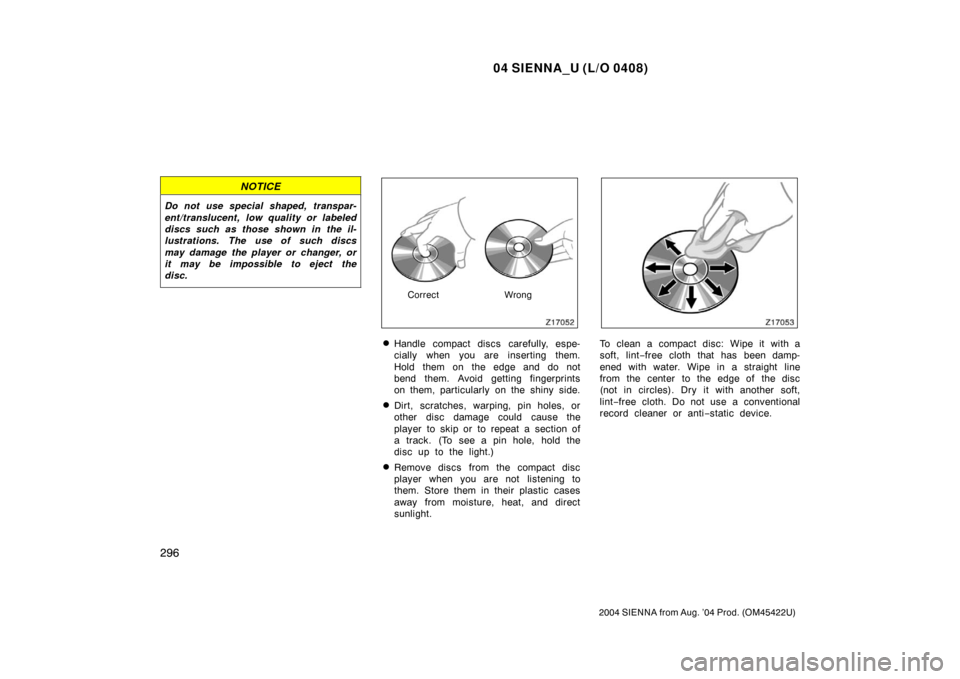
Do not use special shaped, transpar-
ent/translucent, low quality or labeled
discs such as those shown in the il-
lustrations. The use of such discs
may damage the player or changer, or
it may be impossible to eject the
disc.
CorrectWrong
�Handle compact discs carefully, espe-
cially when you are inserting them.
Hold them on the edge and do not
bend them. Avoid getting fingerprints
on them, particularly on the shiny side.
�Dirt, scratches, warping, pin holes, or
other disc damage could cause the
player to skip or to repeat a section of
a track. (To see a pin hole, hold the
disc up to the light.)
�Remove discs from the compact disc
player when you are not listening to
them. Store them in their plastic cases
away from moisture, heat, and direct
sunlight.
To clean a compact disc: Wipe it with a
soft, lint−free cloth that has been damp-
ened with water. Wipe in a straight line
from the center to the edge of the disc
(not in circles). Dry it with another soft,
lint −free cloth. Do not use a conventional
record cleaner or anti −static device.