� For the JBL brand audio system, “JBL” logo is provided on the panel.
142
Audio system
Quick reference for your audio system
Page
1 Audio operation screen display
button 143. . . . . . . . . . . . . . . . . . . . . . . .
2 Function switch display
screen 144. . . . . . . . . . . . . . . . . . . . . . .
3 Cassette tape slot 151. . . . . . . . . . . . .
4 Frequency turning knob 148. . . . . . .
5 [Radio mode] Preset tuning 148. . . .
[Tape mode] Side change of
cassette tape 151. . . . . . . . . . . . . . . . .
[DISC mode] Disc selection 155. . . .
6 SCAN button 149, 156. . . . . . . . . . . . . .
7 Mode selectors 144. . . . . . . . . . . . . . . .
8 Stopping and ejecting a
cassette tape 151. . . . . . . . . . . . . . . . .
9 [Radio mode] Seek tuning 148. . . . . .
[Tape/DISC mode] Direct access to
a desired program 152/156. . . . . . . . . .
10 Turning the system on and
adjusting volume 143. . . . . . . . . . . . . .
156 (ii) Selecting a desired track
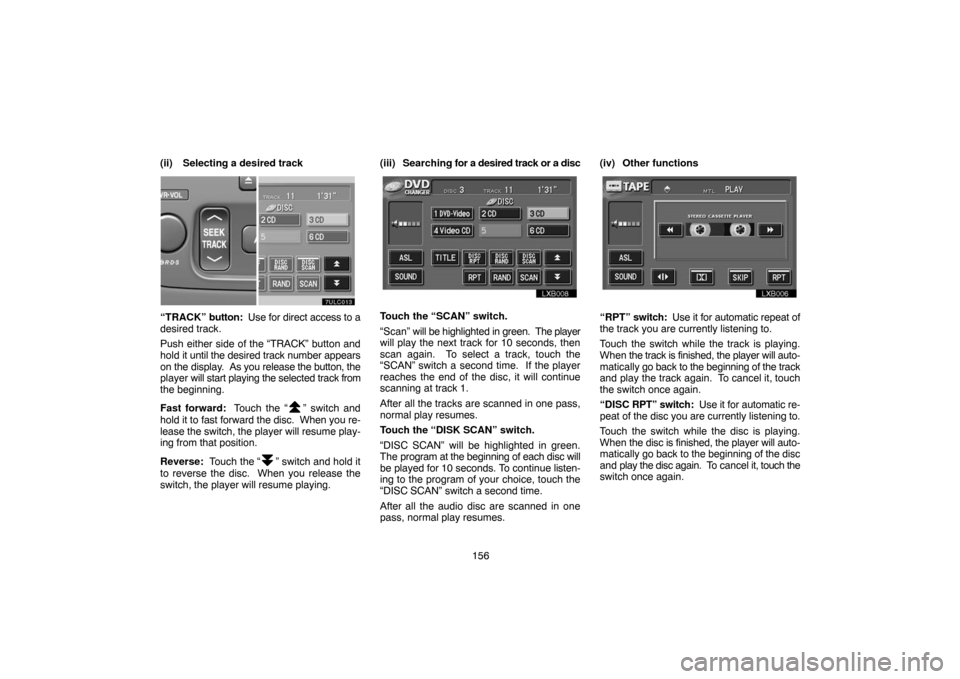
“TRACK” button: Use for direct access to a
desired track.
Push either side of the “TRACK” button and
hold it until the desired track number appears
on the display. As you release the button, the
player will start playing the selected track from
the beginning.
Fast forward: Touch the “
” switch and
hold it to fast forward the disc. When you re-
lease the switch, the player will resume play-
ing from that position.
Reverse: Touch the “
” switch and hold it
to reverse the disc. When you release the
switch, the player will resume playing.(iii) Searching for a desired track or a disc
Touch the “SCAN” switch.
“Scan” will be highlighted in green. The player
will play the next track for 10 seconds, then
scan again. To select a track, touch the
“SCAN” switch a second time. If the player
reaches the end of the disc, it will continue
scanning at track 1.
After all the tracks are scanned in one pass,
normal play resumes.
Touch the “DISK SCAN” switch.
“DISC SCAN” will be highlighted in green.
The program at the beginning of each disc will
be played for 10 seconds. To continue listen-
ing to the program of your choice, touch the
“DISC SCAN” switch a second time.
After all the audio disc are scanned in one
pass, normal play resumes.(iv) Other functions“RPT” switch: Use it for automatic repeat of
the track you are currently listening to.
Touch the switch while the track is playing.
When the track is finished, the player will auto-
matically go back to the beginning of the track
and play the track again. To cancel it, touch
the switch once again.
“DISC RPT” switch: Use it for automatic re-
peat of the disc you are currently listening to.
Touch the switch while the disc is playing.
When the disc is finished, the player will auto-
matically go back to the beginning of the disc
and play the disc again. To cancel it, touch the
switch once again.