Page 131 of 182
121 When you call the number registered in
phonebook and input a code number and the
like to operate a answering machine or use a
telephone service in bank, you can do this op-
eration.
(g) Change the settings of the
Bluetooth phone
Touch the “Settings” switch to display
“Settings” screen and scroll with “�”.
You can change the settings of the phone.(i) Change the phonebook
The system has two phonebooks. You can
select either of a phonebook.
Touch the “Phone Book 1” or “Phone
Book 2”
switch.
Page 132 of 182
122 (ii) Transfer the telephone number
You can transfer the telephone numbers in
your Bluetooth phone to the system. Up to
500 numbers can be registered in one
phonebook. Transfer it while the engine is
running.
1. Touch the “Start Transfer” switch
to display “Data Transfer” screen.
2. Touch the “Overwrite” or “Add”
switch if the phonebook is not empty.
3. Transfer the phonebook data to the
system with operating the Bluetooth
phone.
This screen appears while transferring. To
cancel it, touch the
“Cancel” switch. If the
transferring is interrupted on the way, the
phonebook data transferred by then can be
memorized in the system.(iii) Register the one touch dial
You can register the desired telephone
number from phonebooks, dialed num-
bers and received calls. Up to 17 items the
one touch dial can be registered.1. Touch the “Set One Touch” switch
in which you want to register the phone
number.
Page 133 of 182
123
2. Touch the desired telephone number.
Select the new registration from 118 ex-
cept 6 and touch the switch.
A latest received number is registered in the
6th item.(iv) Delete the memory
�Delete the telephone number in the
phonebook.
Touch the “Delete” switch of “Phone
Book”.
Select the desired number from the list.If you want to delete all the phone numbers in
phonebook, touch the
“Delete All” switch.
Touch “YES” switch.
Touch
“NO” switch and the previous screen
appears.
Page 136 of 182
126
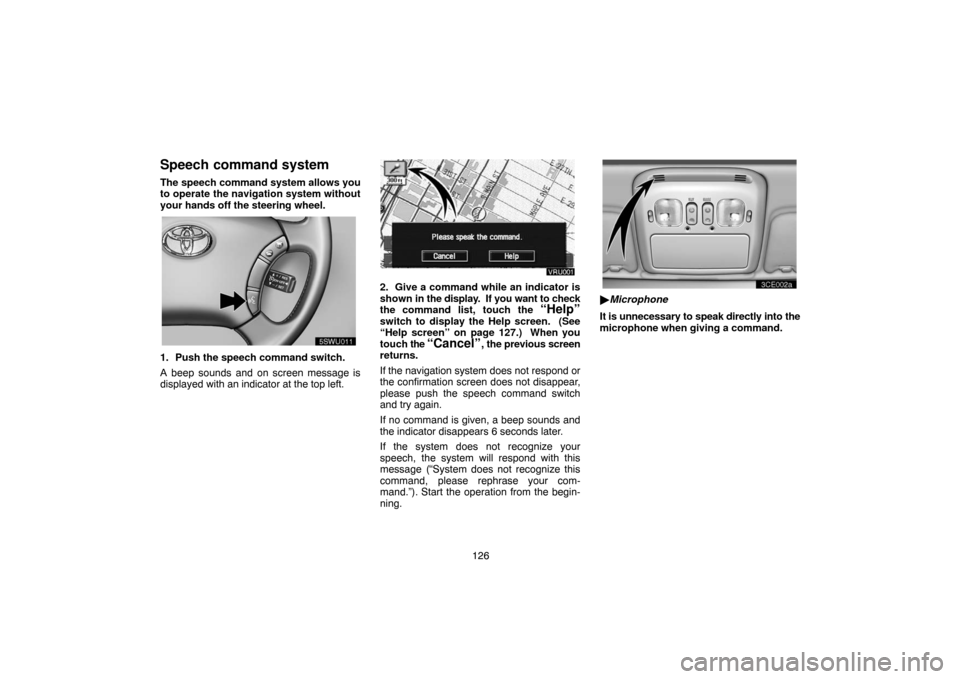
Speech command system
The speech command system allows you
to operate the navigation system without
your hands off the steering wheel.
UNL301
1. Push the speech command switch.
A beep sounds and on screen message is
displayed with an indicator at the top left.
2. Give a command while an indicator is
shown in the display. If you want to check
the command list, touch the
“Help”
switch to display the Help screen. (See
“Help screen” on page 127.) When you
touch the
“Cancel”, the previous screen
returns.
If the navigation system does not respond or
the confirmation screen does not disappear,
please push the speech command switch
and try again.
If no command is given, a beep sounds and
the indicator disappears 6 seconds later.
If the system does not recognize your
speech, the system will respond with this
message (“System does not recognize this
command, please rephrase your com-
mand.”). Start the operation from the begin-
ning.
UNL303
�Microphone
It is unnecessary to speak directly into the
microphone when giving a command.
Page 179 of 182

169 Multiangle feature: You can enjoy the
same scene at different angles.
Multilanguage feature: You can select a
language of the subtitle and audio.
Region codes: The region codes are pro-
vided on DVD players and DVD discs. If the
DVD video disc does not have the same re-
gion code as the DVD player, you cannot play
the disc on the DVD player. For region codes,
see page 168.
Audio: This DVD player can play liner PCM,
Dolby digital and MPEG audio format DVD.
Other decoded type cannot be played.
Title and chapter: Video and audio pro-
grams stored in DVD video disc are divided in
parts by title and chapter.
Title: The largest unit of the video and audio
programs stored on DVD video discs. Usual-
ly, one piece of movie, one album, or one au-
dio program is assigned as a title.
Chapter: The unit smaller than that of title. A
title comprises plural chapters.Manufactured under license from Dolby
Laboratories. “Dolby”, “Pro Logic”, and
the doubleD symbol are trademarks of
Dolby Laboratories. Confidential unpub-
lished works.
�19921997 Dolby Laboratories. All
rights reserved.
This product incorporates copyright
protection technology that is protected by
method claims of certain U.S. patents and
other intellectual property rights owned by
Macrovision Corporation and other rights
owners. Use of this copyright protection
technology must be authorized by Macro-
vision Corporation, and is intended for
home and other limited viewing uses only
unless otherwise authorized by Macrovi-
sion Corporation. Reverse engineering or
disassembly is prohibited.
“DTS” is a trademark of Digital Theater
Systems, Inc.
Car audio/video system
operating hints
NOTICE
To ensure the correct audio/video sys-
tem operation:
�Be careful not to spill beverages over
the audio system.
�Do not put anything other than a cas-
sette tape or magazine into the cas-
sette tape slot or DVD player.
�The use of cellular phone inside or
near the vehicle may cause a noise
from the speakers of the audio
system which you are listening to.
However, this does not indicate a
malfunction.
VI
Page 180 of 182

170 Radio reception
Usually, the problem with radio reception
does not mean there is a problem with your ra-
dio − it is just the normal result of conditions
outside the vehicle.
For example, nearby buildings and terrain
can interfere with FM reception. Power lines
or telephone wires can interfere with AM sig-
nals. And of course, radio signals have a lim-
ited range, and the farther you are from a sta-
tion, the weaker its signal will be. In addition,
reception conditions change constantly as
your vehicle moves.
Here are some common reception problems
that probably do not indicate a problem with
your radio:
FM
Fading and drifting stations − Generally,
the effective range of FM is about 40 km (25
miles). Once outside this range, you may no-
tice fading and drifting, which increase with
the distance from the radio transmitter. They
are often accompanied by distortion.
Multipath − FM signals are reflective, mak-
ing it possible for two signals to reach your an-
tenna at the same time. If this happens, the
signals will cancel each other out, causing a
momentary flutter or loss of reception.Static and fluttering − These occur when
signals are blocked by buildings, trees, or oth-
er large objects. Increasing the bass level
may reduce static and fluttering.
Station swapping − If the FM signal you are
listening to is interrupted or weakened, and
there is another strong station nearby on the
FM band, your radio may tune in the second
station until the original signal can be picked
up again.
AM
Fading − AM broadcasts are reflected by the
upper atmosphere − especially at night.
These reflected signals can interfere with
those received directly from the radio station,
causing the radio station to sound alternately
strong and weak.
Station interference − When a reflected sig-
nal and a signal received directly from a radio
station are very nearly the same frequency,
they can interfere with each other, making it
difficult to hear the broadcast.
Static − AM is easily affected by external
sources of electrical noise, such as high ten-
sion power lines, lightening, or electrical mo-
tors. This results in static.Caring for your cassette player and tapes
For high performance from your cassette
player and tapes:
Clean the tape head and other parts regularly.
�A dirty tape head or tape path can de-
crease sound quality and tangle your cas-
sette tapes. The easiest way to clean
them is by using a cleaning tape. (A wet
type is recommended.)
Use high−quality cassettes:
�Low−quality cassette tapes can cause
many problems, including poor sound, in-
consistent playing speed, and constant
auto−reversing. They can also get stuck
or tangled in the cassette player.
�Do not use a cassette if it has been dam-
aged or tangled or if its label is peeling off.
�Do not leave a cassette in the player if you
are not listening to it, especially if it is hot
outside.
�Store cassettes in their cases and out of
direct sunlight.
�Avoid using cassettes with a total playing
time longer than 100 minutes (50 minutes
per side). The tape used in these cas-
settes is thin and could get stuck or
tangled in the cassette player.


