Page 155 of 182
145
(b) Automatic sound levelizer
When the audio sound becomes difficult to be
heard due to road noise, wind noise, etc. dur-
ing driving, touch the “ASL” switch. The sys-
tem adjusts to the optimum volume and tone
quality according to the noise level.
(c) Tone and balance
How good an audio program sounds to you is
largely determined by the mix of the treble,
mid−range, and bass levels. In fact, different
kinds of music and vocal programs usually
sound better with different mixes of treble,
mid−range, and bass.
A good balance of the left and right stereo
channels and of the front and rear sound lev-
els is also important.
Keep in mind that if you are listening to a ste-
reo recording or broadcast, changing the
right/left balance will increase the volume of
one group of sounds while decreasing the
volume of another.
Touching the “SOUND” switch on the
screen displays the sound adjustment
screen.
VI
Page 156 of 182
146
BASS “+” or “–”: Adjusts low−pitched
tones.
MID “+” or “–”: Adjusts mid−pitched tones.
TREB “+” or “–”: Adjusts high−pitched
tones.
“FRONT” or “REAR”: Adjusts sound bal-
ance between the front and rear speakers.
“L” or “R”: Adjusts sound balance between
the left and right speakers.
“OK”: The previous screen returns.
(d) Your radio antenna
The antenna automatically extends when the
radio is on or the radio system is on, and re-
tracts when the radio mode is off.
UNX602
To adjust the height of the antenna manu-
ally, push the switch.
Clean the antenna mast periodically with a
clean dry cloth.
CAUTION
Before extending the antenna, confirm
that no one is close enough to get
injured.
NOTICE
�To prevent damage to the antenna,
make sure it is retracted before
driving your vehicle through an
automatic car wash.
�Antenna mast have to be extended
higher than 100 mm (3.94 in.) length
when the audio is on. Extend the an-
tenna mast when the radio signal is
weak.
Page 163 of 182

153
�If you set “REW 1”, the player will rewind
to the beginning of the current program.
�When counting the number of programs
you want to rewind, remember to count the
current program as well. For example, if
you want to rewind to a song that is two be-
fore the song you are listening to, push this
button until “REW 3” appears on the dis-
play.
When the beginning of the tape is reached,
the player automatically resumes normal
play.
There must be at least 5 seconds of blank
space between programs for this feature to
work correctly.
“RPT”, “SKIP” or “Automatic program
selection” features: These features may
not work well with some spoken word, live or
classical recordings.
DVD player operation
The DVD player can play audio CDs, DVD
video discs and video CDs.
For appropriate discs for this paper, see “Car
audio/video system operating hints” on page
169.
For safety reasons, you can enjoy DVD video
discs and video CDs only when the vehicle is
completely stopped with the ignition switch in
the “ACC” or “ON” position and the parking
brake applied. While you are driving, you can
hear audio alone even in the DVD video or
video CD mode.
The DVD player can play the discs labeled as
shown below.
(a) Inserting discs
unx604
1. Pull the lock release lever and open the
console box.
unx605
2. Push this button to eject the magazine.
VI
Page 164 of 182

154
unx606
3. Pull out the tray while pushing the lock
release button.
unx607
4. Put a disc on the tray with its label face
up and push the tray back into the maga-
zine.If the label faces down, the disc cannot be
played. In this case, “DISC CHECK” and disc
number appears on the display.
If a disc which is not playable is inserted,
“DISC CHECK” will also appear on the
screen. For appropriate discs for this player,
see “Car audio/video system operating hints”
on page 169.
unx608a
5. Insert the magazine into the player as
indicated by the arrow ahead on the maga-
zine, close the door and console box.When the magazine is set completely, the
system will be in a “Load” cycle for approxi-
mately 30 seconds while the system
searches for discs in the magazine. Upon
completion of this cycle, the DVD player unit
will be ready to play. If the “DISC” button is
pushed during the “Load” cycle, “LOAD” ap-
pears on the display until the system has
completed the load cycle, after which the sys-
tem will begin normal play.
CAUTION
To reduce the chance of injury in case of
an accident or a sudden stop, always
keep the console box closed while driv-
ing.
Page 165 of 182
155
(b) Playing a disc
ung627
Push the “DISC” button if the magazine is
already loaded in the player.
“DVD CHANGER” appears on the display.
The discs set in the magazine are played con-
tinuously, starting with disc number 1. The
disc number of the disc currently being
played, the track number and the time from
the beginning of the program are shown on
the display.
(c) Selecting a desired disc
On the screen: Touch the desired disc
number.
The selected disc number is highlighted in
green.
The player will start playing the selected disc
from the first track.
On the audio panel: Push the “
�” or “�”
side of the “DISC” button.
When you release the button, the player will
start playing the selected disc from the first
track.
(d) Operating an audio CD
(i) Playing an audio CD
Push the “AUDIO” button to display this
screen. You can operate the switches and
choose the number of the disc you want to
play. The selected disc is automatically
played.
VI
Page 166 of 182
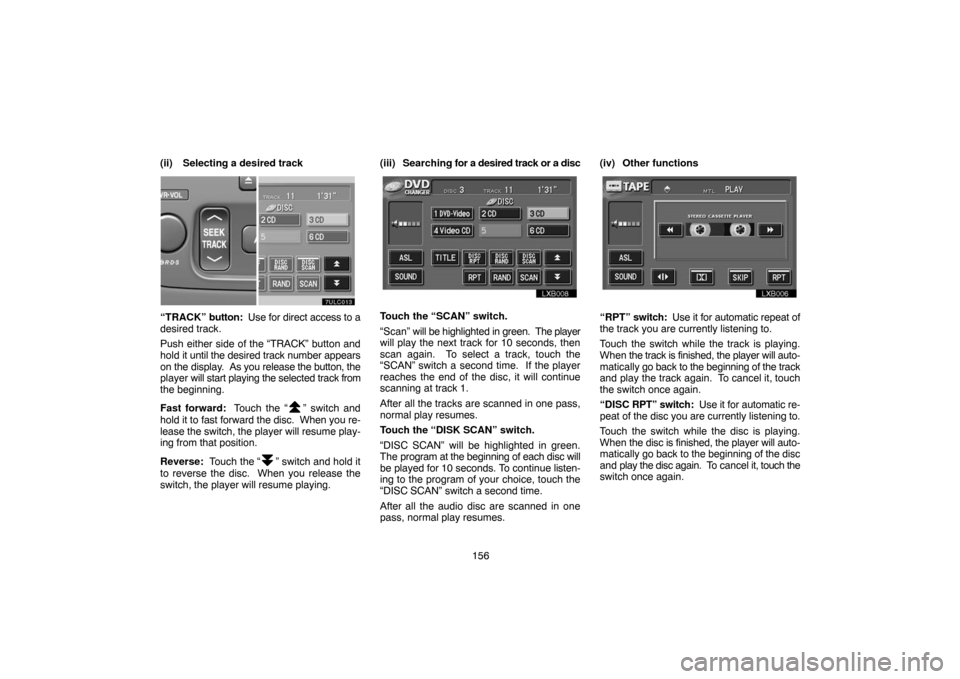
156 (ii) Selecting a desired track
“TRACK” button: Use for direct access to a
desired track.
Push either side of the “TRACK” button and
hold it until the desired track number appears
on the display. As you release the button, the
player will start playing the selected track from
the beginning.
Fast forward: Touch the “
” switch and
hold it to fast forward the disc. When you re-
lease the switch, the player will resume play-
ing from that position.
Reverse: Touch the “
” switch and hold it
to reverse the disc. When you release the
switch, the player will resume playing.(iii) Searching for a desired track or a disc
Touch the “SCAN” switch.
“Scan” will be highlighted in green. The player
will play the next track for 10 seconds, then
scan again. To select a track, touch the
“SCAN” switch a second time. If the player
reaches the end of the disc, it will continue
scanning at track 1.
After all the tracks are scanned in one pass,
normal play resumes.
Touch the “DISK SCAN” switch.
“DISC SCAN” will be highlighted in green.
The program at the beginning of each disc will
be played for 10 seconds. To continue listen-
ing to the program of your choice, touch the
“DISC SCAN” switch a second time.
After all the audio disc are scanned in one
pass, normal play resumes.(iv) Other functions“RPT” switch: Use it for automatic repeat of
the track you are currently listening to.
Touch the switch while the track is playing.
When the track is finished, the player will auto-
matically go back to the beginning of the track
and play the track again. To cancel it, touch
the switch once again.
“DISC RPT” switch: Use it for automatic re-
peat of the disc you are currently listening to.
Touch the switch while the disc is playing.
When the disc is finished, the player will auto-
matically go back to the beginning of the disc
and play the disc again. To cancel it, touch the
switch once again.
Page 167 of 182

157 “RAND” switch: Use it for automatic and
random selection of the disc which you are
currently listening to.
When the switch is touched, the system se-
lects a track in the disc you are currently lis-
tening to. To cancel it, touch the switch once
again.
“DISC RAND” switch: Use it for automatic
track selection for all the audio discs and play
by the system.
When the switch is touched, the system se-
lects a track in all the audio discs in the maga-
zine which is set and plays it. To cancel it,
touch the switch once again.
“TITLE” switch: Use it for displaying the
song title and track number while the CD−
TEXT disc is playing.
The switch is not displayed on the screen
while the CD−TEXT disc is not playing. Up to
29 letters can be displayed. To cancel it,
touch the “TITLE OFF” switch.
(e) Operating a DVD video disc
NOTE: The playback condition of some
DVD video discs may be determined by a
DVD video software producer. This DVD
player plays a disc as the software produc-
er intended. So some functions may not
work properly. Be sure to read the instruc-
tion manual for the DVD video disc sepa-
rately provided. For the detailed informa-
tion about DVD video discs, see “(h) DVD
player and DVD video disc information”Precautions on DVD video disc
When recording with a DVD video or video
CD, audio tracks may not record in some
cases while the menu is displayed. As audio
will not play in this case, verify that the video
tracks are playing and then activate playback.
When playback of a disc is completed:
�If an audio CD is playing, the next CD will
be selected and playback will begin auto-
matically.
�If a DVD video or video CD is playing, play-
back will stop or the menu screen will be
displayed. The next disc will not play back
automatically. (Audio tracks cannot be
heard while the disc is stopped)
The title/chapter number and playback time
display may not appear while playing back
certain DVD video discs.
VI
Page 168 of 182
158
CAUTION
Conversational speech on some DVDs
is recorded at a low volume to empha-
size the impact of sound effects. If you
adjust the volume assuming that the
conversations represent the maximum
volume level that the DVD will play, you
may be startled by louder sound effects
or when you change to a different audio
source. The louder sounds may have a
significant impact on the human body or
pose a driving hazard. Keep this in mind
when you adjust the volume.
The “DVD Hint!” screen appears when the
video screen is first displayed after you
turn the ignition key to “ACC” or “ON”.
Touch the “OK” switch when you read the
message.(i) Playing a DVD video disc
unx614
Push the “AUDIO” button to display this
screen. You can operate the switches and
choose the number of the disc you want to
play. The selected disc is automatically
played.
When you touch the “PICTURE” switch, the
video screen returns.


