Page 2 of 173
ii
Important information about this manual
For safety reasons, this manual indicates
items requiring particular attention with the
following marks.
CAUTION
This is a warning against anything
which may cause injury to people if the
warning is ignored. You are informed
about what you must or must not do in
order to reduce the risk of injury to
yourself and others.
NOTICE
This is a warning against anything
which may cause damage to the ve-
hicle or its equipment if the warning is
ignored. You are informed about what
you must or must not do in order to
avoid or reduce the risk of damage to
your vehicle and its equipment.
INFORMATION
This provides additional information.
Initial screen
When you start the engine or turn the ignition
switch to the “ACC” position, the initial
screen appears and the system begins
operating.
CAUTION
When the vehicle is stopped with the
engine running, always apply the park-
ing brake for safety.
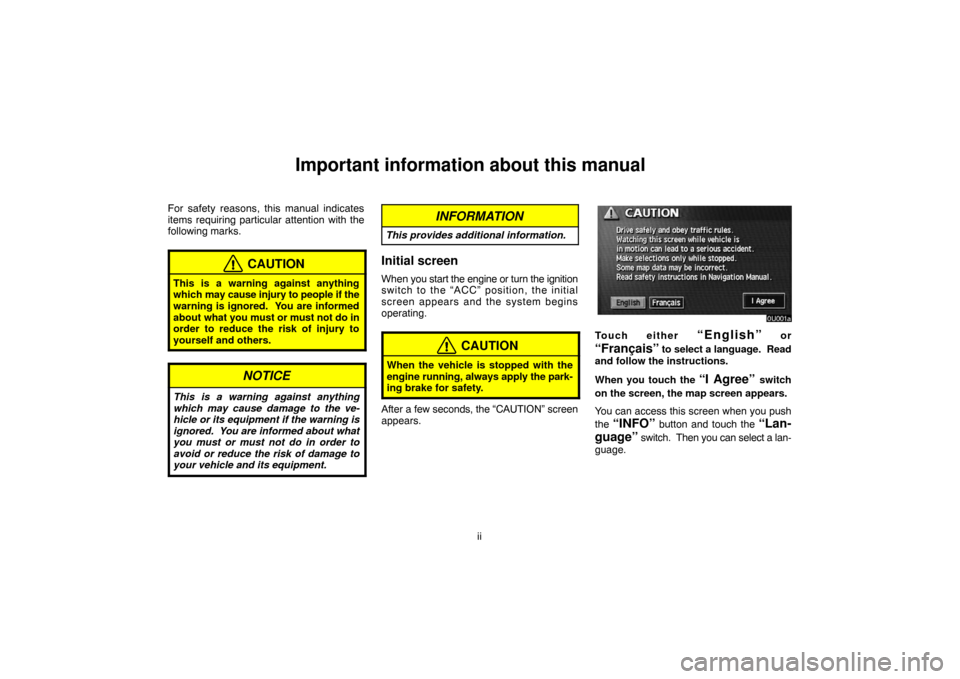
After a few seconds, the “CAUTION” screen
appears.
Touch either “English” or
“Français” to select a language. Read
and follow the instructions.
When you touch the
“I Agree” switch
on the screen, the map screen appears.
You can access this screen when you push
the
“INFO” button and touch the “Lan-
guage”
switch. Then you can select a lan-
guage.
Page 107 of 173

97
Notice of “Date”: You can input the next
maintenance date.
Notice of “Distance”: You can input the driv-
ing distance until the next maintenance
check.
When you touch the
switch on the
“Maintenance” screen, the screen changes to
the “Personal Event” screen. Touch the keys
to input the desired name and then input con-
ditions.
After you input the date and/or distance,
touch the
“OK” switch. The screen then re-
turns to the “Maintenance” screen.
The following switches appear.
“Delete All”: To cancel all conditions which
have been inputted.“Reset All”: To reset the item which has sat-
isfied a condition.
Touch the
“Off” switch at the top of the
“Maintenance” screen to turn off the informa-
tion screen.
When your vehicle needs to be serviced, the
icon color will change to orange.
INFORMATION
�For scheduled maintenance informa-
tion, please refer to the “Scheduled
Maintenance Guide” or “Owner’s
Manual Supplement”.
�Depending on the driving or the road
conditions, the actual date and dis-
tance may differ from the stored date
and distance in the system.
Information items
Oil change
Replace oil filter
Rotate tires
Replace tires
Replace battery
Replace brake linings
Replace wiper blades
Page 108 of 173
98
Replace engine coolant
Replace brake fluid
Replace ATF
Scheduled maintenance
Replace air filter
Personal event
(a) Register dealer
You can register the dealer name, staff,
location and phone number.
1. Touch the “Set Dealer” switch on
the “Maintenance” screen.
2. Enter the location of the dealer in the
same way as for destination input. (See
page 20.)
Page 118 of 173
108
To edit: Touch the corresponding “Memo”
or “Location” switch. (See page 106 for
details.)
To delete: Touch the
“Delete” switch.
(See page 105 for details.)
Trip information
Trip information such as driving distance,
average vehicle speed, fuel consumption,
etc. can be displayed on the screen.
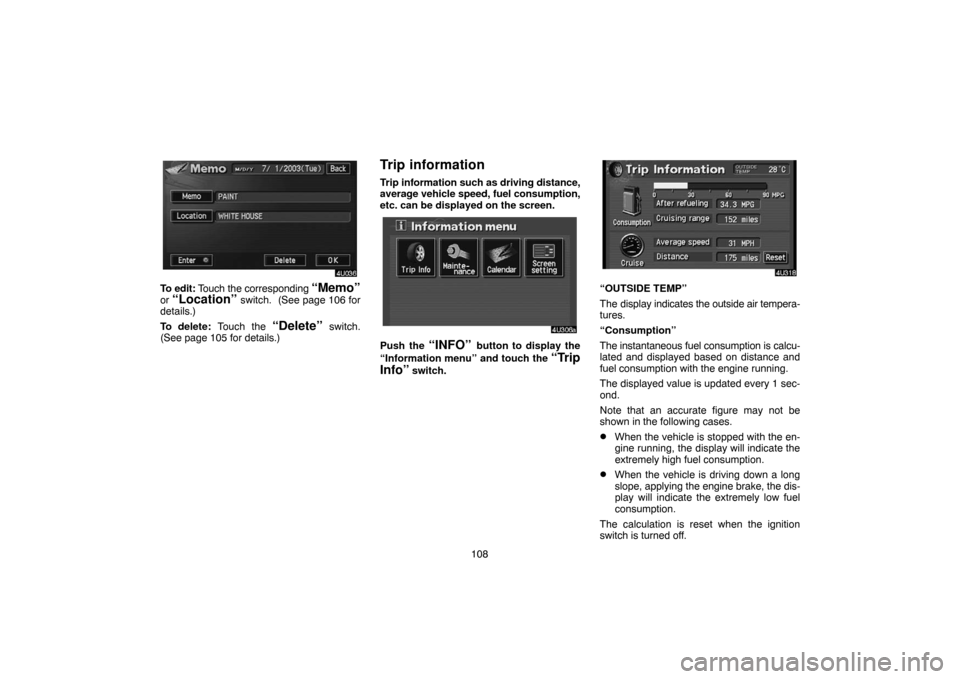
Push the “INFO” button to display the
“Information menu” and touch the
“Trip
Info”
switch.
“OUTSIDE TEMP”
The display indicates the outside air tempera-
tures.
“Consumption”
The instantaneous fuel consumption is calcu-
lated and displayed based on distance and
fuel consumption with the engine running.
The displayed value is updated every 1 sec-
ond.
Note that an accurate figure may not be
shown in the following cases.
�When the vehicle is stopped with the en-
gine running, the display will indicate the
extremely high fuel consumption.
�When the vehicle is driving down a long
slope, applying the engine brake, the dis-
play will indicate the extremely low fuel
consumption.
The calculation is reset when the ignition
switch is turned off.
Page 144 of 173
134
CAUTION
Conversational speech on some DVDs
is recorded at a low volume to empha-
size the impact of sound effects. If you
adjust the volume assuming that the
conversations represent the maximum
volume level that the DVD will play, you
may be startled by louder sound effects
or when you change to a different audio
source. The louder sounds may have a
significant impact on the human body or
pose a driving hazard. Keep this in mind
when you adjust the volume.
This “DVD Hint!” screen appears when the
video screen is first displayed after you
turn the ignition key to “ACC” or “ON”.
Touch “OK” when you read the message.PLAYING A DVD VIDEO DISC
Push the “AUDIO” button to display this
screen.
It you touch the “PICTURE” switch when the
vehicle is completely stopped and the parking
brake is applied, the video screen returns.
Page 152 of 173
142 1918
Serbian
1919Siswati
1920Sesotho
1921Sundanese
1923Swahili
2001Tamil
2005Telugu
2007Tajik
2008Thai
2009Tigrinya
2011Turkmen
2012Tagalog
2014Setswana
2015Tonga
2018Turkish
2019Tsonga
2020Tatar
2023Tw i
2111Ukrainian
2118Urdu
2126Uzbek
2209Vietnamese
2215Volapük
2315Wolof
2408Xhosa
2515Yoruba
2621Zulu
(f) Operating a video CD
PLAYING A VIDEO CD
Push the “AUDIO” button to display this
screen.
It you touch the “PICTURE” switch when the
vehicle is completely stopped and the parking
brake is applied, the video screen returns.


