2004 PONTIAC VIBE light
[x] Cancel search: lightPage 109 of 370

The main components of your instrument panel are the
following:
A. Air Outlets. See
Outlet Adjustment on page 3-22.
B. Instrument Panel Cluster. See
Instrument Panel
Cluster on page 3-26.
C. Hazard Warning Flasher Button. See
Hazard
Warning Flashers on page 3-4.
D. Audio System. See
Audio System(s) on page 3-41.
E. Rear Window Defogger Button. See ªRear Window
Defoggerº under
Climate Control System on
page 3-19.
F. Front Passenger Safety Belt Reminder Light. See
Safety Belt Reminder Light on page 3-28.
G. Climate Control System. See
Climate Control
System on page 3-19.
H. Power Remote Control Mirror Button. See
Outside
Remote Control Mirrors on page 2-36.
I. Instrument Panel Brightness Control. See
ªInstrument Panel Brightnessº under
Interior Lamps
on page 3-14.
J. Rear Liftglass Release Button. See
Liftgate/Liftglass
on page 2-9.
K. Coinholder. See
Coinholder(s) on page 2-37.
L. Content Theft-Deterrent Security Light. See
Content
Theft-Deterrent on page 2-13.M. Storage Compartment. See
Instrument Panel
Storage Area on page 2-37.
N. Turn Signal/Multifunction Lever. See
Turn
Signal/Multifunction Lever on page 3-5.
O. Hood Release. See
Hood Release on page 5-10.
P. Tilt Lever. See
Tilt Wheel on page 3-5.
Q. Horn. See
Horn on page 3-5.
R. Cruise Control Lever (Option). See ªCruise Controlº
under
Turn Signal/Multifunction Lever on page 3-5.
S. Ignition Switch. See
Ignition Positions on page 2-16.
T. Windshield Wiper Lever. See ªWindshield Wipersº
under
Turn Signal/Multifunction Lever on page 3-5.
U. Cigarette Lighter. See
Ashtrays and Cigarette Lighter
on page 3-19.
V. Shift Lever. See
Shifting Into Park (P) on page 2-28.
W. Power Outlet. See
Power Outlet 115 Volt Alternating
Current on page 3-18.
X. Parking Brake. See
Parking Brake on page 2-27.
Y. Center Console Storage Area. See
Center Console
Storage Area on page 2-37.
Z. Glove Box. See
Glove Box on page 2-37.
3-3
Page 112 of 370

Turn and Lane-Change Signals
The turn signal has an upward (for right) and a
downward (for left) position. These positions allow you
to signal a turn or a lane change.
To signal a turn, move the lever all the way up or down.
When the turn is ®nished, the lever will return
automatically.
To signal a lane change, raise or lower the lever until
the arrow starts to ¯ash. Hold it there until you complete
your lane change. The lever will return by itself when
you release it.
An arrow on the instrument
panel cluster will ¯ash in
the direction of the
turn or lane change.
If you signal a turn or a lane change and notice the
arrow ¯ashing rapidly, a signal bulb may be burned out
and other drivers won't see your turn signal.
If a bulb is burned out, have it replaced to help avoid an
accident. If the arrows don't go on at all when you
signal a turn, check for burned-out bulbs and then check
the fuse. See
Fuses and Circuit Breakers on page 5-98.
Headlamp High/Low-Beam Changer
The headlamps must be on for this feature to work.
For high beams, push the turn signal lever away
from you.
When the high beams are
on, this light on the
instrument panel cluster
also will be on.
It will go off when you switch to the low beams.
To switch back to low beams, pull the lever
toward you.
Flash-to-Pass
With the lever in the low-beam position, pull the lever
toward you to momentarily switch to high beams
(to signal that you are going to pass). If you have the
headlamps on when you release the lever, they will
return to the low beams.
3-6
Page 113 of 370
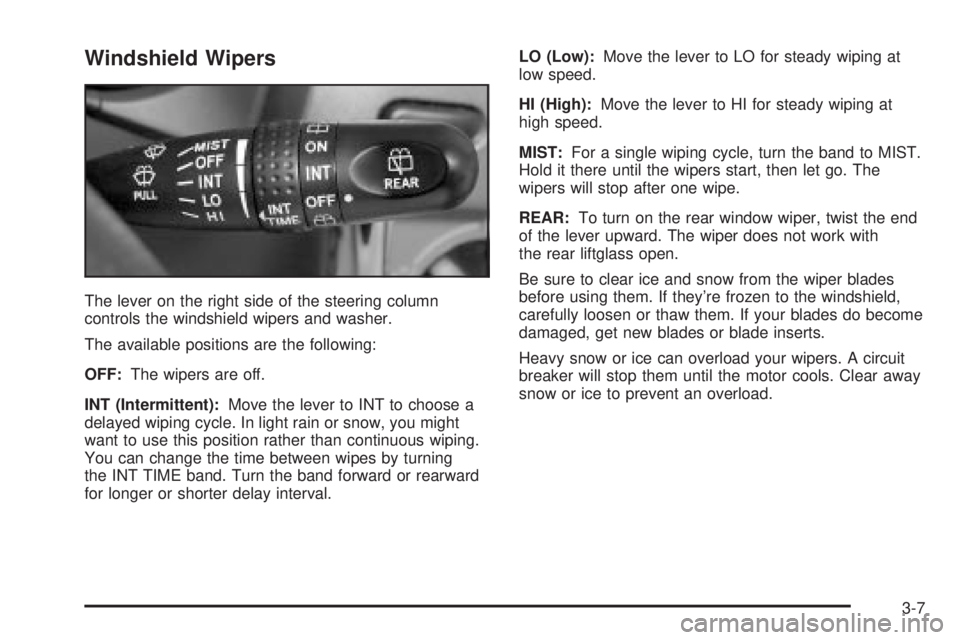
Windshield Wipers
The lever on the right side of the steering column
controls the windshield wipers and washer.
The available positions are the following:
OFF:The wipers are off.
INT (Intermittent):Move the lever to INT to choose a
delayed wiping cycle. In light rain or snow, you might
want to use this position rather than continuous wiping.
You can change the time between wipes by turning
the INT TIME band. Turn the band forward or rearward
for longer or shorter delay interval.LO (Low):Move the lever to LO for steady wiping at
low speed.
HI (High):Move the lever to HI for steady wiping at
high speed.
MIST:For a single wiping cycle, turn the band to MIST.
Hold it there until the wipers start, then let go. The
wipers will stop after one wipe.
REAR:To turn on the rear window wiper, twist the end
of the lever upward. The wiper does not work with
the rear liftglass open.
Be sure to clear ice and snow from the wiper blades
before using them. If they're frozen to the windshield,
carefully loosen or thaw them. If your blades do become
damaged, get new blades or blade inserts.
Heavy snow or ice can overload your wipers. A circuit
breaker will stop them until the motor cools. Clear away
snow or ice to prevent an overload.
3-7
Page 115 of 370

With cruise control, you can maintain a speed of
25 mph (40 km/h) or more without keeping your foot on
the accelerator. This can really help on long trips.
Cruise control does not work at speeds below 25 mph
(40 km/h).
{CAUTION:
·Cruise control can be dangerous where
you can't drive safely at a steady speed.
So, don't use your cruise control on
winding roads or in heavy traffic.
·Cruise control can be dangerous on
slippery roads. On such roads, fast
changes in tire traction can cause
needless wheel spinning, and you could
lose control. Don't use cruise control on
slippery roads.
Setting Cruise Control
{CAUTION:
If you leave your cruise control on when you're
not using cruise, you might hit a button and go
into cruise when you don't want to. You could
be startled and even lose control. Keep the
cruise control switch off until you want to use
cruise control.
1. Press the ON-OFF button at the end of the cruise
control lever. The CRUISE light on the instrument
panel cluster will come on. See
Cruise Control Light
on page 3-39for more information.
2. Get up to the speed you want.
3. Move the lever down to SET/COAST and release it.
4. Take your foot off the accelerator pedal.
3-9
Page 117 of 370

Reducing Speed While Using Cruise
Control
There are two ways to reduce your speed while using
cruise control:
·Push and hold the lever to SET/COAST until you
reach the lower speed you want, then release it.
·To slow down in very small amounts, push the lever
down brie¯y. Each time you do this, you'll go about
1 mph (1.6 km/h) slower.
Passing Another Vehicle While Using
Cruise Control
Use the accelerator pedal to increase your speed.
When you take your foot off the pedal, your vehicle will
slow down to the cruise control speed you set earlier.
Using Cruise Control on Hills
How well your cruise control will work on hills depends
upon your speed, load and the steepness of the hills.
When going up steep hills, you may have to step on the
accelerator pedal to maintain your speed.When going downhill, you may have to brake or shift to
a lower gear to keep your speed down. Of course,
applying the brake or downshifting to SECOND (2) or
LOW (L) takes you out of cruise control. Many
drivers ®nd this to be too much trouble and don't use
cruise control on steep hills.
Ending Cruise Control
There are several ways to turn off the cruise control:
·Step lightly on the brake pedal or push the
clutch pedal, if you have a manual transaxle.
·Press the CRUISE ON-OFF button again.
·Pull the cruise control lever toward you.
Erasing Speed Memory
When you turn off the cruise control or the ignition, your
cruise control set speed memory is erased. The set
speed memory is also erased when the vehicle speed is
less than 25 mph (40 km/h).
3-11
Page 118 of 370

Exterior Lamps
The lever on the left side of the steering column
operates the exterior lamps.
O(Exterior Lamps):Turn the outside part of the
lever with the symbol on it, to operate the lamps.The exterior lamp switch has three positions:
OFF:Turning the switch to this position turns off all
lamps, except the Daytime Running Lamps (DRL).
O(Parking Lamps):Turning the switch to this position
turns on the parking lamps together with the following:
·Sidemarker Lamps
·Taillamps
·License Plate Lamp
·Instrument Panel Lights
3(Headlamps):Turning the switch to this position
turns on the headlamps, together with the previously
listed lamps and lights.
Turn the switch to OFF to turn off the lamps.
-(Fog Lamps):You can also use the control lever
to turn on the fog lamps. They will come on only
when the headlamps are on low beam.
3-12
Page 119 of 370

Automatic Headlamp System
Your vehicle is equipped with an automatic light sensor
on the top left corner of the instrument panel, so be
sure it is not covered or the headlamps will be on
continuously.
When it is dark enough outside, your automatic
headlamp system will turn on your low-beam headlamps
at the normal brightness along with other lamps such
as the taillamps, sidemarker, parking lamps and
instrument panel lights. The parking brake must be
released for the automatic headlamp system to work.
This is indicated by the headlamp symbol on your
instrument panel cluster.
If you are driving through a parking garage, overcast
weather, or a tunnel, the automatic headlamp system
may turn on your low-beam headlamps at a normal
brightness along with the taillamps, sidemarker, parking
lamps and the instrument panel lights. The radio lights
will be dimmer, and the instrument panel cluster lights
may dim. There will be a delay of several seconds before
the lights will turn on when starting the car at night.
Headlamps On Reminder
If you turn the ignition to LOCK or ACC and leave
the lamps on, you'll hear a tone when you open the
driver's door.
Daytime Running Lamps
Daytime Running Lamps (DRL) can make it easier for
others to see the front of your vehicle during the
day. DRL can be helpful in many different driving
conditions, but they can be especially helpful in the short
periods after dawn and before sunset. Fully functional
daytime running lamps are required on all vehicles
®rst sold in Canada.
The DRL system will make your headlamps come on at
a reduced brightness when the following conditions
are met:
·The ignition is on with the engine running,
·the exterior lamps switch is off and
·the parking brake is released.
When the DRL are on, only your headlamps will be on
at a reduced brightness. The taillamps, sidemarker
and other lamps won't be on. Your instrument panel
won't be lit up either.
When you turn the exterior lamp switch to the headlamp
position, your DRL will go off and your headlamps will
come on. The other lamps that come on with your
headlamps will also come on.
3-13
Page 121 of 370

The brightness of the instrument panel lights will
decrease when the headlamps are on. It is recommended
that the brightness level is kept at the maximum setting
for all daytime driving to insure proper visibility.
The interior light has the following positions:
OFF:This position turns the light off.
ON:This position keeps the light on all the time.
6(Door):This position turns the light on when any
of the side doors, the liftgate or the liftglass is opened.
The light goes off when all the side doors, the liftgate
and the liftglass are closed.
Entry Lighting
While the instrument panel brightness control is in the
door position, the light will come on when any side door,
the liftgate or the liftglass is opened. After all the side
doors, liftgate and liftglass are closed, and the key is out
of the ignition, in LOCK or ACC, the light will remain
on for about 15 seconds and then go out except under
the following conditions:
·The ignition is turned to ACC or ON after all the side
doors, the liftgate and the liftglass are closed.
·All the side doors and liftgate are locked when the
liftglass is closed and the light is still on.
When any side door is unlocked with the key or remote
keyless entry system transmitter, the light comes on
for 15 seconds, even if the door is not opened.
To prevent the battery from draining, the lamps
will automatically turn off when the key is in the
ACC or LOCK positions or if the key is removed
for 20 minutes or more.
3-15