Satellite radio reception capability is not func-
tional, and “NO SAT” will be displayed while
scrolling through audio modes, unless optional
satellite receiver and antenna were installed, and
an XM
or SIRIUS
TM
satellite radio service
subscription is active. For information on satellite
radio, contact your NISSAN dealer.
When RADIO mode select button is pushed
while the ignition switch is in the ACC or ON, the
radio will come on at the station/channel last
played.
The last station/channel played will also come on
when the ON/OFF knobis pushed to ON.
If a compact disc or tape is playing when the
RADIO mode select button is turned to ON, the
compact disc or tape will automatically be
turned off and the last radio station/channel
played will come on.
The FM stereo indicator ST will glow during FM
stereo reception. When the stereo broadcast
signal is weak, the radio will automatically
change from stereo to monaural reception.
Satellite radio mode (if equipped with optional
factory installed satellite receiver and antenna
(retrofit unavailable), and with an active XM
or
SIRIUS
TM
satellite radio service subscription):
To select the satellite radio mode SAT1 or
SAT2, push the RADIO mode select button untilSAT1 or SAT2 appears on the display.
TUNE (Tuning):WARNING
The radio should not be tuned while
driving so full attention may be given to
vehicle operation.
Use these buttons for manual tuning. To move
quickly through the channels, hold either of the
TUNE buttons down for more than 0.5 seconds.
SEEK tuning:
For AM and FM radio
Push the SEEK button
or
, to tune
from high to low or low to high frequencies and
stops at the next broadcasting station.
For SATELLITE radio
Push the SEEK button
or
to seek
channels of the next or previous category.
SCANtuning:
Push the SCAN tuning button to tune from low
to high frequencies and stops at each broad-
casting station for 5 seconds. Pushing the but-
ton again during this 5 seconds period will stopSCAN tuning and the radio will remain tuned to
that station.
If the SCAN tuning button is not pushed within 5
seconds, SCAN tuning moves to the next sta-
tion.
Display mode (RPT⋅DISP) of satellite
radio:
�Pushing the “RPT” button will display addi-
tional information (for example: Title, Artist
name) about the satellite radio broadcast.
�Pushing the “RPT” button for more than 1.5
seconds will change the display mode as
follows:
Channel number→Channel name→Artist
name→Song title→Channel number
Station memory operations:
Twelve stations/channel can be set for the FM
band (six for FM1, six for FM2) and satellite radio
(six for SAT1, six for SAT2) and six stations can
be set for the AM band.
1. Tune to the desired station using the SEEK,
SCAN or TUNE button.
2. Select the desired station/channel and keep
pushing any of the desired station/channel
memory buttons (1 to 6) until a beep sound is
4-24
Heater, air conditioner and audio systems
�
04.3.9/R50-D/V5
�
heard. (The radio mutes when the select
button is pushed.)
3. The channel indicator will then come on and
the sound will resume. Memorizing is now
complete.
4. Other buttons can be set in the same manner.
If the battery cable is disconnected, or if the fuse
blows, the radio memory will be cancelled. In
that case, reset the desired stations.
Automatic preset button:
To select the preset FM, AM, SAT or PTY
station/channel, push the AUTO.P button for
less than 1.5 seconds.
To preset the FM, AM, SAT or PTY
station/channel, push the AUTO.P button for
more than 1.5 seconds.Program type (Category (CAT))
button:
When PTY button is pressed during FM mode,
the PTY name of the current tuned station is
displayed. When the PTY (CAT) button is
pressed during satellite radio mode, the cat-
egory name of the current channel is displayed.
During this time if the PTY data code is zero, or
the data is unreadable; the display will show
NONE.1. PTY (CAT) selection mode
PTY (CAT) name selection can be done by the
up/down TUNE button
or
in the PTY
(CAT) selection mode.
After selecting a PTY (CAT) name, push the
TUNE button
or
within 10 seconds.
Tuning to the PTY (CAT) station will start. If you
do not push the TUNE button within the 10
second period, the PTY (CAT) mode will be
canceled.
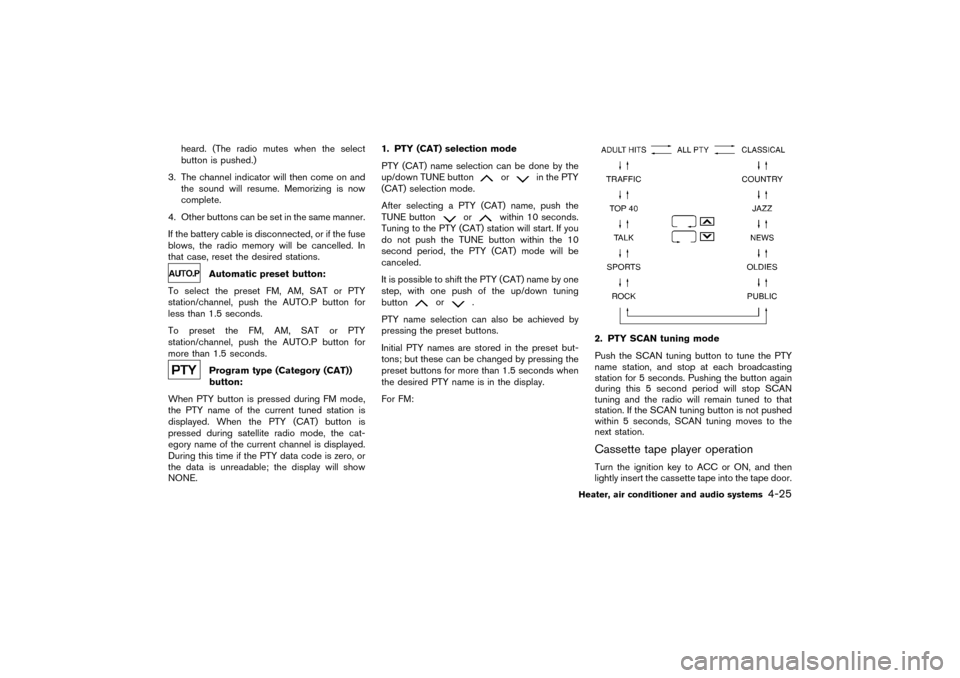
It is possible to shift the PTY (CAT) name by one
step, with one push of the up/down tuning
button
or
.
PTY name selection can also be achieved by
pressing the preset buttons.
Initial PTY names are stored in the preset but-
tons; but these can be changed by pressing the
preset buttons for more than 1.5 seconds when
the desired PTY name is in the display.
For FM:
2. PTY SCANtuning mode
Push the SCAN tuning button to tune the PTY
name station, and stop at each broadcasting
station for 5 seconds. Pushing the button again
during this 5 second period will stop SCAN
tuning and the radio will remain tuned to that
station. If the SCAN tuning button is not pushed
within 5 seconds, SCAN tuning moves to the
next station.Cassette tape player operationTurn the ignition key to ACC or ON, and then
lightly insert the cassette tape into the tape door.
Heater, air conditioner and audio systems
4-25
�
04.3.9/R50-D/V5
�