2004 NISSAN MAXIMA air condition
[x] Cancel search: air conditionPage 75 of 280
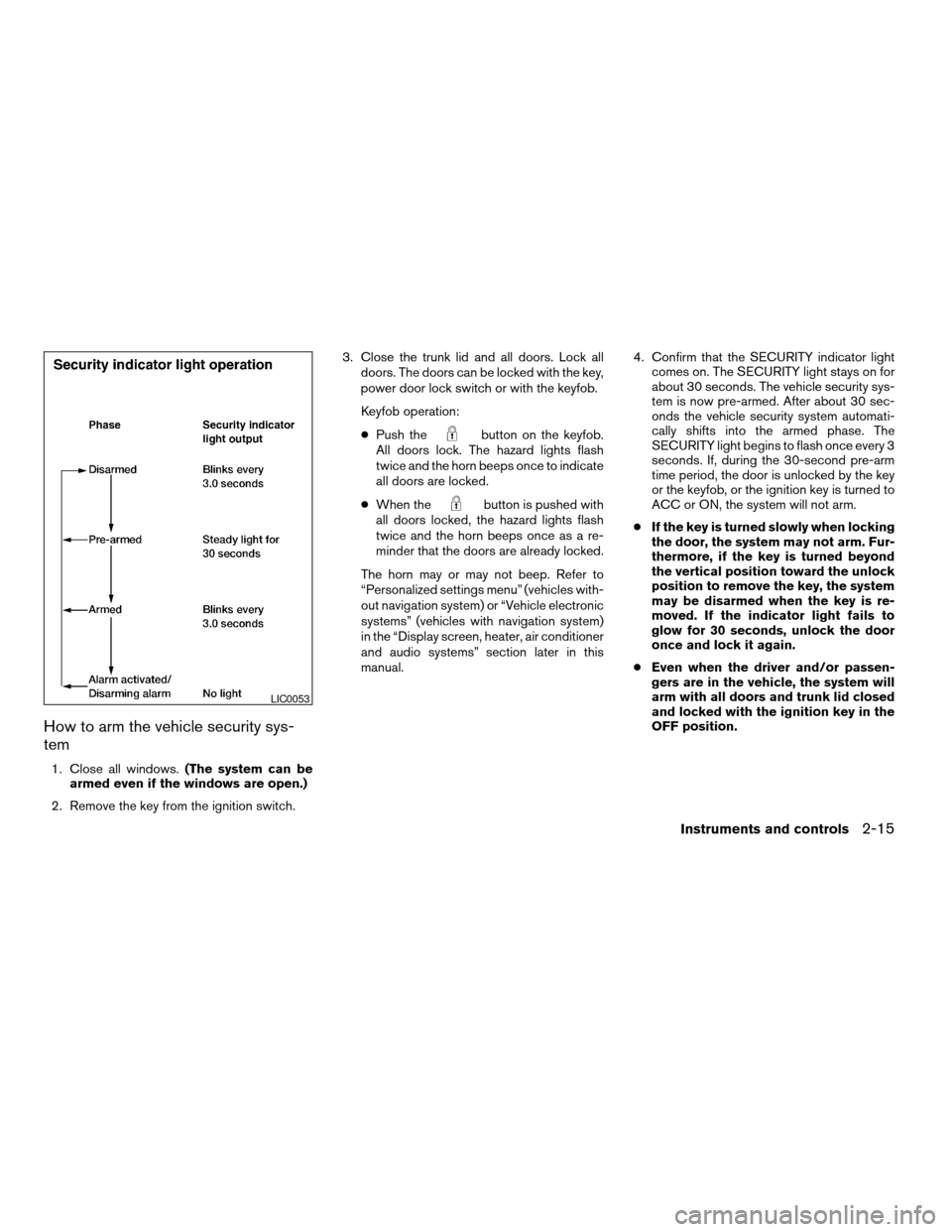
How to arm the vehicle security sys-
tem
1. Close all windows.(The system can be
armed even if the windows are open.)
2. Remove the key from the ignition switch.3. Close the trunk lid and all doors. Lock all
doors. The doors can be locked with the key,
power door lock switch or with the keyfob.
Keyfob operation:
cPush the
button on the keyfob.
All doors lock. The hazard lights flash
twice and the horn beeps once to indicate
all doors are locked.
cWhen the
button is pushed with
all doors locked, the hazard lights flash
twice and the horn beeps once as a re-
minder that the doors are already locked.
The horn may or may not beep. Refer to
“Personalized settings menu” (vehicles with-
out navigation system) or “Vehicle electronic
systems” (vehicles with navigation system)
in the “Display screen, heater, air conditioner
and audio systems” section later in this
manual.4. Confirm that the SECURITY indicator light
comes on. The SECURITY light stays on for
about 30 seconds. The vehicle security sys-
tem is now pre-armed. After about 30 sec-
onds the vehicle security system automati-
cally shifts into the armed phase. The
SECURITY light begins to flash once every 3
seconds. If, during the 30-second pre-arm
time period, the door is unlocked by the key
or the keyfob, or the ignition key is turned to
ACC or ON, the system will not arm.
cIf the key is turned slowly when locking
the door, the system may not arm. Fur-
thermore, if the key is turned beyond
the vertical position toward the unlock
position to remove the key, the system
may be disarmed when the key is re-
moved. If the indicator light fails to
glow for 30 seconds, unlock the door
once and lock it again.
cEven when the driver and/or passen-
gers are in the vehicle, the system will
arm with all doors and trunk lid closed
and locked with the ignition key in the
OFF position.
LIC0053
Instruments and controls2-15
ZREVIEW COPY:Ð2004 Maxima(max)
Owners Manual(owners)ÐUSA English(nna)
10/07/03Ðtbrooks
X
Page 78 of 280
NOTE:
You can turn on or turn off the driving
speed dependent intermittent wiper func-
tion. Refer to “Personalized settings
menu” (vehicles without navigation sys-
tem) or “Vehicle electronic systems” (ve-
hicles with navigation system) in the “Dis-
play screen, heater, air conditioner and
audio systems” section later in this manual.
s2Low — continuous low speed operation
s3High — continuous high speed operation
Push the lever up
s4to have one sweep opera-
tion of the wiper.
Pull the lever toward you
s5to operate the
washer. The wiper will also operate several times.
WARNING
In freezing temperatures the washer solu-
tion may freeze on the windshield and
obscure your vision which may lead to an
accident. Warm the windshield with the
defroster before you wash the windshield.
CAUTION
cDo not operate the washer continu-
ously for more than 30 seconds.cDo not operate the washer if the reser-
voir tank is empty.
cDo not fill the window washer reservoir
tank with washer fluid concentrates at
full strength. Some methyl alcohol
based washer fluid concentrates may
permanently stain the grille if spilled
while filling the window washer reser-
voir tank.
cPre-mix washer fluid concentrates with
water to the manufacturer’s recom-
mended levels before pouring the fluid
into the window washer reservoir tank.
Do not use the window washer reservoir
tank to mix the washer fluid concen-
trate and water.To defrost the rear window glass and outside
mirrors (if so equipped) , start the engine and
push the rear window defroster switch on. The
rear window defroster indicator light on the
switch comes on. Push the switch again to turn
the defroster off.
The rear window defroster automatically turns off
after approximately 15 minutes.
CAUTION
When cleaning the inner side of the rear
window, be careful not to scratch or dam-
age the rear window defroster.
LIC0388
REAR WINDOW AND OUTSIDE
MIRROR (if so equipped)
DEFROSTER SWITCH
2-18Instruments and controls
ZREVIEW COPY:Ð2004 Maxima(max)
Owners Manual(owners)ÐUSA English(nna)
10/07/03Ðtbrooks
X
Page 80 of 280
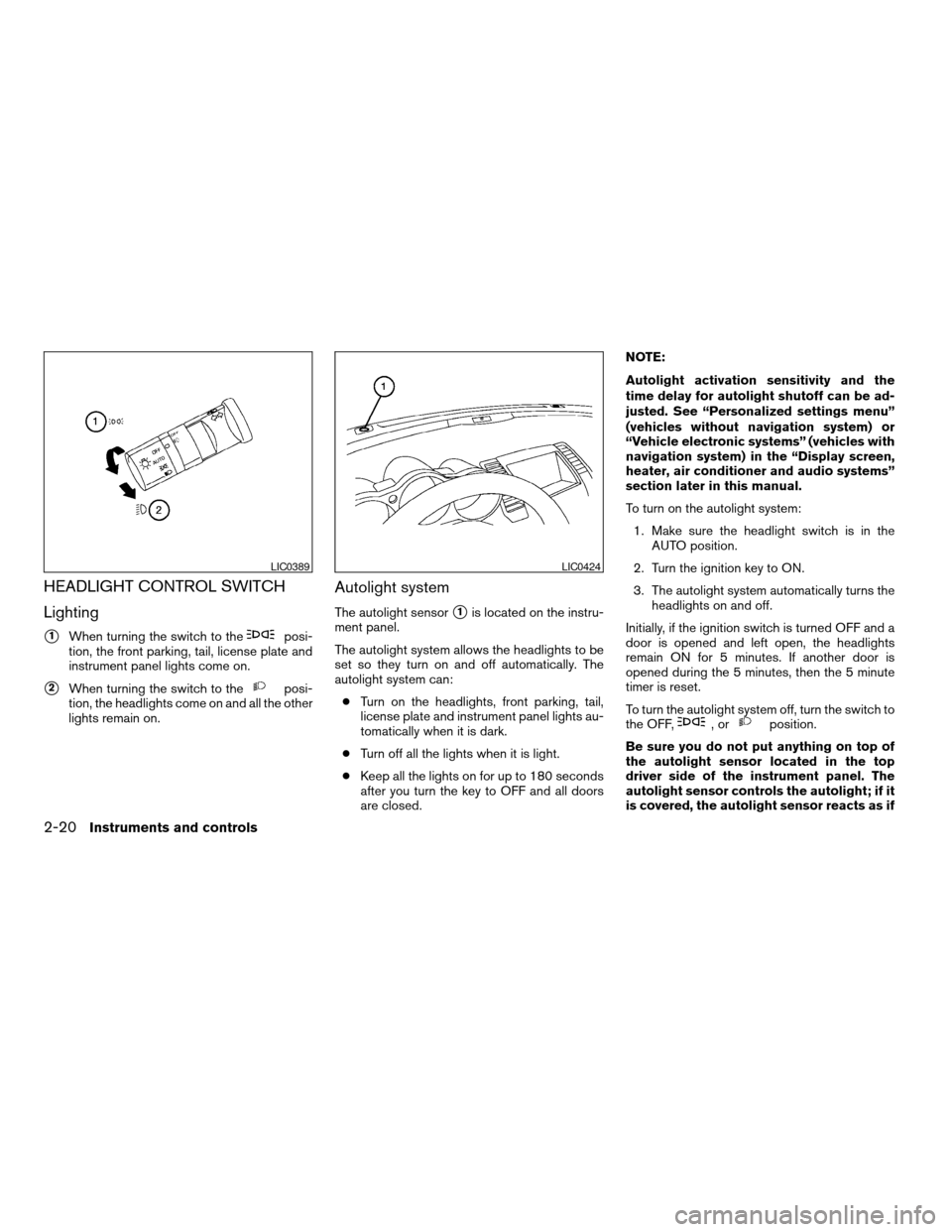
HEADLIGHT CONTROL SWITCH
Lighting
s1When turning the switch to theposi-
tion, the front parking, tail, license plate and
instrument panel lights come on.
s2When turning the switch to theposi-
tion, the headlights come on and all the other
lights remain on.
Autolight system
The autolight sensors1is located on the instru-
ment panel.
The autolight system allows the headlights to be
set so they turn on and off automatically. The
autolight system can:
cTurn on the headlights, front parking, tail,
license plate and instrument panel lights au-
tomatically when it is dark.
cTurn off all the lights when it is light.
cKeep all the lights on for up to 180 seconds
after you turn the key to OFF and all doors
are closed.NOTE:
Autolight activation sensitivity and the
time delay for autolight shutoff can be ad-
justed. See “Personalized settings menu”
(vehicles without navigation system) or
“Vehicle electronic systems” (vehicles with
navigation system) in the “Display screen,
heater, air conditioner and audio systems”
section later in this manual.
To turn on the autolight system:
1. Make sure the headlight switch is in the
AUTO position.
2. Turn the ignition key to ON.
3. The autolight system automatically turns the
headlights on and off.
Initially, if the ignition switch is turned OFF and a
door is opened and left open, the headlights
remain ON for 5 minutes. If another door is
opened during the 5 minutes, then the 5 minute
timer is reset.
To turn the autolight system off, turn the switch to
the OFF,
,orposition.
Be sure you do not put anything on top of
the autolight sensor located in the top
driver side of the instrument panel. The
autolight sensor controls the autolight; if it
is covered, the autolight sensor reacts as if
LIC0389LIC0424
2-20Instruments and controls
ZREVIEW COPY:Ð2004 Maxima(max)
Owners Manual(owners)ÐUSA English(nna)
10/07/03Ðtbrooks
X
Page 87 of 280
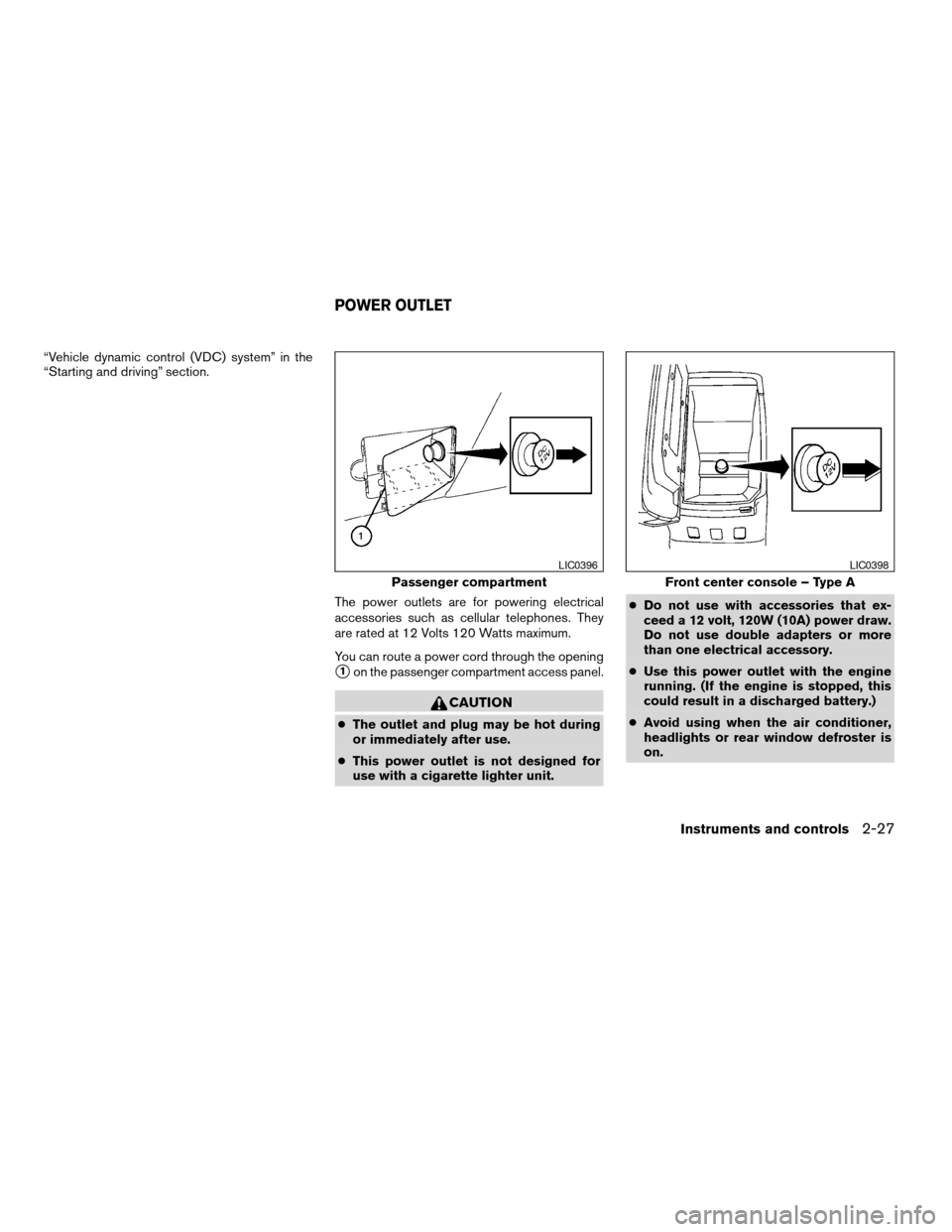
“Vehicle dynamic control (VDC) system” in the
“Starting and driving” section.
The power outlets are for powering electrical
accessories such as cellular telephones. They
are rated at 12 Volts 120 Watts maximum.
You can route a power cord through the opening
s1on the passenger compartment access panel.
CAUTION
cThe outlet and plug may be hot during
or immediately after use.
cThis power outlet is not designed for
use with a cigarette lighter unit.cDo not use with accessories that ex-
ceed a 12 volt, 120W (10A) power draw.
Do not use double adapters or more
than one electrical accessory.
cUse this power outlet with the engine
running. (If the engine is stopped, this
could result in a discharged battery.)
cAvoid using when the air conditioner,
headlights or rear window defroster is
on.
Passenger compartment
LIC0396
Front center console – Type A
LIC0398
POWER OUTLET
Instruments and controls2-27
ZREVIEW COPY:Ð2004 Maxima(max)
Owners Manual(owners)ÐUSA English(nna)
10/07/03Ðtbrooks
X
Page 112 of 280
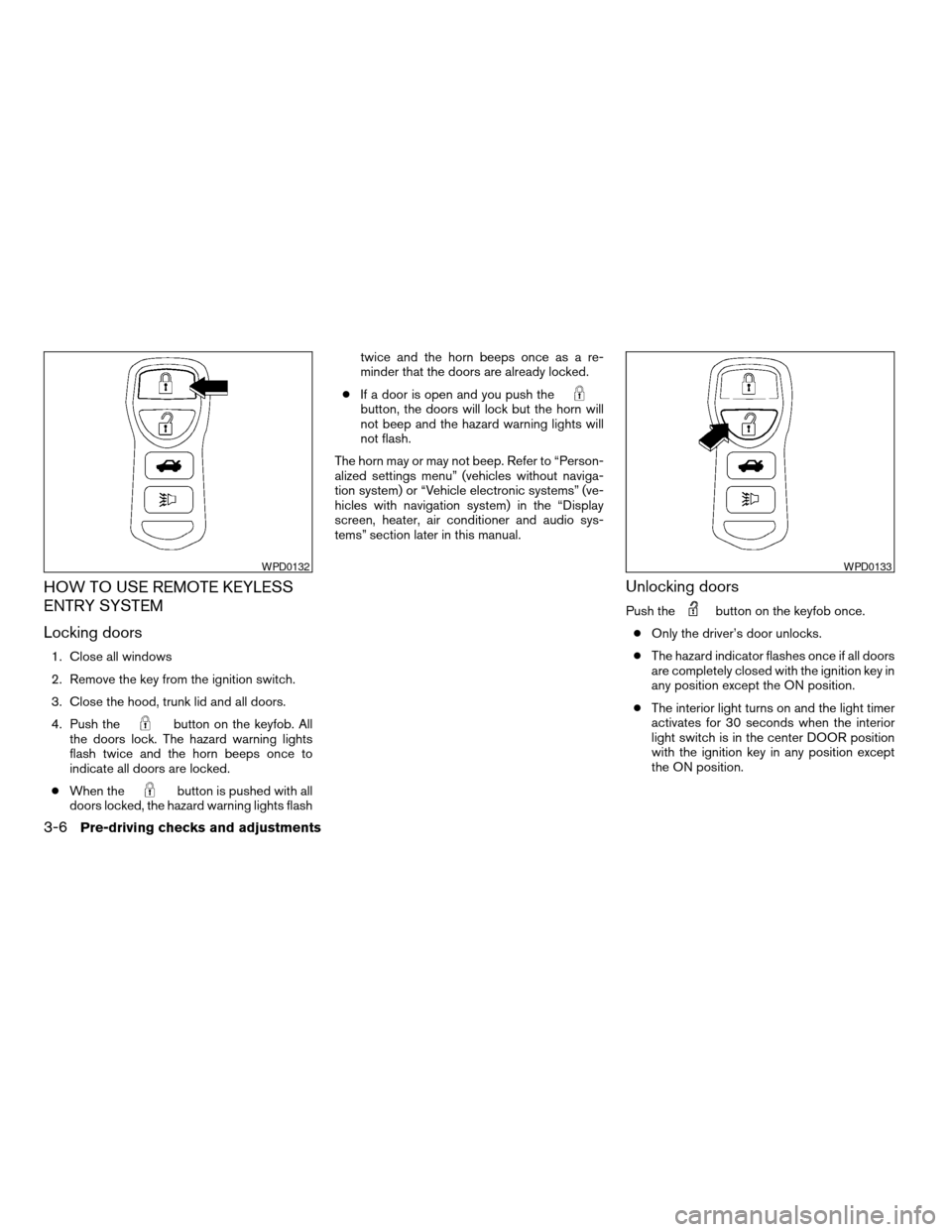
HOW TO USE REMOTE KEYLESS
ENTRY SYSTEM
Locking doors
1. Close all windows
2. Remove the key from the ignition switch.
3. Close the hood, trunk lid and all doors.
4. Push the
button on the keyfob. All
the doors lock. The hazard warning lights
flash twice and the horn beeps once to
indicate all doors are locked.
cWhen the
button is pushed with all
doors locked, the hazard warning lights flashtwice and the horn beeps once as a re-
minder that the doors are already locked.
cIf a door is open and you push the
button, the doors will lock but the horn will
not beep and the hazard warning lights will
not flash.
The horn may or may not beep. Refer to “Person-
alized settings menu” (vehicles without naviga-
tion system) or “Vehicle electronic systems” (ve-
hicles with navigation system) in the “Display
screen, heater, air conditioner and audio sys-
tems” section later in this manual.
Unlocking doors
Push thebutton on the keyfob once.
cOnly the driver’s door unlocks.
cThe hazard indicator flashes once if all doors
are completely closed with the ignition key in
any position except the ON position.
cThe interior light turns on and the light timer
activates for 30 seconds when the interior
light switch is in the center DOOR position
with the ignition key in any position except
the ON position.
WPD0132WPD0133
3-6Pre-driving checks and adjustments
ZREVIEW COPY:Ð2004 Maxima(max)
Owners Manual(owners)ÐUSA English(nna)
10/07/03Ðtbrooks
X
Page 127 of 280
cWhen the key is turned from ACC to LOCK
with the driver’s door open while the auto-
matic transmission selector lever is in the P
(Park) position.
The driver’s seat and steering wheel will return to
the previous position:
cWhen the key is inserted into the ignition
switch.
cWhen the driver’s door is closed with the key
turned to LOCK.
cWhen the key is turned from ACC to ON
while the automatic transmission selector
lever is in the P (Park) position.
The entry/exit feature can be adjusted or can-
celed. See “Vehicle electronic systems” in the
“Display screen, heater, air conditioner and audio
systems” section of this manual.
SYSTEM OPERATION
The automatic drive positioner system will not
work or will stop operating under the following
conditions:
cwhen the vehicle speed is above 4 MPH (7
km/h) .
cwhen any two or more of the memory
switches are simultaneously pushed while
the automatic drive positioner is operating.cwhen the adjusting switch for the driver’s
seat is turned on while the automatic drive
positioner is operating.
cwhen the memory switch (1 or 2) is not
pushed for at least 1 second.
cwhen the seat has been already moved to
the memorized position.
cwhen no seat position is stored in the
memory switch.
The automatic drive positioner system can be
adjusted and canceled. See “Vehicle electronic
systems” in the “Display screen, heater, air con-
ditioner and audio systems” section of this
manual.
Pre-driving checks and adjustments3-21
ZREVIEW COPY:Ð2004 Maxima(max)
Owners Manual(owners)ÐUSA English(nna)
10/20/03Ðarosenma
X
Page 129 of 280
4 Display screen, heater, air conditioner
and audio systems
Control panel buttons — without navigation system....4-2
Names of components..........................4-3
How to use JOYSTICK and “ENTER” button.......4-3
How to use “PREV” button......................4-3
How to use “TRIP” button.......................4-3
How to use “FUEL ECON” button................4-4
Clock.........................................4-4
How to use “E/M” button........................4-4
How to use
(maintenance) button..........4-5
How to use the “SETTING” button................4-5
button...................................4-6
Control panel buttons — with navigation system.......4-7
Names of the components.......................4-7
How to use joystick and “ENTER” button..........4-8
How to use “PREV” button......................4-8
Setting up the start-up screen...................4-8
How to use the “TRIP” button....................4-8
How to use the “SETTING” button...............4-10
button..................................4-14Ventilators.......................................4-14
Heater and air conditioner (automatic)..............4-16
Automatic operation...........................4-16
Manual operation..............................4-17
Operating tips.................................4-18
Servicing air conditioner...........................4-18
Audio system....................................4-19
Radio........................................4-19
FM radio reception............................4-19
AM radio reception............................4-19
Satellite radio reception........................4-19
Audio operation precautions....................4-20
FM-AM-SAT radio with cassette player and
compact disc (CD) player (Type A)/CD
changer (Type B)..............................4-23
CD care and cleaning..........................4-30
Steering wheel switch for audio control..........4-31
Antenna......................................4-32
Car phone or CB radio............................4-32
ZREVIEW COPY:Ð2004 Maxima(max)
Owners Manual(owners)ÐUSA English(nna)
10/20/03Ðarosenma
X
Page 130 of 280
WARNING
cPositioning of the heating or air condi-
tioning controls and display controls
should not be done while driving in or-
der that full attention may be given to
the driving operation.
cDo not disassemble or modify this sys-
tem. If you do, it may result in accidents,
fire, or electrical shock.
cDo not use this system if you notice any
abnormality, such as a frozen screen or
lack of sound. Continued use of the
system may result in accident, fire or
electric shock.
cIn case you notice any foreign object in
the system hardware, spill liquid on it,
or notice smoke or smell coming from
it, stop using the system immediately
and contact your nearest NISSAN
dealer. Ignoring such conditions may
lead to accidents, fire or electrical
shock.
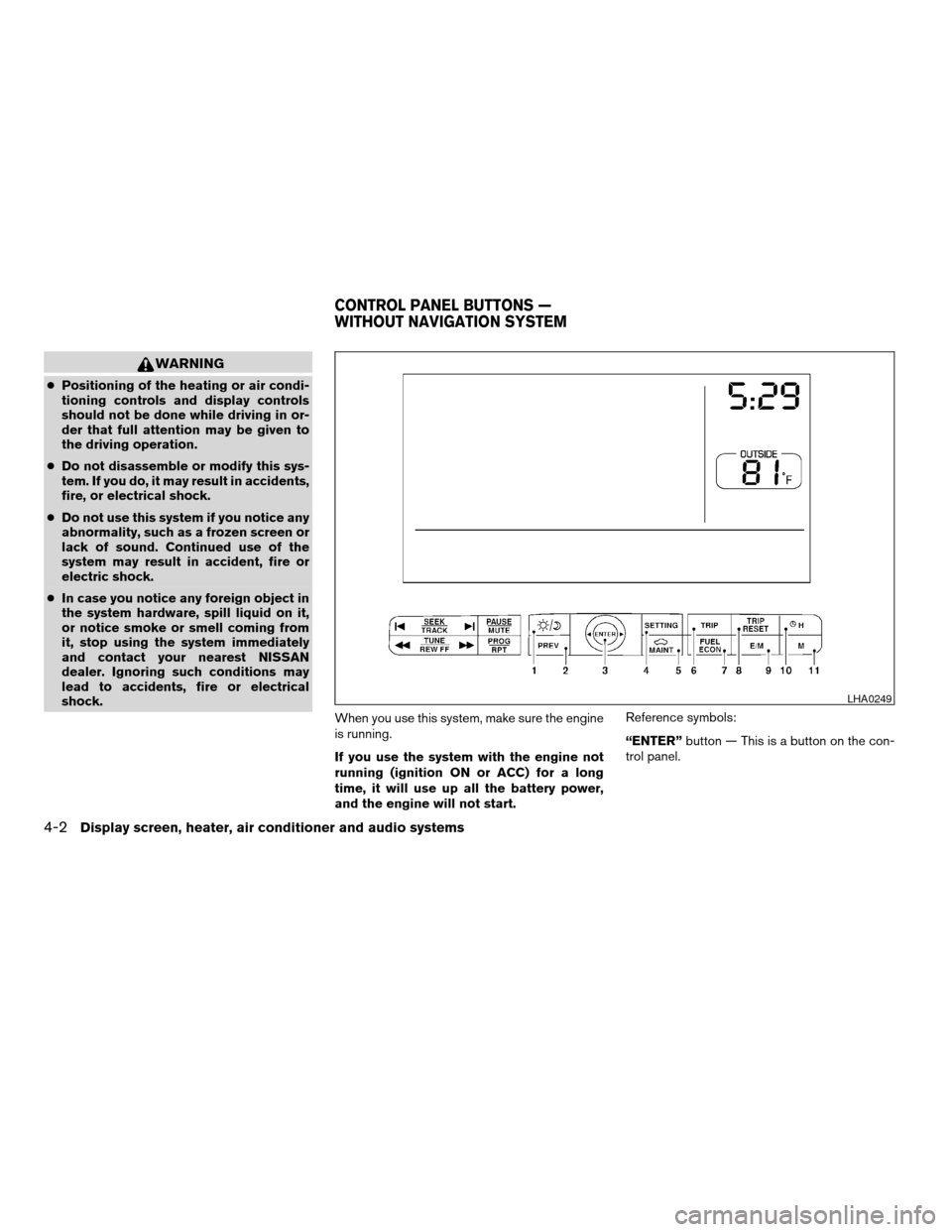
When you use this system, make sure the engine
is running.
If you use the system with the engine not
running (ignition ON or ACC) for a long
time, it will use up all the battery power,
and the engine will not start.Reference symbols:
“ENTER”button — This is a button on the con-
trol panel.
LHA0249
CONTROL PANEL BUTTONS —
WITHOUT NAVIGATION SYSTEM
4-2Display screen, heater, air conditioner and audio systems
ZREVIEW COPY:Ð2004 Maxima(max)
Owners Manual(owners)ÐUSA English(nna)
10/20/03Ðarosenma
X