Page 44 of 434
43 Getting started
Driving
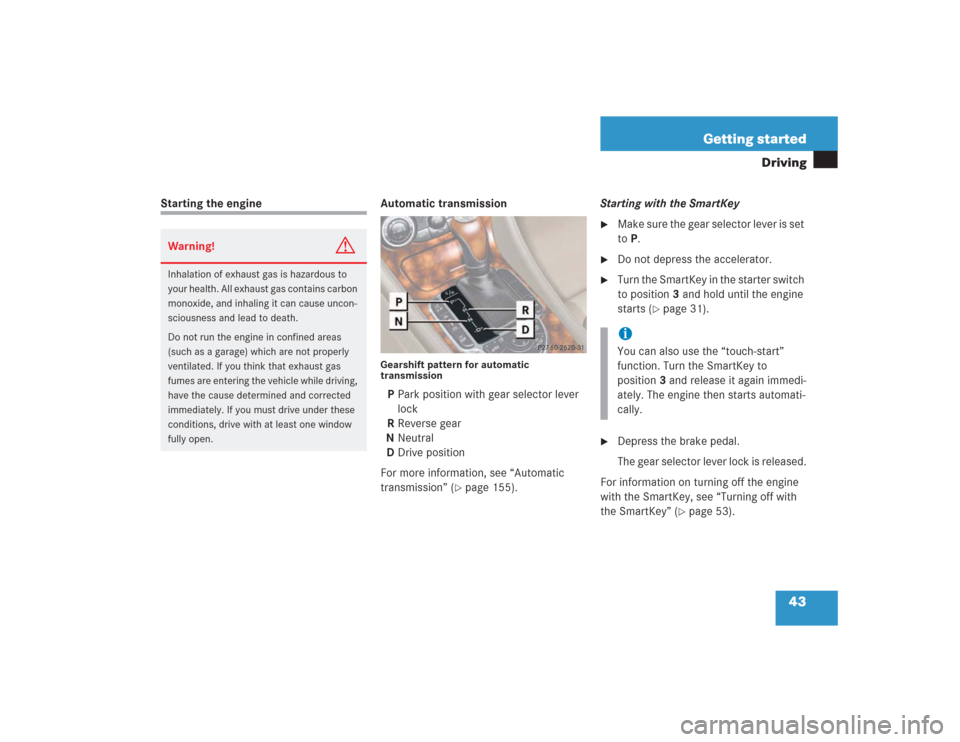
Starting the engine Automatic transmission
Gearshift pattern for automatic
transmissionP Park position with gear selector lever
lock
R Reverse gear
N Neutral
D Drive position
For more information, see “Automatic
transmission” (
�page 155).Starting with the SmartKey
�
Make sure the gear selector lever is set
to P.
�
Do not depress the accelerator.
�
Turn the SmartKey in the starter switch
to position3 and hold until the engine
starts (
�page 31).
�
Depress the brake pedal.
The gear selector lever lock is released.
For information on turning off the engine
with the SmartKey, see “Turning off with
the SmartKey” (
�page 53).
Warning!
G
Inhalation of exhaust gas is hazardous to
your health. All exhaust gas contains carbon
monoxide, and inhaling it can cause uncon-
sciousness and lead to death.
Do not run the engine in confined areas
(such as a garage) which are not properly
ventilated. If you think that exhaust gas
fumes are entering the vehicle while driving,
have the cause determined and corrected
immediately. If you must drive under these
conditions, drive with at least one window
fully open.
iYou can also use the “touch-start”
function. Turn the SmartKey to
position3 and release it again immedi-
ately. The engine then starts automati-
cally.
Page 116 of 434
115 Controls in detail
Memory function
Storing positions into memory�
Adjust the seats, steering wheel and
rear view mirrors to the desired posi-
tion (
�page 34).
�
Press memory buttonM.
�
Release memory button and press a
stored position button1, 2, or3 within
three seconds.
All the settings are stored at the select-
ed position.
Recalling positions from memory�
On memory switch, press and hold
stored position button1, 2 or3 until
the seat, steering wheel and rear view
mirrors have fully moved to the stored
positions.Storing exterior rear view mirror
parking position
For easier parking, you can adjust the
passenger-side exterior rear view mirror so
that you can see the right rear wheel as
soon as you engage reverse gearR.
For information on activating the parking
position feature, see “Setting parking posi-
tion for exterior rear view mirror”
(�page 149).
iReleasing the button immediately
stops movement to the stored posi-
tions.
iYou can store a parking position for the
passenger-side exterior rear view mir-
ror for each SmartKey or SmartKey
with KEYLESS-GO*.
Page 157 of 434
156 Controls in detailAutomatic transmissionOne-touch gearshifting
Even with an automatic transmission you
can change the gears manually when the
gear selector lever is in positionD.
Downshifting�
Briefly press the gear selector lever to
the left in theD-direction.
The transmission will shift from the current
gear to the next lower gear. This action
simultaneously limits the gear range of the
transmission (
�page 157).Upshifting
�
Briefly press the gear selector lever to
the right in theD+direction.
The transmission will shift from the current
gear to the next higher gear as permitted
by the shift program. This action simul-
taneously extends the gear range of the
transmission.Canceling gear range limit
�
Press and hold the gear selector lever
in theD+direction until
D reappears in
the right multifunction display.
The transmission will shift from the current
gear range directly to gear rangeD.
Shifting into optimal gear range
�
Press and hold the gear selector lever
in theD-direction.
The transmission will automatically select
the gear range suited for optimal
acceleration and deceleration. This will
involve shifting down one or more gears.
Warning!
G
On slippery road surfaces, never downshift
in order to obtain braking action. This could
result in drive wheel slip and reduced
vehicle control. Your vehicle’s ABS will not
prevent this type of loss of control.
iTo avoid overrevving the engine when
the gear selector lever is moved to
theD-direction, the transmission will
not shift to a lower gear if the engine’s
max. speed would be exceeded.
Page 280 of 434
279 Operation
Vehicle care
Light alloy wheels
Mercedes-Benz approved Wheel Care
should be used for regular cleaning of the
light alloy wheels.
If possible, clean wheels once a week with
Mercedes-Benz approved Wheel Care, us-
ing a soft bristle brush and a strong spray
of water.
Follow the instructions on container.
Instrument cluster
Use a gentle dishwashing detergent or
mild detergent for delicate fabrics as a
washing solution. Wipe with a cloth moist-
ened in lukewarm solution. Do not use
scouring agents.Steering wheel and gear selector lever
Wipe with a damp cloth and dry thoroughly
or clean with Mercedes-Benz approved
Leather Care.
Cup holder
Use a gentle dishwashing detergent or
mild detergent for delicate fabrics as a
washing solution. Wipe with a cloth moist-
ened in lukewarm solution. Do not use
scouring agents.
Hard plastic trim items
Pour Mercedes-Benz approved Interior
Care onto soft lint-free cloth and apply
with light pressure.
Headliner
Clean with soft bristle brush, or use a
dry-shampoo cleaner in case of excessive
dirt.Seat belts
The webbing must not be treated with
chemical cleaning agents. Use only clear,
lukewarm water and soap. Do not dry the
webbing at temperatures above 176°F
(80°C) or in direct sunlight.
iOnly use acid-free cleaning materials.
Acid may cause corrosion or damage to
the clear coat.
Warning!
G
Do not bleach or dye seat belts as this may
severely weaken them. In a crash they may
not be able to provide adequate protection.
Page 407 of 434
406 IndexCentral locking
Automatic 105
Central locking switch 105
Switching on/off (control
system) 146
Unlocking from inside 105
Central locking switch 25
Central unlocking switch 25
Changing
Batteries (SmartKey with
KEYLESS-GO*) 329
Batteries (SmartKey) 328
SmartKey setting 91
SmartKey with KEYLESS-GO*
settings 96
Vehicle level 209
Charging
Vehicle batteries 361
CHECK ENGINE
Messages in display 303
CHECK ENGINE malfunction indicator
lamp 23, 285Checking
Coolant level 258
Oil level 252, 255
Tire inflate pressure 252
Vehicle lighting 252
Child safety
Airbags 60
Automatic child seat recognition 72
Infant and child restraint systems 58
Cigarette lighter 25, 219
Cleaning
Cup holder 279
Gear selector lever 279
Hard plastic trim items 279
Headlamps 168
Headliner 279
Leather upholstery 280
Plastic and rubber parts 280
Seat belts 279
Steering wheel 279
Upholstery 280
Windshield 47
Wood trims 280Clock 21
Closing
Hood 254
Power window with
KEYLESS-GO* 183
Retractable hardtop (SmartKey) 189
Retractable hardtop (switch) 186
Side windows 182
Sunshade 192
Trunk lid 102
Windows 181
Windows with KEYLESS-GO* 183
Cockpit 398
Collapsible tire 398
COMAND 25, 398
COMAND, radio and telephone 247
Combination switch 21, 47, 120, 121
Comfort driving
Transmission program mode 161
Consumer information 394
Page 424 of 434
423 Index
Trunk lid
Opening 99
Trunk lid emergency release 102
Turn signals 21, 47
Additional in mirrors 332
Front bulbs 332
Indicator lamps 23
Rear bulbs 332
Turning off the engine 53
U
Units
Setting speedometer units 141
Setting temperature units 140
Setting tire inflation pressure
units 147
Unlocking 30
Centrally from inside 105
Driver’s door in an emergency 325
Fuel filler flap 250
Storage compartments 217, 326Trunk 92, 100
Trunk (KEYLESS-GO*) 97
Trunk in an emergency 326
Vehicle in an emergency 325
With the SmartKey 30
With the SmartKey with
KEYLESS-GO* 32, 93
Uphill driving
Cruise control 194
Upholstery
Cleaning 280
Upshifting 156
V
Vehicle
Individual settings 137
Locking 25
Locking in an emergency 327
Minimum distance (Parktronic*) 211
Towing 365
Unlocking 25
Unlocking in an emergency 325Vehicle care
Cup holder 279
Gear selector lever 279
Hard plastic trim items 279
Headliner 279
Leather upholstery 280
Plastic and rubber parts 280
Seat belts 279
Steering wheel 279
Upholstery 280
Wood trims 280
Vehicle level 208, 402
Changing 209
Setting 209
Vehicle level control 402
Vehicle level control switch 26
Vehicle lighting
Checking 252
Vehicle tool kit 323
Ventilation and residual heat 178