Page 313 of 435
312 Practical hintsWhat to do if …?Messages in the display
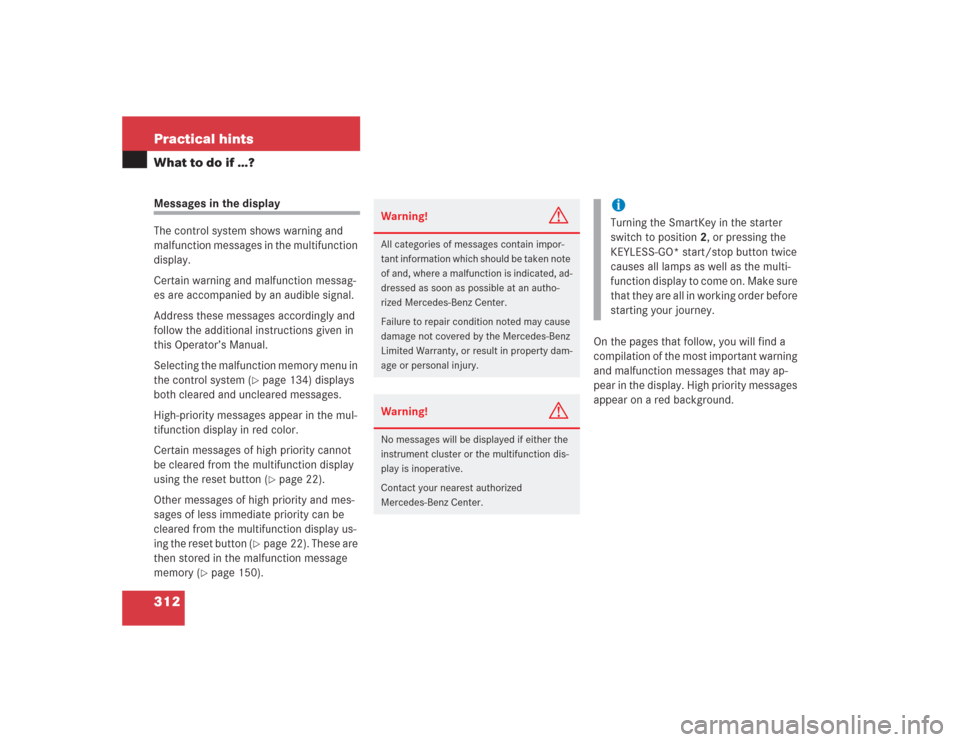
The control system shows warning and
malfunction messages in the multifunction
display.
Certain warning and malfunction messag-
es are accompanied by an audible signal.
Address these messages accordingly and
follow the additional instructions given in
this Operator’s Manual.
Selecting the malfunction memory menu in
the control system (
�page 134) displays
both cleared and uncleared messages.
High-priority messages appear in the mul-
tifunction display in red color.
Certain messages of high priority cannot
be cleared from the multifunction display
using the reset button (�page 22).
Other messages of high priority and mes-
sages of less immediate priority can be
cleared from the multifunction display us-
ing the reset button (
�page 22). These are
then stored in the malfunction message
memory (
�page 150).On the pages that follow, you will find a
compilation of the most important warning
and malfunction messages that may ap-
pear in the display. High priority messages
appear on a red background.
Warning!
G
All categories of messages contain impor-
tant information which should be taken note
of and, where a malfunction is indicated, ad-
dressed as soon as possible at an autho-
rized Mercedes-Benz Center.
Failure to repair condition noted may cause
damage not covered by the Mercedes-Benz
Limited Warranty, or result in property dam-
age or personal injury.Warning!
G
No messages will be displayed if either the
instrument cluster or the multifunction dis-
play is inoperative.
Contact your nearest authorized
Mercedes-Benz Center.
iTurning the SmartKey in the starter
switch to position2, or pressing the
KEYLESS-GO* start/stop button twice
causes all lamps as well as the multi-
function display to come on. Make sure
that they are all in working order before
starting your journey.
Page 314 of 435
313 Practical hints
What to do if …?
Text messagesDisplay
Display message
Possible cause
Possible solution
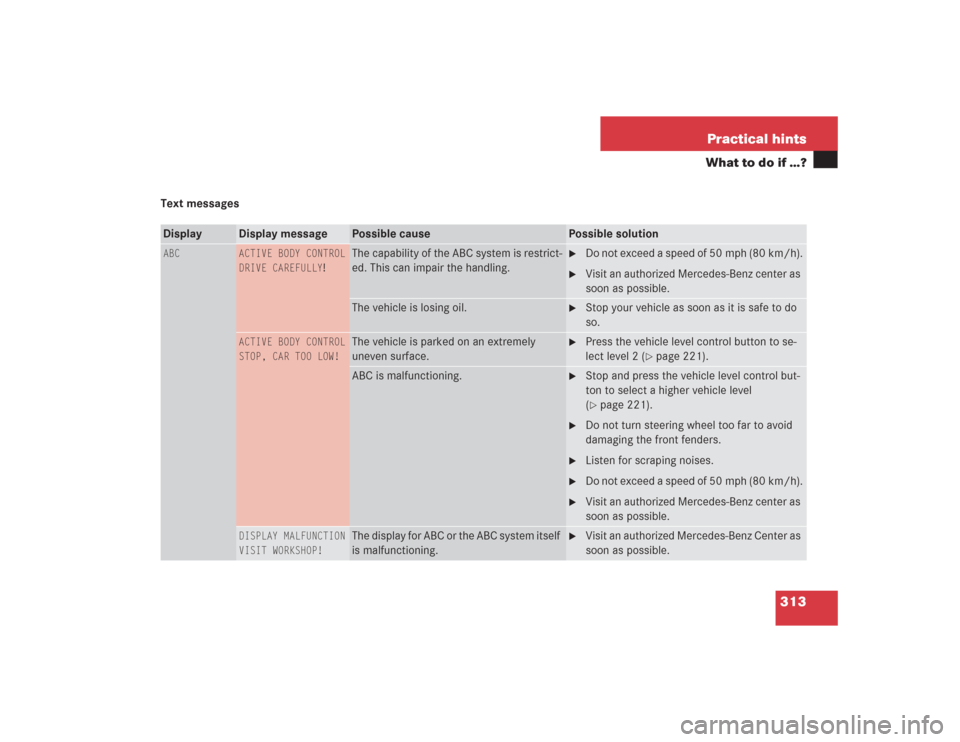
ABC
ACTIVE BODY CONTROL
DRIVE CAREFULLY
!
The capability of the ABC system is restrict-
ed. This can impair the handling.
�
Do not exceed a speed of 50 mph (80 km/h).
�
Visit an authorized Mercedes-Benz center as
soon as possible.
The vehicle is losing oil.
�
Stop your vehicle as soon as it is safe to do
so.
ACTIVE BODY CONTROL
STOP, CAR TOO LOW!
The vehicle is parked on an extremely
uneven surface.
�
Press the vehicle level control button to se-
lect level 2 (
�page 221).
ABC is malfunctioning.
�
Stop and press the vehicle level control but-
ton to select a higher vehicle level
(�page 221).
�
Do not turn steering wheel too far to avoid
damaging the front fenders.
�
Listen for scraping noises.
�
Do not exceed a speed of 50 mph (80 km/h).
�
Visit an authorized Mercedes-Benz center as
soon as possible.
DISPLAY MALFUNCTION
VISIT WORKSHOP!
The display for ABC or the ABC system itself
is malfunctioning.
�
Visit an authorized Mercedes-Benz Center as
soon as possible.
Page 319 of 435
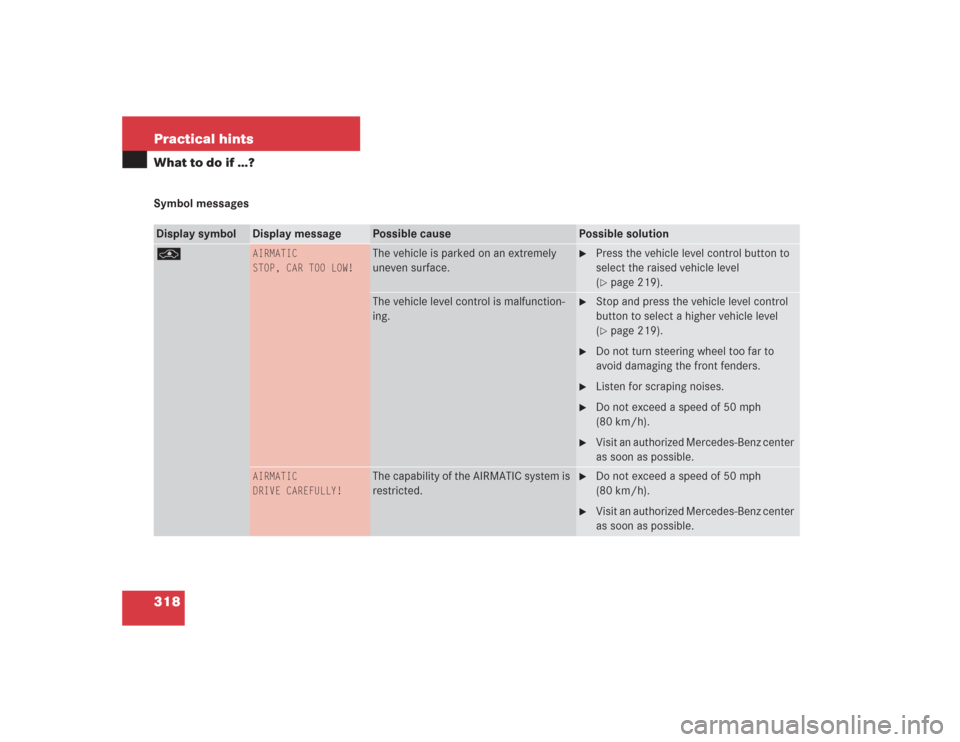
318 Practical hintsWhat to do if …?Symbol messagesDisplay symbol
Display message
Possible cause
Possible solution
@
AIRMATIC
STOP, CAR TOO LOW!
The vehicle is parked on an extremely
uneven surface.
�
Press the vehicle level control button to
select the raised vehicle level
(�page 219).
The vehicle level control is malfunction-
ing.
�
Stop and press the vehicle level control
button to select a higher vehicle level
(�page 219).
�
Do not turn steering wheel too far to
avoid damaging the front fenders.
�
Listen for scraping noises.
�
Do not exceed a speed of 50 mph
(80 km/h).
�
Visit an authorized Mercedes-Benz center
as soon as possible.
AIRMATIC
DRIVE CAREFULLY!
The capability of the AIRMATIC system is
restricted.
�
Do not exceed a speed of 50 mph
(80 km/h).
�
Visit an authorized Mercedes-Benz center
as soon as possible.
Page 330 of 435
329 Practical hints
What to do if …?
Display symbol
Display message
Possible cause
Possible solution
F
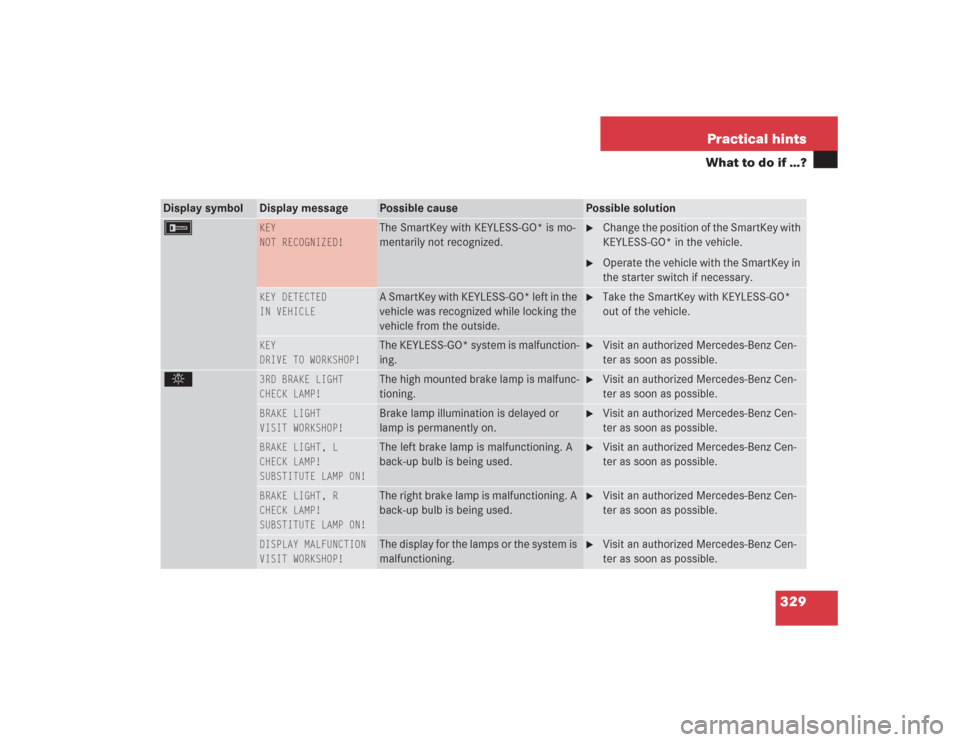
KEY
NOT RECOGNIZED!
The SmartKey with KEYLESS-GO* is mo-
mentarily not recognized.
�
Change the position of the SmartKey with
KEYLESS-GO* in the vehicle.
�
Operate the vehicle with the SmartKey in
the starter switch if necessary.
KEY DETECTED
IN VEHICLE
A SmartKey with KEYLESS-GO* left in the
vehicle was recognized while locking the
vehicle from the outside.
�
Take the SmartKey with KEYLESS-GO*
out of the vehicle.
KEY
DRIVE TO WORKSHOP!
The KEYLESS-GO* system is malfunction-
ing.
�
Visit an authorized Mercedes-Benz Cen-
ter as soon as possible.
.
3RD BRAKE LIGHT
CHECK LAMP!
The high mounted brake lamp is malfunc-
tioning.
�
Visit an authorized Mercedes-Benz Cen-
ter as soon as possible.
BRAKE LIGHT
VISIT WORKSHOP!
Brake lamp illumination is delayed or
lamp is permanently on.
�
Visit an authorized Mercedes-Benz Cen-
ter as soon as possible.
BRAKE LIGHT, L
CHECK LAMP!
SUBSTITUTE LAMP ON!
The left brake lamp is malfunctioning. A
back-up bulb is being used.
�
Visit an authorized Mercedes-Benz Cen-
ter as soon as possible.
BRAKE LIGHT, R
CHECK LAMP!
SUBSTITUTE LAMP ON!
The right brake lamp is malfunctioning. A
back-up bulb is being used.
�
Visit an authorized Mercedes-Benz Cen-
ter as soon as possible.
DISPLAY MALFUNCTION
VISIT WORKSHOP!
The display for the lamps or the system is
malfunctioning.
�
Visit an authorized Mercedes-Benz Cen-
ter as soon as possible.
Page 331 of 435
330 Practical hintsWhat to do if …?Display symbol
Display message
Possible cause
Possible solution
.
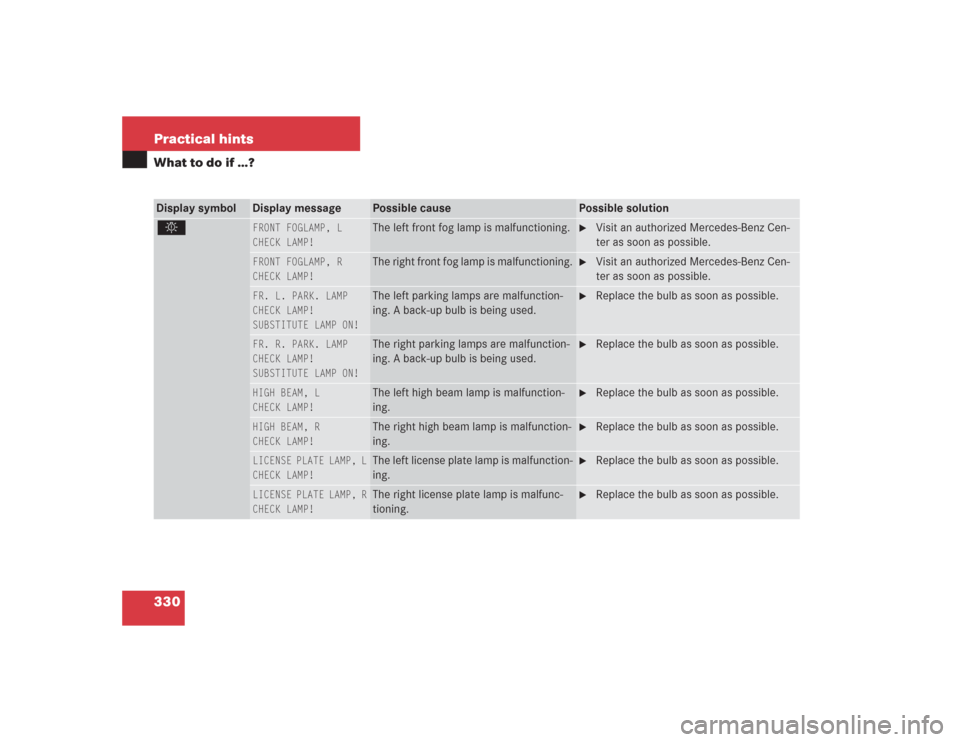
FRONT FOGLAMP, L
CHECK LAMP!
The left front fog lamp is malfunctioning.
�
Visit an authorized Mercedes-Benz Cen-
ter as soon as possible.
FRONT FOGLAMP, R
CHECK LAMP!
The right front fog lamp is malfunctioning.
�
Visit an authorized Mercedes-Benz Cen-
ter as soon as possible.
FR. L. PARK. LAMP
CHECK LAMP!
SUBSTITUTE LAMP ON!
The left parking lamps are malfunction-
ing. A back-up bulb is being used.
�
Replace the bulb as soon as possible.
FR. R. PARK. LAMP
CHECK LAMP!
SUBSTITUTE LAMP ON!
The right parking lamps are malfunction-
ing. A back-up bulb is being used.
�
Replace the bulb as soon as possible.
HIGH BEAM, L
CHECK LAMP!
The left high beam lamp is malfunction-
ing.
�
Replace the bulb as soon as possible.
HIGH BEAM, R
CHECK LAMP!
The right high beam lamp is malfunction-
ing.
�
Replace the bulb as soon as possible.
LICENSE PLATE LAMP, L
CHECK LAMP!
The left license plate lamp is malfunction-
ing.
�
Replace the bulb as soon as possible.
LICENSE PLATE LAMP, R
CHECK LAMP!
The right license plate lamp is malfunc-
tioning.
�
Replace the bulb as soon as possible.
Page 354 of 435
353 Practical hints
Replacing bulbs
�Replacing bulbs
Safe vehicle operation depends on proper
exterior lighting and signaling. It is there-
fore essential that all bulbs and lamp as-
semblies are in good working order at all
times.
Correct headlamp adjustment is extremely
important. Have headlamps checked and
readjusted at regular intervals and when a
bulb has been replaced. See an authorized
Mercedes-Benz Center for headlamp ad-
justment.
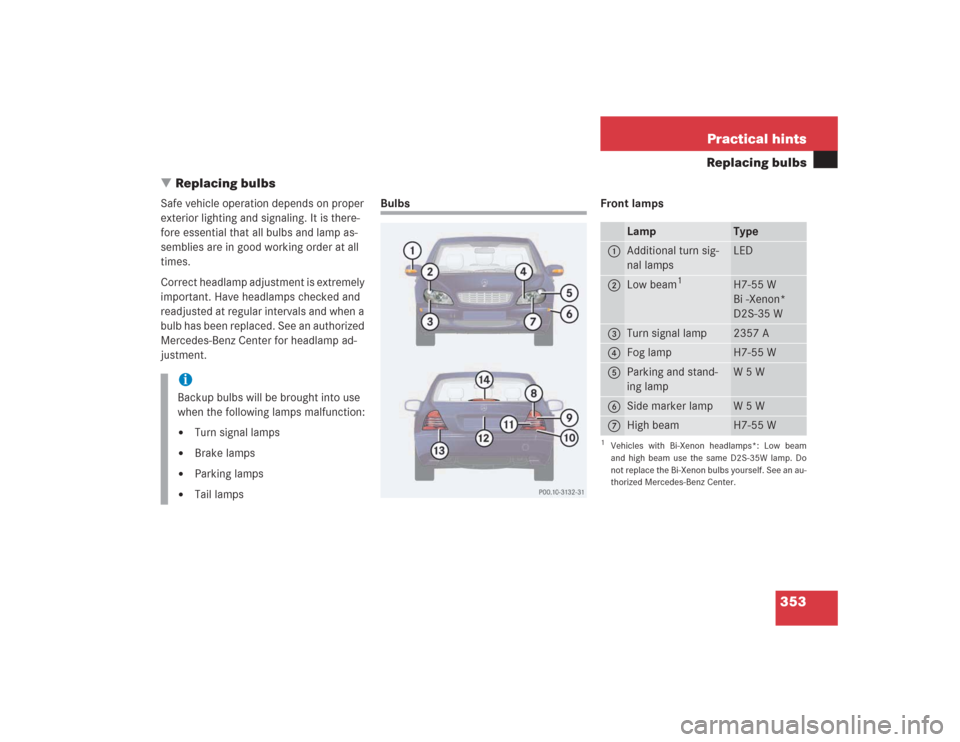
Bulbs Front lamps
iBackup bulbs will be brought into use
when the following lamps malfunction:�
Turn signal lamps
�
Brake lamps
�
Parking lamps
�
Tail lamps
Lamp
Type
1
Additional turn sig-
nal lamps
LED
2
Low beam
1
1Vehicles with Bi-Xenon headlamps*: Low beam
and high beam use the same D2S-35W lamp. Do
not replace the Bi-Xenon bulbs yourself. See an au-
thorized Mercedes-Benz Center.
H7-55 W
Bi -Xenon*
D2S-35 W
3
Turn signal lamp
2357 A
4
Fog lamp
H7-55 W
5
Parking and stand-
ing lamp
W5W
6
Side marker lamp
W5W
7
High beam
H7-55 W
Page 355 of 435
354 Practical hintsReplacing bulbsRear lamps Notes on bulb replacement
�
Only use 12 volt bulbs of the same type
and with the specified watt rating.
�
Switch lights off before changing a bulb
to prevent short circuits.
�
Always use a clean lint-free cloth when
handling bulbs.
�
Your hands should be dry and free of oil
and grease.
�
If the newly installed bulb does not
come on, visit an authorized
Mercedes-Benz Center.
�
Have the LEDs and bulbs for the follow-
ing lamps replaced by an authorized
Mercedes-Benz Center.�
Additional turn signal lamps in the
exterior rear view mirrors
�
High mounted brake lamp
�
Bi-Xenon lamps*
�
Front fog lamps
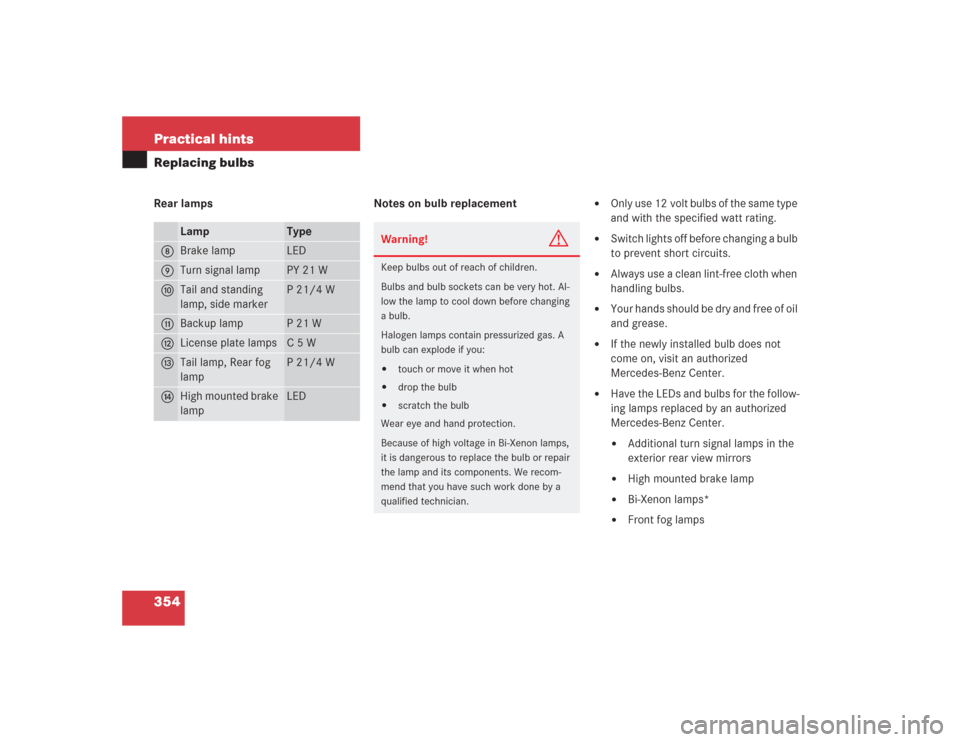
Lamp
Type
8
Brake lamp
LED
9
Turn signal lamp
PY 21 W
a
Tail and standing
lamp, side marker
P 21/4 W
b
Backup lamp
P21W
c
License plate lamps
C5W
d
Tail lamp, Rear fog
lamp
P 21/4 W
e
High mounted brake
lamp
LED
Warning!
G
Keep bulbs out of reach of children.
Bulbs and bulb sockets can be very hot. Al-
low the lamp to cool down before changing
a bulb.
Halogen lamps contain pressurized gas. A
bulb can explode if you:�
touch or move it when hot
�
drop the bulb
�
scratch the bulb
Wear eye and hand protection.
Because of high voltage in Bi-Xenon lamps,
it is dangerous to replace the bulb or repair
the lamp and its components. We recom-
mend that you have such work done by a
qualified technician.
Page 356 of 435
355 Practical hints
Replacing bulbs
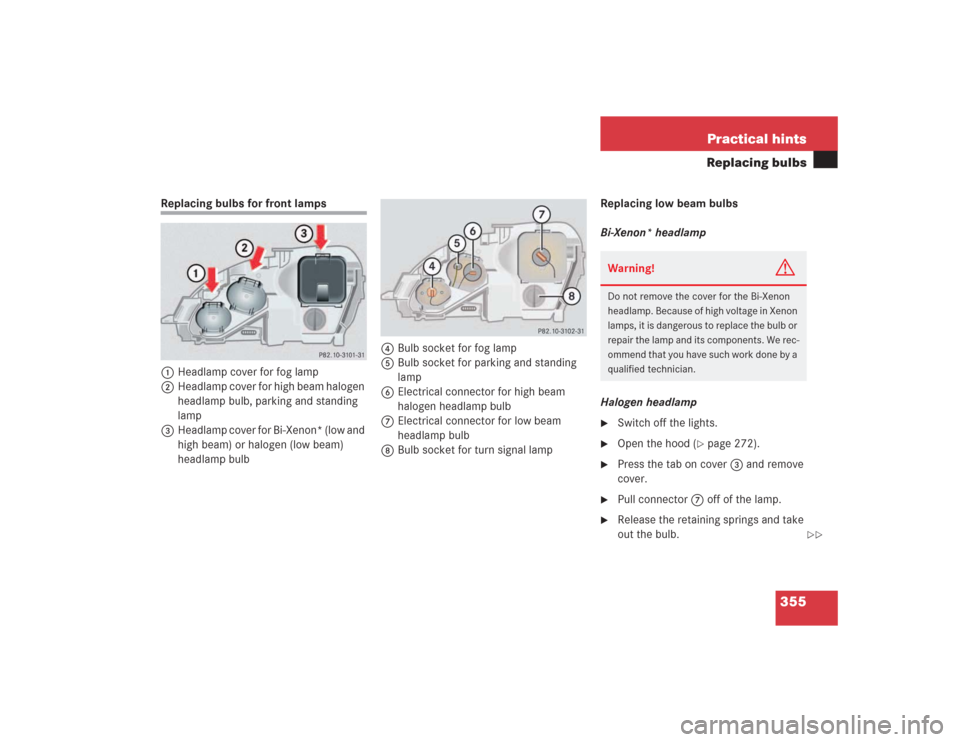
Replacing bulbs for front lamps
1Headlamp cover for fog lamp
2Headlamp cover for high beam halogen
headlamp bulb, parking and standing
lamp
3Headlamp cover for Bi-Xenon* (low and
high beam) or halogen (low beam)
headlamp bulb4Bulb socket for fog lamp
5Bulb socket for parking and standing
lamp
6Electrical connector for high beam
halogen headlamp bulb
7Electrical connector for low beam
headlamp bulb
8Bulb socket for turn signal lampReplacing low beam bulbs
Bi-Xenon* headlamp
Halogen headlamp
�
Switch off the lights.
�
Open the hood (
�page 272).
�
Press the tab on cover3 and remove
cover.
�
Pull connector7 off of the lamp.
�
Release the retaining springs and take
out the bulb.Warning!
G
Do not remove the cover for the Bi-Xenon
headlamp. Because of high voltage in Xenon
lamps, it is dangerous to replace the bulb or
repair the lamp and its components. We rec-
ommend that you have such work done by a
qualified technician.
��