Page 190 of 442
190 Controls in detailAutomatic climate control*Adjusting air volume
Adjusting manually
Nine blower speeds are available.�
Press� to decrease or Q to in-
crease air volume to the desired level.
The
Auto
display disappears and the
automatic mode is switched off. The
selected blower speed is shown in the
display.
Adjusting automatically
�
Press left or right U button.
The air volume is adjusted automatical-
ly.
Maximum cooling MAX COOL
If the left and right air distribution controls
as well as the airflow volume control are
set toU and there is a high need for
cooling, the display “MAX COOL” appears
in the front and rear display.
This provides the fastest possible cooling
of the vehicle interior (when windows and
sliding / pop-up roof* or panorama
sliding / pop-up roof* are closed).DefrostingActivating
�
Press buttonP.
The indicator lamp on the button
comes on.
or
Switch off air recirculation, if selected.
�
Press buttonO.
The indicator lamp on the button goes
out.
�
Close center air vents.
�
Adjust side air vents upwards.
Deactivating
�
Press buttonP.
The indicator lamp on the button goes
out. Defrosting is turned off.
iThese settings should only be selected
for a short time.
Page 193 of 442

193 Controls in detail
Automatic climate control*
Deactivating�
Press buttone.
The indicator lamp on the button goes
out.
The system switches automatically to the
air recirculation mode if the carbon
monoxide (CO) or nitrogen oxide (NO
X)
concentration of the outside air increases
beyond a predetermined level.
The automatic air recirculation mode does
not function if AC
OFF
mode is selected or if
the outside temperature has fallen below
41
°F(5
°C). The activated charcoal filter should be
switched off when windows fog up on the
inside, or if the passenger compartment
needs to be quickly heated or cooled
down.
Deactivating the climate control sys-
tem
Deactivating
It is possible to deactivate the automatic
climate control system.�
Press buttonM until the display is
cleared.
The climate control system is deacti-
vated.Reactivating
�
Press buttonM again.
iIf you keep buttone pressed, the
side windows and the sliding / pop-up
roof* will return to their previous posi-
tion.
iWith the climate control system deacti-
vated, the air flow and circulation are
switched off.
Only choose this setting temporarily to
prevent the windows from fogging up.
Page 211 of 442
211 Controls in detail
Driving systems
�Driving systems
The following driving systems are ex-
plained on the following pages:�
Cruise control and Distronic*, with
which the vehicle can maintain a preset
speed
�
Airmatic* adjusts the vehicle suspen-
sion characteristics automatically and
controls the vehicle level
�
Parktronic system*, which assists the
driver during parking maneuvers
The BAS, ABS, ESP and SBC are described
in the “Safety and Security” section
(
�page 74).
Cruise control
The cruise control automatically maintains
the speed you set for your vehicle.
Use of cruise control is recommended for
driving at a constant speed for extended
periods of time. You can set any speed
over 20 mph (30 km / h).
The cruise control function is operated by
means of the cruise control lever.
The cruise control lever is the uppermost
lever found on the left-hand side of the
steering column (
�page 20).
Warning!
G
Cruise control is a convenience system de-
signed to assist the driver during vehicle op-
eration. The driver is and must always
remain responsible for the vehicle speed
and for safe brake operation.
Only use cruise control if the road, traffic
and weather conditions make it advisable to
travel at a steady speed.�
The use of cruise control can be danger-
ous on winding roads or in heavy traffic
because conditions do not allow safe
driving at a steady speed.
�
The use of cruise control can be danger-
ous on slippery roads. Rapid changes in
tire traction can result in wheel spin and
loss of control.
�
Deactivate cruise control when driving
in fog.
The “Resume” function should only be oper-
ated if the driver is fully aware of the previ-
ously set speed and wishes to resume this
particular preset speed.
Page 226 of 442
226 Controls in detailDriving systemsAirmatic DC (Dual Control)*
Airmatic automatically selects the opti-
mum suspension tuning and ride height for
your vehicle. The Airmatic consists of two
components:�
Adaptive Damping System (ADS)
�
Vehicle level control
The ADS automatically selects the opti-
mum damping for the respective driving
conditions. At the same time the suspen-
sion is set to either sporty or comfort.
Suspension tuning
The suspension tuning is set according to:
�
Your driving style
�
Road surface conditions
�
Your choice of suspension style,
“sporty I”, “sporty II” or “comfortable”,
which you select using the damping
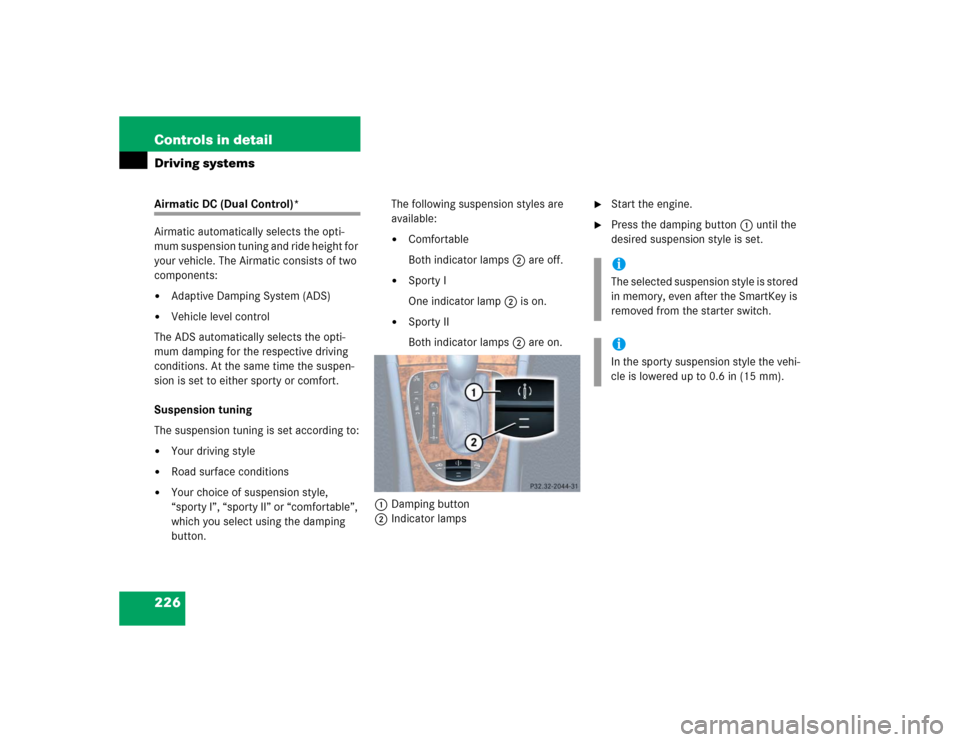
button.The following suspension styles are
available:
�
Comfortable
Both indicator lamps2 are off.
�
Sporty I
One indicator lamp2 is on.
�
Sporty II
Both indicator lamps2 are on.
1Damping button
2Indicator lamps
�
Start the engine.
�
Press the damping button1 until the
desired suspension style is set.iThe selected suspension style is stored
in memory, even after the SmartKey is
removed from the starter switch.iIn the sporty suspension style the vehi-
cle is lowered up to 0.6 in (15 mm).
Page 227 of 442
227 Controls in detail
Driving systems
Vehicle level control
Your vehicle automatically adjusts its ride
height to�
reduce fuel consumption
�
increase vehicle safety
The following vehicle chassis ride heights
can be selected:
�
Normal
�
RaisedThe vehicle chassis ride height is raised or
lowered according to the selected level
setting and to the vehicle speed:
�
At a speed above approximately above
68 mph (110 km / h) and the sporty
suspension style selected
(�page 226), ride height is reduced
automatically by up to approximately
0.6in (15mm).
�
With decreasing speed, the ride height
is again raised to the “Normal” level.Select the “Raised” level only when re-
quired by current driving conditions. Oth-
erwise
�
fuel consumption may increase
�
handling may be impaired
iThese height adjustments are so small
that you may not notice any change.
Warning!
G
To help avoid personal injury, keep hands
and feet away from wheel housing area, and
stay away from under the vehicle when low-
ering the vehicle chassis.
Page 228 of 442
228 Controls in detailDriving systemsThe following vehicle level settings can be
selected when the vehicle is stationary and
the engine is running:
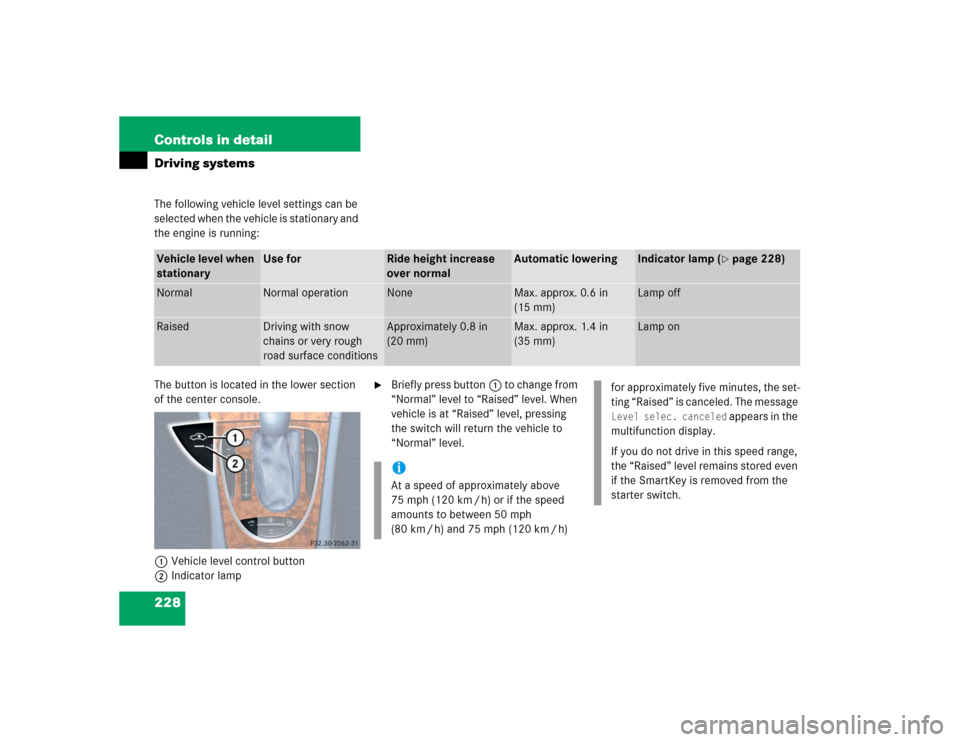
The button is located in the lower section
of the center console.
1Vehicle level control button
2Indicator lamp
�
Briefly press button1 to change from
“Normal” level to “Raised” level. When
vehicle is at “Raised” level, pressing
the switch will return the vehicle to
“Normal” level.
Vehicle level when
stationary
Use for
Ride height increase
over normal
Automatic lowering
Indicator lamp (
�page 228)
Normal
Normal operation
None
Max. approx. 0.6 in
(15 mm)
Lamp off
Raised
Driving with snow
chains or very rough
road surface conditions
Approximately 0.8 in
(20 mm)
Max. approx. 1.4 in
(35 mm)
Lamp on
iAt a speed of approximately above
75 mph (120 km / h) or if the speed
amounts to between 50 mph
(80 km / h) and 75 mph (120 km / h)
for approximately five minutes, the set-
ting “Raised” is canceled. The message Level selec. canceled
appears in the
multifunction display.
If you do not drive in this speed range,
the “Raised” level remains stored even
if the SmartKey is removed from the
starter switch.
Page 271 of 442
271 Operation
Driving instructions
Tread wear indicators (TWI) are required by
law. These indicators are located in six
places on the tread circumference and be-
come visible at a tread depth of approxi-
mately
1⁄16
in (1.6 mm), at which point the
tire is considered worn and should be re-
placed.
The tread wear indicator appears as a solid
band across the tread.
Specified tire pressures must be main-
tained. This applies particularly if the tires
are subjected to high loads (e.g. high
speeds, heavy loads, high ambient temper-
atures).
Hydroplaning
Depending on the depth of the water layer
on the road, hydroplaning may occur, even
at low speeds and with new tires. Reduce
vehicle speed, avoid track grooves in the
road and apply brakes cautiously in the
rain.
Inspect the tires and the vehicle underbody
for possible damage. If the vehicle or tires
appear unsafe, have it towed to the nearest
Mercedes-Benz Center or tire dealer for re-
pairs.
Warning!
G
Although the applicable federal motor vehi-
cle safety laws consider a tire to be worn
when the tread wear indicators (TWI) be-
come visible at approximately
1/16in
(1.6 mm), we recommend that you do not al-
low your tires to wear down to that level. As
tread depth approaches
1/8in (3 mm), the
adhesion properties on a wet road are
sharply reduced.
Depending upon the weather and/or road
surface (conditions), the tire traction varies
widely.
Warning!
G
Do not drive with a flat tire. A flat tire affects
the ability to steer or brake the vehicle. You
may lose control of the vehicle. Continued
driving with a flat tire or driving at high
speed with a flat tire will cause excessive
heat build-up and possibly a fire.
Page 298 of 442
298 OperationMaintenanceClearing the service indicator
You can clear the service indicator�
Press the j button on the multi-
function steering wheel.
The service indicator is cleared and the
standard display appears in the multi-
function display.
Service term exceeded
If you have exceeded the suggested ser-
vice term, you will see the following mes-
sage in the multifunction display:Service A exceeded by XXXXX miles (km)
Service A exceeded by XXX days
Service A exceeded by X day Any authorized Mercedes-Benz Center will
reset the service indicator following a com-
pleted service.
Calling up the service indicator�
Switch the ignition on.
The standard display of the control sys-
tem appears (
�page 129).
�
Press buttonk orj on the mul-
tifunction steering wheel until the
FSS PLUS indicator appears in the mul-
tifunction display.
Resetting the service indicator
In the event that a service on your vehicle
is not carried out by an authorized
Mercedes-Benz Center, you can reset the
service indicator yourself.�
Switch the ignition on.
The standard display of the control sys-
tem appears (
�page 134).
�
Press buttonk orj on the mul-
tifunction steering wheel until the
FSS PLUS indicator appears in the mul-
tifunction display.
�
Press the reset button (
�page 22) for
about five seconds.
iIf the battery is disconnected, the days
of disconnection will not be included in
the count shown by the service indica-
tor. To arrive at the true service dead-
line, you will need to subtract these
days from the days shown in the ser-
vice indicator.
Do not confuse the service indicator
with the engine oil level indicator :.