Page 105 of 442
105 Controls in detail
Locking and unlocking
Separately locking the trunk
Your vehicle may be equipped with a func-
tion permitting the separate locking of the
trunk using the mechanical key. If present,
this feature can permit you to deny any un-
authorized person access to the trunk by
locking the trunk separately and leaving
the SmartKey less the mechanical key with
the vehicle.
To verify the presence of this feature, use
the mechanical key to lock the trunk and
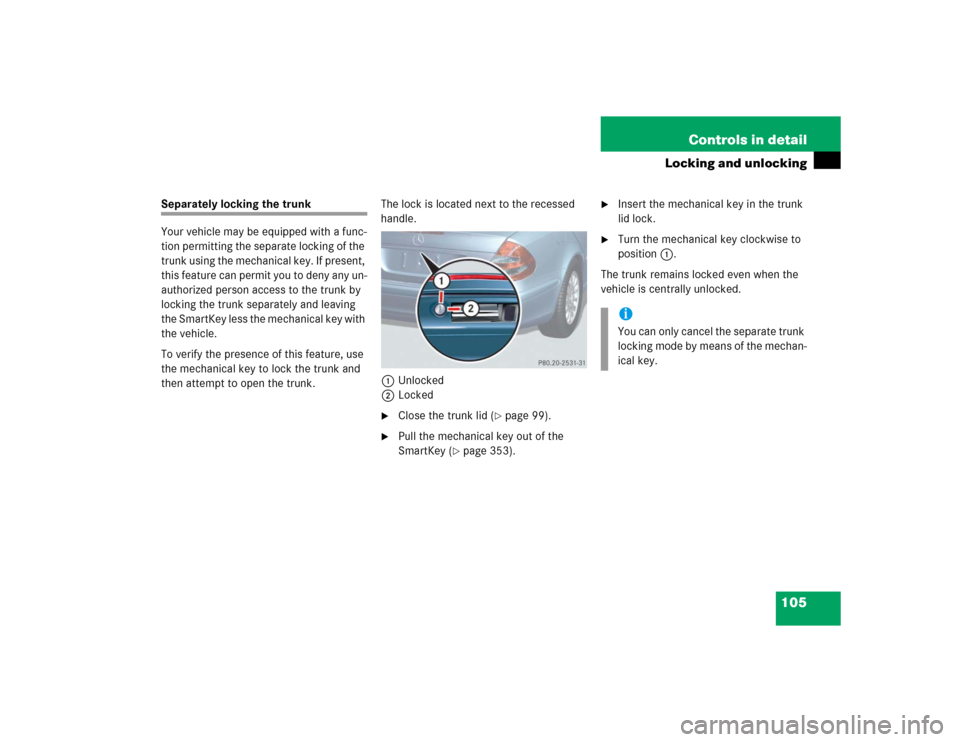
then attempt to open the trunk.The lock is located next to the recessed
handle.
1Unlocked
2Locked
�
Close the trunk lid (
�page 99).
�
Pull the mechanical key out of the
SmartKey (
�page 353).
�
Insert the mechanical key in the trunk
lid lock.
�
Turn the mechanical key clockwise to
position1.
The trunk remains locked even when the
vehicle is centrally unlocked.iYou can only cancel the separate trunk
locking mode by means of the mechan-
ical key.
Page 106 of 442
106 Controls in detailLocking and unlockingSeparately unlocking the trunk�
Pull the mechanical key out of the
SmartKey (
�page 353).
�
Insert the mechanical key in the trunk
lid lock.
�
Turn the mechanical key completely to
the left to position2, (
�page 105).
You can now open the trunk (�page 97).
A minimum height clearance of 5.90 ft
(1.80 m) is required to open the trunk lid.
Automatic central locking
The doors and the trunk automatically lock
when the ignition is switched on and the
wheels are turning at vehicle speeds of ap-
proximately 9mph (15km/h) or more.
You can open a locked door from the in-
side. Open door only when conditions are
safe to do so.Information on towing the vehicle can be
found in the “Practical hints” section
(
�page 381).
You can deactivate the automatic locking
mode over the control system
(�page 149).
iUnlocking the trunk with the mechani-
cal key will trigger the anti-theft alarm
system. To cancel the alarm, do one of
the following:�
Press button Œ or ‹ on the
SmartKey.
�
Insert the SmartKey in the starter
switch.
iThe doors unlock automatically after an
accident if the force of the impact ex-
ceeds a preset threshold.
The vehicle automatically locks when
the ignition is switched on and the
wheels are turning at vehicle speeds of
approximately 9 mph (15 km/h) or
more. You could therefore lock yourself
out when the vehicle�
is pushed or towed
�
is on a test stand
Page 107 of 442

107 Controls in detail
Locking and unlocking
Locking and unlocking from the inside
You can lock or unlock the doors and the
trunk from inside using the central locking
switch. This can be useful, for example, if
y o u w a n t t o l o c k t h e v e h i c l e b e f o r e s t a r t i n g
to drive.
The fuel filler flap cannot be locked or un-
locked with the central locking switch.The switch is located in the center console.
Central locking switch1Locking
2Unlocking
Locking�
Press upper half1 of the central lock-
ing switch.
If both front doors are closed, the vehi-
cle locks.Unlocking
�
Press lower half2 of the central lock-
ing switch.
The vehicle unlocks.
Warning!
G
When leaving the vehicle, always remove the
SmartKey from the starter switch, take it
with you and lock the vehicle. Do not leave
children unattended in the vehicle, or with
access to an unlocked vehicle. Unsuper-
vised use of vehicle equipment may cause
an accident and / or serious personal injury.
iYou can open a locked door from the
inside. Open door only when conditions
are safe to do so.
If the vehicle was previously centrally
locked using the SmartKey, it will not
unlock using the central locking switch.
If the vehicle was previously locked
with the central locking switch�
while in the selective remote con-
trol mode, only the door opened
from the inside is unlocked.
�
while in the global remote control
mode, the vehicle is unlocked com-
pletely when a door is opened from
the inside.
Page 113 of 442
113 Controls in detailSeats
Massage function (PULSE)
The massage function can help prevent
muscle tension during long drives.�
Press button6.
The indicator lamp in button2 comes
on. The air cushions in the lumbar area
pulsate.
Heated seats*
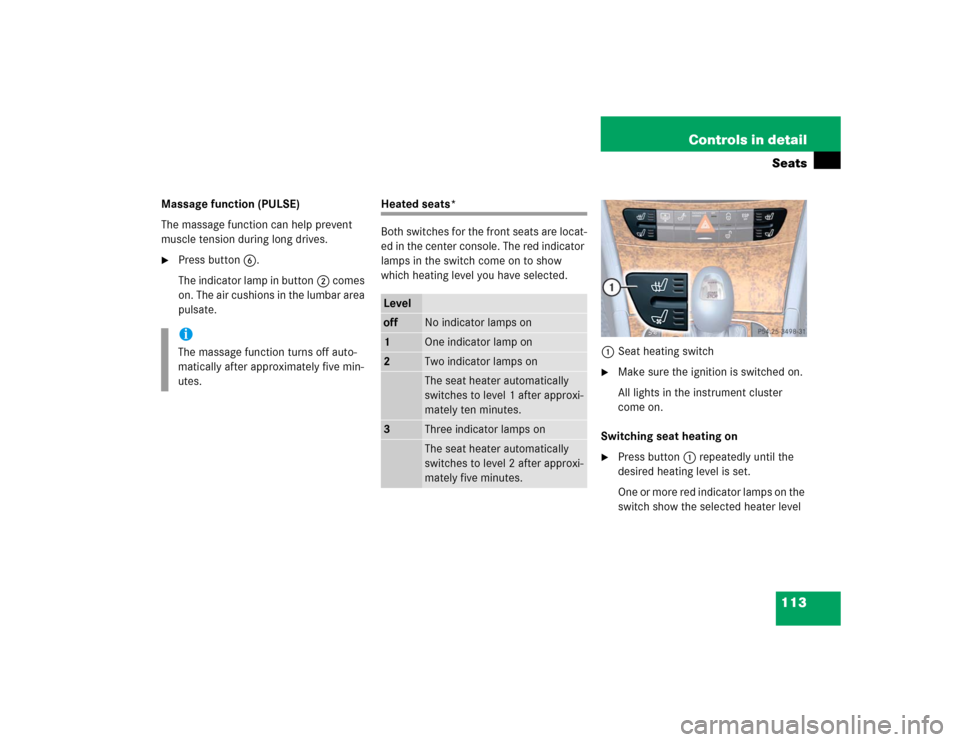
Both switches for the front seats are locat-
ed in the center console. The red indicator
lamps in the switch come on to show
which heating level you have selected.
1Seat heating switch
�
Make sure the ignition is switched on.
All lights in the instrument cluster
come on.
Switching seat heating on
�
Press button1 repeatedly until the
desired heating level is set.
One or more red indicator lamps on the
switch show the selected heater level
iThe massage function turns off auto-
matically after approximately five min-
utes.
Leveloff
No indicator lamps on
1
One indicator lamp on
2
Two indicator lamps onThe seat heater automatically
switches to level 1 after approxi-
mately ten minutes.
3
Three indicator lamps onThe seat heater automatically
switches to level 2 after approxi-
mately five minutes.
Page 114 of 442
114 Controls in detailSeatsSwitching seat heating off�
Press button1 repeatedly until all in-
dicator lamps go out.
Seat ventilation*
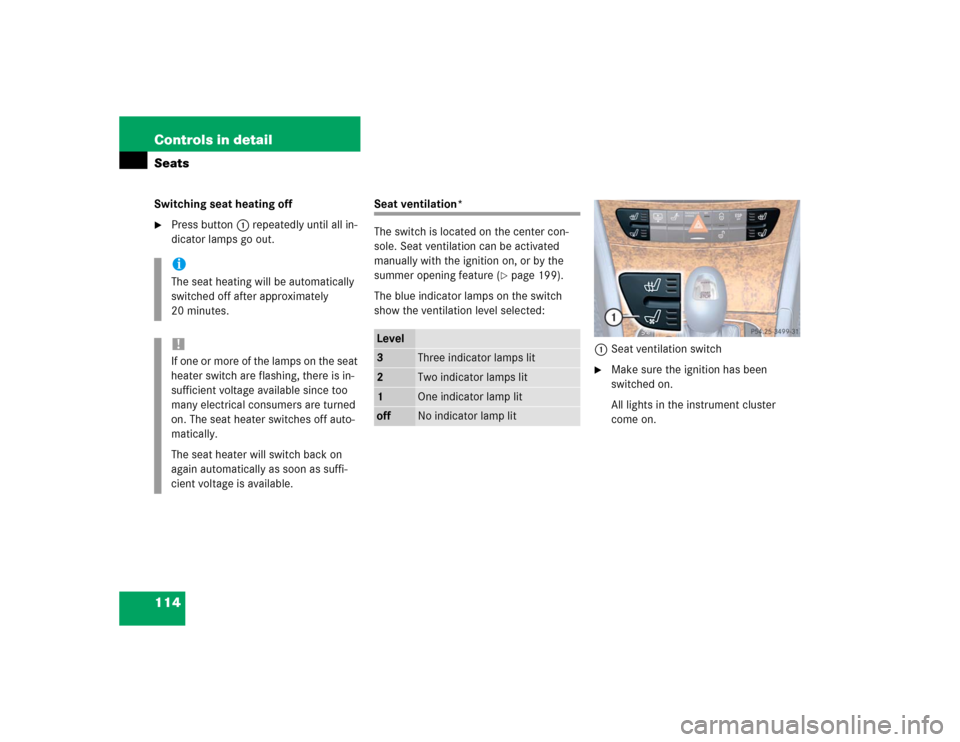
The switch is located on the center con-
sole. Seat ventilation can be activated
manually with the ignition on, or by the
summer opening feature (
�page 199).
The blue indicator lamps on the switch
show the ventilation level selected:
1Seat ventilation switch
�
Make sure the ignition has been
switched on.
All lights in the instrument cluster
come on.
iThe seat heating will be automatically
switched off after approximately
20 minutes.!If one or more of the lamps on the seat
heater switch are flashing, there is in-
sufficient voltage available since too
many electrical consumers are turned
on. The seat heater switches off auto-
matically.
The seat heater will switch back on
again automatically as soon as suffi-
cient voltage is available.
Level3
Three indicator lamps lit
2
Two indicator lamps lit
1
One indicator lamp lit
off
No indicator lamp lit
Page 117 of 442
117 Controls in detail
Memory function
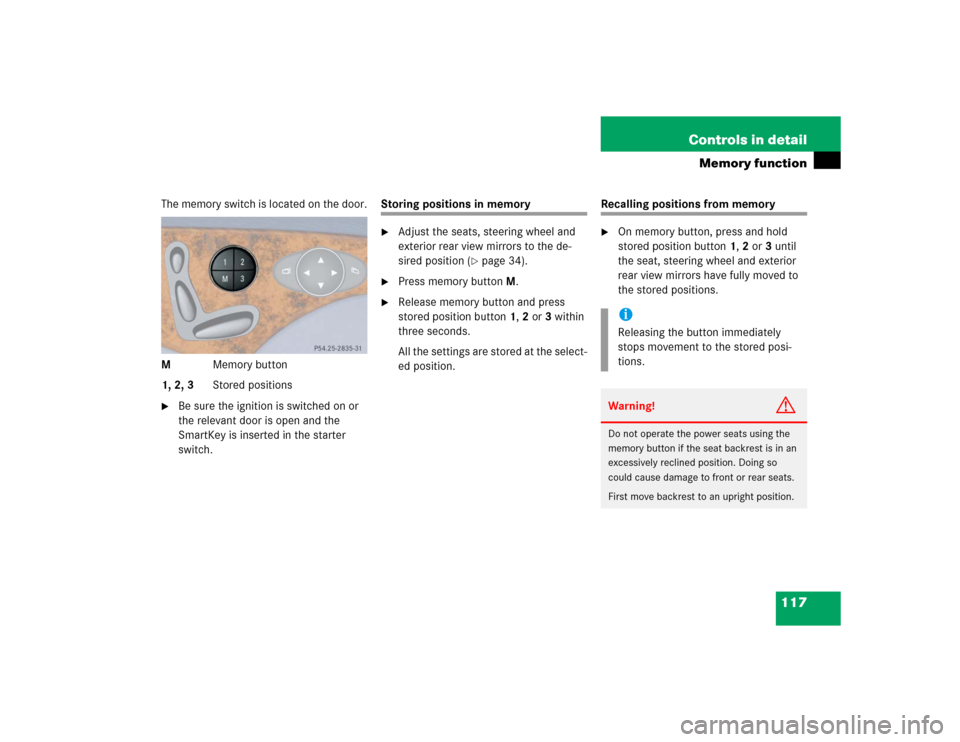
The memory switch is located on the door.
MMemory button
1, 2, 3Stored positions�
Be sure the ignition is switched on or
the relevant door is open and the
SmartKey is inserted in the starter
switch.
Storing positions in memory�
Adjust the seats, steering wheel and
exterior rear view mirrors to the de-
sired position (
�page 34).
�
Press memory buttonM.
�
Release memory button and press
stored position button 1, 2 or 3 within
three seconds.
All the settings are stored at the select-
ed position.
Recalling positions from memory�
On memory button, press and hold
stored position button1, 2 or3 until
the seat, steering wheel and exterior
rear view mirrors have fully moved to
the stored positions.iReleasing the button immediately
stops movement to the stored posi-
tions.Warning!
G
Do not operate the power seats using the
memory button if the seat backrest is in an
excessively reclined position. Doing so
could cause damage to front or rear seats.
First move backrest to an upright position.
Page 124 of 442
124 Controls in detailLightingSwitching on the hazard warning
flasher�
Press the hazard warning flasher
switch.
All turn signals will flash.
Switching off the hazard warning
flasher
�
Press hazard warning flasher switch
again.
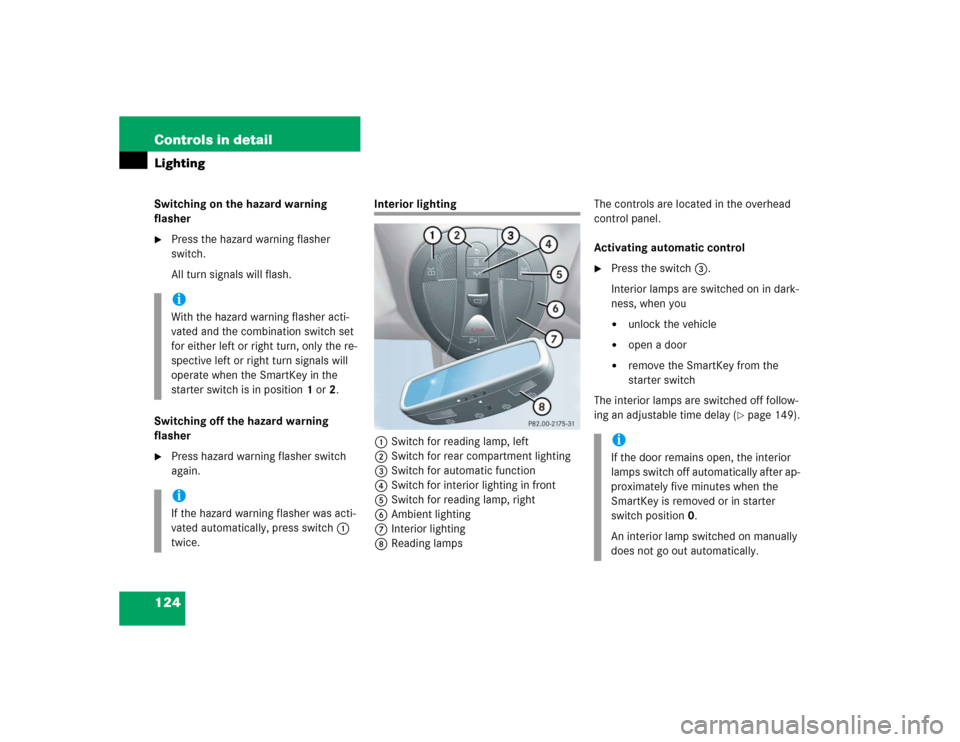
Interior lighting
1Switch for reading lamp, left
2Switch for rear compartment lighting
3Switch for automatic function
4Switch for interior lighting in front
5Switch for reading lamp, right
6Ambient lighting
7Interior lighting
8Reading lampsThe controls are located in the overhead
control panel.
Activating automatic control
�
Press the switch3.
Interior lamps are switched on in dark-
ness, when you�
unlock the vehicle
�
open a door
�
remove the SmartKey from the
starter switch
The interior lamps are switched off follow-
ing an adjustable time delay (
�page 149).
iWith the hazard warning flasher acti-
vated and the combination switch set
for either left or right turn, only the re-
spective left or right turn signals will
operate when the SmartKey in the
starter switch is in position1 or2.iIf the hazard warning flasher was acti-
vated automatically, press switch1
twice.
iIf the door remains open, the interior
lamps switch off automatically after ap-
proximately five minutes when the
SmartKey is removed or in starter
switch position0.
An interior lamp switched on manually
does not go out automatically.
Page 125 of 442
125 Controls in detail
Lighting
Deactivating automatic control�
Press the switch3.
The interior lighting remains switched
off, even when you�
centrally unlock the vehicle
�
open a door
�
remove the SmartKey from the
starter switch
Manual control
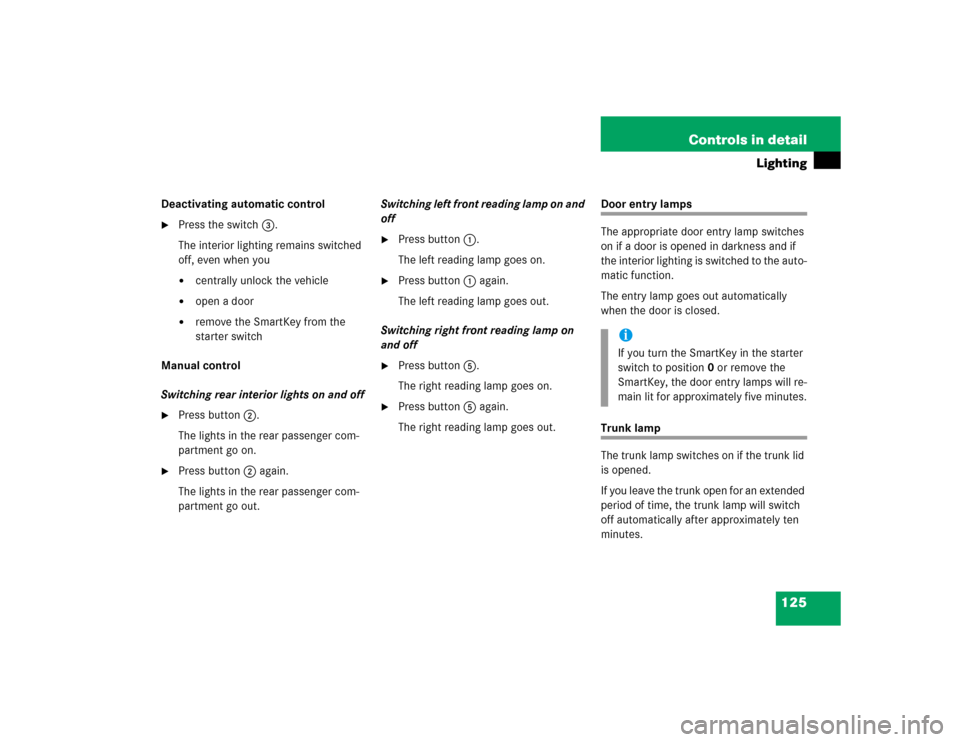
Switching rear interior lights on and off
�
Press button2.
The lights in the rear passenger com-
partment go on.
�
Press button2 again.
The lights in the rear passenger com-
partment go out.Switching left front reading lamp on and
off
�
Press button1.
The left reading lamp goes on.
�
Press button1 again.
The left reading lamp goes out.
Switching right front reading lamp on
and off
�
Press button5.
The right reading lamp goes on.
�
Press button5 again.
The right reading lamp goes out.
Door entry lamps
The appropriate door entry lamp switches
on if a door is opened in darkness and if
the interior lighting is switched to the auto-
matic function.
The entry lamp goes out automatically
when the door is closed.Trunk lamp
The trunk lamp switches on if the trunk lid
is opened.
If you leave the trunk open for an extended
period of time, the trunk lamp will switch
off automatically after approximately ten
minutes.
iIf you turn the SmartKey in the starter
switch to position0 or remove the
SmartKey, the door entry lamps will re-
main lit for approximately five minutes.