Page 79 of 442
79 Safety and Security
Driving safety systems
Switching on the ESP�
Press ESP button1.
The ABS/ESP warning lamp v in
the instrument cluster goes out.
You are now again in normal driving
mode.
The SBC brake system
The SBC brake system combines a hydrau-
lic brake circuit with electronically con-
trolled brake servo assistance. You have
increased braking safety and improved
braking comfort.
Warning!
G
When the ABS/ESP warning lamp v is
illuminated continuously, the ESP is
switched off.
Adapt your speed and driving to the prevail-
ing road conditions and to the non-operating
status of the ESP.!Turn on the ESP immediately if the
aforementioned circumstances do not
apply anymore.
Warning!
G
Never ignore a brake malfunction indicated
in the speedometer display, for example by
the ; (USA only) or 3 (Canada only)
warning lamp. Refer to the “Practical hints”
section (
�page 312). Also read and ob-
serve the messages in the instrument clus-
ter display (�page 318).
Warning!
G
The SBC brake system requires electrical
power to operate.
A malfunction in the vehicle’s power supply
or electrical system may impair brake sys-
tem operation and switch it into its emer-
gency operation mode. In such a case, the
red brake warning lamp (
�page 312) and
warning messages in the instrument cluster
(
�page 318) come on while driving. To
brake, the driver must then apply signifi-
cantly greater brake pedal pressure and de-
press the pedal much further to obtain the
expected braking effect. If necessary, apply
full pressure to the brake pedal. Brakes may
only be applied to the front wheels. Stop-
ping distance is increased!
��
Page 82 of 442
82 Safety and SecurityDriving safety systemsFour wheel electronic traction system (4MATIC) with the ESP
Models with all-wheel-drive only.
The 4MATIC improves vehicle’s ability to
use available traction, e.g. during winter
operation in mountains under snowy
conditions, by applying power to all four
wheels.
Warning!
G
If you see the ESP warning lampv flash-
ing in the speedometer, proceed as follows:�
While driving off, apply as little throttle
as possible
�
While driving, ease up on the accelera-
tor
�
Adapt your speed and driving style to
the prevailing road conditions
Failure to observe these guidelines could
cause the vehicle to skid.
The ESP cannot prevent accidents resulting
from excessive speed.!Do not tow with one axle raised.
Otherwise the transfer case can be
damaged, which is not covered by the
Mercedes-Benz Limited Warranty.
!Performance testing must only be con-
ducted on a two-axle dynamometer.
Otherwise the transfer case can be
damaged, which is not covered by the
Mercedes-Benz Limited Warranty.!Because of the ESP’s automatic opera-
tion, the engine and ignition must be
shut off (SmartKey in starter switch
position0 or1 or KEYLESS-GO
start/stop button* in position0 or1)
when the parking brake is being tested
on a brake test dynamometer.
Active braking action through ESP may
otherwise seriously damage the front
or rear axle brake system.
Operational tests with the engine
running can only be conducted on a
two-axle dynamometer.
Page 92 of 442

92 Controls in detailLocking and unlockingSmartKey 1‹ Lock button
2Š Unlock button for the trunk lid
3Mechanical key locking tab
4ΠUnlock button
5Battery check lamp
6Â Panic button (
�page 73)
For more information on using the
SmartKey buttons, see “SmartKey”
(
�page 88).Important notes on using KEYLESS-GO
�
You can also use the SmartKey with
KEYLESS-GO like a normal SmartKey
(�page 88).
�
You can combine KEYLESS-GO func-
tions with normal SmartKey functions
(e.g. unlocking with KEYLESS-GO and
locking with the remote control).
�
Always carry the SmartKey with
KEYLESS-GO with you.
�
Never store the SmartKey with
KEYLESS-GO together with:�
Electronic items such as a cellular
phone or another SmartKey with
KEYLESS-GO
�
Metallic objects such as coins or
metal foil
Doing so could impair the function of
the KEYLESS-GO system.
Warning!
G
When leaving the vehicle, always remove the
SmartKey from the starter switch, take the
SmartKey with KEYLESS-GO* with you and
lock the vehicle. Do not leave children unat-
tended in the vehicle, or with access to an
unlocked vehicle. Unsupervised use of vehi-
cle equipment may cause serious personal
injury.!To prevent possible malfunction, avoid
exposing the SmartKey with
KEYLESS-GO to high levels of electro-
magnetic radiation.iYou can also open and close the power
windows (
�page 197) and
sliding / pop-up roof* (
�page 201) or
panorama sliding / pop-up roof*
(
�page 208) using the SmartKey.
Page 93 of 442

93 Controls in detail
Locking and unlocking
�
To lock or unlock the vehicle, the
SmartKey must be located outside the
vehicle within approximately 3 ft (1 m)
of a door or the trunk.
�
In order to start the engine with the
SmartKey with KEYLESS-GO:�
The SmartKey with KEYLESS-GO
must be located in the vehicle.
�
All the doors must be closed.
�
The brake pedal must be firmly de-
pressed. Do not depress the accel-
erator.
�
If you have started the engine with the
KEYLESS-GO start / stop button, you
can only turn it off again with this but-
ton, even if you have put the SmartKey
in the starter switch in the meantime.
�
This does not apply if, after starting, the
selector lever is still in positionP and
then the SmartKey is inserted in the
starter switch. The SmartKey will then
have priority over the KEYLESS-GO
function and the vehicle’s electrical
system will operate according to the
position of the SmartKey in the starter
switch, even stopping the engine.
�
If the SmartKey with KEYLESS-GO is
positioned farther away from the vehi-
cle and can no longer be recognized by
the system, the vehicle cannot be
locked or the engine started via the
KEYLESS-GO system.
�
If the SmartKey with KEYLESS-GO is re-
moved from the vehicle while the igni-
tion is switched on (e.g. if passenger
exits the vehicle with the SmartKey),
the message
Key not recognized!
will
appear in the multifunction display.
Find the SmartKey or change its
present location immediately (e.g.
place it on the front passenger seat or
insert it in shirt pocket).
�
Remember that the engine can be
started by anyone with a SmartKey
with KEYLESS-GO that is left inside the
vehicle. If you leave the SmartKey with
KEYLESS-GO behind when exiting and
locking the vehicle, the message
Key
recognized in vehicle!
will appear in
the multifunction display.
Page 107 of 442

107 Controls in detail
Locking and unlocking
Locking and unlocking from the inside
You can lock or unlock the doors and the
trunk from inside using the central locking
switch. This can be useful, for example, if
y o u w a n t t o l o c k t h e v e h i c l e b e f o r e s t a r t i n g
to drive.
The fuel filler flap cannot be locked or un-
locked with the central locking switch.The switch is located in the center console.
Central locking switch1Locking
2Unlocking
Locking�
Press upper half1 of the central lock-
ing switch.
If both front doors are closed, the vehi-
cle locks.Unlocking
�
Press lower half2 of the central lock-
ing switch.
The vehicle unlocks.
Warning!
G
When leaving the vehicle, always remove the
SmartKey from the starter switch, take it
with you and lock the vehicle. Do not leave
children unattended in the vehicle, or with
access to an unlocked vehicle. Unsuper-
vised use of vehicle equipment may cause
an accident and / or serious personal injury.
iYou can open a locked door from the
inside. Open door only when conditions
are safe to do so.
If the vehicle was previously centrally
locked using the SmartKey, it will not
unlock using the central locking switch.
If the vehicle was previously locked
with the central locking switch�
while in the selective remote con-
trol mode, only the door opened
from the inside is unlocked.
�
while in the global remote control
mode, the vehicle is unlocked com-
pletely when a door is opened from
the inside.
Page 109 of 442
109 Controls in detailSeats
Removing and installing front seat head restraints
Information on head restraint adjustment
can be found in the “Getting started” sec-
tion (
�page 36).
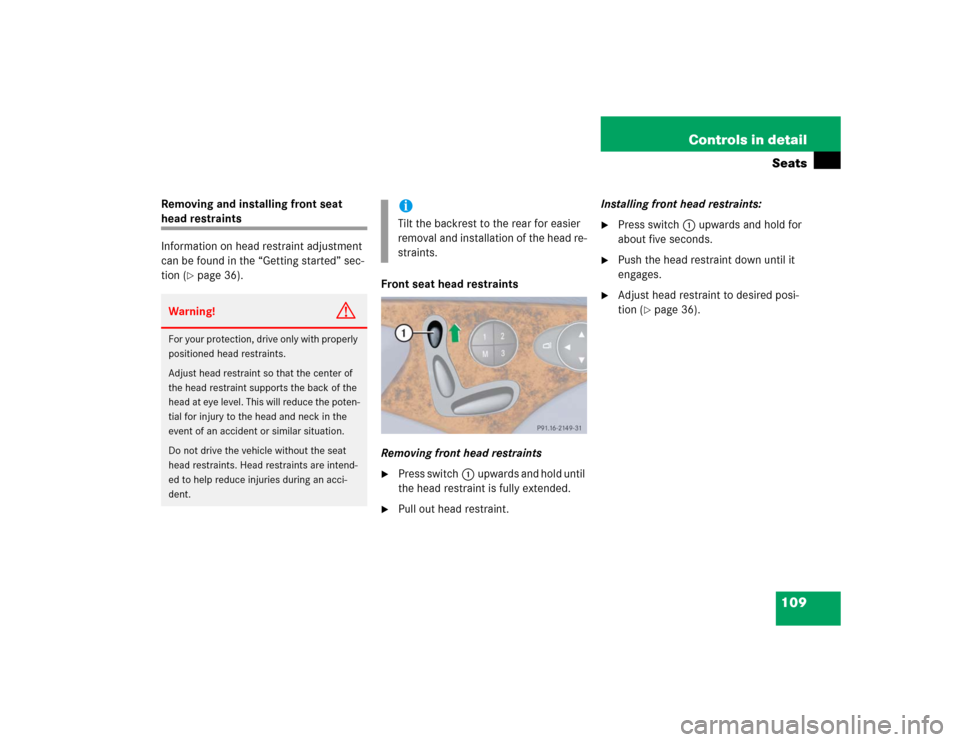
Front seat head restraints
Removing front head restraints
�
Press switch1upwards and hold until
the head restraint is fully extended.
�
Pull out head restraint.Installing front head restraints:
�
Press switch1upwards and hold for
about five seconds.
�
Push the head restraint down until it
engages.
�
Adjust head restraint to desired posi-
tion (
�page 36).
Warning!
G
For your protection, drive only with properly
positioned head restraints.
Adjust head restraint so that the center of
the head restraint supports the back of the
head at eye level. This will reduce the poten-
tial for injury to the head and neck in the
event of an accident or similar situation.
Do not drive the vehicle without the seat
head restraints. Head restraints are intend-
ed to help reduce injuries during an acci-
dent.
iTilt the backrest to the rear for easier
removal and installation of the head re-
straints.
Page 112 of 442
112 Controls in detailSeatsDrive - Dynamic seat*
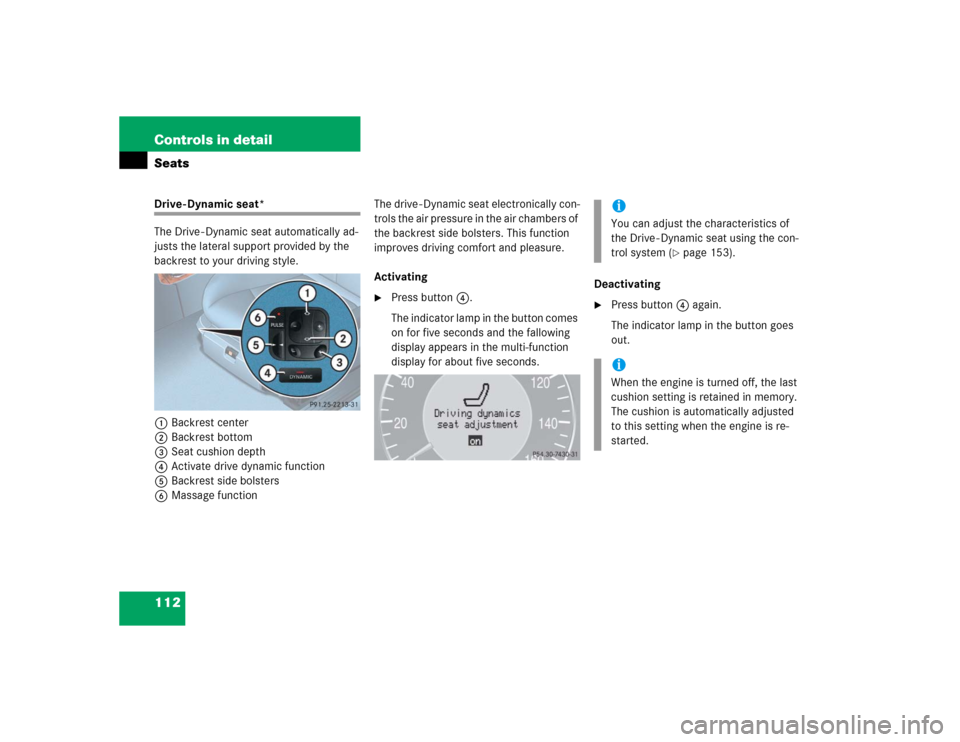
The Drive - Dynamic seat automatically ad-
justs the lateral support provided by the
backrest to your driving style.
1Backrest center
2Backrest bottom
3Seat cushion depth
4Activate drive dynamic function
5Backrest side bolsters
6Massage functionThe drive - Dynamic seat electronically con-
trols the air pressure in the air chambers of
the backrest side bolsters. This function
improves driving comfort and pleasure.
Activating
�
Press button4.
The indicator lamp in the button comes
on for five seconds and the fallowing
display appears in the multi-function
display for about five seconds.Deactivating
�
Press button4 again.
The indicator lamp in the button goes
out.iYou can adjust the characteristics of
the Drive - Dynamic seat using the con-
trol system (
�page 153).
iWhen the engine is turned off, the last
cushion setting is retained in memory.
The cushion is automatically adjusted
to this setting when the engine is re-
started.
Page 113 of 442
113 Controls in detailSeats
Massage function (PULSE)
The massage function can help prevent
muscle tension during long drives.�
Press button6.
The indicator lamp in button2 comes
on. The air cushions in the lumbar area
pulsate.
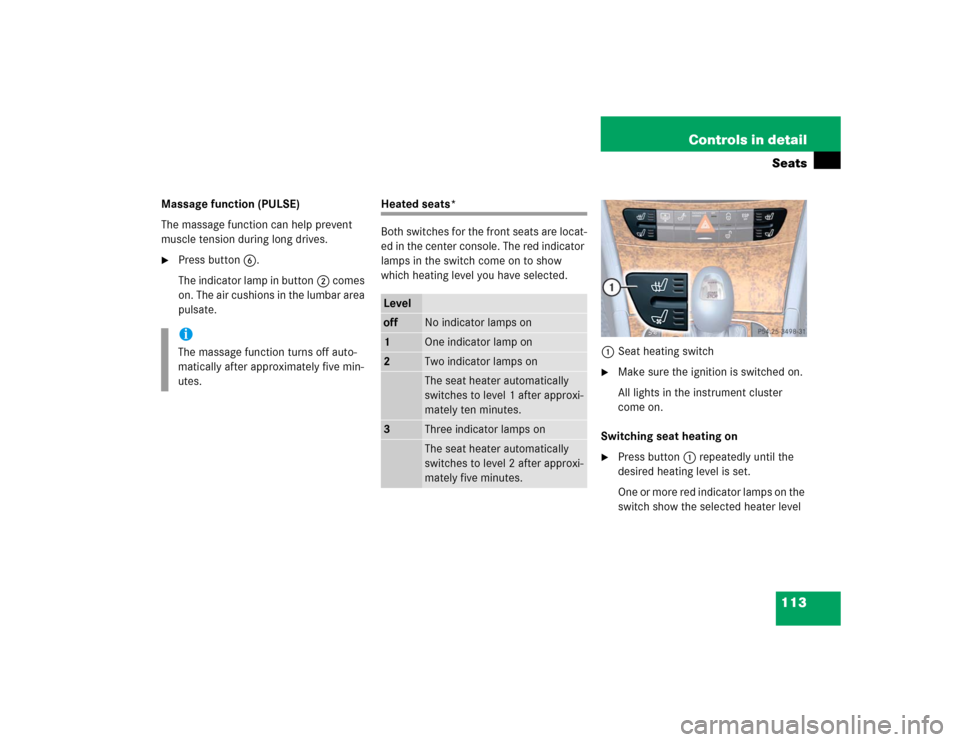
Heated seats*
Both switches for the front seats are locat-
ed in the center console. The red indicator
lamps in the switch come on to show
which heating level you have selected.
1Seat heating switch
�
Make sure the ignition is switched on.
All lights in the instrument cluster
come on.
Switching seat heating on
�
Press button1 repeatedly until the
desired heating level is set.
One or more red indicator lamps on the
switch show the selected heater level
iThe massage function turns off auto-
matically after approximately five min-
utes.
Leveloff
No indicator lamps on
1
One indicator lamp on
2
Two indicator lamps onThe seat heater automatically
switches to level 1 after approxi-
mately ten minutes.
3
Three indicator lamps onThe seat heater automatically
switches to level 2 after approxi-
mately five minutes.