Page 195 of 400
195 Controls in detail
Audio system
Accepting an incoming call in cassette,
CD or radio mode
If the telephone is activated in the back-
ground (receiving symbol
S visible on dis-
play), the audio source is muted when a
call is received. The ringing tone is heard
and the caller’s telephone number or the
name under which this telephone number
has been saved in the telephone book ap-
pears on the display. If the caller’s number
is not transmitted,
CALL
appears in the dis-
play.
�
Press the
SND
key to accept the call.Muting a call
It is possible to mute a call; the caller is
then no longer able to hear you.
Mute on
�
Press the
MUT
key.
Mute off
�
Press the
MUT
key.
Terminating a call
�
Press the
END
key.
The current call is terminated.Call waiting
If you receive another call during an al-
ready active call, you can accept the sec-
ond call and switch between the two.
Accepting a second call
�
Press the
SND
key.
You are connected with the second
caller, the first call is muted.
Switching between the calls
�
Press the
SND
key.
Terminating the second call
�
Press the
END
key.
The current call will be terminated. You
are connected with the muted call
again.
Page 221 of 400
221 Controls in detail
Useful features
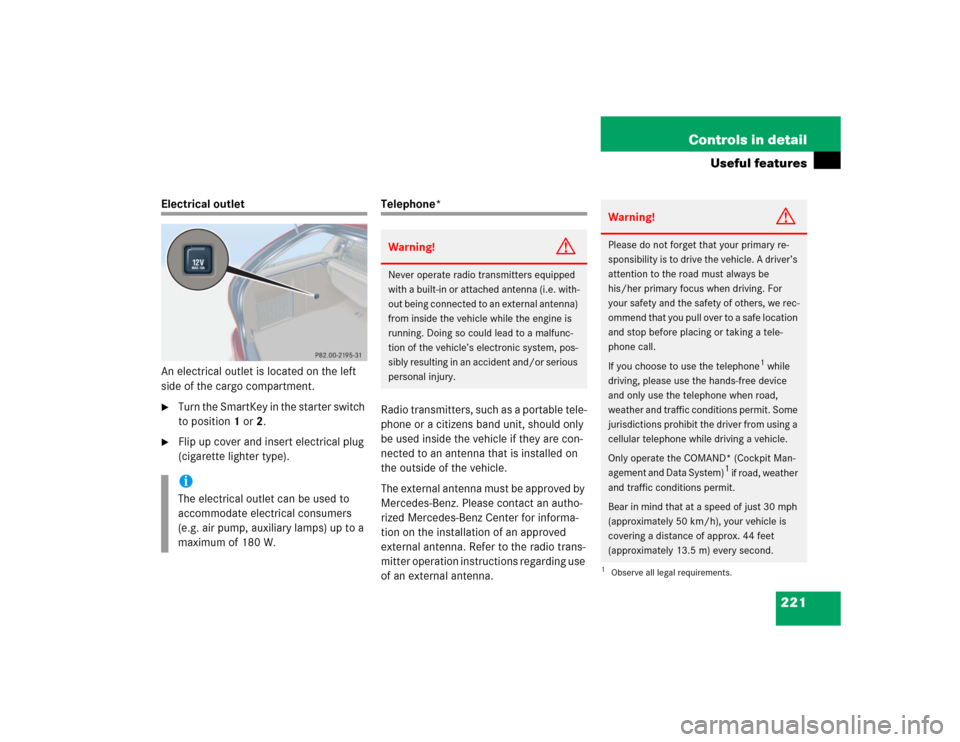
Electrical outlet
An electrical outlet is located on the left
side of the cargo compartment.�
Turn the SmartKey in the starter switch
to position1 or2.
�
Flip up cover and insert electrical plug
(cigarette lighter type).
Telephone*
Radio transmitters, such as a portable tele-
phone or a citizens band unit, should only
be used inside the vehicle if they are con-
nected to an antenna that is installed on
the outside of the vehicle.
The external antenna must be approved by
Mercedes-Benz. Please contact an autho-
rized Mercedes-Benz Center for informa-
tion on the installation of an approved
external antenna. Refer to the radio trans-
mitter operation instructions regarding use
of an external antenna.
iThe electrical outlet can be used to
accommodate electrical consumers
(e.g. air pump, auxiliary lamps) up to a
maximum of 180 W.
Warning!
G
Never operate radio transmitters equipped
with a built-in or attached antenna (i.e. with-
out being connected to an external antenna)
from inside the vehicle while the engine is
running. Doing so could lead to a malfunc-
tion of the vehicle’s electronic system, pos-
sibly resulting in an accident and/or serious
personal injury.
Warning!
G
Please do not forget that your primary re-
sponsibility is to drive the vehicle. A driver’s
attention to the road must always be
his/her primary focus when driving. For
your safety and the safety of others, we rec-
ommend that you pull over to a safe location
and stop before placing or taking a tele-
phone call.
If you choose to use the telephone
1 while
driving, please use the hands-free device
and only use the telephone when road,
weather and traffic conditions permit. Some
jurisdictions prohibit the driver from using a
cellular telephone while driving a vehicle.
Only operate the COMAND* (Cockpit Man-
agement and Data System)
1 if road, weather
and traffic conditions permit.
Bear in mind that at a speed of just 30 mph
(approximately 50 km/h), your vehicle is
covering a distance of approx. 44 feet
(approximately 13.5 m) every second.
1Observe all legal requirements.
Page 229 of 400
229 Controls in detail
Useful features
Remote door unlock
In case you have locked your vehicle unin-
tentionally (e.g. SmartKey inside vehicle),
and the reserve SmartKey is not handy:�
Contact the Mercedes-Benz Response
Center at 1-800-756-9018 (in the USA)
or 1-888-923-8367 (in Canada).
You will be asked to provide your pass-
word which you provided when you
completed the subscriber agreement.
�
Then return to your vehicle and pull the
tailgate recessed handle for a minimum
of 20 seconds until the SOS button is
flashing.
The message
EMERGENCY CALL –
CALL CONNECTED appears in the multi-
function display.
As an alternative, you may unlock the vehi-
cle via Internet using the ID and password
sent to you shortly after the completion of
your acquaintance call.The Response Center will then unlock your
vehicle with the remote door unlocking
feature.
iWhen a Tele Aid call has been initiated,
the audio system or the COMAND* sys-
tem audio is muted and the selected
mode (radio, tape or CD) pauses. The
optional cellular phone (if installed)
switches off. If you must use this
phone, the vehicle must be parked. Dis-
connect the coiled cord and place the
call. The COMAND* navigation system
(if engaged) will continue to run. The
display in the instrument cluster is
available for use, and spoken com-
mands are only available by pressing
the RPT button on the COMAND* unit.
A pop-up window will appear in the
COMAND* display to indicate that a
Tele Aid call is in progress.
iThe remote door unlock feature is avail-
able if the relevant cellular phone net-
work is available.
The SOS button will flash and the
message
EMERGENCY CALL –
CALL CONNECTED
will appear in the
multifunction display to indicate
receipt of the door unlock command.
Once the vehicle is unlocked, a
Response Center specialist will
attempt to establish voice contact with
the vehicle occupants.
If the tailgate recessed handle was
pulled for more than 20 seconds
before door unlock authorization was
received by the Response Center, you
must wait 15 minutes before pulling
the tailgate recessed handle again.
Page 234 of 400
234 Controls in detailUseful featuresStep 12:�
Confirm the garage door operation by
pressing the programmed integrated
signal transmitter button (2, 3
or4).
Step 13:
�
To program the remaining two buttons,
repeat the steps above starting with
step 3.Gate operator/Canadian programming
Canadian radio-frequency laws require
transmitter signals to “time-out” (or quit)
after several seconds of transmission
which may not be long enough for the
integrated signal transmitter to pick up the
signal during programming. Similar to this
Canadian law, some U.S. gate operators
are designed to “time-out” in the same
manner.
If you live in Canada or if you are having
difficulties programming a gate operator
(regardless of where you live) by using the
programming procedures, replace step 4
with the following:Step 4:
�
Continue to press and hold the
integrated signal transmitter button
(2, 3 or4) while you press and
re-press (“cycle”) your hand-held
remote control transmitter6 every
two seconds until the frequency signal
has been learned. Upon successful
training, the indicator lamp1 will
flash slowly and then rapidly after
several seconds.
�
Proceed with programming step 5 and
step 6 to complete.
��