Page 132 of 400

132 Controls in detailControl system
The delayed shut-off feature is
deactivated. It will reactivate as soon
as you reinsert the SmartKey in the
starter switch.
Interior lighting delayed shut-off
Use this function to set whether and for
how long you would like the interior
lighting to remain lit during darkness after
the SmartKey is removed from the starter
switch.
�
Move the selection marker with
theæ orç button to the LIGHTING
submenu.
�
Press buttonj ork repeatedly
until you see this message in the
display:
INT. LIGHTING DELAYED
SHUT-OFF.The selection marker is on the current
setting.
�
Pressæ orç to select the
desired lamp-on time period.
You can select:�
0 s
, the delayed shut-off feature is
deactivated
�
5 s,
10 s
, 15 s
or
20 s
, the delayed
shut-off feature is activatedVehicle submenu
Access the
VEHICLE
submenu via the
SETTINGS
menu. Use the
VEHICLE
submenu
to make general vehicle settings. The
following functions are available:
Setting station selection mode
Use the
PRESS BUTTON IN AUDIO MODE
function to select the manual or memory
station selection mode for the radio
(�page 119).
�
Move the selection marker with
theæ orç button to the VEHICLE
submenu.
Function
Page
Set station selection mode
(radio)
132
Set automatic locking
133
��
Page 133 of 400
133 Controls in detail
Control system
�
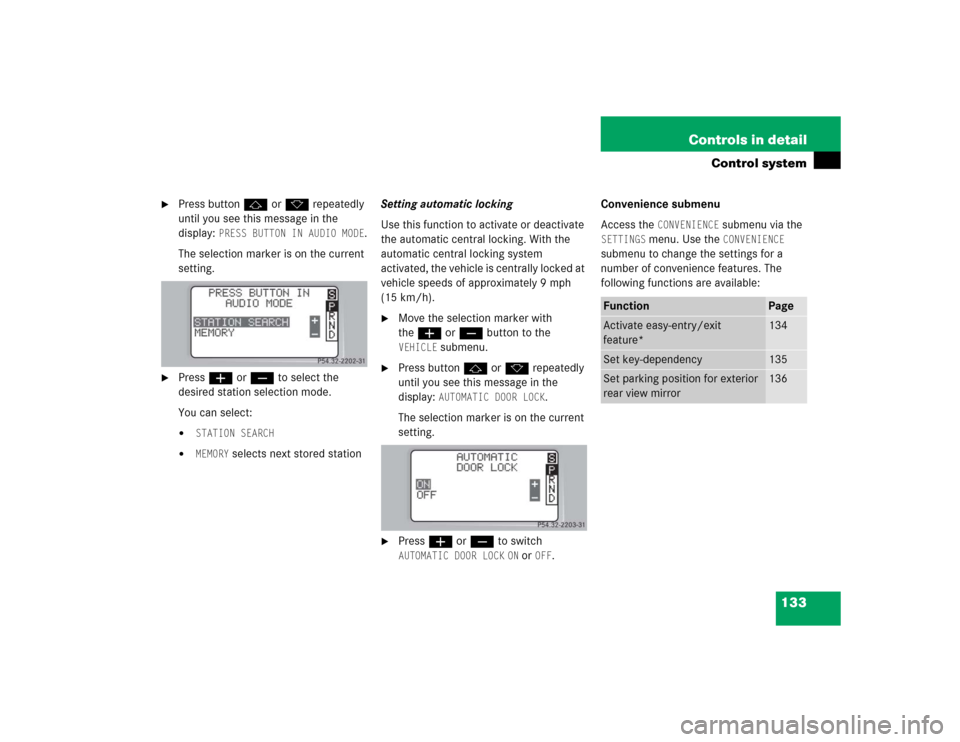
Press buttonj ork repeatedly
until you see this message in the
display:
PRESS BUTTON IN AUDIO MODE
.
The selection marker is on the current
setting.
�
Pressæ orç to select the
desired station selection mode.
You can select:�
STATION SEARCH
�
MEMORY
selects next stored stationSetting automatic locking
Use this function to activate or deactivate
the automatic central locking. With the
automatic central locking system
activated, the vehicle is centrally locked at
vehicle speeds of approximately 9 mph
(15 km/h).
�
Move the selection marker with
theæ orç button to the VEHICLE
submenu.
�
Press buttonj ork repeatedly
until you see this message in the
display:
AUTOMATIC DOOR LOCK
.
The selection marker is on the current
setting.
�
Pressæ orç to switch AUTOMATIC DOOR LOCK
ON or
OFF
.Convenience submenu
Access the
CONVENIENCE
submenu via the
SETTINGS
menu. Use the
CONVENIENCE
submenu to change the settings for a
number of convenience features. The
following functions are available:
Function
Page
Activate easy-entry/exit
feature*
134
Set key-dependency
135
Set parking position for exterior
rear view mirror
136
Page 134 of 400

134 Controls in detailControl systemActivating easy-entry/exit feature*
Use this function to activate and
deactivate the easy-entry/exit feature.
When the feature is activated, the steering
wheel and driver’s seat will move back to
facilitate exiting when you�
remove the SmartKey from the starter
switch
�
open the driver’s door
However, the engine must be turned off.After entering the vehicle the steering
wheel and seat will move into the position
stored in memory when you
�
close the driver’s door with the
SmartKey in starter switch position2.
�
you put the SmartKey in the starter
switch with the driver’s door closed.
Warning!
G
You must make sure no one can become
trapped or injured by the moving steering
wheel and the driver’s seat when the
easy-entry/exit feature* is activated and
the driver’s door is being opened and the en-
gine is turned off or the SmartKey is re-
moved from the starter switch.
Do not leave children unattended in the ve-
hicle, or with access to an unlocked vehicle.
Children could open the driver’s door and
unintentionally activate the easy-entry/exit
feature*, which could result in an accident
and/or serious personal injury.
iTo cancel seat/steering wheel
movement, do one of the following:�
press the seat adjustment switch*
(�page 35)
�
move the steering column stalk*
(�page 37)
�
press the stored position button*
(�page 100)
Page 135 of 400

135 Controls in detail
Control system
�
Move the selection marker with
theæ orç button to the CONVENIENCE
submenu.
�
Press buttonj ork repeatedly
until you see this message in the
display:
EASY-ENTRY FEATURE
ACTIVATE.
The selection marker is on the current
setting.
�
Pressæ orç to change the
easy-entry/exit setting.The following settings are available for
the easy-entry/exit feature:Setting key-dependency
Use this function to set whether the
memory settings for the seats, the steering
wheel and the mirrors should be stored
separately for each SmartKey (
�page 99).
�
Move the selection marker with
theæ orç button to the CONVENIENCE
submenu.
�
Press buttonj ork repeatedly
until you see this message in the
display:
SETTINGS KEY-DEPENDENT
.
The selection marker is on the current
setting.
�
Pressæ orç to set
key-dependency to
ON or
OFF
.
OFF
The
easy-entry/exit
feature is
deactivated
STEERING COLUMN
Only the
steering column
is moved
STEERING COLUMN +
SEAT
Both the
steering column
and the seat are
moved
Page 136 of 400
136 Controls in detailControl systemSetting parking position* for exterior
rear view mirror
Use the
MIRROR SETTING WHEN PARKING
function to select whether the passen-
ger-side exterior rear view mirror should be
turned downward during parking maneu-
vers when reverse gearR is engaged.
For additional information, see “Activating
exterior rear view mirror parking posi-
tion*” (
�page 150).
�
Move the selection marker to the CONVENIENCE
submenu using theæ
orç button.
�
Press buttonj ork repeatedly
until you see this message in the
display:
MIRROR SETTING WHEN
PARKING.
The selection marker is on the current
setting.
�
Pressæ orç to switch function ON or
OFF
.
Trip computer menu
Use the trip computer menu to call up
statistical data on your vehicle. The
following information is available:Function
Page
Fuel consumption statistics after
start
137
Fuel consumption statistics
since last reset
137
Call up range (distance to empty)
138
Page 137 of 400
137 Controls in detail
Control system
Fuel consumption statistics after start�
Press buttonÿ orè repeatedly
until you see the first function of the
Trip computer menu.
�
Press buttonj ork repeatedly
until you see this message in the
display:
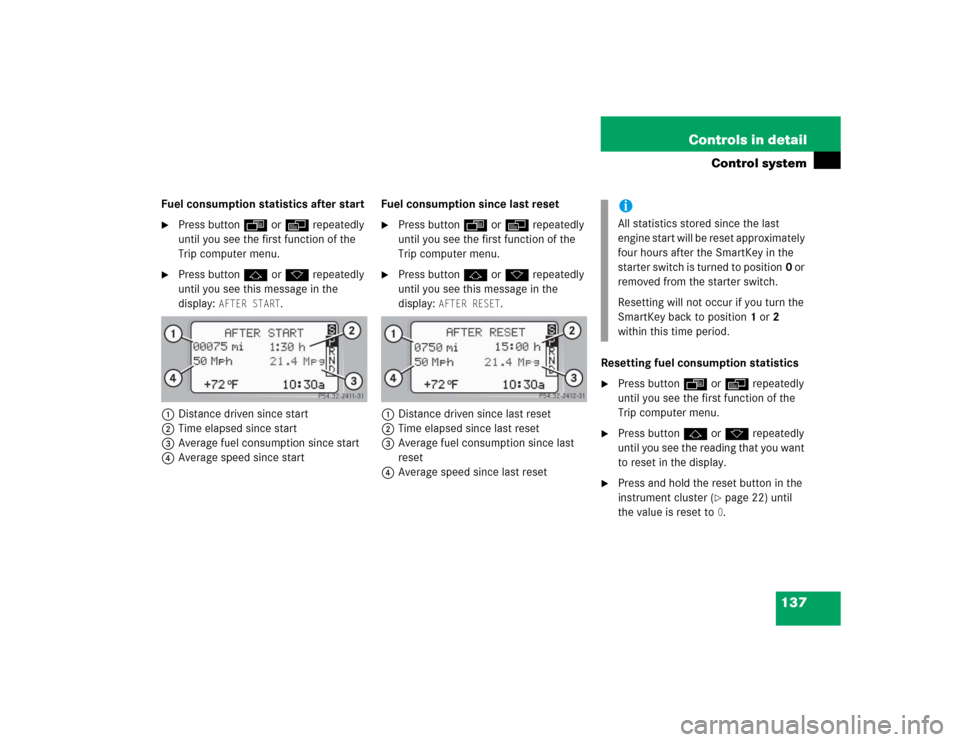
AFTER START
.
1Distance driven since start
2Time elapsed since start
3Average fuel consumption since start
4Average speed since startFuel consumption since last reset
�
Press buttonÿ orè repeatedly
until you see the first function of the
Trip computer menu.
�
Press buttonj ork repeatedly
until you see this message in the
display:
AFTER RESET
.
1Distance driven since last reset
2Time elapsed since last reset
3Average fuel consumption since last
reset
4Average speed since last resetResetting fuel consumption statistics
�
Press buttonÿ orè repeatedly
until you see the first function of the
Trip computer menu.
�
Press buttonj ork repeatedly
until you see the reading that you want
to reset in the display.
�
Press and hold the reset button in the
instrument cluster (
�page 22) until
the value is reset to0.
iAll statistics stored since the last
engine start will be reset approximately
four hours after the SmartKey in the
starter switch is turned to position0 or
removed from the starter switch.
Resetting will not occur if you turn the
SmartKey back to position1 or2
within this time period.
Page 141 of 400

141 Controls in detail
Manual transmission
�Manual transmission
Manual transmission is standard
equipment on select models and not
available on all models.
For information on driving with a manual
transmission, see “Manual transmission”
(�page 43).
Do not exceed the maximum speed in the
individual gears. Refer to tachometer
(�page 111) for engine speeds.
Shifting into reverse�
Stop the vehicle completely.
�
Pull gearshift lever up and shift
inRreverse.
Warning!
G
For vehicles equipped with a manual trans-
mission, getting out of your vehicle with the
gearshift lever not engaged in first or
reverse gear and parking brake engaged is
dangerous.
Also, when parked on an incline, an engaged
first or reverse gear alone may not prevent
your vehicle from moving, possibly hitting
people or objects.
Always set the parking brake in addition to
engaging first or reverse gear (
�page 50).
When parked on an incline, turn front wheels
towards the road curb.
Do not park this vehicle in areas where
combustible materials such as grass, hay or
leaves can come into contact with the hot
exhaust system, as these materials could be
ignited and cause a vehicle fire.Warning!
G
When leaving the vehicle, always remove the
SmartKey from the starter switch, take it
with you and lock the vehicle. Do not leave
children unattended in the vehicle, or with
access to an unlocked vehicle. Children
could move the gearshift lever, which could
result in an accident and/or serious injury.Warning!
G
On slippery road surfaces, never downshift
in order to obtain braking action.
This could result in drive wheel slip and
reduced vehicle control. Your vehicle’s ABS
will not prevent this type of loss of control.!Downshifting gears leading to overrev-
ving the engine can result in engine
damage that is not covered by the
Mercedes-Benz Limited Warranty.
Never hold the vehicle stopped on a hill
by using the clutch pedal. The clutch
may be damaged which is not covered
by the Mercedes-Benz Limited
Warranty.
Do not exceed the engine speed limits
(�page 111).
Page 142 of 400
142 Controls in detailAutomatic transmission*
�Automatic transmission*Automatic transmission is standard
equipment on select models and available
as optional equipment on other models
Information on driving with an automatic
transmission is found in the “Getting
started” section (
�page 44).
Your vehicle’s transmission adapts its gear
shifting process to your individual driving
style by continually adjusting the shift
points up or down. These shift point adjust-
ments are performed based on current
operating and driving conditions.
If the operating conditions change, the
automatic transmission reacts by
adjusting its gear shift program.The automatic transmission selects indi-
vidual gears automatically, depending on:
�
the gear selector lever positionD with
gear ranges4, 3, 2, 1 (
�page 144)
�
the selected shift program (C/S)
(�page 146)
�
the position of the accelerator pedal
(�page 147)
�
the vehicle speed
The current gear selector lever position
and shift program (
C/S) appear in the
multifunction display (�page 113).
An additional indication of the current gear
selector lever position can be found on the
cover of the shifting-gate. The indicators
come on when you activate a switch (e.g.
unlocking the vehicle or opening a door)
and go out after approximately
15 minutes.When the gear selector lever is in
positionD, you can influence transmission
shifting by:
�
limiting the gear range
�
changing gears manually
iDuring the brief warm-up, transmission
upshifting is delayed. This allows the
catalytic converter to heat up more
quickly to operating temperature.
Warning!
G
It is dangerous to shift the gear selector
lever out ofP orN if the engine speed is
higher than idle speed. If your foot is not
firmly on the brake pedal, the vehicle could
accelerate quickly forward or reverse. You
could lose control of the vehicle and hit
someone or something. Only shift into gear
when the engine is idling normally and when
your right foot is firmly on the brake pedal.
