Page 223 of 368

Parking brake with auto-release (if equipped)
Apply the parking brake whenever
the vehicle is parked. To set the
parking brake, press the parking
brake pedal down until the pedal
stops.
The BRAKE warning lamp in the
instrument cluster illuminates and
remains illuminated (when the
ignition is turned ON) until the
parking brake is released.
Always set the parking brake fully and make sure that the
gearshift is securely latched in P (Park).
The parking brake is not recommended to stop a moving vehicle.
However, if the normal brakes fail, the parking brake can be used to stop
your vehicle in an emergency. Since the parking brake applies only the
rear brakes, the vehicle ’ s stopping distance will increase greatly and the
handling of your vehicle will be adversely affected.
Your vehicle has an automatic parking brake release. To release the
parking brake:
1. Turn the ignition to the ON position.
2. Press the brake pedal.
3. Move the gearshift out of the P (Park) position (the parking brake will
release automatically when you shift into reverse). The brake pedal must
remain pressed while the gearshift is moved.
2004 Navigator (nav)
Owners Guide (post-2002-fmt)
USA English (fus) Driving
223
Page 230 of 368

The Roll Stability Control button
allows the driver to control the
availability of the Roll Stability
Control system. The Roll Stability
Control system status is indicated
by a warning indicator light with a
“ sliding car ” icon in the instrument cluster that will flash when the
system is activated and an indicator light in the control button that will
illuminate when the system is turned off. In vehicles with a message
center, the message “ Roll Stability Control OFF ” will be displayed.
If a failure is detected in the Roll Stability Control system, the warning
indicator light in the instrument cluster will stay on. If the warning
indicator light in the instrument cluster remains on while the engine is
running, have the system serviced immediately.
Pressing the button once will disable the Roll Stability Control stability
enhancement and the engine power reduction portion of the traction
enhancement feature; the brake portion of the traction enhancement
feature will still function normally. Pressing and holding the button for
more than five seconds will disable the Roll Stability Control stability
enhancement and traction enhancement feature. If the vehicle is stuck
in snow or mud or when driving in deep sand, switching off the Roll
Stability Control system may be beneficial so the wheels are allowed to
spin. If your vehicle seems to lose engine power while driving in deep
sand or very deep snow, switching off the Roll Stability Control stability
enhancement feature will restore full engine power and will enhance
momentum through the obstacle.
Some drivers may notice a slight movement of the brake pedal when the
Roll Stability Control performs a system self-check. During Roll Stability
Control operation you may experience the following:
• A rumble or grinding noise
• A slight deceleration of the vehicle
• The Roll Stability Control indicator light will flash
• If your foot is on the brake pedal, you will feel a vibration in the
pedal.
• If the driving condition is severe and your foot is not on the brake, the
brake pedal will move to apply higher brake forces. You may also hear
a whoosh of air from under the instrument panel during this severe
condition.
All these conditions are normal during Roll Stability Control operation. O
F
F
2004 Navigator (nav)
Owners Guide (post-2002-fmt)
USA English (fus)Driving
230
Page 236 of 368

(Overdrive) can be deactivated
by pressing the transmission control
switch (TCS) on the end of the
gearshift lever.
The transmission control indicator
light (TCIL) will illuminate in the
instrument cluster.
Drive – Not shown on the display. Activate by pressing the transmission
control switch (TCS) on the end of the gearshift lever with the gearshift
in the position. The TCIL will illuminate in the instrument cluster.
Transmission operates in gears one through three. (Drive) provides
more engine braking than (Overdrive) and is useful when:
• driving with a heavy load.
• towing a trailer up or down steep hills.
• additional engine downhill braking is desired. If towing a trailer, refer
to Driving while you tow in the Trailer towing section.
To return to
(Overdrive) mode, press the transmission control switch
(TCS). The TCIL will no longer be illuminated.
Each time the vehicle is started, the transmission will automatically
return to normal overdrive mode.
Every time the vehicle is shut off and restarted, you must press the
transmission control switch to cancel overdrive operation if driving in
overdrive is not desired. P
R
N
D
2
1
O
D
2004 Navigator (nav)
Owners Guide (post-2002-fmt)
USA English (fus)Driving
236
Page 241 of 368

Positions of the Control Trac system
The Control Trac system functions
in four modes:
• 2H (2WD HIGH) delivers power
to the rear wheels only. This is
appropriate for normal on-road
driving on dry pavement.
• A4WD (4X4 AUTO) provides
electronic control four-wheel
drive with power delivered to all
four wheels, as required, for
increased traction. This is appropriate for all on-road driving
conditions, such as dry road surfaces, wet pavement, snow or gravel.
• 4H (4X4 HIGH) provides mechanically locked four-wheel drive power
to front and rear wheels. The “ 4X4 ” light will illuminate in the
instrument cluster when this position is selected. This position is not
recommended for use on dry pavement. This position is only intended
for severe winter or off-road conditions, such as deep snow, ice or
shallow sand.
• 4L (4X4 LOW) provides mechanically locked four-wheel drive when
extra power at reduced speeds is required. The “ 4X4 LOW ” light will
illuminate in the instrument cluster when this position is selected.
This position is not recommended for use on dry pavement. Use this
position for off-road low-speed operation or when extra power is
required, such as climbing steep grades, going through deep sand or
pulling a boat out of the water.
Note: If your vehicle is equipped with AdvanceTrac � , the
AdvanceTrac � system will automatically turn off the stability
enhancement feature when you shift the Control Trac A4WD system into
4L (4X4 LOW). The brake traction enhancement feature will still be
enabled.
The AdvanceTrac � stability enhancement system can be turned off
manually by pressing the AdvanceTrac � button (refer to AdvanceTrac �
Stability Enhancement System in this chapter) while operating in 2H,
A4WD or 4H while driving in deep sand, very deep snow or more
strenuous off-road maneuvers. This will disable the engine management
feature, allowing the vehicle to maintain full power and enhanced
momentum through the obstacle.
2004 Navigator (nav)
Owners Guide (post-2002-fmt)
USA English (fus) Driving
241
Page 242 of 368
Utility and four-wheel drive vehicles are not designed for
cornering at speeds as high as passenger cars any more than
low-slung sports cars are designed to perform satisfactorily under
off-road conditions. Avoid sharp turns or abrupt maneuvers in these
vehicles.
Note: The Control Trac selector knob should not be changed while the
rear wheels are slipping.
Using the Control Trac system
Shifting from 2H to A4WD or 4H
Move the control to the A4WD or
4H position at any forward speed up
to 88 km/h (55 mph). The “ 4X4 ”
light in the instrument cluster will
illuminate if 4H is selected.
Shifting from A4WD to 4H
Move the control from A4WD to 4H
at a stop or while driving at any
speed.
2004 Navigator (nav)
Owners Guide (post-2002-fmt)
USA English (fus)Driving
242
Page 268 of 368
The fuses are coded as follows.
Fuse/Relay
Location Fuse Amp
Rating Passenger Compartment Fuse Panel
Description
1 10A* Run/Accessory - Instrument cluster, Front
wiper motor, Rear wiper motor, Tire
Pressure Monitor System (TPMS) module
2 20A* Brake On/Off (stoplamp) switch, Turn
signal/Hazard flasher, AdvanceTrac �
stoplamps relay, Stoplamps, Center
High-Mounted Stoplamp (CHMSL), Turn
signal lamps
3 7.5A* Power mirror switch, Memory module (logic
power), Driver seat switch (memory)
4 15A* Rear seat audio controls, Navigation module,
DVD player
2004 Navigator (nav)
Owners Guide (post-2002-fmt)
USA English (fus)Roadside Emergencies
268
Page 270 of 368
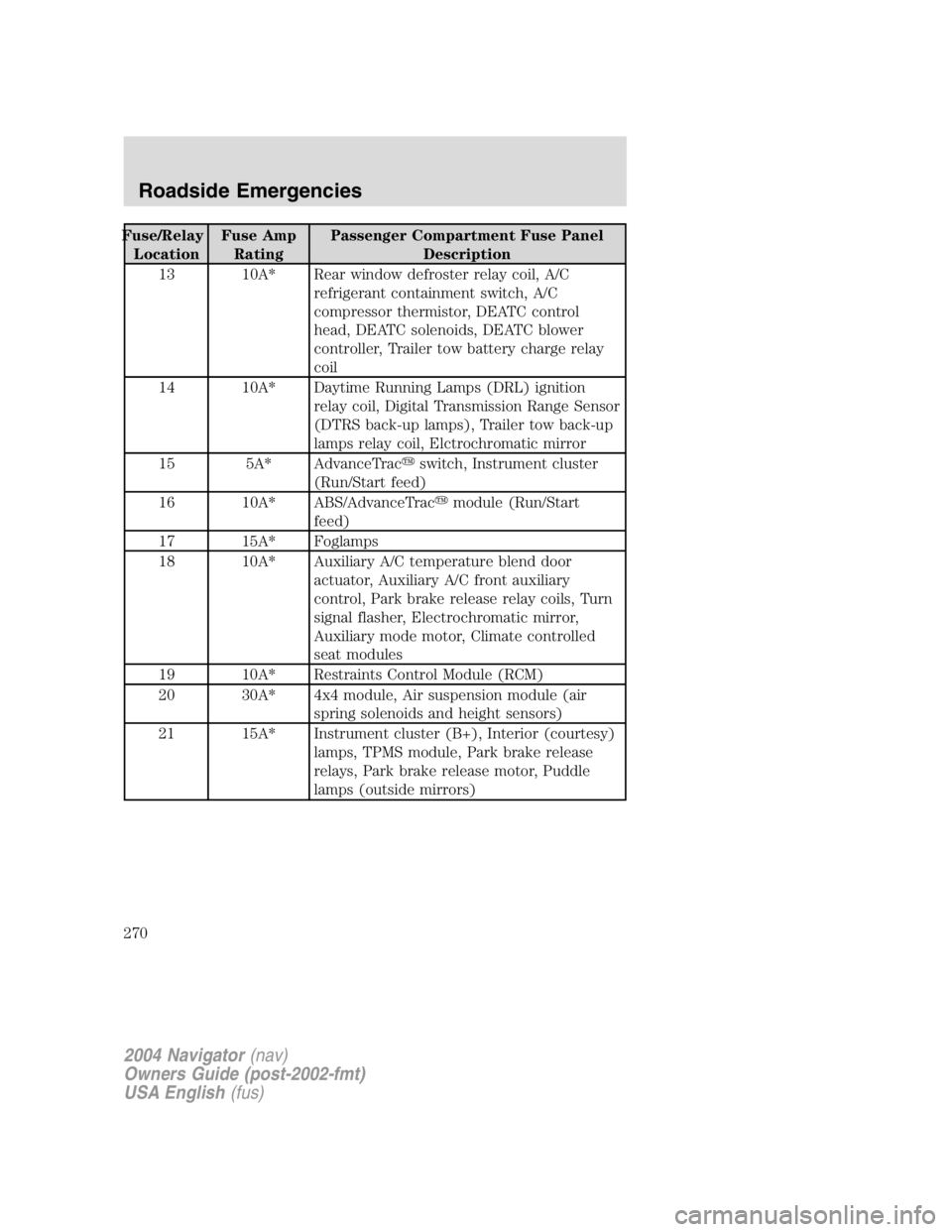
Fuse/Relay
Location Fuse Amp
Rating Passenger Compartment Fuse Panel
Description
13 10A* Rear window defroster relay coil, A/C
refrigerant containment switch, A/C
compressor thermistor, DEATC control
head, DEATC solenoids, DEATC blower
controller, Trailer tow battery charge relay
coil
14 10A* Daytime Running Lamps (DRL) ignition
relay coil, Digital Transmission Range Sensor
(DTRS back-up lamps), Trailer tow back-up
lamps relay coil, Elctrochromatic mirror
15 5A* AdvanceTrac � switch, Instrument cluster
(Run/Start feed)
16 10A* ABS/AdvanceTrac � module (Run/Start
feed)
17 15A* Foglamps
18 10A* Auxiliary A/C temperature blend door
actuator, Auxiliary A/C front auxiliary
control, Park brake release relay coils, Turn
signal flasher, Electrochromatic mirror,
Auxiliary mode motor, Climate controlled
seat modules
19 10A* Restraints Control Module (RCM)
20 30A* 4x4 module, Air suspension module (air
spring solenoids and height sensors)
21 15A* Instrument cluster (B+), Interior (courtesy)
lamps, TPMS module, Park brake release
relays, Park brake release motor, Puddle
lamps (outside mirrors)
2004 Navigator (nav)
Owners Guide (post-2002-fmt)
USA English (fus)Roadside Emergencies
270
Page 272 of 368

Fuse/Relay
Location Fuse Amp
Rating Passenger Compartment Fuse Panel
Description
33 20A* HEGO sensors, EGR vacuum regulator
(EVR) solenoid, Intake Manifold Tuning
valve (IMTV) solenoid, Canister vent
solenoid, Vapor Management valve (VMV)
solenoid, A/C compressor clutch relay coil
34 20A* PCM, Idle Air Control (IAC) solenoid, Mass
Air Flow (MAF) sensor, Fuel injectors, Fuel
pump relay, Fuel pump shut-off switch, Fuel
pump motor
35 20A* High beam headlamps, Instrument cluster
high beam indicator
36 10A* Trailer tow right turn/stop lamps
37 20A* Cargo area power point
38 25A* Rear wiper motor, Washer pump (rear
window wash)
39 20A* Console power points
40 20A* DRL relays, DRL foglamps, DRL headlamp
relay coil, Headlamp switch (headlamps),
Multifunction switch (flash-to-pass), BSM
(autolamp headlamps relay), High beam
relay coil, Fuse 25 (LH low beam), Fuse 23
(RH low beam)
41 20A* Cigar lighter, OBD II diagnostic connector
42 10A* Trailer tow left turn/stop lamps
101 30A** Starter motor relay, Starter motor solenoid
102 30A** Ignition switch power
103 30A** ABS/AdvanceTrac � module (pump motor)
104 30A** LH 3rd row seat relay, LH 3rd row seat
switch, LH 3rd row seat motor
105 30A** Power liftgate module, Power liftgate
motors, Power running boards control
106 30A** Trailer tow battery charge relay, Trailer tow
7 – wire connector (battery charge)
2004 Navigator (nav)
Owners Guide (post-2002-fmt)
USA English (fus)Roadside Emergencies
272

