Page 157 of 296

443
1
2
3
4
5
6
7
8
9
Driving your vehicle
ESP OFF indicator
(if equipped)The ESP OFF indicator will illumi-
nate when the ignition switch is
turned ON, but should go off after
approximately 3 seconds. To switch
to ESP OFF mode, press the ESP
button. The ESP OFF indicator will
illuminate indicating the ESP is deac-
tivated. If this indicator stays on in
the ESP ON mode, the ESP may
have a malfunction. Take your car to
the authorized Kia dealer and have
the system checked.
Safety belt warning chime If the driver's seat belt is not fastened
when the ignition key is turned “ON”
or if it is disconnected after the key is
ON, the safety belt warning chime
will sound for approximately 6 sec-
onds.Door ajar warning chime
(if equipped)If a door is opened with the ignition
switch ON, the warning chime will
sound.
Key reminder warning chimeIf the driver’s door is opened and the
ignition key is left in with the ignition
switch in the LOCK or ACC position,
the key reminder warning chime will
sound. This is to prevent you from
locking your keys in the vehicle.
ESPOFF
Opirus-ENG (CAN) 4.qxd 7/8/03 2:19 PM Page 43
Page 158 of 296

Driving your vehicle44
4
1
2
3
4
5
6
7
8
9
Battery saver function The purpose of this feature is to
prevent the battery from being dis-
charged. The system automatically
turns off the small light when the
driver removes the ignition key and
opens the driver- side door.
With this feature, the parklight will be turned off automatically if the
driver parks on the side of road at
night.
If necessary, to keep the lights on
when the ignition key is removed,
perform the following :
1) Open the driver-side door.
2) Turn the parklights OFF and ON again using the light switch on the
steering column.
Lighting control The light switch has a Headlight and
a Parklight position.
To operate the lights, turn the knob at
the end of the control lever to one of
the following positions:➀
OFF position
➁
Parklight position
➂
Headlight position
Parklight position ( )When the light switch is in the park-
light position (1st position), the tail,
position, license and instrument
panel lights are ON.
LIGHTING
2GHN2053
2GHN2055A
Opirus-ENG (CAN) 4.qxd 7/8/03 2:19 PM Page 44
Page 160 of 296

Driving your vehicle46
4
1
2
3
4
5
6
7
8
9
Turn signalsThe ignition switch must be on for the
turn signals to function. To turn on
the turn signals, move the lever up or
down. Green arrow indicators on the
instrument panel indicate which turn
signal is operating. They will self-
cancel after a turn is completed. If
the indicator continues to flash after
a turn, manually return the lever to
the OFF position.
Lane change signals To signal a lane change, move the
turn signal lever slightly and hold it in
position. The lever will return to the
OFF position when released.
If an indicator stays on and does not
flash or if it flashes abnormally, one
of the turn signal bulbs may be
burned out and will require replace-
ment.✽ ✽
NOTICEIf an indicator flash is abnormally
quick or slow, bulb may be burned
out or have a poor electrical con-
nection in the circuit. Automatic headlight aiming
(if equiped)
To provide better driver visibility and
reduce eye fatigue, the headlight
aiming (direction) is automatically
controlled depending on vehicle load
and vehicle angle (when vehicle is
loaded with passengers, cargo or
used for towing, the additional load
can alter the headlight aiming point
on the road surface). This system
provides constant automatic head-
light aiming under various vehicle
conditions and angles to ensure the
headlights are always pointed in the
right direction.
2GHN2055
Right turnLeft turn
Left lane
changeRight lane
change
Opirus-ENG (CAN) 4.qxd 7/8/03 2:19 PM Page 46
Page 164 of 296
Driving your vehicle50
4
1
2
3
4
5
6
7
8
9
Type BOperates as follows when the igni-
tion switch is turned ON.
OFF/LO/HI/ : See the explanation
for type A operation.
AUTO (if equipped); The rain sensor located on theupper end of windshield glass
senses the amount of rainfall and
controls the wiping cycle for the
proper intervals. The more it rains,
the faster the wiper operates.
When the rain stops, the wiper
stops. To vary the speed setting,
turn the speed control knob (
➀).
(S : slow operation, F: fast opera-
tion.) If the ignition switch is turned ON
when the wiper switch is set in AUTO
mode, or wiper switch is set in AUTO
mode when the ignition switch is ON,
wiper will operate once to perform a
self-check of the system. Set the
wiper to OFF position when the wiper
is not in use.
1GHA2054A
Sensor
Opirus-ENG (CAN) 4.qxd 7/8/03 2:19 PM Page 50
Page 165 of 296

451
1
2
3
4
5
6
7
8
9
Driving your vehicle
✽ ✽NOTICEWhen washing the vehicle, set the
wiper switch in the OFF position to
stop the auto wiper operation.
Wiper may operate and be damaged
if the switch is set in AUTO mode
while washing vehicle.
Do not remove the sensor cover
located on the upper end of the pas-
senger side windshield glass.
Damage to system parts could occur
and may not be covered by you vehi-
cle warranty.
When the starting the vehicle in
winter, set the wiper switch in the
OFF position. Otherwise, wipers
may operate and ice may damage
the windshield wiper blades.
Always remove all snow and ice and
defrost the windshield properly
prior to operating the windshield
wipers.
Variable intermittent wipersSet the lever to the INT or AUTO
position and choose the desired
wiper interval by turning the ring.
CAUTION
When the ignition switch is ON
and the windshield wiper switchis placed in the AUTO mode, usecaution in the following situa-tions to avoid any injury to thehands or other parts of thebody:
Do not touch the upper end of
the windshield glass facingthe rain sensor.
Do not wipe the upper end of
the windshield glass with adamp or wet cloth.
Do not put pressure on the
windshield glass.
1GHA2209
Opirus-ENG (CAN) 4.qxd 7/8/03 2:19 PM Page 51
Page 168 of 296
Driving your vehicle54
4
1
2
3
4
5
6
7
8
9
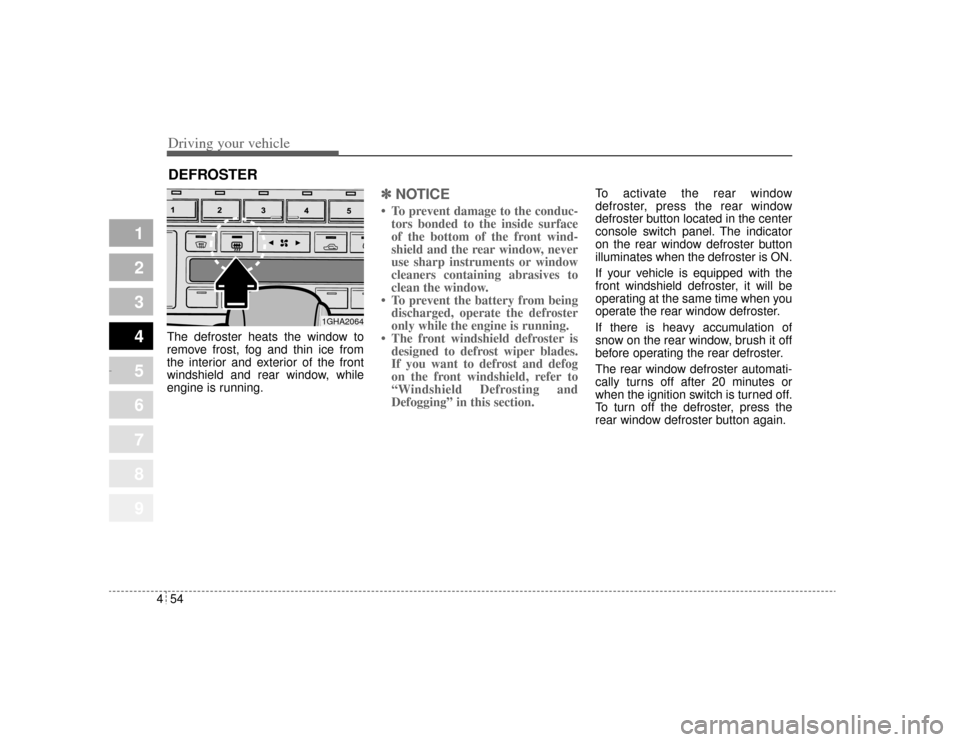
The defroster heats the window to
remove frost, fog and thin ice from
the interior and exterior of the front
windshield and rear window, while
engine is running.
✽ ✽
NOTICE• To prevent damage to the conduc-
tors bonded to the inside surface
of the bottom of the front wind-
shield and the rear window, never
use sharp instruments or window
cleaners containing abrasives to
clean the window.
• To prevent the battery from being discharged, operate the defroster
only while the engine is running.
• The front windshield defroster is designed to defrost wiper blades.
If you want to defrost and defog
on the front windshield, refer to
“Windshield Defrosting and
Defogging” in this section.
To activate the rear window
defroster, press the rear window
defroster button located in the center
console switch panel. The indicator
on the rear window defroster button
illuminates when the defroster is ON.
If your vehicle is equipped with the
front windshield defroster, it will be
operating at the same time when you
operate the rear window defroster.
If there is heavy accumulation of
snow on the rear window, brush it off
before operating the rear defroster.
The rear window defroster automati-
cally turns off after 20 minutes or
when the ignition switch is turned off.
To turn off the defroster, press the
rear window defroster button again.
DEFROSTER
1GHA2064
Opirus-ENG (CAN) 4.qxd 7/8/03 2:19 PM Page 54
Page 169 of 296
455
1
2
3
4
5
6
7
8
9
Driving your vehicle
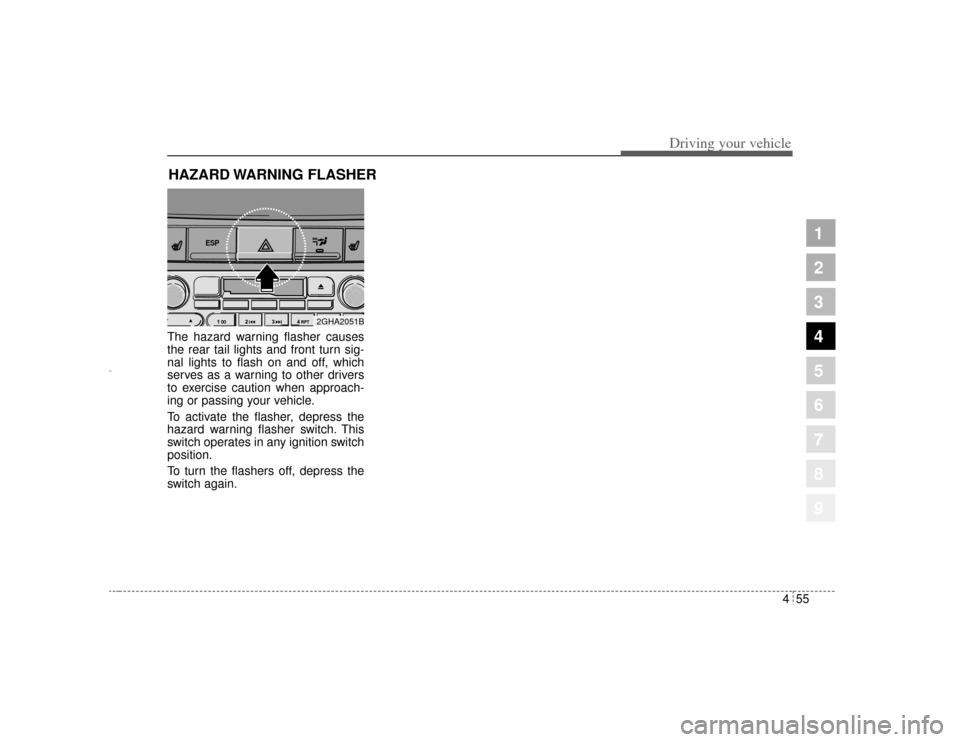
The hazard warning flasher causes
the rear tail lights and front turn sig-
nal lights to flash on and off, which
serves as a warning to other drivers
to exercise caution when approach-
ing or passing your vehicle.
To activate the flasher, depress the
hazard warning flasher switch. This
switch operates in any ignition switch
position.
To turn the flashers off, depress the
switch again.HAZARD WARNING FLASHER
ESP
2GHA2051B
Opirus-ENG (CAN) 4.qxd 7/8/03 2:19 PM Page 55
Page 178 of 296
Driving your vehicle64
4
1
2
3
4
5
6
7
8
9
Instrument panel ventsIf air flow control is not satisfactory,
check the instrument panel vents.
The outlet port ( ) can be opened or
closed separately using the vertical
thumbwheel. To close the vent, rotate
it upward to the maximum position.
To open the vent, rotate it downward.
Also, you can adjust the direction of
air delivery from these vents using
vertical or horizontal thumbwheels
as shown.
Air conditioning button Push the A/C button to turn the air
conditioning system on (indicator
light will illuminate).
Push the button again to turn the air
conditioning system off.
OFF buttonPush the OFF button to turn off the
air climate control system. However
you can still operate the mode, air
intake buttons as long as the ignition
switch is ON.
1GHA2076
B
1GHA2222
1GHA2258
Opirus-ENG (CAN) 4.qxd 7/8/03 2:19 PM Page 64