2004 JEEP LIBERTY display
[x] Cancel search: displayPage 126 of 374
Retain the original transmitter of the RF device you are
programming for use in other vehicles as well as for
future HomeLink programming. It is also suggested that
upon the sale of the vehicle, the programmed HomeLink
buttons be erased for security purposes. To erase the
programmed buttons, perform the procedure shown
below under9When Your Vehicle Is New9, or, for assis-
tance, contact HomeLink at:www.homelink.comor by
calling:1-800-355-3515.
When Your Vehicle Is New
Prior to programming HomeLink for the first time the
factory test codes must be erased. To erase HomeLink
memory, press and hold the two outer HomeLink buttons
(buttons one and three). The message CLEARING
CHANNELS will appear on the HomeLink display. After
approximately 20 seconds, the message CHANNELS
CLEARED will appear on the EVIC display. Do not hold
the buttons for longer than 30 seconds.
Programming HomeLink
NOTE:It is recommended that a new battery be placed
in the hand-held transmitter of the device being pro-
grammed to HomeLink for quicker training and accurate
transmission of the radio frequency signal.
WARNING!
Vehicle exhaust contains carbon monoxide, a danger-
ous gas. Do not run the vehicle's engine while
programming HomeLink. Exhaust gas can cause se-
rious injury or death.
126 UNDERSTANDING THE FEATURES OF YOUR VEHICLE
Page 127 of 374
WARNING!
Your motorized door or gate will open and close
while you are programming HomeLink. Do not
program HomeLink if people or pets are in the path
of the door or gate. A moving door or gate can cause
serious injury or death to people and pets or damage
to objects.
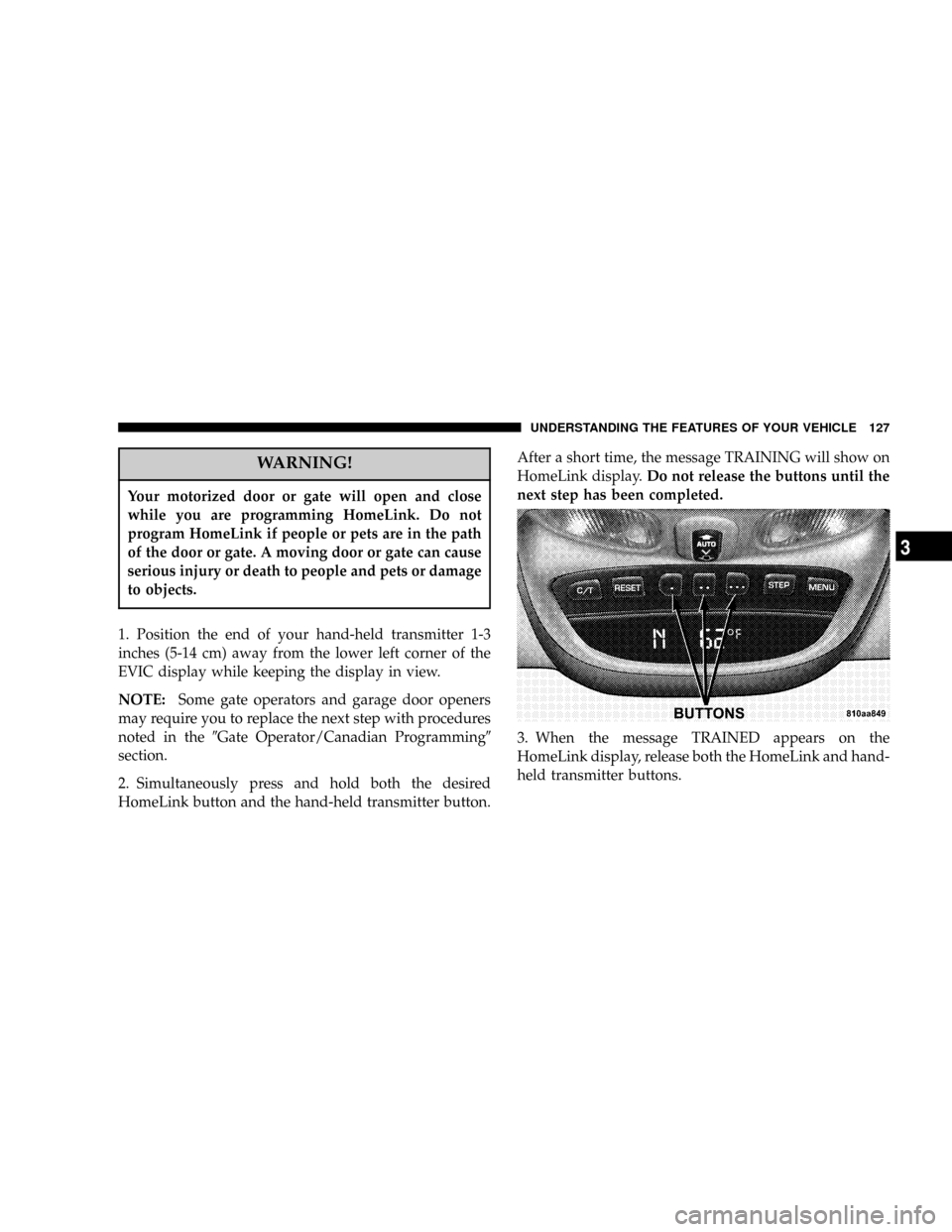
1. Position the end of your hand-held transmitter 1-3
inches (5-14 cm) away from the lower left corner of the
EVIC display while keeping the display in view.
NOTE:Some gate operators and garage door openers
may require you to replace the next step with procedures
noted in the9Gate Operator/Canadian Programming9
section.
2. Simultaneously press and hold both the desired
HomeLink button and the hand-held transmitter button.After a short time, the message TRAINING will show on
HomeLink display.Do not release the buttons until the
next step has been completed.
3. When the message TRAINED appears on the
HomeLink display, release both the HomeLink and hand-
held transmitter buttons.
UNDERSTANDING THE FEATURES OF YOUR VEHICLE 127
3
Page 128 of 374

NOTE:If the HomeLink display does not change to
TRAINED, contact HomeLink atwww.homelink.comor
call1-800-355-3515for assistance.
4. Press and hold the just-trained HomeLink button.
TRANSMIT should appear on the display.
If your device activates when the HomeLink button is
depressed and released, programming is complete.
NOTE:To program the remaining two HomeLink but-
tons, simply repeat the9Programming HomeLink9pro-
cess.
If the message TRANSMIT appears on the HomeLink
display but your device does not activate, the device may
be equipped with a9rolling code9system. Continue with
steps five through seven below to complete the program-
ming of a rolling code equipped device (most commonly
a garage door opener).5. At the garage door opener receiver (motor-head unit)
in the garage, locate the9learn9or9smart9button. This
can usually be found where the hanging antenna wire is
attached to the motor-head unit.
6. Firmly press and release the9learn9or9smart9button.
(The name and color of the button may vary by manu-
facturer.)
NOTE:There are 30 seconds in which to initiate the next
step.
7. Return to the vehicle and firmly press, hold for two
seconds and release the programmed HomeLink button.
Repeat the9press/hold/release9sequence a second time,
and, depending on the brand of the garage door opener
(or other rolling code equipped device), repeat this
sequence a third time to complete the programming
process.
128 UNDERSTANDING THE FEATURES OF YOUR VEHICLE
Page 129 of 374

HomeLink should now activate your rolling code
equipped device.
NOTE:To program the remaining two HomeLink but-
tons, simply repeat the9Programming Homelink9pro-
cess.
If, after programming the HomeLink Wireless Control
System, the hand-held transmitter and/or other
HomeLink units in other vehicles fail to activate the
rolling code equipped device, you may need to clear (or
(erase() the device's receiver memory. Refer to your
garage door opener's Owner's Manual for the proce-
dure or contact HomeLink at 1-800-355-3515 or on the
Internet at www.homelink.com. After clearing the re-
ceiver, you must reprogram the original hand-held
transmitter(s) to the receiver using the procedure in the
garage door opener's Owner's Manual. Finally, repro-
gram the hand-held transmitter(s) to HomeLink using
the steps under(Programming HomeLink(.Gate Operator/Canadian Programming
Canadian radio-frequency laws require transmitter sig-
nals to9time-out9(or quit) after several seconds of
transmission - which may not be long enough for
HomeLink to pick up the signal during programming.
Similar to this Canadian law, some U.S. gate operators are
designed to9time-out9in the same manner.
If you live in Canada or you are having difficulties
programming a gate operator by using the9Program-
ming HomeLink9procedures (regardless of where you
live), replace step two with the following:
NOTE:If programming a garage door opener or gate
operator, it is advised to unplug the device during the
9cycling9process to prevent possible overheating.
Press and hold the HomeLink button while you press
and release - every two seconds ((cycle() your hand-held
transmitter button until the radio signal has success-
fully been accepted by HomeLink. (The message
TRAINED will appear on the HomeLink display.)
UNDERSTANDING THE FEATURES OF YOUR VEHICLE 129
3
Page 146 of 374

NTo Set The Push-Button Memory..........161
NBalance............................162
NFade..............................162
NBass And Treble Tone Control............162
NAM/FM Selection.....................162
NMode Button........................162
NCassette Player Features................162
NCD Changer Control Capability
Ð If Equipped.......................164
NRadio Display Messages................166
mSales Code RBKÐAM/ FM Stereo Radio With
CD Player And CD Changer Controls........167
NRadio Operation......................167
NCD Player Operation...................169NCD Changer Control Capability
Ð If Equipped.......................171
NRadio Display Messages................173
mSales Code RBPÐAM & FM Stereo Radio With
Cassette Tape Player, CD Player, And Optional
CD/DVD Changer Controls...............174
NRadio Operation......................174
NTape Player Operation..................178
NCD Player Operation...................180
NCD/DVD Changer Operation
Ð If Equipped.......................182
mSales Code RBQÐAM/FM Stereo Radio With
6 - Disc CD Changer....................183
NRadio Operation......................184
NCD Player Operation...................186
146 UNDERSTANDING YOUR INSTRUMENT PANEL
Page 154 of 374

towing a trailer. It should not be allowed to exceed the
upper limits of the normal operating range.
If the pointer rises to the red zone (five chimes will
occur), pull over and stop the vehicle. Do not turn the
engine off. Idle the vehicle with the air conditioning
turned off, until the pointer drops back into the normal
range. If the engine remains in the high range, turn the
engine off and call for service.
12. Reset Button
Press this button to toggle between the odometer and trip
odometer display. When in the trip odometer mode,
holding the button in resets the trip odometer. Also,
pressing the ªResetº button will clear out any warning
messages in the odometer display.
13. Odometer/Trip Odometer
A vacuum fluorescent display indicates the total distance
the vehicle has been driven. Also, the cluster will display,
replacing the odometer/trip odometer, vehicle warningmessages such as: door/gate/glass ajar and low washer
fluid. See appropriate sections for more information.
NOTE:If vehicle is equipped with the optional Elec-
tronic Vehicle Information Center (EVIC) in the overhead
console, all warnings including ªdoorº, ªGATEº,
ªGLASSº, and ªLOWASHº will only be displayed in the
EVIC display (not in the instrument cluster). For addi-
tional information, refer to ªOverhead Console Ð If
Equippedº in Section 3.
U.S. federal regulations require that upon transfer of
vehicle ownership, the seller certify to the purchaser the
correct mileage that the vehicle has been driven. There-
fore, if the odometer reading is changed during repair or
replacement, be sure to keep a record of the reading
before and after the service so that the correct mileage can
be determined.
154 UNDERSTANDING YOUR INSTRUMENT PANEL
Page 158 of 374

when driving, if the driver seat belt remains unbuckled,
the Seat Belt Warning Light will flash or remain on
continuously. Refer to9Enhanced Driver Seat Belt Re-
minder System (BeltAlertŸ)9in the Occupant Restraints
section for more information.
27. Light Bar Indicator Light Ð If Equipped
This light indicates when the light bar lamps
are on.
ELECTRONIC DIGITAL CLOCK
The clock and radio each use the display panel built into
the radio. A digital readout shows the time in hours and
minutes whenever the ignition switch is in the ON or
ACC position and the time button is pressed.
When the ignition switch is in the OFF position, or when
the radio frequency is being displayed, time keeping is
accurately maintained.
Clock Setting Procedure
1. Turn the ignition switch to the ON or ACC position
and press the time button. Using the tip of a ballpoint pen
or similar object, press either the hour (H) or minute (M)
buttons on the radio.
2. Press the H button to set hours or the M button to set
minutes. The time setting will increase each time you
press a button.
RADIO GENERAL INFORMATION
Radio Broadcast Signals
Your new radio will provide excellent reception under
most operating conditions. Like any system, however, car
radios have performance limitations, due to mobile op-
eration and natural phenomena, which might lead you to
believe your sound system is malfunctioning. To help
158 UNDERSTANDING YOUR INSTRUMENT PANEL
Page 161 of 374

For your convenience, the volume can be turned down,
but not up, when the audio system is off and the ignition
is ON.
Seek
Press and release the SEEK button to search for the next
station in either the AM or FM mode. Press the top of the
button to seek up and the bottom to seek down. The
radio will remain tuned to the new station until you
make another selection. Holding the button will bypass
stations without stopping until you release it.
Tune
Press the TUNE control up or down to increase or
decrease the frequency. If the button is pushed and held,
the radio will continue to tune until the button is
released. The frequency will be displayed and continu-
ously updated while the button is pushed.
To Set The Push-Button Memory
When you are receiving a station that you wish to
commit to push-button memory, press the SET button.
The symbol SET 1 will now show in the display window.
Select the ª1±5º button you wish to lock onto this station
and press and release that button. If a button is not
selected within 5 seconds after pressing the SET button,
the station will continue to play but will not be locked
into push-button memory.
You may add a second station to each push-button by
repeating the above procedure with this exception: Press
the SET button twice and SET 2 will show in the display
window. Each button can be set for SET 1 and SET 2 in
both AM and FM. This allows a total of 10 AM and 10 FM
stations to be locked into push-button memory. The
stations stored in SET 2 memory can be selected by
pressing the push-button twice.
UNDERSTANDING YOUR INSTRUMENT PANEL 161
4