2004 JEEP LIBERTY Section 2
[x] Cancel search: Section 2Page 116 of 374

Display U.S. or Metric?
Pressing the STEP button when in this display selects US
or Metric. The overhead console and instrument panel
displays will be in the selected units.
Auto Door Locks?
When this feature is selected, all doors and the swing
gate will lock automatically when the speed of the
vehicle reaches 15 mph (25 km/h). Pressing the STEP
button when in this display will select ªYesº or ªNo.º
Auto Unlock On Exit? (Available Only When the
AUTO DOOR LOCKS Feature is Turned On )
When this feature is selected all the vehicle's doors will
unlock when the driver's door is opened if the vehicle is
stopped and the transmission is in P (Park) or N (Neu-
tral) position. Pressing the STEP button when in this
display will select ªYesº or ªNo.º
Remote Unlock Driver's Door 1st?
When this feature is selected only the driver's door will
unlock on the first press of the remote keyless entry
unlock button and require a second press to unlock the
remaining locked doors and swing gate. WhenREMOTE
UNLOCK ALL DOORSis selected all of the doors and
the swing gate will unlock at the first press of the remote
keyless entry unlock button. Pressing the STEP button
when in this display will select DRIVER'S DOOR 1ST or
ALL DOORS. This can also be programmed using the key
fob, refer to ªRemote Keyless Entryº earlier in this
section.
Train Remote?
Pressing the STEP button when in this display will select
ªYesº or ªNo.º
NOTE:Any time you perform this procedure, it is
necessary to retrain all currently trained key fobs.
116 UNDERSTANDING THE FEATURES OF YOUR VEHICLE
Page 117 of 374

To Train Additional Key Fobs (using the EVIC module)
1. Press the MENU button until TRAIN REMOTE? NO is
displayed. Press the STEP button to change to YES. Then,
PRESS A VALID FOB KEY will be displayed. Press either
the ªLockº or ªUnlockº button on the current key fob.
2. The next display will say PRESS FOB 2 LOCK &
UNLOCK. Press both key fob buttons simultaneously.
3. The next display will say PRESS FOB 2 UNLOCK.
Press the unlock button on the second key fob.
4. The next display will say FOB 2 TRAINED. At this
point, the procedure can be exited by pressing the STEP,
RESET, or C/T button.
5. Repeat step2Ð4totrain additional key fobs. A total
of four key fobs can be programmed.
Can also be programmed using the key fob, refer to
ªRemote Keyless Entryº earlier in this section.Sound Horn On Lock?
When this feature is selected, a short horn sound will
occur when the remote keyless entry ªLockº button is
pressed. This feature may be selected with or without the
flash lights on lock/unlock feature. Pressing the STEP
button when in this display will select ªYesº or ªNo.º
Can also be programmed using the key fob, refer to
ªRemote Keyless Entryº earlier in this section.
Flash Lights With Locks?
When this feature is selected, the front and rear turn
signals will flash when the doors are locked or unlocked
using the remote keyless entry transmitter. This feature
may be selected with or without the sound horn on lock
feature selected. Pressing the STEP button when in this
display will select ªYesº or ªNo.º Can also be pro-
grammed using the key fob, refer to ªRemote Keyless
Entryº earlier in this section.
UNDERSTANDING THE FEATURES OF YOUR VEHICLE 117
3
Page 127 of 374
WARNING!
Your motorized door or gate will open and close
while you are programming HomeLink. Do not
program HomeLink if people or pets are in the path
of the door or gate. A moving door or gate can cause
serious injury or death to people and pets or damage
to objects.
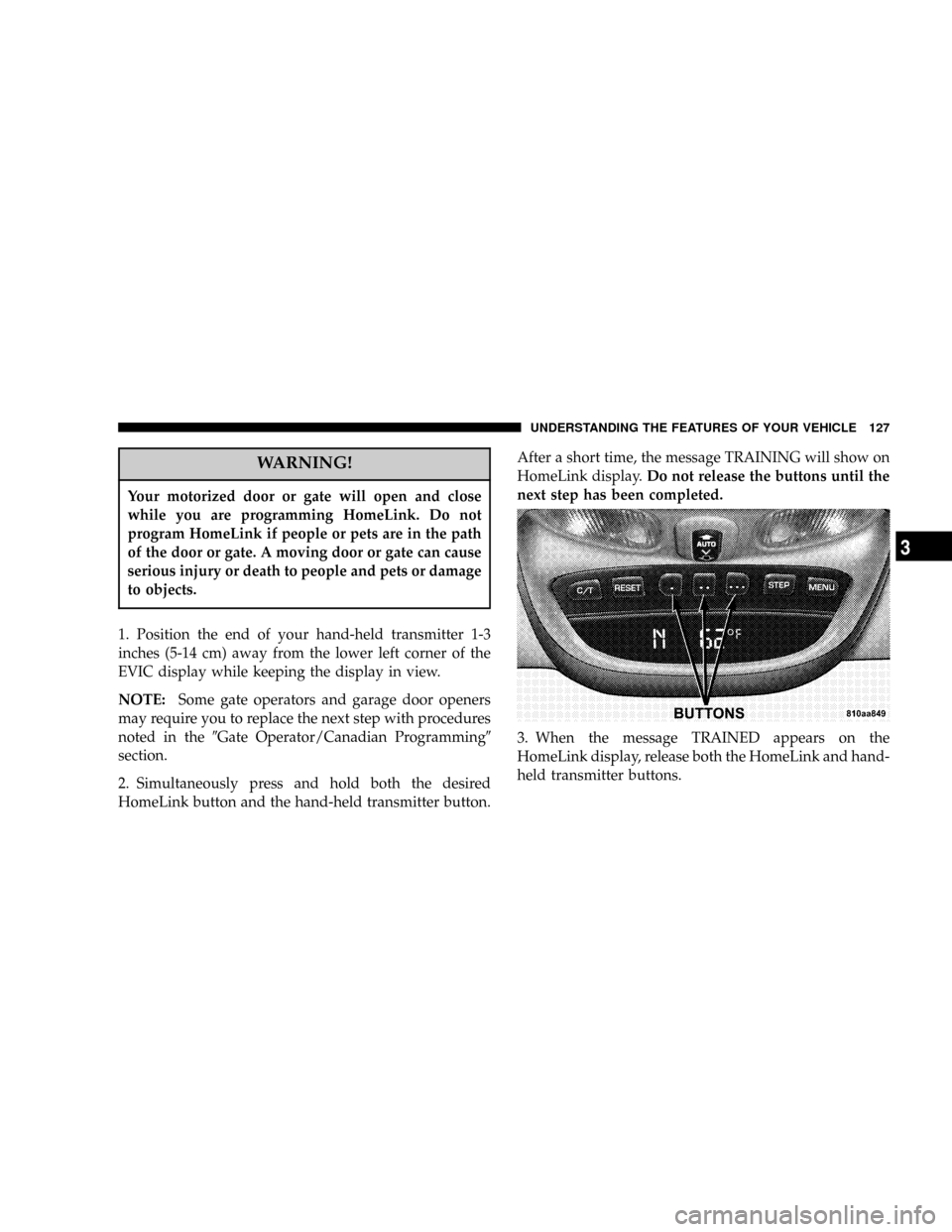
1. Position the end of your hand-held transmitter 1-3
inches (5-14 cm) away from the lower left corner of the
EVIC display while keeping the display in view.
NOTE:Some gate operators and garage door openers
may require you to replace the next step with procedures
noted in the9Gate Operator/Canadian Programming9
section.
2. Simultaneously press and hold both the desired
HomeLink button and the hand-held transmitter button.After a short time, the message TRAINING will show on
HomeLink display.Do not release the buttons until the
next step has been completed.
3. When the message TRAINED appears on the
HomeLink display, release both the HomeLink and hand-
held transmitter buttons.
UNDERSTANDING THE FEATURES OF YOUR VEHICLE 127
3
Page 154 of 374

towing a trailer. It should not be allowed to exceed the
upper limits of the normal operating range.
If the pointer rises to the red zone (five chimes will
occur), pull over and stop the vehicle. Do not turn the
engine off. Idle the vehicle with the air conditioning
turned off, until the pointer drops back into the normal
range. If the engine remains in the high range, turn the
engine off and call for service.
12. Reset Button
Press this button to toggle between the odometer and trip
odometer display. When in the trip odometer mode,
holding the button in resets the trip odometer. Also,
pressing the ªResetº button will clear out any warning
messages in the odometer display.
13. Odometer/Trip Odometer
A vacuum fluorescent display indicates the total distance
the vehicle has been driven. Also, the cluster will display,
replacing the odometer/trip odometer, vehicle warningmessages such as: door/gate/glass ajar and low washer
fluid. See appropriate sections for more information.
NOTE:If vehicle is equipped with the optional Elec-
tronic Vehicle Information Center (EVIC) in the overhead
console, all warnings including ªdoorº, ªGATEº,
ªGLASSº, and ªLOWASHº will only be displayed in the
EVIC display (not in the instrument cluster). For addi-
tional information, refer to ªOverhead Console Ð If
Equippedº in Section 3.
U.S. federal regulations require that upon transfer of
vehicle ownership, the seller certify to the purchaser the
correct mileage that the vehicle has been driven. There-
fore, if the odometer reading is changed during repair or
replacement, be sure to keep a record of the reading
before and after the service so that the correct mileage can
be determined.
154 UNDERSTANDING YOUR INSTRUMENT PANEL
Page 157 of 374

the system is arming. After the alarm successfully arms,
the light will flash at a slower rate to indicate the alarm
is set.
21. Fuel Gage
When the ignition key is in the ON position, the pointer
will show the level of fuel remaining in the fuel tank. A
small arrow indicates the side of the vehicle where the
filler cap (gas cap) is located.
22. Sentry Key Indicator Light Ð If Equipped
Refer to ªSentry Key Immobilizer Systemº in
Section 2 of this manual for more information.
23. Low Fuel Warning Light
When the fuel level reaches approximately 2.7 U.S.
Gallons (10L) this light will come on and remain on
until fuel is added. The ªLow Fuel Warning Lightº
may turn on and off again, especially during and afterhard braking, accelerations, or turns. This occurs due to
the shifting of the fuel in the tank. Also, a single chime
will sound.
24. Airbag Warning Light
This indicator lights and remains lit for 6 to 8
seconds when the ignition is first turned on. If the
light doesn't come on, stays on, or comes on while
driving, have the airbag system checked by an autho-
rized dealer.
25. O/D (Overdrive) Off Indicator Light
This light will illuminate when the O/D OFF
button has been selected. The O/D OFF button is
located on the gear shift lever.
26. Seat Belt Indicator Light
When the ignition switch is first turned ON, this
light will turn on for 5 to 8 seconds as a bulb check.
During the bulb check, if the driver's seat belt is
unbuckled, a chime will sound. After the bulb check or
UNDERSTANDING YOUR INSTRUMENT PANEL 157
4
Page 158 of 374

when driving, if the driver seat belt remains unbuckled,
the Seat Belt Warning Light will flash or remain on
continuously. Refer to9Enhanced Driver Seat Belt Re-
minder System (BeltAlertŸ)9in the Occupant Restraints
section for more information.
27. Light Bar Indicator Light Ð If Equipped
This light indicates when the light bar lamps
are on.
ELECTRONIC DIGITAL CLOCK
The clock and radio each use the display panel built into
the radio. A digital readout shows the time in hours and
minutes whenever the ignition switch is in the ON or
ACC position and the time button is pressed.
When the ignition switch is in the OFF position, or when
the radio frequency is being displayed, time keeping is
accurately maintained.
Clock Setting Procedure
1. Turn the ignition switch to the ON or ACC position
and press the time button. Using the tip of a ballpoint pen
or similar object, press either the hour (H) or minute (M)
buttons on the radio.
2. Press the H button to set hours or the M button to set
minutes. The time setting will increase each time you
press a button.
RADIO GENERAL INFORMATION
Radio Broadcast Signals
Your new radio will provide excellent reception under
most operating conditions. Like any system, however, car
radios have performance limitations, due to mobile op-
eration and natural phenomena, which might lead you to
believe your sound system is malfunctioning. To help
158 UNDERSTANDING YOUR INSTRUMENT PANEL
Page 220 of 374

NOTE:If the vehicle is started in cold outside tempera-
tures, shifts into Overdrive may be delayed. Normal
Overdrive and shifting operation will resume when the
temperature of the transmission reaches the appropriate
temperature. Refer to the ªNoteº under ªTorque Con-
verter Clutchº later in this section.
If the transmission temperature gets too hot, the trans-
mission may downshift out of Overdrive or engage
overdrive at higher vehicle speeds until the transmission
cools down. After cooldown, Overdrive will resume
normal operation.
2 (Second)
For moderate grades and to assist braking on dry pave-
ment or in mud and snow. Begins at a stop in low gear
with automatic upshift to 2nd gear. Will not shift to 3rd.1 (First)
For hard pulling at low speeds in mud, sand, snow, or on
steep grades. Begins and stays in low gear with no
upshift. Provides engine compression braking at low
speeds.
CAUTION!
²Never race the engine with the brakes on and the
vehicle in gear, and never hold the vehicle on an
incline without applying the brakes. These prac-
tices can cause overheating and damage to the
transmission.
²When ªrockingº a stuck vehicle by moving be-
tween ªFirstº and R (Reverse), do not spin the
wheels faster than 15 mph (24 km/h), or drivetrain
damage may result.
220 STARTING AND OPERATING
Page 225 of 374

4L
4-Wheel-Drive Low Range - Low speed 4 wheel drive.
Locks the front and rear driveshafts together. Forces the
front and rear wheels to rotate at the same speed.
Additional traction and maximum pulling power for
loose, slippery road surfaces only. Do not exceed 25 mph
(40 km/h). (Allows engine starting without depressing
the clutch pedal on vehicles equipped with manual
transmission. Refer to ªStarting Procedures Ð Manual
Transmission (4WD Models Only)º in this section.
Shifting Procedure
2H to 4H or 4H to 2H
Shifting between 2H and 4H can be made with the
vehicle in motion up to 55 mph (88 km/h). The transfer
case will engage/disengage faster if you momentarily
release the accelerator pedal after completing the shift.
Apply a constant force when shifting the transfer case
lever.
4H to 4L or 4L to 4H
With the vehicle rolling at 2 to 3 mph (3 to 5 km/h), shift
an automatic transmission to N (Neutral) or depress the
clutch on a manual transmission. While the vehicle is
coasting at 2 to 3 mph (3 to 5 km/h), shift the transfer
case lever firmly to the desired position. Do not pause in
transfer case N (Neutral).
NOTE:To shift from 4H to 4L, the shift lever should
pushed away from the driver, and then rearward into 4L.
In 4H, there is a neutral stop to prevent shifting into N
(Neutral) by accident.
NOTE:Pausing in transfer case N (Neutral) in vehicles
equipped with an automatic transmission may require
shutting the engine OFF to avoid gear clash while
completing the shift. If difficulty occurs, shift automatic
transmission to N (Neutral), hold foot on brake, and turn
engine OFF. Make shift to the desired mode.
STARTING AND OPERATING 225
5