Page 991 of 4449

BL-184
VEHICLE SECURITY (THEFT WARNING) SYSTEM
Revision: 2004 November 2004 FX35/FX45
�through back door closure motor terminal 8
�through body grounds B15 and B45.
VEHICLE SECURITY SYSTEM ALARM OPERATION
The vehicle security system is triggered by
�opening a door
�opening the back door
�opening the hood
�detection of battery disconnect and connect.
The vehicle security system will be triggered once the system is in armed phase,
When BCM receives a ground signal at terminals 12 (passenger side door), 13 (rear RH door), 58 (back door),
62 (driver side door), 63 (rear LH door), or receives a signal from the IPDM E/R (hood switch).
When the vehicle security system is triggered,
ground is supplied intermittently from IPDM E/R terminals 38 and 60.
When headlamp high relay (with built-in IPDM E/R) and horn relay are energized and then power is supplied
to headlamps (LH and RH) and horns (HIGH and LOW).
The headlamps flash and the horn sounds intermittently.
The alarm automatically turns off after 50 seconds, but will reactivate if the vehicle is tampered with again.
VEHICLE SECURITY SYSTEM DEACTIVATION
To deactivate the vehicle security system, a door or the back door must be unlocked with the key, key fob or
Intelligent Key.
When the key is used to unlock a door, BCM terminal 22 receives signal
�from terminal 14 of the power window main switch (door lock and unlock switch).
When the BCM receives either one of these signals or unlock signal from key cylinder switch, key fob or Intel-
ligent Key, the vehicle security system is deactivated. (Disarmed phase)
PANIC ALARM OPERATION
Remote keyless entry system may or may not operate vehicle security system (horn and headlamps) as
required.
When the remote keyless entry system is triggered, ground is supplied intermittently from IPDM E/R terminals
38 and 60.
When headlamp relay (which built-in IPDM E/R) and horn relay are energized and then power is supplied to
headlamps (LH and RH) and horns (HIGH and LOW).
The headlamp flashes and the horn sounds intermittently.
The alarm automatically turns off after 25 seconds or when BCM receives any signal from key fob or Intelligent
Key.
Page 999 of 4449
BL-192
VEHICLE SECURITY (THEFT WARNING) SYSTEM
Revision: 2004 November 2004 FX35/FX45
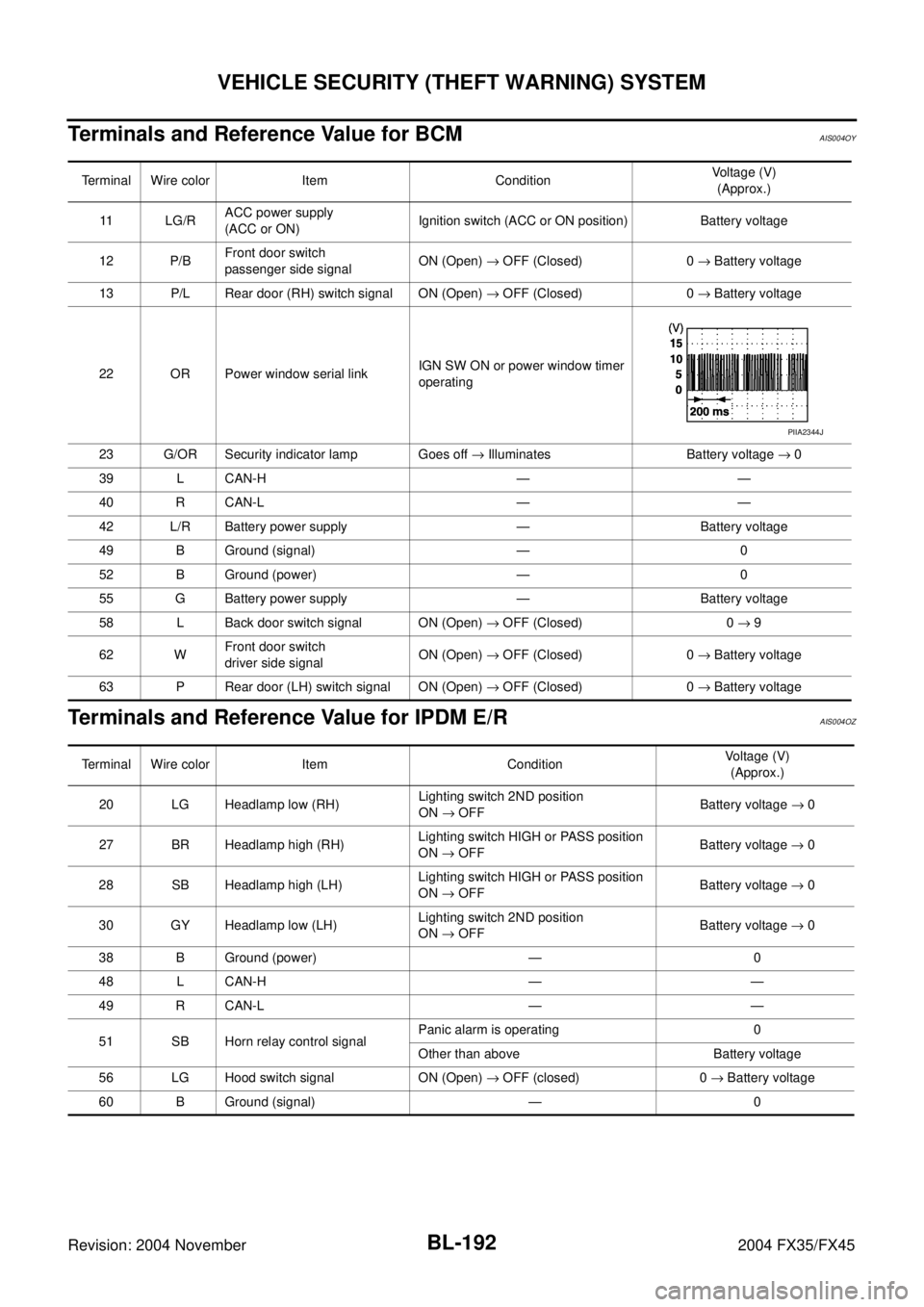
Terminals and Reference Value for BCMAIS004OY
Terminals and Reference Value for IPDM E/RAIS004OZ
Terminal Wire color Item ConditionVoltage (V)
(Approx.)
11 L G / RACC power supply
(ACC or ON)Ignition switch (ACC or ON position) Battery voltage
12 P/BFront door switch
passenger side signalON (Open) → OFF (Closed) 0 → Battery voltage
13 P/L Rear door (RH) switch signal ON (Open) → OFF (Closed) 0 → Battery voltage
22 OR Power window serial linkIGN SW ON or power window timer
operating
23 G/OR Security indicator lamp Goes off → Illuminates Battery voltage → 0
39 L CAN-H — —
40 R CAN-L — —
42 L/R Battery power supply — Battery voltage
49 B Ground (signal) — 0
52 B Ground (power) — 0
55 G Battery power supply — Battery voltage
58 L Back door switch signal ON (Open) → OFF (Closed) 0 → 9
62 WFront door switch
driver side signalON (Open) → OFF (Closed) 0 → Battery voltage
63 P Rear door (LH) switch signal ON (Open) → OFF (Closed) 0 → Battery voltage
PIIA2344J
Terminal Wire color Item ConditionVoltage (V)
(Approx.)
20 LG Headlamp low (RH)Lighting switch 2ND position
ON → OFFBattery voltage → 0
27 BR Headlamp high (RH)Lighting switch HIGH or PASS position
ON → OFFBattery voltage → 0
28 SB Headlamp high (LH)Lighting switch HIGH or PASS position
ON → OFFBattery voltage → 0
30 GY Headlamp low (LH)Lighting switch 2ND position
ON → OFFBattery voltage → 0
38 B Ground (power) — 0
48 L CAN-H — —
49 R CAN-L — —
51 SB Horn relay control signalPanic alarm is operating 0
Other than above Battery voltage
56 LG Hood switch signal ON (Open) → OFF (closed) 0 → Battery voltage
60 B Ground (signal) — 0
Page 1005 of 4449
BL-198
VEHICLE SECURITY (THEFT WARNING) SYSTEM
Revision: 2004 November 2004 FX35/FX45
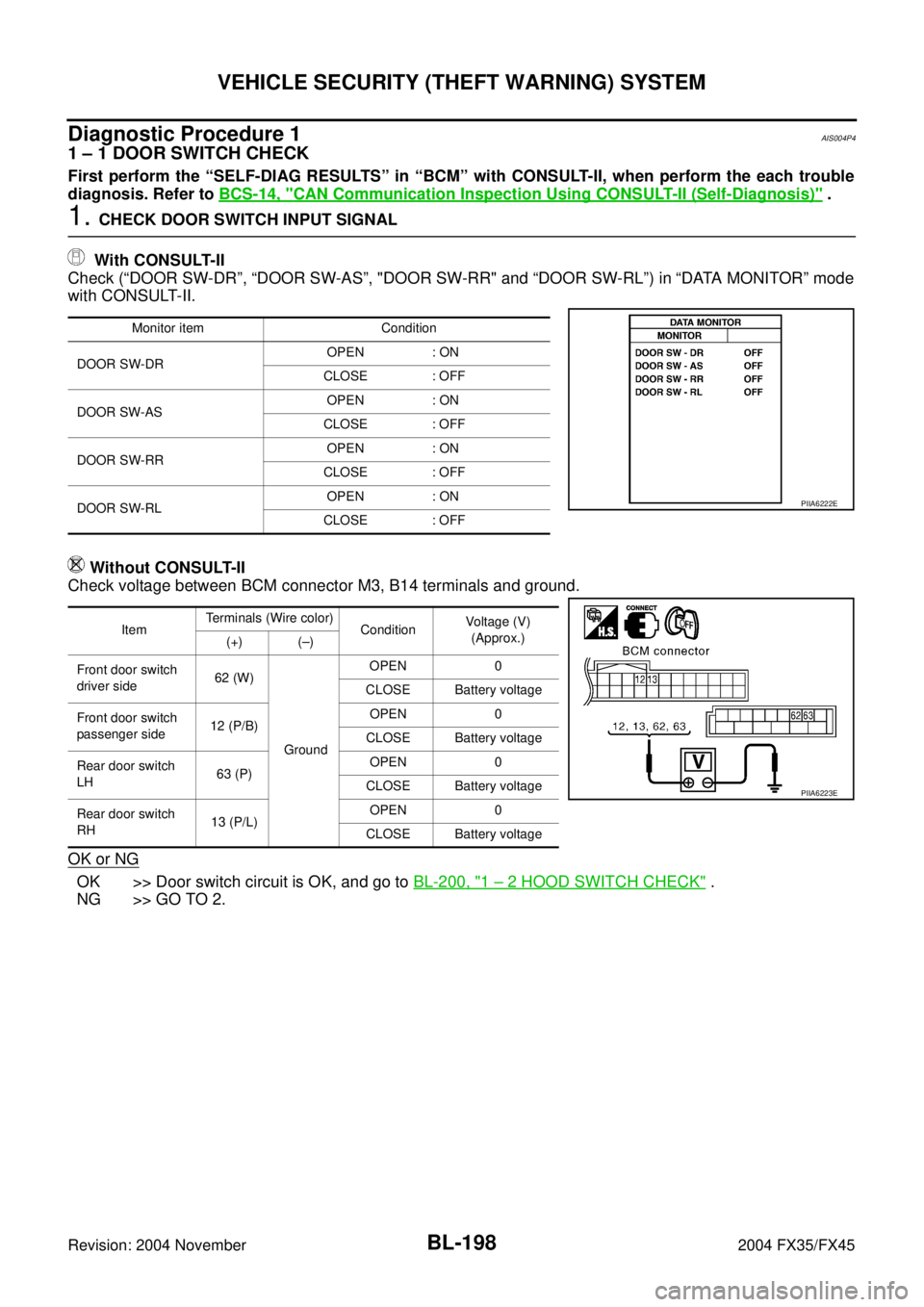
Diagnostic Procedure 1AIS004P4
1 – 1 DOOR SWITCH CHECK
First perform the “SELF-DIAG RESULTS” in “BCM” with CONSULT-II, when perform the each trouble
diagnosis. Refer to BCS-14, "
CAN Communication Inspection Using CONSULT-II (Self-Diagnosis)" .
1. CHECK DOOR SWITCH INPUT SIGNAL
With CONSULT-II
Check (“DOOR SW-DR”, “DOOR SW-AS”, "DOOR SW-RR" and “DOOR SW-RL”) in “DATA MONITOR” mode
with CONSULT-II.
Without CONSULT-II
Check voltage between BCM connector M3, B14 terminals and ground.
OK or NG
OK >> Door switch circuit is OK, and go to BL-200, "1 – 2 HOOD SWITCH CHECK" .
NG >> GO TO 2.
Monitor item Condition
DOOR SW-DROPEN : ON
CLOSE : OFF
DOOR SW-ASOPEN : ON
CLOSE : OFF
DOOR SW-RROPEN : ON
CLOSE : OFF
DOOR SW-RLOPEN : ON
CLOSE : OFF
PIIA6222E
ItemTerminals (Wire color)
ConditionVoltage (V)
(Approx.)
(+) (–)
Front door switch
driver side62 (W)
GroundOPEN 0
CLOSE Battery voltage
Front door switch
passenger side12 (P/B)OPEN 0
CLOSE Battery voltage
Rear door switch
LH63 (P)OPEN 0
CLOSE Battery voltage
Rear door switch
RH13 (P/L)OPEN 0
CLOSE Battery voltage
PIIA6223E
Page 1006 of 4449
VEHICLE SECURITY (THEFT WARNING) SYSTEM
BL-199
C
D
E
F
G
H
J
K
L
MA
B
BL
Revision: 2004 November 2004 FX35/FX45
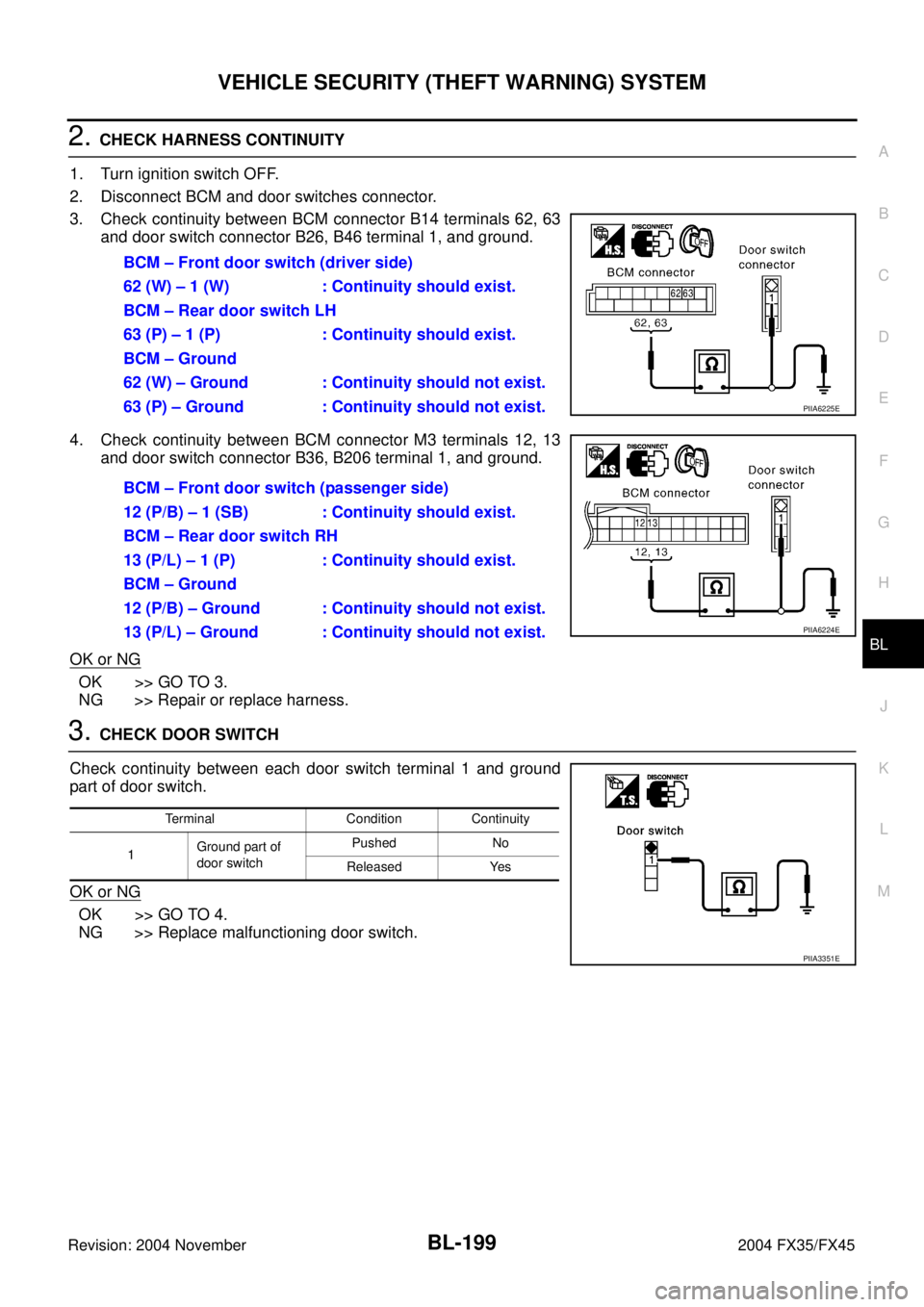
2. CHECK HARNESS CONTINUITY
1. Turn ignition switch OFF.
2. Disconnect BCM and door switches connector.
3. Check continuity between BCM connector B14 terminals 62, 63
and door switch connector B26, B46 terminal 1, and ground.
4. Check continuity between BCM connector M3 terminals 12, 13
and door switch connector B36, B206 terminal 1, and ground.
OK or NG
OK >> GO TO 3.
NG >> Repair or replace harness.
3. CHECK DOOR SWITCH
Check continuity between each door switch terminal 1 and ground
part of door switch.
OK or NG
OK >> GO TO 4.
NG >> Replace malfunctioning door switch.BCM – Front door switch (driver side)
62 (W) – 1 (W) : Continuity should exist.
BCM – Rear door switch LH
63 (P) – 1 (P) : Continuity should exist.
BCM – Ground
62 (W) – Ground : Continuity should not exist.
63 (P) – Ground : Continuity should not exist.
PIIA6225E
BCM – Front door switch (passenger side)
12 (P/B) – 1 (SB) : Continuity should exist.
BCM – Rear door switch RH
13 (P/L) – 1 (P) : Continuity should exist.
BCM – Ground
12 (P/B) – Ground : Continuity should not exist.
13 (P/L) – Ground : Continuity should not exist.
PIIA6224E
Terminal Condition Continuity
1Ground part of
door switchPushed No
Released Yes
PIIA3351E
Page 1007 of 4449
BL-200
VEHICLE SECURITY (THEFT WARNING) SYSTEM
Revision: 2004 November 2004 FX35/FX45
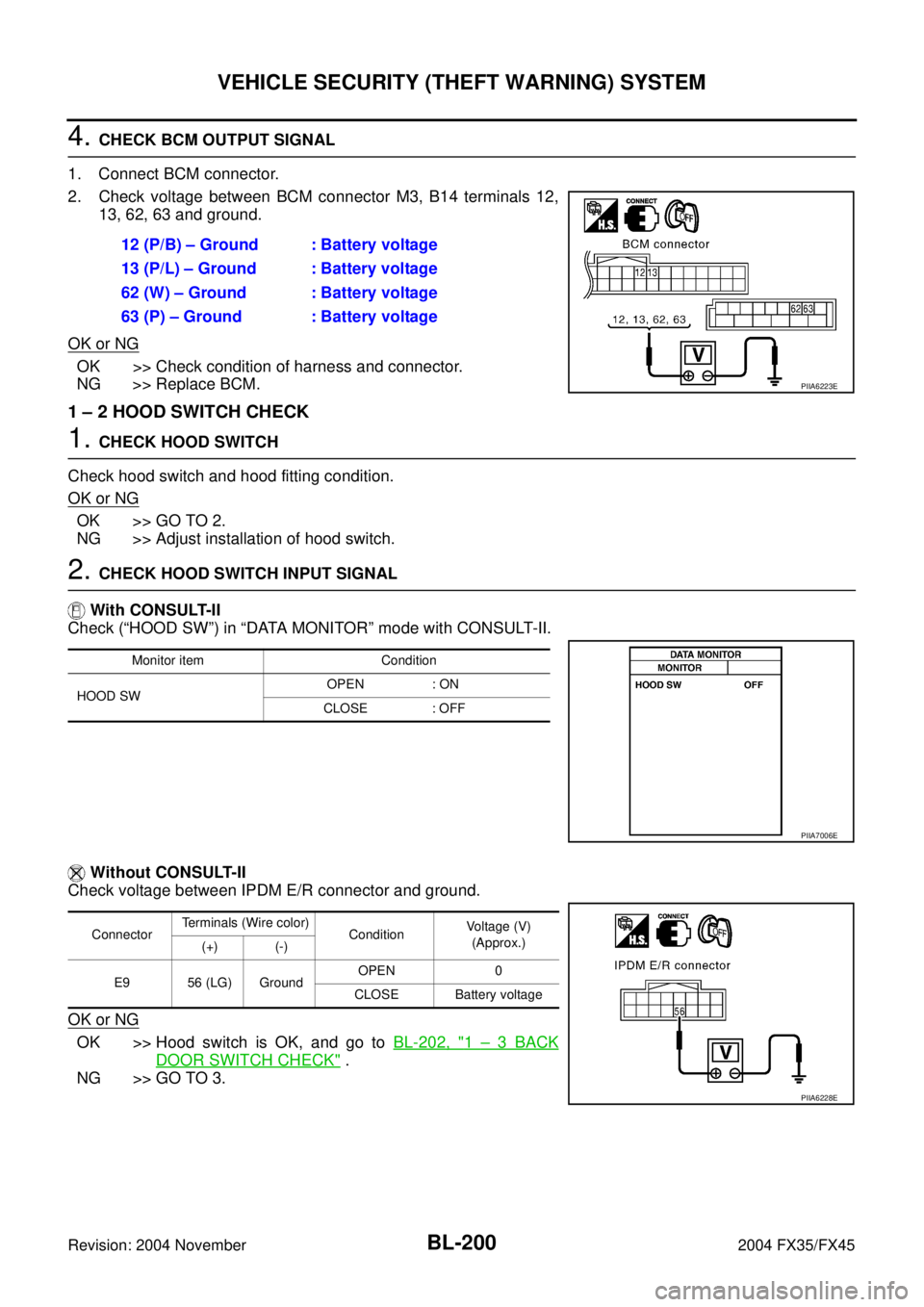
4. CHECK BCM OUTPUT SIGNAL
1. Connect BCM connector.
2. Check voltage between BCM connector M3, B14 terminals 12,
13, 62, 63 and ground.
OK or NG
OK >> Check condition of harness and connector.
NG >> Replace BCM.
1 – 2 HOOD SWITCH CHECK
1. CHECK HOOD SWITCH
Check hood switch and hood fitting condition.
OK or NG
OK >> GO TO 2.
NG >> Adjust installation of hood switch.
2. CHECK HOOD SWITCH INPUT SIGNAL
With CONSULT-II
Check (“HOOD SW”) in “DATA MONITOR” mode with CONSULT-II.
Without CONSULT-II
Check voltage between IPDM E/R connector and ground.
OK or NG
OK >> Hood switch is OK, and go to BL-202, "1 – 3 BACK
DOOR SWITCH CHECK" .
NG >> GO TO 3.12 (P/B) – Ground : Battery voltage
13 (P/L) – Ground : Battery voltage
62 (W) – Ground : Battery voltage
63 (P) – Ground : Battery voltage
PIIA6223E
Monitor item Condition
HOOD SWOPEN : ON
CLOSE : OFF
PIIA7006E
ConnectorTerminals (Wire color)
ConditionVoltage (V)
(Approx.)
(+) (-)
E9 56 (LG) GroundOPEN 0
CLOSE Battery voltage
PIIA6228E
Page 1008 of 4449
VEHICLE SECURITY (THEFT WARNING) SYSTEM
BL-201
C
D
E
F
G
H
J
K
L
MA
B
BL
Revision: 2004 November 2004 FX35/FX45
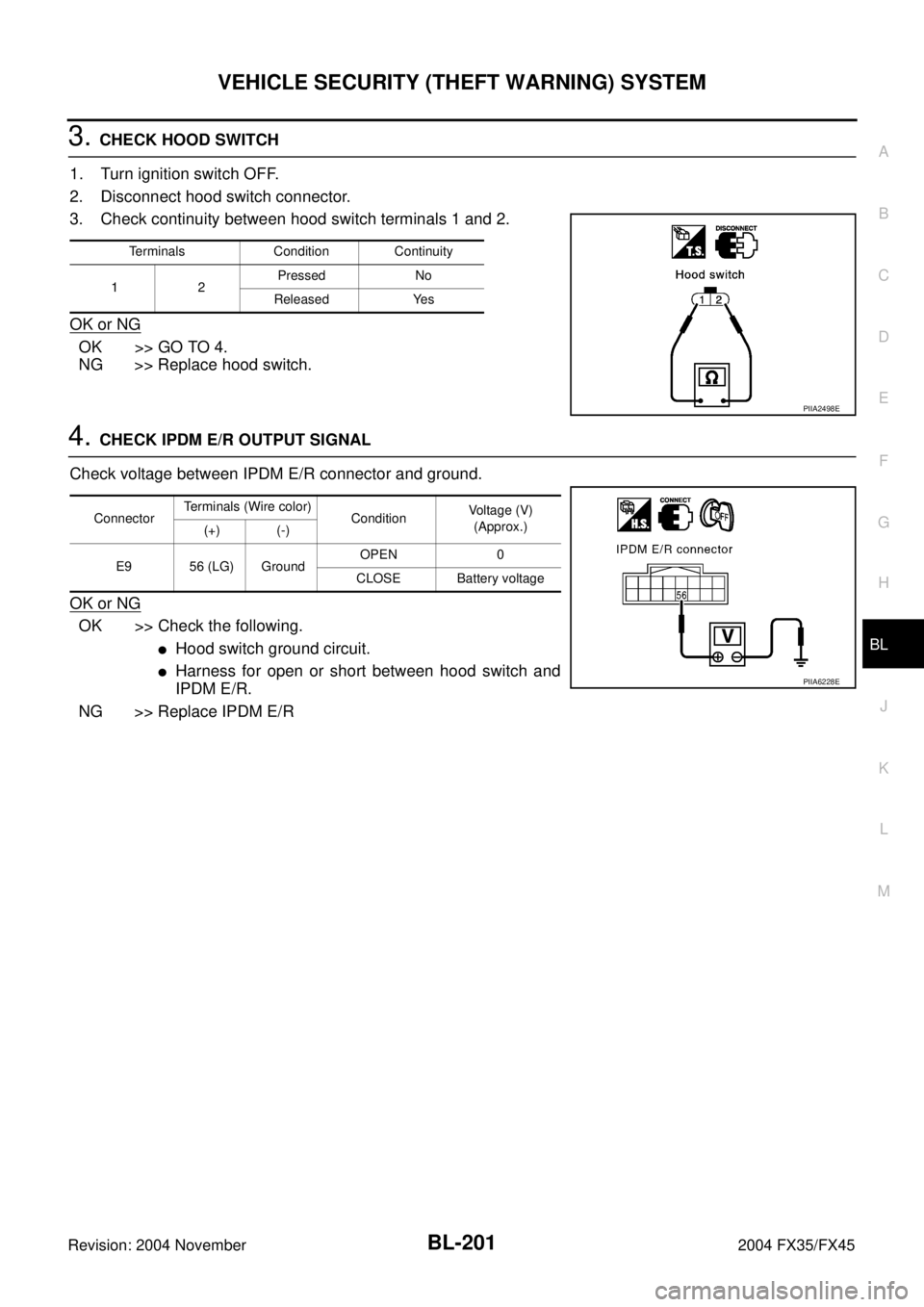
3. CHECK HOOD SWITCH
1. Turn ignition switch OFF.
2. Disconnect hood switch connector.
3. Check continuity between hood switch terminals 1 and 2.
OK or NG
OK >> GO TO 4.
NG >> Replace hood switch.
4. CHECK IPDM E/R OUTPUT SIGNAL
Check voltage between IPDM E/R connector and ground.
OK or NG
OK >> Check the following.
�Hood switch ground circuit.
�Harness for open or short between hood switch and
IPDM E/R.
NG >> Replace IPDM E/R
Terminals Condition Continuity
1 2Pressed No
Released Yes
PIIA2498E
ConnectorTerminals (Wire color)
ConditionVoltage (V)
(Approx.)
(+) (-)
E9 56 (LG) GroundOPEN 0
CLOSE Battery voltage
PIIA6228E
Page 1009 of 4449
BL-202
VEHICLE SECURITY (THEFT WARNING) SYSTEM
Revision: 2004 November 2004 FX35/FX45
1 – 3 BACK DOOR SWITCH CHECK
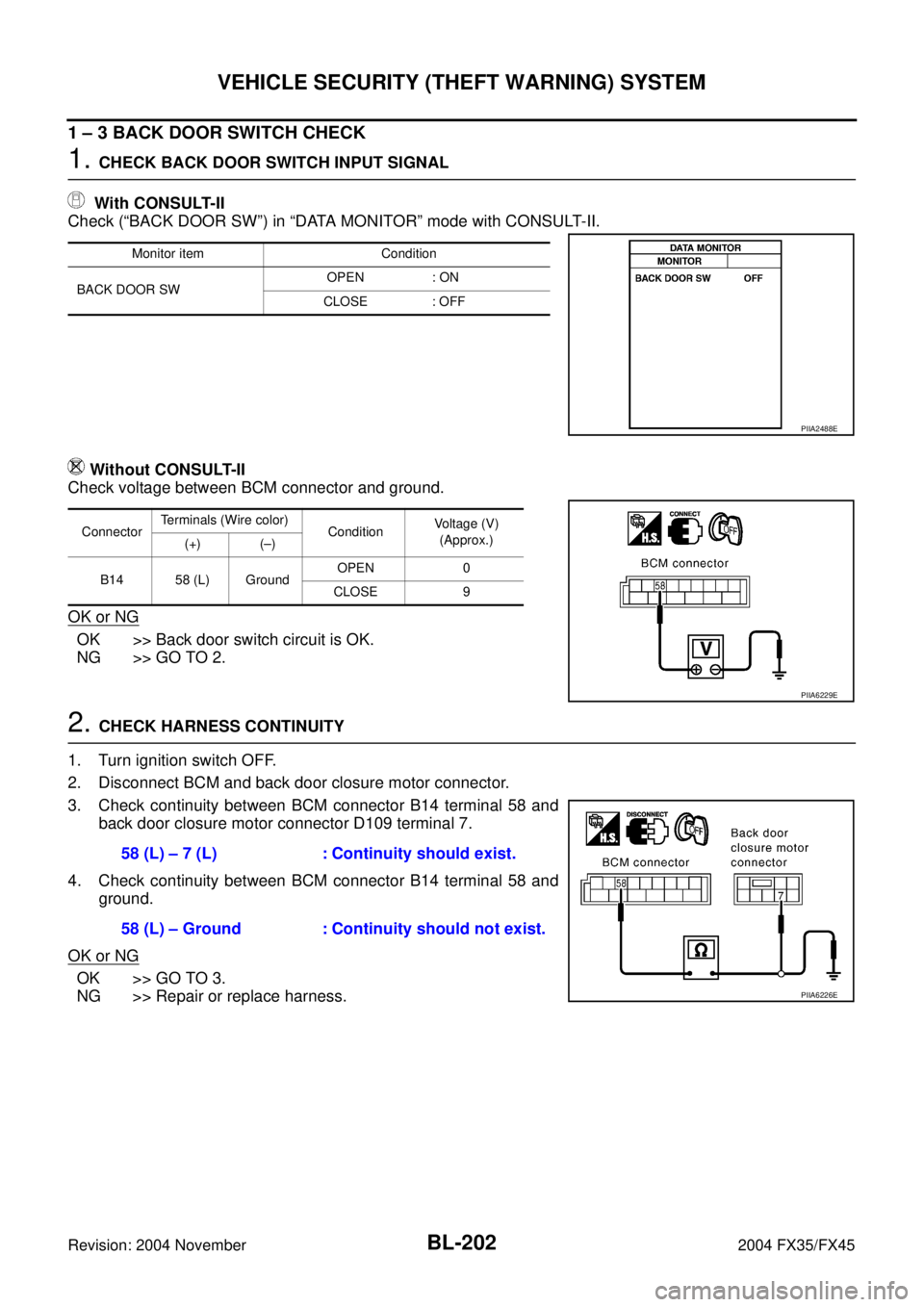
1. CHECK BACK DOOR SWITCH INPUT SIGNAL
With CONSULT-II
Check (“BACK DOOR SW”) in “DATA MONITOR” mode with CONSULT-II.
Without CONSULT-II
Check voltage between BCM connector and ground.
OK or NG
OK >> Back door switch circuit is OK.
NG >> GO TO 2.
2. CHECK HARNESS CONTINUITY
1. Turn ignition switch OFF.
2. Disconnect BCM and back door closure motor connector.
3. Check continuity between BCM connector B14 terminal 58 and
back door closure motor connector D109 terminal 7.
4. Check continuity between BCM connector B14 terminal 58 and
ground.
OK or NG
OK >> GO TO 3.
NG >> Repair or replace harness.
Monitor item Condition
BACK DOOR SWOPEN : ON
CLOSE : OFF
PIIA2488E
ConnectorTerminals (Wire color)
ConditionVoltage (V)
(Approx.)
(+) (–)
B14 58 (L) GroundOPEN 0
CLOSE 9
PIIA6229E
58 (L) – 7 (L) : Continuity should exist.
58 (L) – Ground : Continuity should not exist.
PIIA6226E
Page 1010 of 4449
VEHICLE SECURITY (THEFT WARNING) SYSTEM
BL-203
C
D
E
F
G
H
J
K
L
MA
B
BL
Revision: 2004 November 2004 FX35/FX45
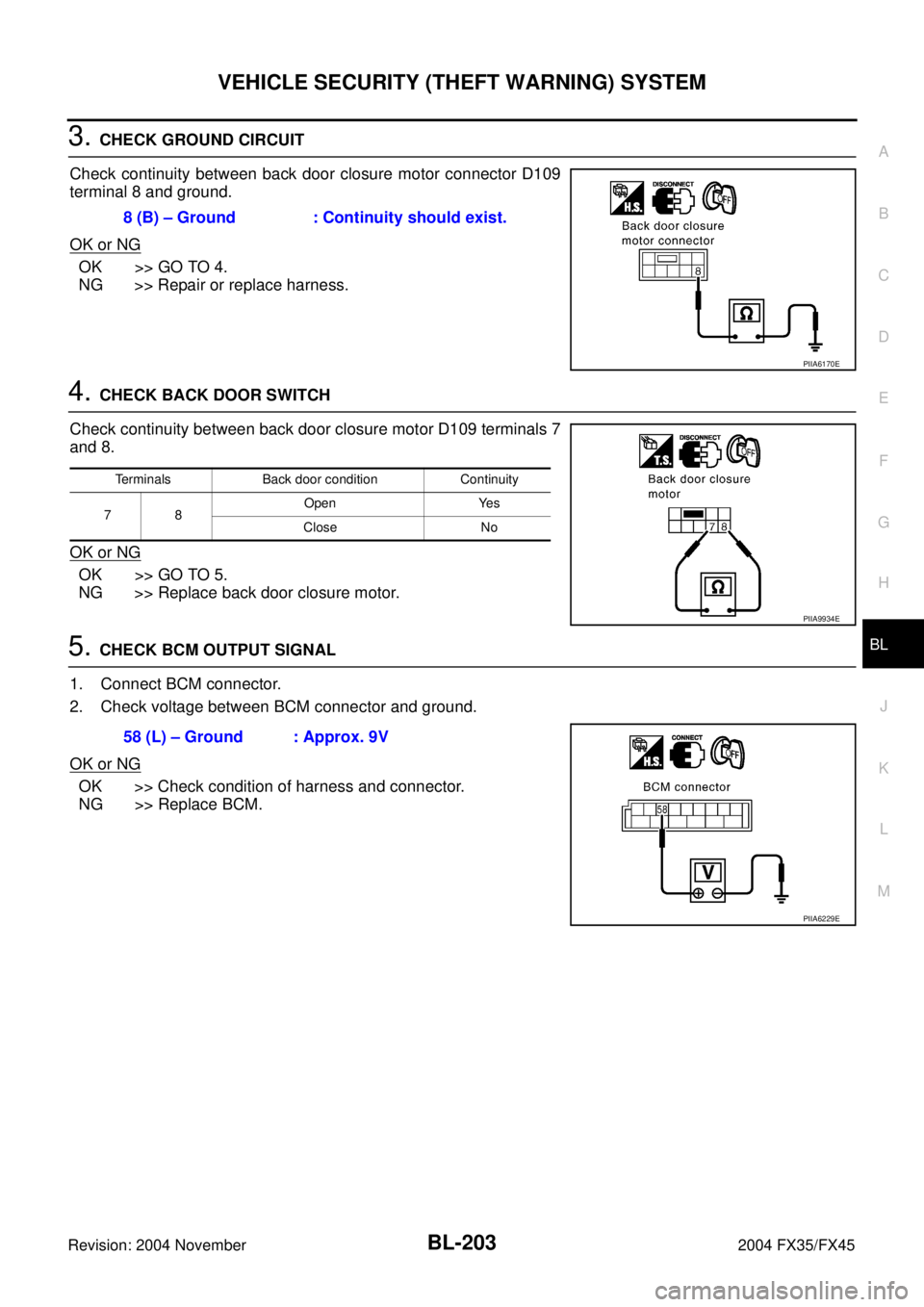
3. CHECK GROUND CIRCUIT
Check continuity between back door closure motor connector D109
terminal 8 and ground.
OK or NG
OK >> GO TO 4.
NG >> Repair or replace harness.
4. CHECK BACK DOOR SWITCH
Check continuity between back door closure motor D109 terminals 7
and 8.
OK or NG
OK >> GO TO 5.
NG >> Replace back door closure motor.
5. CHECK BCM OUTPUT SIGNAL
1. Connect BCM connector.
2. Check voltage between BCM connector and ground.
OK or NG
OK >> Check condition of harness and connector.
NG >> Replace BCM.8 (B) – Ground : Continuity should exist.
PIIA6170E
Terminals Back door condition Continuity
78Open Yes
Close No
PIIA9934E
58 (L) – Ground : Approx. 9V
PIIA6229E